|
The Official Newsletter for School Certifying Officials
|
|
Leadership Corner
Director of Education Service Joseph Garcia
Greetings GI Bill Partners,
On January 3, 2024, I joined the Digital GI Bill team to film the first video of the State of Education Service series. This video shares the Department of Veterans Affairs (VA) Education Service’s (EDU’s) continued mission to modernize the delivery of benefits over the next three to five years through the following four strategic initiatives:
- Customer service excellence
- Continuous improvement
- Platform and technology enhancement
- People advocacy
The second video of this video series will focus on the customer service excellence pillar and will explore how VA’s modernization efforts focus on meeting the needs of Veterans, Service members, beneficiaries and all of you in the School Certifying Official (SCO) community.
I would like to thank you for all you do every day in your essential role in helping Veterans, Service members and their dependents receive their hard-earned benefits. I look forward to continuing to work with you and accomplishing great things.
Respectfully,
Joseph Garcia, Executive Director
Education Service
Enrollment Manager reminder: editing the “Student Info” tab data
When logged into Enrollment Manager (EM), you can search for students with existing accounts in VA systems. If a student is found, biographical and contact information appears. If a student is not found, you can add the new student to Enrollment Manager. For existing accounts:
Bio-Info
You are unable to make any changes to the “First name”, “Middle name”, “Last name”, or “Date of birth” fields. If you identify that any of this information is incorrect or outdated, have the student submit a correction request (along with all applicable supporting evidence of the change) through the AskVA system.
Contact-Info
You are unable to make any changes to the “Mailing address” sections. If you identify that any of this information is incorrect or outdated, have the student contact the Education Call Center at 888-442-4551 or submit a correction request through the AskVA system.
|
|
Change coming soon: Resources for schools page
The Resources for schools webpage will soon see a full redesign. This redesign began during the fall of 2023 and has been a joint project between our Digital Engagement Team, National Training Teams, VA.gov partners, and the SCO collaboration group.
What can you expect from the redesign?
- A more streamlined webpage which will make locating needed resources easier and quicker.
- A direct link to the Education Service Upload Portal for when you need to submit documents directly to VA.
- A forms library so you can quickly and efficiently find any non-protected VA form you might need.
When can you expect the website to be updated?
- The update will be made within the next few months. Our current release timeline is before the next SCO newsletter edition in April.
- Notice about the redesign when it goes live will be made via GovDelivery message.
The input from the SCO Collaboration group has been absolutely vital to this project. It also means, in our commitment to customer service excellence, that the redesign was heavily influenced by you, our everyday users. So, we look forward to providing that resource to you soon and hope you will keep engaged with us so that we can continue to finetune our resources and trainings to provide you with the top tier support you deserve.
|
|
Calendar of events

Association of Veterans Education Certifying Officials (AVECO) conference: March 12, 2024
March Office Hours: March 20, 2024 – March 21, 2024
April Office Hours: April 17, 2024 – April 18, 2024
To view the dates for other upcoming webinars, please visit the National Training Team - Schools Training Calendar.
To view the summary and recordings for previous webinars, please visit the Education Service Webinars and Training webpage. All webinar recordings can be found on our webinar playlist.
Subscribe to receive all our updates!
As a reminder, you must be subscribed to our GovDelivery email list to receive routine communications (such as webinar invites or office hour notes) from Education Service.
|
|
Enrollment Manager one year anniversary
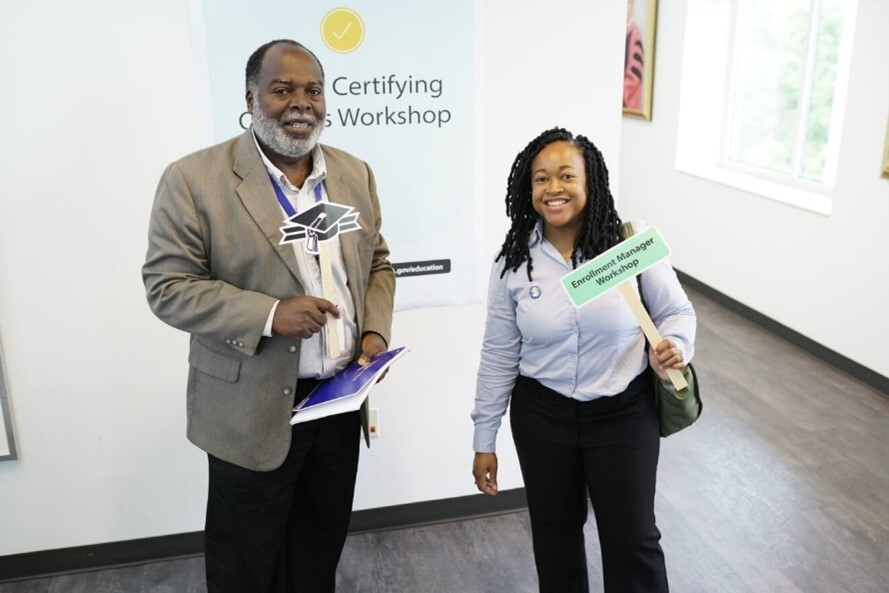
Two SCOs from the Emory SCO Enrollment Manager workshop.
Can you believe it’s about to be one year since EM launched? As we look back, we appreciate all the feedback you and your fellow SCOs provided to make this system as valuable as possible. We look forward to continuing to receive your feedback and using it to inform critical updates to the system.
To celebrate one year with EM, VBA EDU is hosting, a Virtual Enrollment Manager Anniversary Workshop on Wednesday, March 6, 2024. SCOs who attend this event will have the opportunity to share their experiences with EM and connect with EDU leadership. We will also take time to recognize members of the SCO community who have gone above and beyond serving GI Bill students.
For those of you who weren’t able to secure a spot, celebrate the one-year anniversary with Enrollment Manager with us on the Post-9/11 GI Bill Facebook page.
|
|
Recent Enrollment Manager updates
Noticed anything new about Enrollment Manager? On February 3, 2024, we made updates to some of the system features based on your feedback. A few of the top priority changes included in this round of system updates are:
-
Improved ability to filter by facility, status and benefit types on the Enrollments tab.
-
Provided the ability to view the benefit type currently in use by a student on the Benefits tab.
-
Updated the term “Current Benefit” to now appear as “Last Benefit Paid” and the term "Pending Benefit" now appears as “Benefit student wants to use.”
-
Added an additional field for the re-entering and confirmation of a student’s social security number when adding a student.
-
Populated actual birth dates for a subset of students whose birth dates were previously defaulted to 01/01/1900.
Log in to Enrollment Manager to experience these updates today at https://iam.education.va.gov/.
Learn more about recent updates on the Enrollment Manager system updates webpage.
|
|
How VA kept everyone in the know
Quarter one of fiscal year 2024

Newsletters:
|
Messages sent to GI Bill beneficiaries:
|
|
 |
|
|
Update may be needed for beneficiaries VA direct deposit information
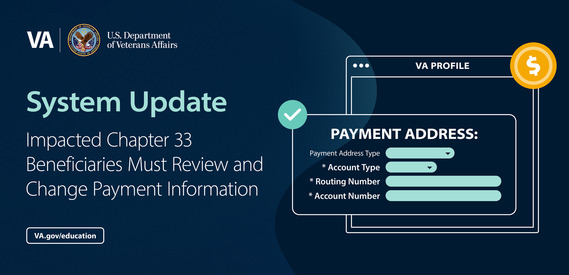 As a part of VA’s efforts to protect Veterans against fraud, modernize our payment systems, and ensure timely and accurate payments, VA is requiring all Veterans and beneficiaries who receive GI Bill payments and other benefit payments across multiple banking accounts to select one account by April 20. For example, if a Veteran receives GI Bill payments to one of their bank accounts and disability compensation payments to another, they will need to select one account for all payments by April 20.
This shift will protect Veterans against fraud and ensure that VA is able to pay Veterans on time, every time, without error. It’s happening as a part of VA’s efforts to modernize the 50-year-old, antiquated GI bill payment system. Once fully deployed, the platform will improve claims processing and customer service by providing direct, online, one-stop access to GI Bill benefits and information.
VA is aware of nearly 50,000 GI Bill beneficiaries who receive another VA benefit and currently have two separate payment accounts. No later than April 20, 2024, these students will need to consolidate their benefits payments into a single banking account.
VA will be aggressively reaching out to these students through text message, phone, and email on a weekly basis through April 20. They will continue to receive text messages and emails until they have updated their information in VA.gov.
The easiest way to make this change is for students to log on to Change Your VA Direct Deposit Information | Veterans Affairs. When they get to the pay information, there will be a box for the bank account information of their Education benefit, and a box for the bank account information for the other benefit they receive. The beneficiary should then update the bank account information to use the same account for all benefits.
Please assist students as you can by sharing the following information with any students who may reach out to you about this topic.
Changing payment information is an individual, self-service process. To do this, beneficiaries can take these steps:
- Sign in to VA.gov with a verified Login.gov or ID.me account.
- Go to the Direct deposit information section of their VA.gov profile.
- There will be a box with direct deposit information for education benefits AND a box for the other benefit they receive.
-
If the accounts don’t match, they must update the information so it's the same for each account.
Beneficiaries who do not have a bank account can go to Veterans Benefits Banking Program (VBBP) - Veterans Benefits Administration (va.gov) for additional information. For step-by-step instructions on how to update deposit information online, go to www.va.gov/resources/how-to-change-direct-deposit-information-for-va-benefits/.
Student resources
Free educational and career counseling
Any student who is eligible for the GI Bill® is also eligible for Personalized Career Planning and Guidance, a free benefit that provides:
- Career counseling to help students decide which civilian or military jobs they want.
- Educational counseling to help them find a training program or field of study.
- Academic and adjustment counseling to help students address issues or barriers that get in the way of their success.
- Resume support and goal planning.
Students can use this benefit more than once.
STEM students may be eligible for added benefits
You can help students studying for science, technology, engineering and mathematics (STEM) degrees by letting them know about the Edith Nourse Rogers STEM Scholarship. This scholarship is for Veterans using the Post-9/11 GI Bill and Fry Scholars, and allows them additional benefits by up to nine months or $30,000.
To be eligible for the Edith Nourse Rogers STEM Scholarship the individual must:
- Be enrolled in a qualifying STEM program.
- Have completed a certain amount of time on their degree.
- Have six months or less of their benefits left (if a student applies too soon, they’ll be denied).
Guides to help your students use their benefits
Regardless of where your students are in their education journey, VA has a useful resource that can help them make decisions about what to do next. It’s a three-part guide called “Building Your Future with the GI Bill”:
|
|
Annual training requirements reminder
The Annual Training window for this year closes August 31, 2024.
Relevant links:
You can view the number of training modules and training hours you’ve completed in the SCO Training Portal in the “Your Completion Status” table.
Self-certification steps reminder:
- Login to the SCO Online Training Portal.
- Select “Office Hours”, “Conference Sessions” or “Supplemental Training”.
- Locate the applicable session and select “Begin”.
- Verify that you have selected the correct training session; then select “Continue”.
- Select “Yes, you completed 100%”; then select “Submit”.
- Enter the date of training; then select “Submit”.
- Download your results and retain the certificate.
|
|
SCO resources

GI Bill certification and benefit information links:
|

Enrollment Manager links:
|
 |
|
Point of contact links:
|
If you have questions or concerns about ID.me or Login.gov you must contact them directly. These systems are not managed by VA.
Share your good news story!
Does your school have an exciting Veteran-centric event or initiative to share? We want to know about it and share your good news in an upcoming SCO Spotlight! Click here to find out how to submit your good news story.
|
|
 |
|
US Department of Veterans Affairs
Veterans Benefits Administration
1-888-442-4551, TDD: 711
|
Do you have a question or concern about GI Bill benefits? Contact us safely and securely with Ask VA! |
|
 |
|
|
|
|
|