|
This message has been sent to subscribers of the Provider Hub newsletter. If someone forwarded you this email, we encourage you to subscribe directly.
Read this newsletter in:
Welcome! Here’s your fall 2026 Provider Hub newsletter, published by the State of Minnesota. In this edition, you’ll find:
-
Reminder for licensed child care centers to pay 2027 license renewal fee
-
Resources to help child care centers use the Enrollment & Attendance feature
-
Tips for managing staff (“user”) access in the Provider Hub
-
... and more!

Licensed child care centers that plan to continue operating in 2027 should pay their license renewal fee in the Provider Hub by Oct. 30, 2026.
On Sept. 28, a 2027 renewal fee invoice was generated for licensed child care center programs with an active or pending reopening status. Payment must be made for each business license with a 2027 renewal fee invoice. License renewal payments are non-refundable.
Back to top
As of June 22, 2026, 81 child care centers registered with the Child Care Assistance Program (CCAP) are required to submit enrollment and attendance information to the Department of Children, Youth, and Families (DYCF) using the Provider Hub. These providers received direct communication from DCYF about this requirement.
Other child care centers may use the Provider Hub Enrollment & Attendance feature, but they are not required to until notified by DCYF. Providers will be notified at least 90 days before they must begin using the Provider Hub to submit enrollment and attendance information.
To learn more about this requirement and get resources, visit the new electronic attendance record requirement on the DYCF website. On this page, you’ll find links to:
-
“Quick start guides” to help you use the Enrollment & Attendance feature — located in the resources section; available in English, Spanish and Somali
-
Instructions for integrating a child care management system with the Enrollment & Attendance feature — located under the resources section; currently Arux, Brightwheel and Daily Connect systems are supported
Back to top

Authorized Agents (AAs) can complete all tasks in the Provider Hub — including applying for a new license/certification or closing a program. But they don’t have to be the only people who work in the online tool. AAs may give staff permission in the Provider Hub to help manage their license/certification and their business’ participation in other government programs.
To delegate some of their authority, AAs may give some users Delegated Authority access.
Other access levels limit users to editing some information and/or just viewing information, such as Create/Submit, Clerical, Read Only and Attendance Entry.
Unsure what level of access is right for your staff?
Check out user access levels in the Provider Hub for a comprehensive overview of the different types of users and what each can do — especially licensing/certification tasks.
These articles break down what each level of access can do in the other, child care-specific Provider Hub features:
Need help changing a user’s access?
Get step-by-step instructions for changing a user’s access — whether granting a higher level of access or a lower level of access — in edit user access.
Back to top
If you need help getting your staff the right access or completing other tasks in the Provider Hub, call 651-431-6075 or submit a case when you’re logged in. The Product Success team responds to cases Monday through Friday between 8 a.m. and 4:30 p.m.
If someone isn’t available when you call, please leave a message, including as much of the following as possible:
We don’t receive information from callers who don’t leave a voicemail. So, any information you leave in a message helps us return your call effectively and efficiently.
 |
|
Tip: We’ll match our follow-up with how you contacted us. If you call or leave a voicemail, we’ll call you back. If you submit a case within the Provider Hub, we’ll reach out to you there — you’ll get a notification in the online tool when a team member has responded. |
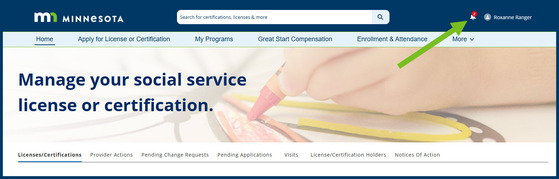
Here’s what the bell notification looks like:
Screenshot of bell notification icon in the Provider Hub
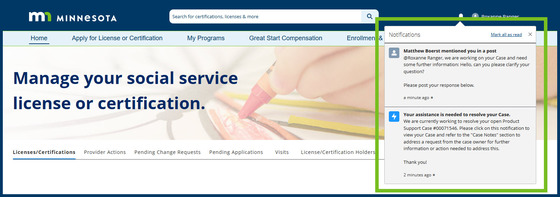
And here are examples of notification summaries:
Screenshot of notification summaries displayed after selecting the bell notification icon in the Provider Hub
Back to top
 Here are some of the updates we’ve made (“released”) to the Provider Hub in the last few months.
Licensed child care centers will find these updates to change requests in the Provider Hub. We made these fixes in September.
Must select a role when submitting a controlling individual change request
Licensed child care centers were previously able to edit an existing controlling individual, remove all roles and submit the account-level change request. This method didn’t deactivate the user’s account role. Instead, it just left that user with a blank account role.
Now, licensed child care centers can only submit a change request for a controlling individual if they’ve selected at least one role for the person. If a provider needs to remove a controlling individual, they should select Remove instead of Edit.
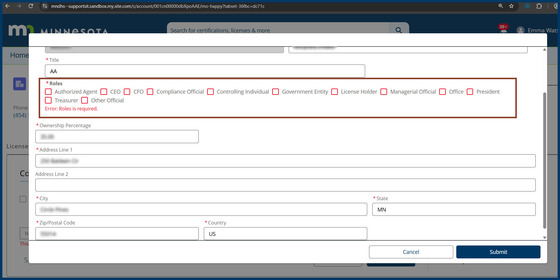
If they try to submit without selecting a role for the controlling individual, they’ll get this error message:
Screenshot of the error message displayed if trying to submit a controlling individual change request without selecting a role
Get help: Licensed child care centers can get step-by-step instructions for requesting a change to controlling individuals in this article.
Can only submit an account-level change request if at least one program/business license is active
Licensed child care centers were previously able to submit an account-level change request even if they didn’t have an active program/business license (BL).
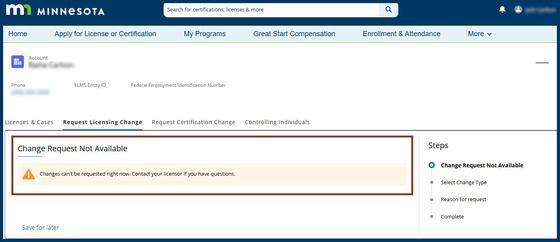
Now, if a provider tries to submit an account-level change request when all of their programs/BLs have the status denied, in application or closed, they’ll get this warning message:
Screenshot of the warning message displayed if trying to submit an account-level change request when all BLs are ineligible
Get help: Licensed child care centers can get help requesting changes to their program via the Provider Hub in the change requests section of the licensing learning library.
Back to top
Child care providers registered with the Child Care Assistance Program (CCAP) will find these updates in the Provider Hub.
Notices in the Provider Hub now identify the servicing agency and case number
Some CCAP provider notices were not displaying the agency the family is authorized by — the “servicing agency,” whether the county or Tribal agency, or a contracted agency. Now, child care providers will find the servicing agency on every CCAP notice they receive in the Provider Hub. We made this update in July.
Also, CCAP provider notices related to a case, such as service authorizations, were not displaying the case number. Now, child care providers will find the case number on all applicable CCAP notices they receive in the Provider Hub. We made this update in August.
Get help: Child care providers can get help viewing CCAP notices with the CCAP Provider Hub User Guide — download the guide and refer to page 122.
Bell notification issued in the Provider Hub when CCAP registration renewal is approved
Previously, after the Department of Children, Youth, and Families (DCYF) approved a provider’s CCAP registration renewal, there was no bell notification in the online tool to let the provider know.
Child care providers will now receive a bell notification in the Provider Hub if they submit their CCAP renewal in the Provider Hub and it’s approved. We made this update in September.
Get help: Child care providers can learn more about renewing their CCAP registration with the CCAP Provider Hub User Guide — download the guide and refer to page 110.
Back to top
Child care centers will find these upgrades to the Enrollment & Attendance feature in the Provider Hub. We made these updates in June.
Individual entering drop off and pick up times can now be recorded
New fields to record the individual entering drop off and pick up times are now available in both the child care management system (CCMS) integration option and the import attendance option of the Enrollment & Attendance (E&A) feature.
Import attendance option upgraded
The import attendance option now also allows child care centers to:
-
Enter multiple in and out times for a child on the same day (like if a child attends care before and after school)
-
Upload more data at once, with increased size limit for .CSV files
-
More simply identify and correct entry errors in the template
-
Upload child, guardian and attendance information in one .CSV file
-
Enter actual times (not just in 15-minute increments)
Back to top
Check out the release notes from the past several months for details on these updates and more:
The State of Minnesota typically releases improvements to the Provider Hub each week and sends release notes at the end of the month.
Provider Hub release notes are sent to Provider Hub users with Delegated Authority access (no signup required). Everyone can access the release notes archive.
Back to top

The Provider Hub is an online tool for social service providers to apply for and manage licenses/certifications, funding opportunities and other available government programs.
We continue to improve the online tool and build new features. As we do so, more providers will get access. Check out the Provider Hub webpage for details on current availability.
Back to top
This newsletter shares general information about the Provider Hub for both current and future users of the online tool, as well as other interested folks. Find previous editions on the Provider Hub webpage.
The newsletter doesn’t replace information sent directly to specific groups — such as alerts for current Provider Hub users or onboarding information for future users. We send those separately.
Know others who may be interested in receiving news about the Provider Hub? Forward this email and encourage them to subscribe to the newsletter directly.
Back to top
|