|
This message has been emailed to Provider Hub users with Delegated Authority access on Monday, Sept. 28, 2026. Please forward or share this information with other Provider Hub users in your organization.
Following updates the State of Minnesota made to the Provider Hub earlier this month, these improvements are now live in the online tool.
Licensed child care centers will find three updates to change requests in the Provider Hub.
Must select a role when submitting a controlling individual change request
Licensed child care centers were previously able to edit an existing controlling individual, remove all roles and submit the account-level change request. This method didn’t deactivate the user’s account role. Instead, it just left that user with a blank account role.
This defect is fixed. If a licensed child care center needs to remove a controlling individual, they should select Remove instead of Edit.
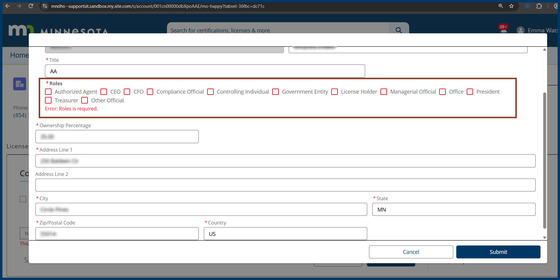
Providers can only submit a change request for a controlling individual if they’ve selected at least one role for the person. If they try to submit without selecting a role for the controlling individual, they’ll get this error message:
Screenshot of the error message displayed if trying to submit a controlling individual change request without selecting a role
Can only submit an account-level change request if at least one program/business license (BL) is active
Licensed child care centers were previously able to submit an account-level change request even if they didn’t have an active program/business license (BL).
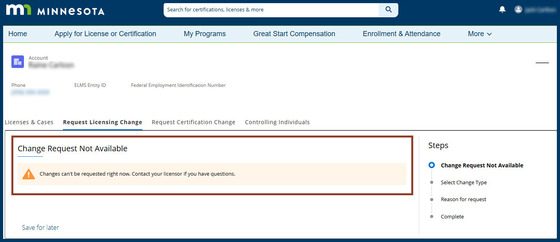
This defect is fixed. If a provider tries to submit an account-level change request when all of their programs/BLs have the status denied, in application or closed, they’ll get this warning message:
Screenshot of the warning message displayed if trying to submit an account-level change request when all BLs are ineligible
Can only submit a business license (BL) change request if the program/BL is active
Licensed child care centers were previously able to submit a change request for one of their programs even if that business license (BL) wasn’t active.
This defect is fixed. If a provider tries to submit a change request for a business license with a status denied, in application or closed, they’ll get a warning message — the same one in the scenario above.
Get help with change requests
If you encounter an error while trying to submit a change request and aren't sure why, contact the Product Success team: Either submit a case when you're logged in or call 651-431-6075.
Licensed child care centers can get help requesting changes to their program via the Provider Hub in the change requests section of the licensing learning library.
Step-by-step instructions for requesting a change to controlling individuals are in this article.
Payment policies optional to upload
Previously, in the Provider Policies section of the Child Care Assistance Program (CCAP) registration, providers were required to upload copies of their payment policies.
Now it’s optional for providers to upload their payment policies. They may proceed with submitting a CCAP registration without uploading these documents.
Bell notification issued in the Provider Hub when CCAP registration renewal is approved
Previously, after the Department of Children, Youth, and Families (DCYF) approved a provider’s Child Care Assistance Program (CCAP) registration renewal, there was no bell notification in the online tool to let the provider know.
Child care providers will now receive a bell notification in the Provider Hub if they submit their CCAP renewal in the Provider Hub and it’s approved.
Get help: Child care providers can learn more about renewing their CCAP registration in the Provider Hub with the CCAP Provider Hub User Guide — download the guide and refer to page 110.
Legal nonlicensed provider attestations enhanced
Previously, when a legal nonlicensed provider submitted a CCAP registration in the Provider Hub and only attested to certain statements in the Terms and Conditions section, they were unable to attest to the remaining items later on.
Now if legal nonlicensed providers need to attest to any remaining statements later in the registration process, they will be able to do so.
Get help: Legal nonlicensed child care providers can learn more about registering with CCAP in the CCAP Provider Hub User Guide — download the guide and refer to page 87.
Provider Hub release notes share recent improvements to the online tool with users. The State of Minnesota typically releases improvements to the Provider Hub each week and sends release notes at the end of each month.
Past release notes are archived on the Provider Hub webpage.
Get support
If you need technical assistance with the Provider Hub, submit a case when you're logged in or call 651-431-6075. The Product Success team — the team of local experts here to help you find success with the Provider Hub — responds to cases Monday through Friday between 8 a.m. and 4:30 p.m.
Give feedback
Provider needs and experiences are important to improving the Provider Hub. Email providerhub@state.mn.us to share comments with the team. Or complete this form to tell us you’re interested in feedback opportunities such as completing a survey or testing a new feature.
Sign up for the Provider Hub newsletter
The Provider Hub newsletter shares updates on new and improved features, tips for using the online tool effectively and more. Sign up for the newsletter here.
|