|
View this as a webpage
Happy Women’s Equality Day, HRD! In 1971, Congress designated August 26 as “Women’s Equality Day,” which commemorates the 1920 certification of the 19th Amendment to the Constitution, granting women the right to vote.
Update on Monkeypox for MDH employees: This week Assistant Commissioner Dan Huff led a session focusing on the recent Monkeypox outbreak and MDH’s response. If you missed the update, you can view the recording by clicking the “Join the Teams Live Event” link in the related Intranet post.
Did you complete your IT Asset Verification? On Monday, everyone should have received an email from MNIT asking you to verify which equipment you have. If you haven’t completed this, please do so today; it only takes a few minutes! Supervisors, please remember to complete the form for any of your staff who are currently on leave.
Appeals for Frontline Worker Pay Program open until August 31: Applicants who applied for Frontline Worker Pay received a message last week letting them that their application will either move forward, or has been denied. If your application has been denied, you can submit a form and evidence to appeal this decision until 5 p.m. on August 31.
Make sure you’re using the SSIS Worker Production Environment: The SSIS updates that we discussed last week have been successfully completed! Staff who use SSIS for their work should make sure that they have updated to the new Horizon servers and use the SSIS worker production environment until October 26. If you have any questions or are encountering errors, please reach out to Matt Heffron or your SSIS superuser.
Having back-to-back meetings and feeling unable to take a break during the day is frustrating and exhausting, and it’s a part of our culture that we can take steps to improve. The Leadership Advisory Team has been reviewing feedback from staff about the number and length of meetings in HRD, and met with the Senior Leadership Team earlier this year to offer some practical suggestions.
Leave a gap between meetings
One suggestion is to offer a gap between meetings so staff have an opportunity to organize other work they have to do, take a bathroom break, or to refill their coffee. This would involve modifying meetings from 60 minutes to 50 minutes, or from 30 minutes to 25 minutes.
Outlook has a built-in function that allows you to start meetings late, or end them early, so that you can give people space in between. To set it up, go to File > Options > Calendar and look at the second section, labeled Calendar Options. Check the box next to Shorten appointments and meetings (outlined in red) to turn on this feature; you can choose to have meetings end early or start late, whichever works best for you.
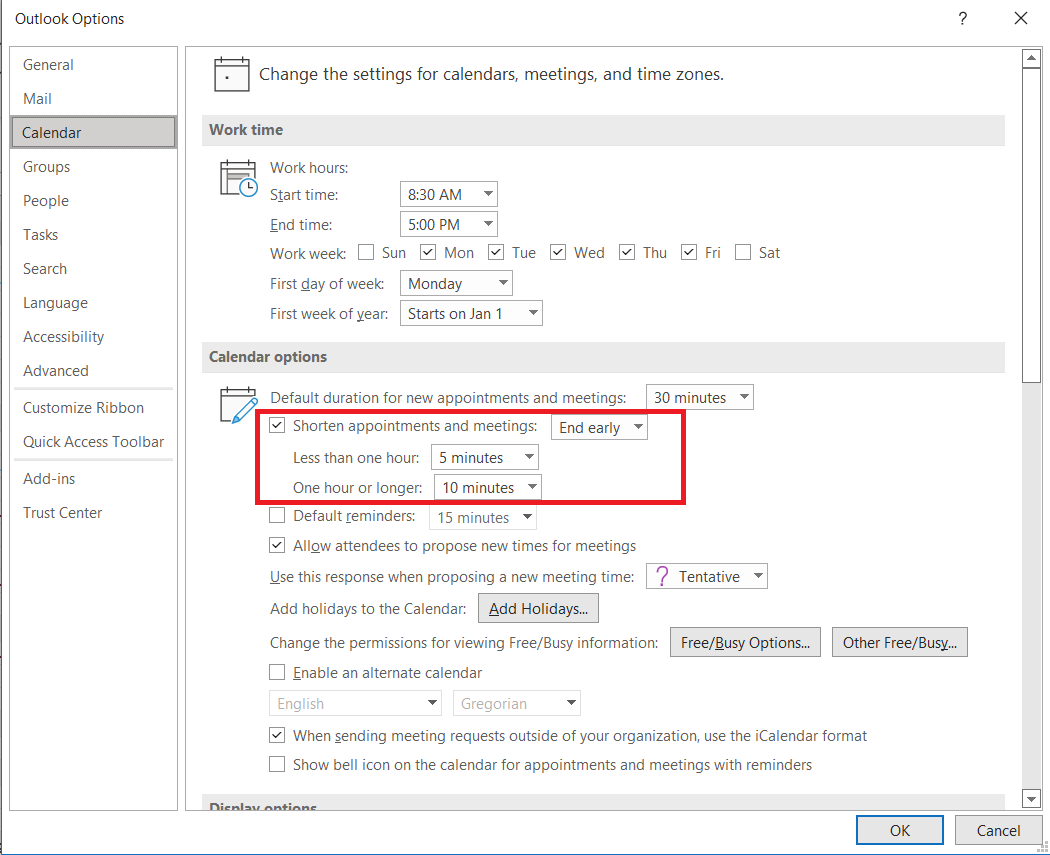 Any meetings you schedule through Outlook will now automatically take these preferences into account. (Meetings scheduled through Teams do not yet update based on these settings – but you can manually type in a shorter time when you are setting up the meeting invite.)
Be aware of lunch breaks
Another idea was to reduce meetings over the lunch hour so staff can take a lunch break. No one likes being hangry, and science tells us that people are a lot more able to focus and engage with their work when they’ve had a break and some food.
We encourage everyone to set up a space on their calendar for their lunch break; the easiest way to do so is to set up a recurring appointment for whatever time works for you and your team. Make sure you label it, so that it’s clear to people looking at your calendar what it is. To make it really stand out, you can set it to Show As: Out of Office so it’s visually different from all of your other meetings (need a refresher on how to do that? Check out our previous article on Showing Out of Office Time on Your Calendar).
If you have to schedule a meeting over someone’s lunch, consider reaching out to them first and seeing if there’s a better time, since calendars aren’t always up to date. Or, mark them as optional if it’s not absolutely necessary that they be there. If you do end up having a meeting during your usual lunch time, make sure you still take your break! (Remember, you can click and drag meetings on your calendar to drop them into empty spaces.)
While these suggestions seem simple, they can have a big impact. Take a moment to look at your calendar, and see if you can implement some of these ideas as a start to improving our culture, and our support of one another.
Gail Anderson is retiring after 45 years of working as a Registered Nurse. Gail has been with MDH for 15 years and has worked in a variety of roles, including Surveyor, Supervisor and Regional Operations Manager.
A can-do gal, Gail has led a number of initiatives while at MDH, most recently coordinating the contract for assistance with long term care survey completion with Health Management Solutions (HMS). She has also been a lead for dialysis surveys, where her extensive pre-MDH experience has been invaluable. Gail leads by example, and uses a broad lens to look at how the work we do and decisions we make. Gail’s fun sense of humor and contagious laugh will certainly be missed. We wish her much happiness and relaxation in her next adventure - retirement!
Gail’s last day with HRD will be September 6, so make sure you reach out before then if there’s something you’d like to share with her. Thank you to Maria King for writing this piece to celebrate Gail’s work.
Every 3 years, MDH reviews our records retention schedule to make sure that it responds to changing business needs and statutory requirements about how we store and manage records related to our work. It’s a long process: records coordinators from across the agency collect the update requests from staff, MDH’s Records Manager Chris Johnson compiles them all into one coherent schedule, and then everything needs to be approved by agency leadership. And then, the schedule is sent off to the State Records Disposition Panel for final approval.
But, it’s finally done! As of August 8, 2022, the new retention schedule has been approved and is in effect. You can find it on the MDH Records and Information Management (RIM) SharePoint site, along with many other helpful resources to help you understand what a record is, how long you need to keep things, and how to properly dispose of records when you need to do so.
The majority of changes that HRD requested during this update were focused on aligning the retention schedules for our state and federal records, and making sure that we are complying with the guidelines that the Centers for Medicare and Medicaid services (CMS) have set out for records relating to federally regulated providers. We’ll go into detail about those changes in a future issue of Have You HRD?, but if you’d like a preview, you can check out the MDH 2022 Retention Schedule Update Presentation that Siobhain gave at this week’s managers meeting.
Happy end of August everyone; Erik Holmberg here bringing you another exciting edition of Have You HRD? – Data Edition.
For this edition I wanted to discuss the different data sources where HRD data is stored. HRD stores data in many different places: Excel sheets, databases, the data lake, and others. Data is stored in databases, spreadsheets, or other sources for a variety of reasons. While I am separating out spreadsheets and databases as being completely different, an Excel spreadsheet is merely a simple form of a database.
The main type of data storage that HRD uses are relational databases: Paradise, ASPEN (the database behind both ACO & ACTS), IQIES, SSIS, Mortsci Oracle, HOP Oracle, ICSD, BATLS, JIRA Time Tracking, as well as the several relational databases that are imported to the HRD Data Lake.
A couple of times I’ve used the term relational database but haven’t quite explained what it means. A relational database is a collection of tables that all have relationships with one another so that the data can be connected and further added on. Think of two tables in an Excel workbook, with one displaying every facility, and another showing every provider. The two tables don’t show all of the same information, but they probably both have the HFID column. That HFID can be thought of as a relationship between the two tables that joins them together.
The other type of data storage that HRD uses are Excel spreadsheets. While they are not the best solution for everything, there are definitely times in which Excel spreadsheets are the best course of action. HRD currently has an overreliance on Excel spreadsheets, but we are getting better over time as we increase development of our data systems.
HRD has a ton of different data systems, that all have their own purposes. Some might ask “Why can’t we just use one database and combine all of the data into one data system?” Well, it isn’t quite that simple; data is stored in different systems for a few reasons. Data is separated out so completely different topics aren’t stored together. Additionally, data is stored separately because of different data needs. There are several different types of relational databases and sometimes the data needs are different and thus different database types are needed.
Anyways, this is enough database speak for one day, so I’ll not drone on any longer. I know this was quite technical but I hope it makes sense and provided you with some additional data insights. If you have any questions about this or anything else, feel free to reach out!
Contact Info: erik.holmberg@state.mn.us
This week, we have the following positions available, and more are coming soon. Please share them with anyone that you think would help make HRD a better place to work!
-
Nursing Evaluator (Federal Operations) Job ID: 53268: These two positions on the Case Mix Review team will conduct audits of a percentage of residents on Medicaid-certified long-term care facilities for coding accuracy of MDS assessment forms and the resulting Case Mix classifications. Closes August 29, 2022.
-
Nursing Evaluator (State Operations), Job ID: 57470: These positions provide regulatory surveillance to licensed assisted living and home care providers using nursing and health related knowledge in an effort to assure quality care and services through compliance with State regulations laws and rules which directly relate to the provision of assisted living and home care services. Closes September 30, 2022.
These positions are open to internal and external candidates. If you would like to apply, please follow the steps below:
- Sign into Employee Self Service
- On My Homepage, click on Careers and enter the Job Opening ID in the Search Jobs box and click >> (Search).
- Click on the Job Title to view the job posting.
- Click Apply for This Job in the top right-hand corner.
|