|
View this as a webpage
Happy Friday, HRD! It’s April 22, and that means that as of today, you should have removed all of your personal items from your assigned workspace in our HRD offices. If you haven’t done that, please connect with your supervisor and set a date for doing so as soon as possible.
Procedures for entering MDH offices: Today we begin our transition to a hybrid work environment! Please keep in mind the following guidelines for entering any MDH building:
- Complete the COVID-19 Employee Status and Work Screening before entering the building each day. Staff who will be in the office for more than 10 minutes must provide proof of vaccination, or complete weekly testing for COVID-19.
- Wear your MDH badge and follow security procedures (close doors, don’t let others tailgate, etc.).
- Face coverings are not required in MDH buildings, but staff should continue to social distance, wash and sanitize hands regularly, and stay home if they feel unwell.
More detailed information is available on the Intranet post: Reminders and information regarding current procedures for entering MDH buildings.
Order any supplies you need by June 6, 2022: The end of the fiscal year (June 30th) is coming up quickly – which means that we’re starting to see deadlines for completing orders of supplies. The deadline for non-IT purchase requests (such as printers) is June 6, so if you or your team needs anything, please submit your orders now. Keep in mind that many items are currently on back order and will take some time to arrive, so the sooner you order, the better.
Acrobat Licenses for all HRD staff have been requested: This week, Siobhain submitted the request for current HRD staff who do not yet have an Adobe Acrobat Pro DC license to receive one. It takes a few weeks for Finance and MNIT to process the requests, but you should be editing PDFs like a pro soon!
RIM Refresher Training and the next HRD all-staff meeting: If you weren’t able to join the RIM Refresher Training at last week’s Redesign Conversation, you can find the recording and slides in their usual place in our HRD Team. Our next Redesign Conversation on April 28 will introduce the HRD Strategic Plan – see you there!
This week Assistant Commissioner Diane Rydrych announced that Maria King has been chosen as our new Health Regulation Division Director. Maria shared her thoughts in a message to all HRD staff that you should have received on Wednesday. Here’s a short excerpt:
To my HRD Colleagues,
I am humbled and honored to have the opportunity to serve the Health Regulation Division as the Division Director. When I agreed to the interim role, I had no thoughts of applying for the permanent position. As I have had the opportunity to work in this role, I saw opportunities to help our organization move forward with the redesign, recovery from a backlog of workload, and progress towards filling the numerous positions that have remained unfilled due to the pandemic.
What a pleasure it has been to get to work with and understand areas of the organization I have not previously been involved with. There are so many facets to our organizational structure, and I’m excited to be part of our growth and forward movement… I feel fortunate to work with all of HRD’s staff, and am grateful for what each of you brings to this organization. Your insights and perspectives are invaluable. I am committed to working with each of you in a respectful and responsive manner and look forward to your feedback and ideas…
Now that we have our new Director, we can shift our focus towards some of our other goals, such as filling in the spaces in our organization and implementing HRD’s Strategic Plan. We’ll be sharing more information about our next steps in the coming weeks, so stay tuned!
Beginning May 1, Assisted Living License renewals will open for facilities that have a conversion assisted living license. The Licensing team has been preparing for the first renewals of the Assisted Living Licensure for several months. The deadline for providers to apply for an ALL renewal license is June 1. After July 1, the grace period ends and fines for late renewal submissions will be applied. The Licensing teams will be busy through August 1 as they help providers, process license renewals and deal with facility closures.
HRD’s Work-Life Transition Planning workgroup met this week to start discussing our strategy for shifting into a hybrid work model. We’ll be providing regular updates to make sure everyone stays in the loop, and will also be reaching out to teams and individuals for assistance and feedback. We want to make sure that we develop the best plan possible, so please let us know if you have suggestions.
Here are the highlights from this week:
-
We need staff from district offices to help us! Currently our workgroup is composed of staff based out of the Golden Rule building. We can’t build a good strategy for all of HRD without including the district offices in our plans, so if you are based in a district office and are interested in helping, please discuss with your supervisor and email Susan Winkelmann to let us know.
-
Progress on the Cleanup phase: Most people seem to have been working on cleaning out their workspaces, and that is great! If you haven’t done it yet, please make it a priority. We’ll be checking in with supervisors to make sure all of the cleanup is complete so that we can start our next steps.
-
What are our next steps? We identified several topics to start working on: developing communications to make sure staff feel connected and have their concerns heard and addressed, analyzing our current space usage and understanding our needs for the future, and brainstorming ways that we can build effective spaces and processes for teams to work together, whether they are in the office or at home.
The HRD WLT Planning workgroup includes the following staff:
- Michelle Adkins
- Christine Dufour
- Mary Halet
- Betsy Hammer
- Todd Hoover
- Siobhain Rivera
- Susan Winkelmann
- Melissa Zaitz
If you have any questions about the WLT process, please reach out to one of the workgroup members, or you can leave anonymous feedback in the HRD Feedback Box.
This week, we have the following positions available, and more are coming soon. Please share them with anyone that you think would help make HRD a better place to work!
-
Office & Admin Specialist, Sr. (Program Operations), Job ID: 54520: This position provides administrative support to the Health Regulation Division’s regulation processes within all functional areas of the division, and to ensure efficient and effective operation of the activities in these areas. This position is also responsible for supply management as the purchasing liaison for the Health Regulation Division. Closes April 27, 2022.
-
Evaluator (State Operations), Job ID: 54842: This position will accept and investigate complaints against health care practitioners regulated by the Health Occupations Program. This position will evaluate evidence collected and recommended whether disciplinary action should be taken, negotiate settlements and enforce discipline to ensure practitioners comply with the statutory requirements enacted to safeguard public health and safety. Closes May 5, 2022.
-
Nursing Evaluator (Federal Operations), Job ID: 53255: These positions will provide onsite surveillance and guidance to health care providers in an effort to assure a level of quality care based upon compliance with Federal and State laws and rules which directly relate to the provision of nursing and health services. Closes August 1, 2022.
These positions are open to both internal and external candidates. If you would like to apply, please follow the steps below:
- Sign into Employee Self Service
- On My Homepage, click on Careers and enter the Job Opening ID in the Search Jobs box and click >> (Search).
- Click on the Job Title to view the job posting.
- Click Apply For This Job in the top right hand corner.
2022 is clipping right along, and we’re quickly approaching the time of year when people begin taking vacations to enjoy the warm weather! Managing our calendars effectively is going to become even more necessary as we move into a hybrid work world, so let’s learn some skills to improve our mastery of Outlook. First up: how to let your teammates know you’re out of the office (without blocking their calendars).
Part 1: Block your calendar…
Start by blocking off your calendar, so that people who are looking at it know when you will be unavailable. You can set up an automatic reply message for emails you receive (we’ll talk about that next week), but that doesn’t tell people ahead of time that you are out – it just sends them an email after they have already sent a calendar invite.
To set your calendar to show when you are out of the office, click the New Appointment button in the top left corner of your Outlook calendar.
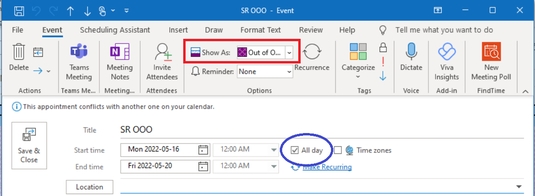
- Fill in a title and select the date(s) you will be unavailable. Select the All day checkbox (circled in blue); it’s easier than filling in specific times if you are going to be gone for one or more days.
- In the Appointment tab of the ribbon, set the Show As option to Out of Office (outlined in red).
- Click Save & Close. The day(s) you selected will now have a purple crosshatch pattern in the calendar, so people will see that you are not available.
 |
Part 2: Not theirs!
Now that your calendar is blocked off, you can send a message to let your team know that you’ll be unavailable. To start, click the New Meeting button in Outlook.
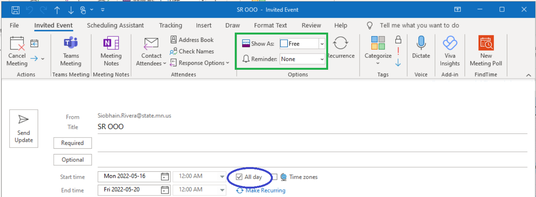
- Fill in a title and select the date(s) you will be unavailable. Select the All day checkbox (circled in blue), so that your meeting shows at the top of your team’s calendar, rather than as an item with a specific time.
- Add the list of people you want to send the message to. You don’t need to differentiate between “required” and “optional” since this isn’t a real meeting.
- In the Meeting tab of the ribbon, set the Show As option to Free (outlined in green). If you don’t set the Show As option to Free, your invite will block out the calendar of everyone you have sent it to – which makes it difficult for anyone trying to schedule a meeting with those people. Make sure that Reminder is set to None as well.
Add any important information in the body of your message, and click Send.
That’s it! You’ve now successfully communicated to your teammates, and to anyone who looks at your calendar, which days you are unavailable in the most convenient way possible. Next week, we’ll talk about setting up an automatic reply for your email. Happy vacationing!
|