|
This message has been sent to subscribers of the Provider Hub newsletter. If someone forwarded you this email, we encourage you to subscribe directly.
Read this newsletter in:
Happy summer! Here’s your June Provider Hub newsletter, published by the State of Minnesota.
In this edition, you’ll find:
-
Details on improvements made to the Provider Hub Enrollment & Attendance feature
-
Invitation to participate in design research
-
Tips for child care centers on requesting changes to their program
-
... and more!

Earlier in June, the State of Minnesota updated the Enrollment & Attendance (E&A) feature in the Provider Hub to improve user experience and ensure the feature meets Child Care Assistance Program (CCAP) requirements.
What we updated
We added new fields to both the child care management system (CCMS) integration and import attendance options to record the individual entering drop off and pick up times.
We also upgraded the process to import attendance information — with this option, child care providers can now:
-
Enter multiple in and out times for a child on the same day (like if a child attends care before and after school)
-
Upload more data at once, with increased size limit for .CSV files
-
More simply identify and correct entry errors in the template
-
Upload child, guardian and attendance information in one .CSV file
-
Enter actual times (not just in 15-minute increments)
How the Enrollment & Attendance feature works
The Enrollment & Attendance (E&A) feature is available to child care centers.
It has three options to record enrollment and attendance info in the Provider Hub for the children in your program:
Kiosk
Parents/trusted adults use the Provider Hub Enrollment & Attendance kiosk on a phone, tablet, or computer supplied by the provider to check their children in and out of the program — this is a free option similar to how private electronic attendance systems work.
Import attendance information
Child care programs that use a child care management system (CCMS) not currently integrated with the Provider Hub and don’t want to use the kiosk option can manually enter and upload their child, guardian and attendance information in one .CSV spreadsheet file.
Child care management system (CCMS) integration
Child care programs that use specific private attendance systems can set their attendance data to automatically transfer from that system to the Provider Hub E&A feature.
Currently, Arux, Brightwheel and Daily Connect integrate with the Provider Hub. The Department of Children, Youth, and Families (DCYF) is working on adding integrations with more CCMS vendors.
Electronic attendance requirement for some Child Care Assistance Program providers
As of June 22, 2026, some providers paid by the Child Care Assistance Program (CCAP) are required to use the Provider Hub Enrollment & Attendance (E&A) feature to report child attendance information to the Department of Children, Youth, and Families (DCYF). DCYF mailed these child care providers a 90-day notice informing them of this requirement in March 2026.
Eventually, all providers paid by CCAP will be required to report attendance in the Provider Hub. However, if you did not receive a notice by mail from DCYF, you are not part of the first rollout group required to meet the June 22, 2026 deadline.
Each of the three Provider Hub E&A options — kiosk, import attendance and CCMS integration — are available to child care centers to submit attendance records to DCYF for CCAP.
For more information, visit New Electronic Attendance Record Requirement | Minnesota Engage DCYF.
Back to top
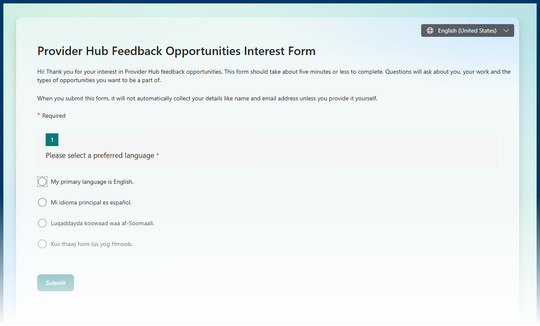
Are you a provider who currently uses or will use the Provider Hub? Do you want to share your experiences? Complete this form to let us know.
Screenshot of the Provider Hub Feedback Opportunities Interest Form
The Provider Hub team regularly does research and testing with providers (called “design research”). We use the feedback we get to keep building and improving the online tool.
In design research, there are no wrong answers: “It’s not a test for you, it’s a test for the Provider Hub.”
After you complete the Feedback Opportunities Interest Form, your name and contact information is added to a roster. The Provider Hub team then uses this roster to contact providers as research needs come up.
The form asks for some details about your program and what types of research you may be interested in (surveys, interviews, workshops). This helps us match feedback opportunities with providers.
Thank you for offering your time and expertise!
Back to top

Need a reminder on how to respond to a provider action from your licensor? Unsure which type of change request to use? Want help getting your staff into the Provider Hub to help manage your license?
Find step-by-step instructions for these and other tasks in your learning library.
What’s a learning library?
A learning library collects — in a single location — all the materials available to help you manage your license/certification in the Provider Hub.
Each type of program using the Provider Hub for licensing/certification has a dedicated learning library — licensed child care centers, certified child care centers and EIDBI agencies.
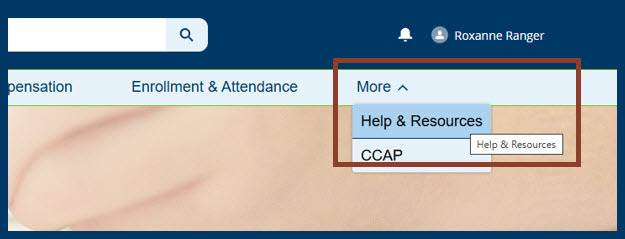
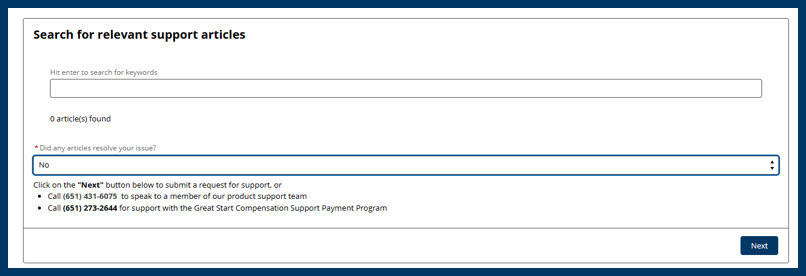
When you’re logged in to the Provider Hub, you can search for articles in Help & Resources.
Screenshot of navigating to the Help & Resources section of the Provider Hub
Screenshot of searching for articles in the Provider Hub
However, the search function doesn’t work as well as we want it to — it can be hard to find the exact article you need. We created the learning library to make finding help a little easier.
Anyone can use the learning library and the individual articles linked within them — a Provider Hub account is not required.
How do I use a learning library?
First, open the learning library for your license type:
Scan the list of contents and select the topic you need help with. You’ll then arrive at the section of the library dedicated to that topic, with links to step-by-step instructions.
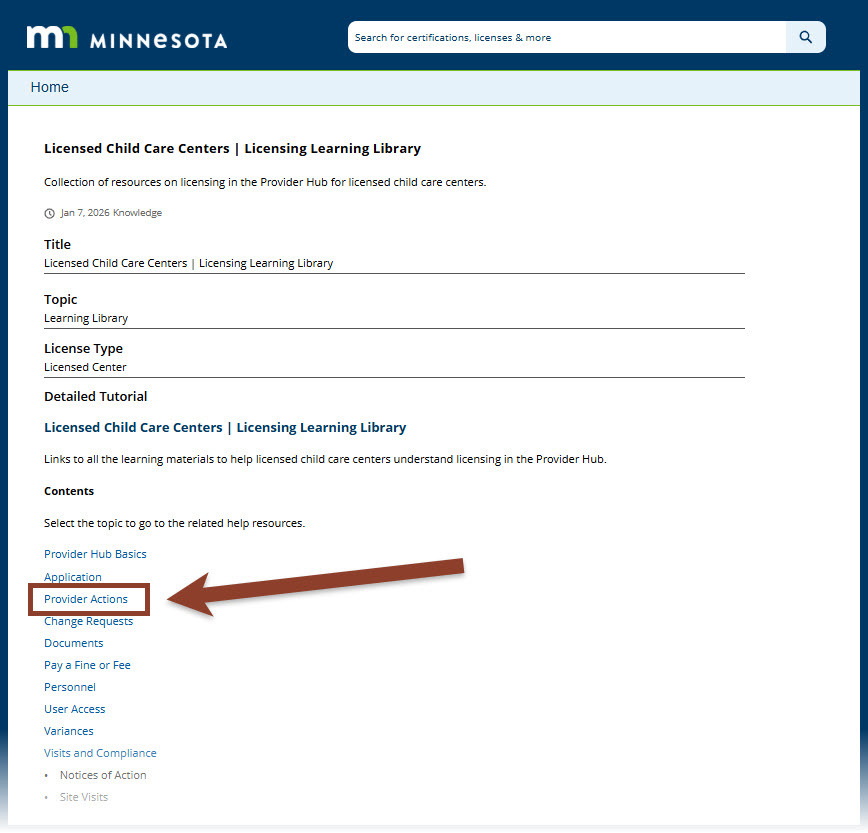
Example: The Authorized Agent for a licensed child care center gets an email stating they need to do something in the Provider Hub (“action needed”) — like upload a document or correct a mistake on an application. They want a reminder on how to respond.
So, they open their learning library and select Provider Actions from the list of contents:
Screenshot of the licensing learning library for licensed child care centers
They’re taken to the section of the library dedicated to that topic.
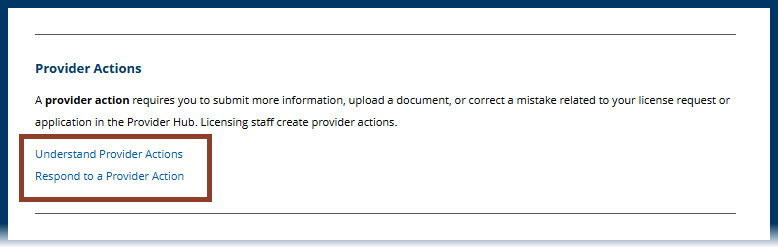
Once there, they find a provider action definition and links to two more articles they can select for more information.
Screenshot of the provider actions section of the licensing learning library for licensed child care centers
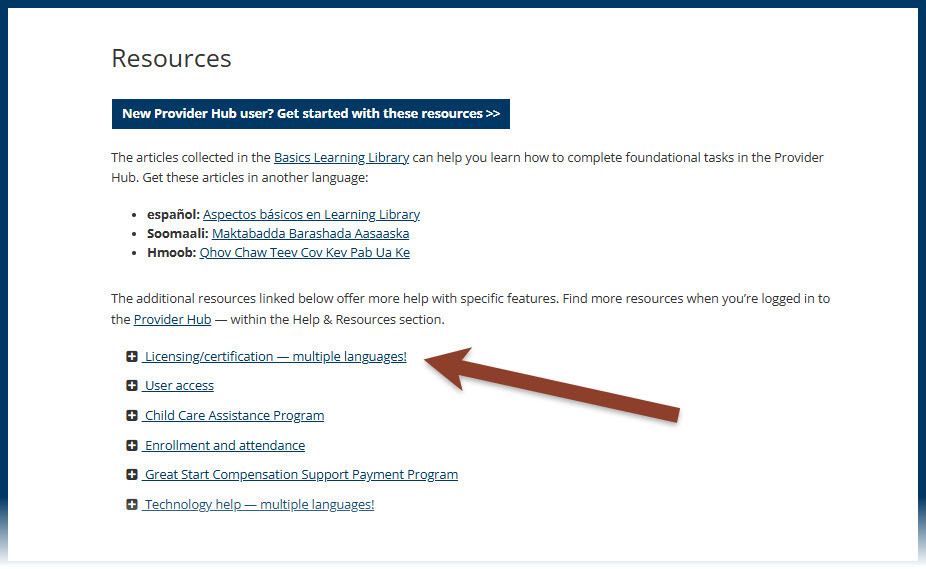
Where’s my learning library?
The licensing/certification learning libraries are linked above. You can also find them in the resources section of the Provider Hub webpage.
Screenshot of the resources section on the Provider Hub webpage
 |
|
Tip: Bookmark your licensing/certification learning library in your internet browser so you have it next time you want help doing something in the Provider Hub. |
Back to top
Seasonal changes often mean changes to child care centers’ operating hours and ages served. Request approval for these changes from your licensor by submitting a change request in the Provider Hub.
Been a while since you’ve had to request a change? Get a refresher with these articles:
Need to request a different type of change? Find more help in the change request section of your certification/licensing learning library:
 |
|
Tip: Submit your request well before you want the change to take effect. You may also want to send an email to your licensor to ensure your change request was received.
Many change requests need to be reviewed and approved by your licensor before you can operate under the new information.
|
Back to top

When child care providers need to renew their Child Care Assistance Program (CCAP) registration, they’ll now receive a bell notification in the Provider Hub 90 days before the renewal is due.
We made this update in April. Previously providers received the notification 60 days before the renewal due date.
Get help: Child care providers can get help renewing their CCAP registration in the Provider Hub with the CCAP Provider User Guide — download the guide to access all the content.
Back to top
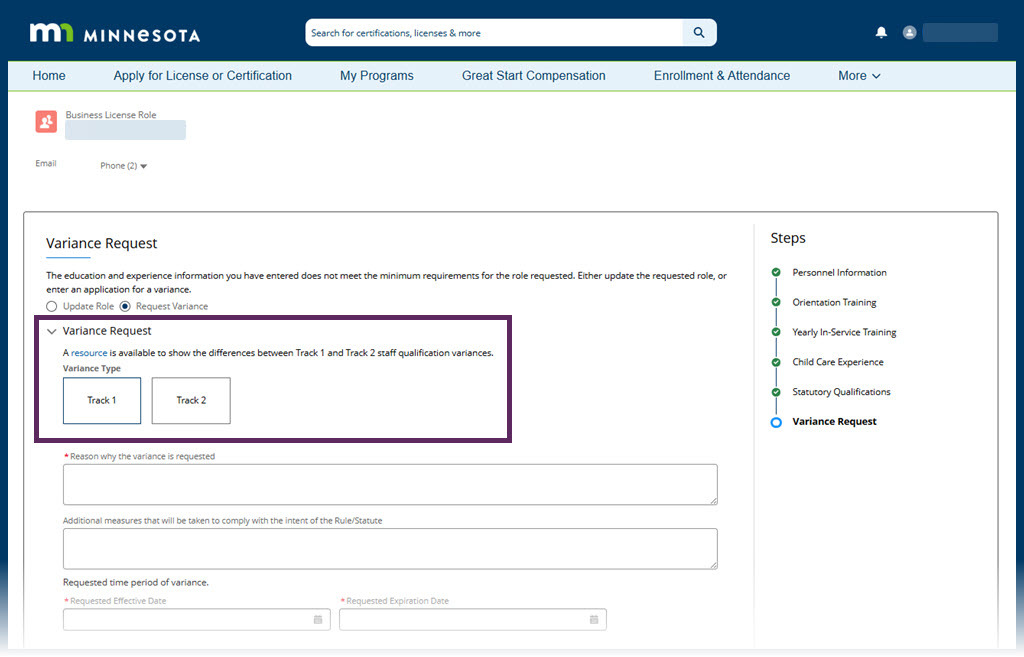
In the Provider Hub personnel/staff variance request process for licensed child care centers, the link to a resource on differences between Track 1 and Track 2 staff qualification variances was broken.
We updated the link in May. It now takes users to Staffing requirements for licensed child care centers on the Department of Children, Youth, and Families (DCYF) website.
Screenshot of the personnel variance request process in the Provider Hub
Get help: Licensed child care centers can get help requesting a personnel variance in the Provider Hub — and other topics on personnel/staff — in the personnel section of the licensing learning library.
Back to top
Check out the release notes from the past couple of months for details on these updates and more:
The State of Minnesota typically releases improvements to the Provider Hub each week and sends release notes at the end of the month.
Provider Hub release notes are sent to Provider Hub users with Delegated Authority access (no signup required). Everyone can review the release notes archive.
Back to top

We clarified the instructions in Request a Change to Yours Hours of Operation for certified child care centers.
We updated this article in May after hearing from users that the original didn’t match what certified child care centers needed to do. Thank you for helping us improve!
Back to top
This spring, parts of the application for a new certified child care center were fixed. So, we updated the screenshots in Apply for a New Certification — Phase 1 to match what applicants now see in the Provider Hub.
Back to top

The Provider Hub is an online tool for social service providers to apply for and manage licenses/certifications, funding opportunities and other available government programs.
We continue to improve the online tool and build new features. As we do so, more providers will get access. Check out the Provider Hub webpage for details on current availability.
Back to top
This newsletter shares general information about the Provider Hub for both current and future users of the online tool, as well as other interested folks. We send a new Provider Hub newsletter about every two months. Find previous editions on the Provider Hub webpage.
The newsletter doesn't replace information sent directly to specific groups — such as alerts for current Provider Hub users or onboarding information for future users. We send those separately.
Share this newsletter with others
Know others who may be interested in receiving news about the Provider Hub? Forward this email and encourage them to subscribe to the newsletter directly.
Back to top
|