|
This message has been sent to all subscribers of the Provider Hub Newsletter. If someone forwarded you this email, we encourage you to subscribe directly.
Welcome to the Provider Hub Newsletter, published by the State of Minnesota Provider Hub team! We’re glad you’re here.
In this first edition of the newsletter, you’ll find:
The Provider Hub team is excited to host our first public information session on Tuesday, September 9 from 6 to 7 p.m.
Anyone interested in learning more about the Provider Hub is welcome to attend. Topics may include new features, recent improvements, resources and upcoming events. Attendees will be welcome to submit questions during the session.
Please register in advance. If you have access needs (for example, an interpreter), please register two weeks before the event.
Back to top
The Provider Hub team has a new email: providerhub@state.mn.us*
You can use this email to give feedback about the online tool or submit requests to the Provider Hub team — such as requests to attend or facilitate an event.
The team managing this email address does not provide technology support or answer policy questions. If they can’t answer your question, they’ll do their best to connect you with a team who can.
*Messages sent to the Provider Hub team at our previous address are forwarding to this new inbox.
Back to top
This month, Minnesota licensed family child care providers with active and pending Child Care Assistance Program (CCAP) registrations are getting Provider Hub accounts created for them.
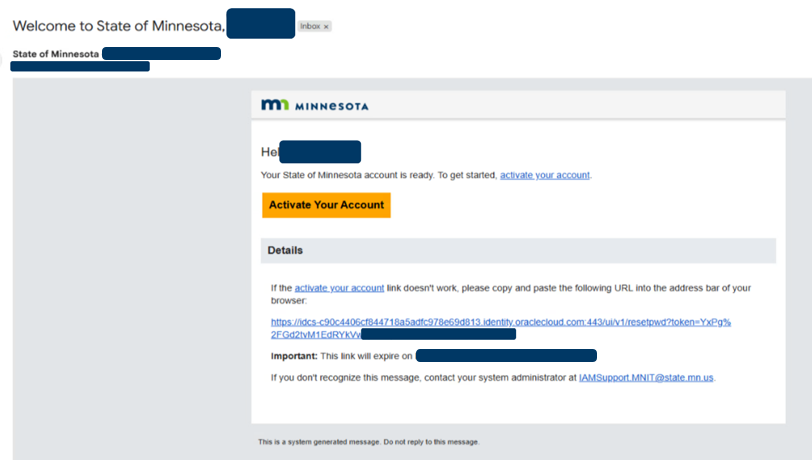
These providers will receive an email from Noreply_PRD@identity.mn.gov at the email address associated with their license:
Account activation email with identifying information boxed out
Minnesota licensed family child care providers who receive this email must select the Activate Your Account button within seven days of when the email was sent. If you don’t activate your account by this date, you’ll need to request a password reset — as explained in the Reactivate Login if Email Link Expires article.
What family child care providers can do in the Provider Hub CCAP feature
Once a Minnesota licensed family child care provider activates their Provider Hub account, they’ll be able to:
- Submit CCAP information, including changes and renewal
- Request access to MEC² PRO (once they have an approved registration in the Provider Hub)
- View notices sent by the Child Care Assistance Program
Managing CCAP registration — and applying for a child care center license — are the only actions Minnesota family child care providers can take in the Provider Hub. Family child care providers are not yet able to manage their family child care license or Great Start Compensation Support Payment Program information in the Provider Hub.
Key Provider Hub benefits for CCAP
-
Digital notices – Access and view CCAP notices within the Provider Hub
-
Faster processing – Real-time submission of registration
-
Secure – Password-protected, verified user access
-
Convenient – Manage your Minnesota child care information in one place
Requirements and questions
For details on requirements for managing CCAP registration information in the Provider Hub, consult the Provider Support team engagement site. If you have questions, contact the CCAP Provider Support team at ccap.providers.dcyf@state.mn.us or 651-431-4848.
Back to top
Progress continues on building family child care licensing in the Provider Hub. As shared in communications with family child care license holders, county licensing staff and partners in July, we’re adjusting the launch timeframe for this new functionality to support a successful rollout (we previously communicated a tentative launch of summer 2025). We’re currently determining when the launch will occur.
Here’s info we do have: We'll first pilot family child care licensing in the Provider Hub with the following counties: Becker, Cass, Crow Wing, Douglas, Hubbard, Morrison, Stevens, Todd and Wadena. After the pilot, the Provider Hub will go live by region. For more details, check out the July 8 email sent to family child care license holders.
We’re actively determining the regional launch order and timeline, and planning in-person support events. We’ll keep sharing more information as detailed are finalized.
Back to top
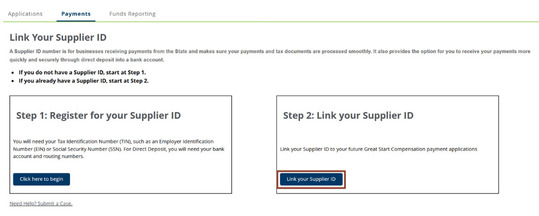
Licensed and certified child care centers can now connect their Supplier ID to their business license within the Provider Hub’s Great Start Compensation Support Payment Program feature. Doing so allows programs to set up direct deposit for Great Start Compensation payments, saving time and effort while adding a layer of security.
From the Payments tab on the Great Start Compensation page of the Provider Hub, child care centers can either register for their Supplier ID (if they don’t already have one) or link their existing Supplier ID to future applications.
Supplier ID page in the Great Start Compensation program feature
Check out the Great Start Compensation Supplier ID Learning Library for guidance on how to use this new feature in the Provider Hub.
If you have questions, submit a case to the Great Start Compensation Support team when you’re logged in to the Provider Hub (licensed and certified child care centers only) or call 651-273-2644 (all providers).
A Supplier ID is a unique number a business receives when they register as a supplier with the State of Minnesota. If you currently receive Great Start Compensation payments via direct deposit, no further action is needed.
Back to top
The Product Success team, formerly known as the Product Experience team, is the group of local experts here to help you find success with the Provider Hub.
Connect with the team
Call 651-431-6075 or submit a support case when you’re logged in to the Provider Hub
If someone isn’t available when you call, please leave a message. In your message, include as much of the following as possible:
We don’t receive information from callers who don’t leave a voicemail. So, any information you leave in a message helps us return your call effectively and efficiently.
We respond to cases Monday through Friday between 8 a.m. and 4:30 p.m. Whether you leave a message or submit a support case online, we aim to respond to cases within 24 hours — this may vary depending on the number of cases we’re receiving.
Three of the top questions — and resources to help
How do I log in and/or change my password? Check out Log In and Change Your Password (PDF).
I manage/work at a licensed child care center. How do I add, update and remove rooms used by my program? Check out Request a Change to Your Program Location or Room Usage in the Provider Hub.
I manage/work at a licensed child care center. How do I enter a personnel variance in the Provider Hub? Check out Add or Update Personnel & Request Personnel Related Variances and Submit a Personnel Variance.
Back to top
We made improvements to the Provider Hub on July 24. Updates included:
- Added ability for providers with an approved Child Care Assistance Program (CCAP) registration in the Provider Hub to request new MEC² PRO users
- Several updates to the Great Start Compensation payment application used by licensed and certified child care centers to improve the application experience
- Improved file upload process throughout the Provider Hub, including ability to upload an increased variety of file types and additional text warning if file(s) are too big to upload
Check out the July Provider Hub Release Notes for details on these updates and more.
Back to top
Several individual Provider Hub resources are now collected in one spot — what we’re calling learning libraries. These libraries are organized by topic to help you find the resource(s) you need.
Here are the collections available today:
View these learning libraries without logging in to the Provider Hub. Find them from the Provider Hub webpage, in the Resources section. They’re searchable, too, from Help & Resources within the Provider Hub.
Back to top
The Provider Hub is an online tool for social services providers to apply for and manage licenses, funding and other government programs.
We continue to improve the online tool and build new features. As we do so, more providers will get access. Check out the Provider Hub webpage for details on current availability.
Back to top
This newsletter shares general information about the Provider Hub for both current and future users of the online tool, as well as other interested folks. We send a new Provider Hub Newsletter about every two months. Find previous editions on the Provider Hub webpage.
We don’t intend for the newsletter to replace information sent directly to specific groups —such as alerts for current Provider Hub users or onboarding information for future users. We’ll keep sending those separately.
Get this newsletter in español, Af Soomaali and Lus Hmoob
The Provider Hub team publishes each newsletter in four languages: English, español (Spanish), Af Soomaali (Somali) and Lus Hmoob (Hmong).
We send the English version first through email. As the other versions are ready, we post them on the Provider Hub webpage. When each of the español, Af Soomaali and Lus Hmoob versions are ready, we send them all in an email to newsletter subscribers.
Share this newsletter with others
Know others who may be interested in receiving news about the Provider Hub? Forward this email and encourage them to subscribe to the newsletter directly.
Back to top
|