 |
|
Dear Tribal Partners, Child Care, and Early Learning Providers,
In October, the Washington State Department of Children, Youth, and Families (DCYF) Licensing Division announced that the complete Child Care and Early Learning Licensing Guidebook (CCELLG) was published online in English. The complete Spanish and Somali versions are being finalized and are coming soon.
The CCELLG is a resource to support child care and early learning programs with the successful implementation and understanding of the Foundational Quality Standards (Chapter 110-300 Washington Administrative Code).
DCYF aims to maintain the CCELLG by incorporating updates to WAC 110-300, as well as current research and resources.
|

For example, the green resources icon (pictured) throughout CCELLG identifies sections with resources to help illustrate concepts. The resources include articles, resource documents, and even videos.
The online format allows the CCELLG to remain a living document with periodic updates of current information and supports. Because it was intentionally designed to be an online resource, DCYF does not have printed copies available for providers. However, providers do have the option to print themselves, either at home or through a printing company of their choice.
For those individuals who prefer a paper version of the CCELLG, it can be printed in part or in its entirety directly from the online document: English | Spanish | Somali.
|
 |
|
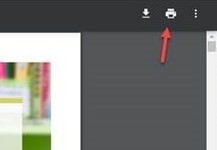
If you are printing from home, in your web browser, select the printer icon.
Please note: the screenshots used here are from Google Chrome. Not everyone's computer or web browser may look the same. If you have trouble locating the printer icon, you can try to right-click on the screen and select 'print' from the menu that pops up.
|
|
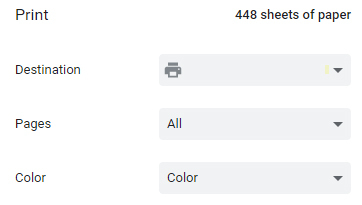
Once you select the printer icon, a popup printing menu will appear.
In this menu, you will select your printer ('Destination'), which pages to print, and either color or black and white.
|
|
 |
 |
|
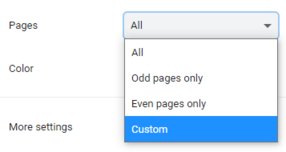
If you want to print select pages only and not the entire CCELLG, click on the dropdown 'Pages' menu and select 'Custom' and enter the desired page numbers. You can enter single pages and page ranges.
For example, you can enter: 119, 310-322, 404
|
If your printer has two-sided printing capability, you can select 'More Settings' and then check the box indicating 'Print on both sides.' When you have made all of your selections, select the 'Print' button.
If you have questions, please email best4kids@dcyf.wa.gov.
Estimados socios tribales y proveedores de cuidado infantil y aprendizaje temprano:
En octubre, la División de Licencias del Departamento de Niños, Jóvenes y Familias del Estado de Washington (Department of Children, Youth, and Families, DCYF) anunció que la guía de licencias de cuidado infantil y aprendizaje temprano (Child Care and Early Learning Licensing Guidebook, CCELLG) completa fue publicada en línea en Inglés. Las versiones completas en español y somalí están siendo finalizadas y llegarán pronto.
La CCELLG es un recurso para apoyar los programas de cuidado infantil y aprendizaje temprano con la implementación exitosa y la comprensión de los Estándares Fundamentales de Calidad (Capítulo 110-300 del Código Administrativo de Washington [Washington Administrative Code, WAC]).
El DCYF pretende mantener la CCELLG incorporando actualizaciones del Capítulo 110-300 del WAC, así como investigaciones y recursos actuales.
|

Por ejemplo, el ícono verde de recursos (en la imagen) a lo largo de la CCELLG identifica secciones con recursos para ayudar a ilustrar conceptos. Los recursos incluyen artículos, documentos de recursos e incluso videos.
El formato en línea permite que la CCELLG siga siendo un documento vivo, con actualizaciones periódicas de la información y los apoyos actuales. Debido a que fue diseñado intencionalmente para ser un recurso en línea, el DCYF no tiene copias impresas disponibles para los proveedores. Sin embargo, los proveedores tienen la opción de imprimirla ellos mismos, ya sea en casa o a través de una empresa de impresión de su elección.
Para aquellas personas que prefieran una versión en papel de la CCELLG, se puede imprimir, en parte o en su totalidad, directamente desde el documento en línea: Inglés | Español | Somalí.
|
 |
|
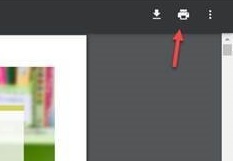
Si está imprimiendo desde casa, seleccione el ícono de impresora en su navegador web.
Nota: las capturas de pantalla utilizadas aquí son de Google Chrome. Puede que no todos los ordenadores o navegadores tengan el mismo aspecto. Si tiene problemas para localizar el ícono de impresora, puede intentar hacer clic con el botón derecho del ratón en la pantalla y seleccionar "print" (imprimir) en el menú que aparece.
|
|
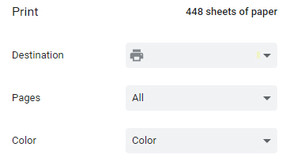
Una vez seleccionado el ícono de impresora, aparecerá un menú de impresión emergente.
En este menú, seleccionará su impresora ("Destination" [Destino]), las páginas que desea imprimir y si desea imprimir en color o en blanco y negro.
|
|
 |
 |
|
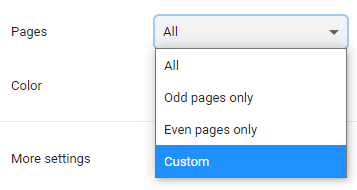
Si desea imprimir solo algunas páginas y no toda la CCELLG, haga clic en el menú desplegable de "Pages" (Páginas), seleccione "Custom" (Personalizar) e introduzca los números de página deseados. Puede introducir páginas individuales y rangos de páginas.
Por ejemplo, puede introducir: 119, 310-322, 404.
|
Si su impresora tiene capacidad para imprimir a dos caras, puede seleccionar "More Settings" (Más ajustes) y luego marcar la casilla que indica "Print on both sides" (Imprimir por ambas caras). Cuando haya realizado todas sus selecciones, seleccione el botón "Print" (Imprimir).
Si tiene preguntas, envíe un correo electrónico a best4kids@dcyf.wa.gov.
Mudanayaal Hay'adaha Qabaa'ilka, Bixiyayaasha Daryeelka Ilmaha iyo Waxbarashada Hore,
Bishii Oktoobar, Washington State Department of Children, Youth, and Families (DCYF, Waaxda Gobalka Washington u Qaabilsan Carruurta, Dhallinta, iyo Qoysaska) Gaar ahaan Qaybta Ruqsadaha waxay ku dhawaaqday in Child Care and Early Learning Licensing Guidebook (CCELLG, Buuga Tilmaamaha Ruqsada ee Waxbarashada Dhallaanka iyo Daryeelka Ilmaha) lagu daabacay oonleen asagoo ku qoran af Ingiriis. Qaybaha Isbaanishka iyo Soomaaliga oo dhameystiran lana naqdiyay ayaa lasoo saarayaa mar dhaw.
CCELLG waa xog barnaamijyada daryeelka ilmaha iyo waxbarashada dhallaanka ka caawinaysa inay si guul leh u hirgeliyaan una fahmaan Heerarka Tayada Aasaasiga ah (Farqada 110-300 ee Xeerka Maamulka Washington).
DCYF waxay dooneysaa inay sii wado CCELLG ayadoo ku daraysa xog cusub WAC 110-300, iyo sidoo kale xogaha iyo cilmi baarisyada dhawaan la sameeyay.
|
|
Tusaale ahaan, Astaanta xogta cagaraan (ee lagu dhex sawiray) CCELLG waxay muujisaa qaybaha leh ilaha gacanta ka geysta muujinta fikradaha. Xogta ilaha waxaa kamid ah qoraalo, dukumiintiyo ay xogo kujiraan, iyo xataa muuqaalo.
Habka oonleenka ah wuxuu CCELLG u oggolaanayaa in dukumiintiga laga helo oonleen ayadoo hadba muddo kadib xogta hadda kujirta iyo taageerada lagu sameynaayo cusbooneysiin. Sababtoo ah waxaa si cad loogu talagalay inuu noqdo xog laga helo oonleen, DCYF ma hayso nuqulo daabacan oo ay kugu talagalay daryeel bixiyaasha. Hase yeeshee, daryeel bixiyaashu waxay haystaan ikhtiyaar ah inay si iskood ah usoo daabacdaan, ayagoo ka daabacanaaya midkood guriga ama shirkad sameysa daabacaadaha oo dookhooda ah.
Dadka doorbidaaya inay helaan CCELLG oo ku qoran warqad, waxay si toos ah oga daabacan karaan dukumiintiga oo qayb ah ama isku dhan khadka oonleenka asagaoo ku qoran: Ingiriis | Isbaanish| Soomaali.
|
|
|
Haddii aad guriga ku daabacanayso, adoo adeegsanaaya boroowsarkaaga, dooro astaanta daabacaada.
Fadlan ogsoonoow: sawirka loo adeegsaday meeshaan waxaa laga soo qaaday Google Chrome. Kumbuyuutar qof walba ama boroowsarka web kasta waxaa laga yabaa inaysan isku si u muuqan. Haddii aad dhib ku qabto inaad hesho astaanta daabacaada, waxaad iskudayi kartaa inaad shaashada labo jeer gujiso (right-click) kadibna meenuga kuusoo baxaaya ka dooro daabac (print).
|
|
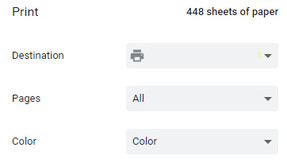
Marka aad ku gujiso astaanta daabacaada, waxaa kusoo bixi doonaa meenuga daabacaada.
Meenugaan, waxaad ka dooran doontaa meesha aad ku keydineyso ('Dukumiintiga aad daabacdo'), bogga aad daabacayso, iyo inaad midab u yeesho ama inaadan u yeelin midab.
|
|
 |
 |
|
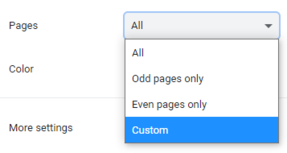
Haddii aad dooneyso inaad daabacdo kaliya dooro boggaga ha dooran guud ahaan CCELLG, meenuga soo baxay ka daaro 'Pages (Bogga)' kadibna dooro "Custom (Wax Ka badel)' kadibna geli tirada boggaga aad dooneyso inaad daabacato. Waxaad gelin kartaa hal bogg ama bogag kaladuwan.
Tusaale ahaan, waxaad gelin kartaa: 119, 310-322, 404
|
Haddii mashiinkaaga daabacaada uu awoodo inuu wax ku daabaco labada dhinacba, waxaad dooran kartaa "More Settings (Sitinada Dheeraadka ah)' kadibna fiiri bokis muujinaaya 'Print on both sides (Ku daabac labada dhinacba).' Marka aad doorato dhammaan waxyaabaha aad dooneyso, guji batoonka 'Print (Daabac)'.
Haddii aad qabto su'aalo, fadlan iimayl udir best4kids@dcyf.wa.gov.
|