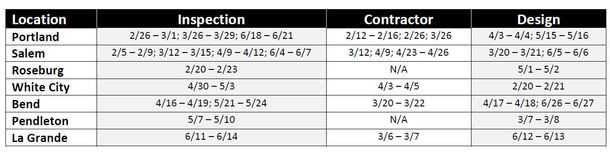
Register for one of the following classes:
You
will need an iLearn account to register. Non-ODOT employees will need to create
an iLearn account if you do not already have one (see instructions below).
1. Designer Training
For those
designing curb ramps on ODOT’s System.
- Training under development – Coming Spring 2018
- Highly recommended that designers attend Inspection Level 1 prior
to designer training.
http://ilearn.oregon.gov//DL.aspx?id=01FA4BF5E9134DCEA352AB735A9DD3A6
2. Contractor Certification
For contractors bidding on projects in 2018 (with curb ramps on ODOT's System) will need to have a certified field supervisor or have certified person on the subprime crew.
- Contractor (1/2 day – classroom and field training)
http://ilearn.oregon.gov//DL.aspx?id=BEFE7A433E1E40278C2838AE1E086409
3. Inspection Certification
For those
filling out curb ramp inspection forms on ODOT’s System are required to be
fully certified (Levels 1 & 2).
-
Level 1 registration (1/2 day – classroom training):
http://ilearn.oregon.gov//DL.aspx?id=414650580DCE4F9795E7DF2FD5340550
Please
share these ADA training opportunities with those designing, building, and
inspecting curb ramps on ODOT’s System.
Contact Scott Chalkley if you have any questions.
Scott.chalkley@odot.state.or.us |
(503)
986-3176
Instructions for Creating
an
iLearnOregon Account
ODOT is now using
iLearnOregon to register
people in their training events.
In order to
register, you must have an
account in iLearnOregon. (NOTE: Another person cannot register for you using their iLearnOregon account.)
Non-ODOT participants registering through iLearnOregon for the first time:
The first time you register for an event, you will
be required to create an
account at: http://ilearn.oregon.gov/Default.aspx
- At the iLearnOregon
select Create New Account near
the upper right of the screen.
- A pop-up window
will display directing you to enter all
required fields (those marked with an *) and that
a confirmation email will
be sent to you. Your Login ID should be at least
six
characters long, and
must not contain
any spaces. Click OK to continue to the User Information screen.
- From the User Registration screen select Not a State Employee.
-
Complete the following information to create an account.
Enter your full first and last name.
Enter your email address (where you would like training notification emails to be sent).
Enter text for your login ID. Your login must be at least 6 characters and cannot contain spaces or special characters such as /, @, or &.
For Job Title, leave it as (None Selected). The job titles in the drop down list come from the State's database and only apply to state employees.
For Organization, select Other, Non State Employees – State of Oregon Public Partners – Transportation, Department of from the drop down list. (State of Oregon Public Partners appears near the bottom of the list.
For Manager, leave it as (None Selected).
5. Click Submit.
6. You will receive an email with instructions on how to confirm your account. You must confirm your account before you can enroll in the training.
|