In This Issue:
The Ohio Department of Medicaid implemented claims validation requirements for Phase 2 and 3 providers on Sunday, June 1. Going forward, claims for services requiring electronic visit verification (EVV) must have matching EVV data for private duty nursing and nurse consults billed to Ohio Medicaid and home health services billed to Medicaid managed care entities.
Claims for services listed below that do not have a matching EVV visit record, or an active Live-in Exemption will be denied.
|
Service Description
|
Service Code
|
Payer
|
Phase
|
|
Private Duty Nursing
|
T1000
|
Billed to ODM as a Fee for Service Claim
|
2
|
|
Nurse Assessment and Consult
|
T1001, T1001_U9
|
Billed to ODM as a Fee for Service Claim
|
2
|
|
Home Health Services
|
G0151, G0152, G0153, G0156, G0299, G0300
|
Billed to Medicaid Managed Care Entities (MCEs)
|
3
|
To avoid payment disruptions related to these new requirements, Phase 2 and 3 providers are strongly encouraged to:
-
Review your EVV match rate – Ensure all visits are properly captured and aligned with claims.
-
Identify gaps – Check if caregivers are using the correct EVV methods: mobile app or telephonic visit verification (TVV).
-
Review the the EVV Provider Look-Up Dashboard for insight into data discrepancy incidents which may delay a claims payment.
-
Use Available Resources – We’ve compiled key materials to help you navigate claims validation:
Additionally, claims readiness trainings are available on demand, with “replay” links to individual sessions available below.
|
Claims Readiness On-Demand Trainings
|
Training Link
|
|
Get Ready for Claims Matching
|
Replay
|
|
Mastering Data Entry
|
Replay
|
|
Visit Maintenance
|
Replay
|
|
Aggregator for Alt EVV Providers
|
Replay
|
Access these sessions on your own schedule and take advantage of additional resources to support your use of the Sandata software. Visit the Ohio Sandata OnDemand site.
We know you're committed to delivering quality care, and we’re here to support you in meeting the claims validation requirements as you go.
If your agency uses an alternative EVV system to connect your data with the Sandata aggregator, please join a one-hour training session June 11 designed just for you. Provider administrators, operational and billing teams who manage claims and EVV submissions are encouraged to attend.
During the training we’ll walk you through how to successfully compare your current EVV platform to Sandata. You’ll also learn:
- Steps to prepare your EVV data for submission.
- Common issues and how to avoid them.
- Best practices for ensuring claims validate successfully.
Join Us for the Alternate EVV Training
DATE: June 11
TIME: 11 a.m. – 12 p.m.
R.S.V.P Save your spot today. Click here to register.
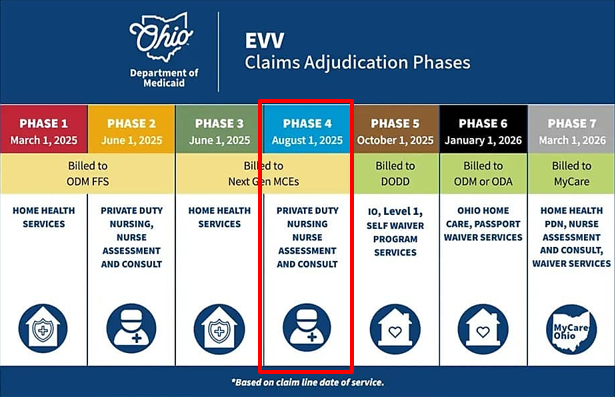 On August 1, Ohio Medicaid implements claims validation requirements providers offering private duty nursing, and nurse assessments and consults billed to managed care entities.
To help you prepare for the upcoming change to claims submissions, ODM and our EVV vendor Sandata are offering several trainings in the next few months to help you avoid common errors impacting claims processing.
Upcoming Phase IV claims validation trainings, dates, and details will be posted on Sandata on Demand - Ohio Trainings.
 Beginning soon, users of the EVV Provider Look-Up Dashboard will be required to enter two pieces of information to access provider data:
- 7-digit Medicaid ID
-
Tax ID on file (typically the Federal Employer ID Number or "FEIN" for organizations, or the Social Security Number for independent providers)
Once both fields are entered, press Enter after typing the Tax ID to view the results.
If no data appears:
- Double-check for extra spaces before or after either entry
- Make sure you’re using the most current information as listed in the Provider Network Management (PNM) system
This added step helps ensure secure and accurate access to provider information.
Thanks to all who joined us May 29 for the EVV Stakeholder Workgroup.
ODM provided updates on the collaboration happening across state-agencies as we prepare for implementing the waiver service phases of claims validation. Participants were also given a recap of the feedback about Alternate EVV Vendors from the previous meeting.
For more insight, please review the May 29 Electronic Visit Verification Stakeholder Workgroup presentation.
Ohio Medicaid will host the next stakeholder meeting on Monday, June 23, 2:30-4 p.m. If you wish to attend in listen-only mode, please register here.

Ohio Medicaid recently released a new resource - the EVV In Demand Resource Guide - to help you more easily find the EVV rules, tools, and reference materials that are most frequently requested by you and your peers.
Located at the top right side of Ohio Medicaid’s Electronic Visit Verification webpage, the In Demand Resource Guide stands alone so you can quickly and easily take advantage of it.
|

If your member recipient changes payers - they move to a different waiver or enroll with a managed care plan for their Medicaid covered services - you must submit a change request to update the live-in caregiver status. Use the online Live-in Caregiver Exemption Request form to request the change.
|

All Providers
Question: What does it mean when I get the "Procedure Code Does Not Match" error?
Answer: The Procedure Code Does Not Match error message means there is no matching visit in the EVV account with both the Provider Medicaid ID and Recipient ID for this service. This could mean
- There is no visit in Sandata Aggregator.
- The visit is not in Verified status in Sandata Aggregator.
- The visit does not have the correct payer and/or service in Sandata Aggregator.
To resolve the Procedure Code Does Not Match error message, go to the Recipient Management screen and ensure the correct program, authorization, and services are in scope. Navigate back to Visit Maintenance module and edit the visit details to make sure the visit has the correct information for the claim. If there is no visit, use the Create Visit button.
For more information visit Claims Assistance – Sandata Technologies.
Question: I am logging into the OHID portal, but my account is not showing when trying to login to the EVV Portal/Aggregator, what's going on?
Answer: The provider needs to ensure Email Address 1* in the Primary Service Address tab of Provider Network Management (PNM) module is the same email address in EVV. The provider needs to take one of the following steps to correct the issue:
- If the email in PNM and EVV is incorrect, the provider should update the email address in PNM and contact Sandata customer care to update the email in EVV.
- If the email in PNM and EVV is correct, the provider should contact Ohio Medicaid's Integrated Helpdesk at 800-686-1516 or email ihd@medicaid.ohio.gov for assistance.
Sandata regularly updates its EVV software via releases to ensure it runs smoothly. Below are the changes introduced in the Sandata EVV web portal and Sandata Mobile Connect app.
Date
|
System
|
Issue Type
|
Description
|
|
5/15/2025
|
EVV
|
Production Support
|
Made Live-In functionality visible to all payers, not just ODM.
|
|
5/15/2025
|
EVV
|
Feature Enhancement/Production Support
|
Updated claim matching logic to consider valid EVV modifiers in Ohio OMES.
|
|
5/22/2025
|
EVV/AGG
|
Prod Support
|
Updated CV Rejection report to exclude valid live-in exemption claim responses.
|
|
5/22/2025
|
AGG
|
Bug
|
Fixed issue with keyboard navigation for group visit code menu (ADA compliance).
|
|
5/22/2025
|
EVV
|
Bug
|
Fixed issue where provider ID was not populated in Visit Listing report records.
|
|
5/22/2025
|
EVV
|
Production Support
|
Fixed issue where total hours were not consistently displaying in Visit Maintenance.
|
|
5/15/2025
|
EVV
|
Bug
|
Fixed issue where claims with more units than the visit incorrectly returned a True Visit found with fewer units; now returns False with Unmatched Units. Occurred in multiple cases.
|
Ohio Medicaid and Sandata Technologies stand ready to assist providers and agencies in meeting claims validation requirements for the March 1 start and beyond.
Click here to see who to contact regarding specific topics or view the table below.

|