Table of Contents
-
Agency Updates: OhioBuys Planned Outage | New Procurement and OhioBuys Website | Preparing for FY Year End Close Reports | Obtaining IT Release and Permits for the Controlling Board | Purchases from a Pre-Governed Contract
-
Supplier Updates: Supplier Webinars
-
Training Tips: Executive Order Guidelines | Help Desk Reminder | Training Calendar | Office Hours
Agency Updates
OHIOBUYS PLANNED OUTAGE
OhioBuys will have a planned maintenance outage beginning 10 PM EST on Saturday, April 30th through approximately 12 PM EST Sunday, May 1, 2022, to coincide with the OAKS System Maintenance outage. Thank you in advance for your patience
NEW PROCUREMENT AND OHIOBUYS WEBSITE
As a reminder, the Procurement and OhioBuys websites have gone through an update to serve our customers better. Beginning on Monday, users will begin using the new consolidated website. You should update your bookmarks to:
Homepage: https://procure.ohio.gov/procure/home
Agency OhioBuys Training: https://procure.ohio.gov/procure/state-and-local-agencies/02_OhioBuys-Agency-Training
OhioBuys Learner Guides and Job Aids: https://procure.ohio.gov/procure/state-and-local-agencies/02_OhioBuys-Agency-Training/03_agency-training-catalog
If you missed the communication sent out last week, you can see the overview of the new website and familiarize yourself with the new features.
PREPARING FOR FISCAL YEAR END CLOSE REPORTS
Currently, DAS sends Fiscal Year-End Close communication reminders to users regarding the dates by which all purchasing activities must be completed in OAKS. This year, OAKS purchasing roles will be turned off at 5:00 PM on Wednesday, June 22nd.
Please keep the following in mind:
- Users will need to resolve all pending items with budget dates in FY22 on or before June 22nd (including integration errors, budget errors, incomplete change orders, and incomplete purchase requisitions).
- All FY22 OhioBuys purchase requisitions and change orders must be in “Ordered” status (or in the case of ODOT, in “ODOT Complete” status) on or before June 22nd. All FY22 POs must also be in “Ordered” status on or before June 22nd. Please note, any transactions for FY22 that do not meet this requirement will be canceled or deleted beginning June 23rd, and the user must re-create the transaction in the new fiscal year when the OhioBuys and OAKS re-open.
- If there are issues, users should sign up for office hours or report them to the help desk immediately so, they can be addressed.
- Users will have “view only” access in both systems (OAKS/OhioBuys) beginning June 22nd once roles are shut off. Users will regain edit rights when OhioBuys and OAKS re-open.
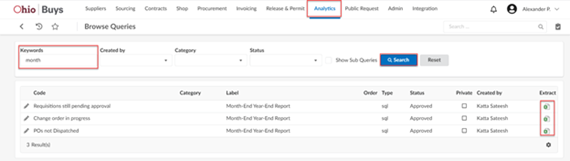
There are three queries in OhioBuys that allows you to find and identify incomplete transactions for clean-up. From the Analytics > Browse Queries page, you can use the keyword “month” to find all three queries. The available queries are:
-
Requisitions still pending approval – this will include anything that is not in “Ordered” status. (For ODOT users, this will bring back anything that is not in “ODOT Completed” status.) We recommend that you filter this query by “Budget FY” (column H) to only show transactions in the current fiscal year and any blanks. This will prevent you from accidentally deleting work that is intended for future fiscal years.
-
Change order in progress – this will also include anything that is not in “Ordered” status.
-
POs not Dispatched – this will include any PO that is currently “In Progress” and has not completed processing to an order.
Click the Extract icon for the query you would like to run. The queries will only display data from the agencies/organizations within your user scope.
 After running these queries, review each transaction and determine whether it will be complete in time for the fiscal year-end close or not. If not, you may want to cancel or delete the transaction. To assist you with reviewing your in-progress purchase requisitions and change orders, there are two job aids that are available:
-
Review Purchase Requisition Status and Approval History: walks through how to find in-progress purchase requisitions on the Browse Requisitions page and explains what each of the purchase requisition statuses indicates. In addition, this job aid explains how to run the Requisitions still pending approval and the Change order in progress queries in OhioBuys.
-
Review Purchase Order Integration Errors: walks through how to find in-progress purchase orders that have encountered an integration error and explain the actions that need to be taken to resolve the displayed error. In addition, this job aid explains how to run the POs not Dispatched
If you have any trouble during the clean-up process, please consider signing up for office hours using one of the below links or email OBM.sharedservice@obm.ohio.gov for assistance.
OBTAINING IT RELEASE AND PERMITS FOR THE CONTROLLING BOARD
Agencies can obtain an IT Release & Permit (i.e., R&P) for Controlling Board purchases via the Contract or Purchase Requisition processes in OhioBuys:
-
IT Contracts: To obtain an IT R&P for a controlling board purchase an agency may create an agency administered contract. By clicking the IT checkbox in the General Information section of the Header, the contract will route through the IT R&P workflow. If you are requesting biennium Controlling Board approval as part of this contract, select the Biennium Fiscal Year 1 and Biennium Fiscal Year 2 and then enter the Biennium Fiscal Year Amount for each fiscal year. Navigate to the Negotiated Terms tab and enter the sum of the Biennium Fiscal Year Amount fields in the Contract Not To Exceed field on the Negotiated Terms tab of the contract. Your draft CB must be attached in the documents section of the contract. Once your contract is submitted and any Supplier negotiations and internal approvals are received, your contract will automatically route for the necessary IT approvals (e.g., IT SIM, IT SME, EITC Analysts, etc.). After IT has completed its review, an IT R&P number will be generated and will be linked on the Release & Permit field on the header of the contract. You will receive an email notification once the necessary approvals have been received. Once you have obtained your CB approval, you will enter the CB number in the CB field on the header page of the contract. Any purchase requisition created that references the approved contract will automatically utilize the IT R&P and CB number on the contract.
-
IT Purchases Below $25,000: For IT purchases below $25,000, the purchase requisition (i.e., PR) workflow will automatically assign your agency’s Blanket R&P number. Each agency’s Blanket R&P will be entered in OhioBuys for the assigned agency. There will be unlimited use of the blanket, and its value will be $999,999,999.00. When an agency purchase is below $25000, the PR will automatically utilize the Blanket R&P. If your PR contains line items with governance commodity codes, it will go through IT Strategic Investment Management (SIM) review prior to being assigned its Blanket R&P number.
-
IT Purchases Above $25,000: For IT purchases greater than $25,000, the PR workflow will automatically assign an R&P after the PR has gone through a full IT approval. The R&P Amount will equal the total of the approved PO (sum of the line items per contract or Supplier). You will receive an email notification once the necessary approvals have been received. After the IT R&P has been assigned to the requisition, the requisition will move back to the requisitioner to wait for the approved CB number to apply to each line item on the requisition. The final agency approver will receive the requisition after the approved CB has been added to the line items.
Agencies cannot submit a request for an IT R&P via the Request to Purchase process in OhioBuys. Additional details regarding the IT R&P process are available in the Creating and Managing Contracts Learner Guide and Release and Permit Overview Job Aid.
PURCHASES FROM PRE-GOVERNANCE CONTRACTS
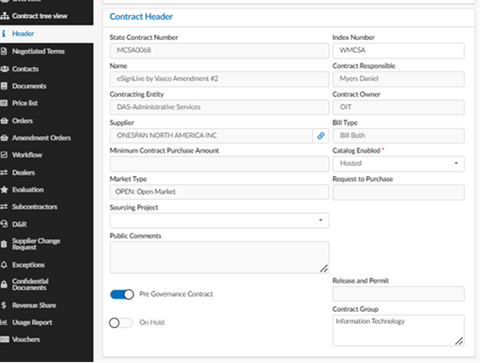
When making purchases in OhioBuys from pre-governance contracts established by the Enterprise IT Contracting team (e.g., MCSA0002 (WORKFRONT), MCSA0068 (ONESPAN NORTH AMERICA)), users are not required to obtain quotes if there is established contract pricing via a catalog. The requirement to attach a quote is/was only for the legacy IT Release and Permit system and does not apply to purchases made in OhioBuys from a catalog.
If a pre-governance contract does not have an established catalog, users must obtain a quote and are encouraged to use the OhioBuys solicitation module to obtain a quote from the supplier. This provides suppliers with a consistent manner in which the State solicits quotes.
To determine if a contract is pre-governed, users can navigate to the Header tab of a contract in OhioBuys to see if the Pre-Governance Contract slider is checked.
Supplier Updates
SUPPLIER WEBINARS
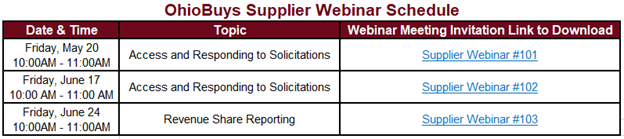
We have three remaining OhioBuys supplier/bidder webinar series through the end of FY 22.
Each supplier/bidder training webinar will be one hour and held on the dates listed below. Please download the webinar meeting invitation file, unzip it, and click the .ics file to add to your calendar.
In addition, a revised Supplier Fact Sheet & Quick Start Guide is available to learn more about the Supplier log-in process and share it with your suppliers. Agency representatives are also welcome to join these webinars to learn more about how suppliers access and use OhioBuys.
Training Tips
EXECUTIVE ORDER GUIDELINES
Per Governor DeWine’s Executive Order 2022-2D, companies interested in doing business with the State of Ohio must follow the most current version of the Standard Terms and Conditions and submit an Affirmation and Disclosure Form on each specific bid or quote.
As part of the solicitation process, this is a requirement for suppliers. Agencies should encourage suppliers to attach the appropriate forms as attachments to their proposals.
HELP DESK REMINDER
Users should remember that when submitting tickets to the help desk, they should be referring to functional issues or questions. If users have a question regarding a specific procurement policy, they should contact Steve Meese via email or Teams at steve.meese@das.ohio.gov.
TRAINING CALENDAR
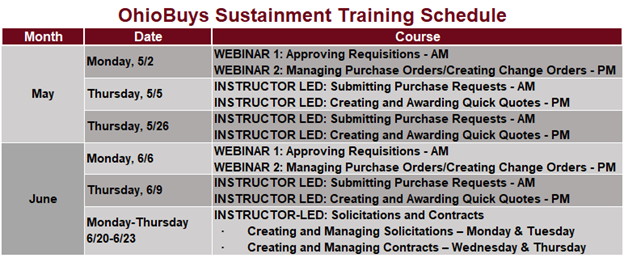
Ongoing OhioBuys training sessions are scheduled now through June 2022. For the complete list, see the below schedule of upcoming sessions.
Users can register for these sessions directly in OhioLearn if they could not previously attend OhioBuys training or if they would like a refresher course on a particular topic. If your agency has a topic request for training or needs solicitation and/or contract training, please notify the project at: OPS.TrainingAcademy@das.ohio.gov.
OFFICE HOURS
One of the resources available to assist your use of OhioBuys is the option to sign up for Office Hours. Users sign up for either 30 or 60-minute Office Hour sessions wherein a dedicated OhioBuys trainer will be available to assist you with OhioBuys functionality. During the month of May, Office Hours registration will remain limited as the training team continues to support the rollout of OhioBuys. In May, Office Hours will typically be available from 11 AM-12 PM and 1PM-2 PM Mondays-Thursdays; however, additional Office Hour slots and trainers will be available on:
- Tuesday, May 3rd
- Thursday, May 5th
- Monday, May 9th
- Wednesday, May 11th
- Friday, May 13th
Starting on Tuesday, May 31, 2022, the OhioBuys team will be continuing expanding Office Hours availability so there are multiple timeslots and available trainers Mondays-Thursdays.
We encourage you to advantage of this resource as you get acclimated to OhioBuys. To sign up for office hours, please follow the prompts on this page: https://outlook.office365.com/owa/calendar/OhioBuysTest@ohiodas.onmicrosoft.com/bookings/
You will receive direct help on a specific transaction as you are working through it!
These Office hours are available for your training-related questions (i.e., how to do something in OhioBuys). If your question(s) is regarding policy or system issues (e.g., why a purchase order is In Progress), users should submit a helpdesk ticket. In addition, anything that substantially involves R&Ps, OAKS, or OneSpan Sign will also need to go to the helpdesk. If you have not attended any OhioBuys training course, you will be redirected to training, and your office hours appointment will be canceled.
Remember, if it's a question of "how," then office hours are the way to go. If it's a question of "why," it needs a helpdesk ticket.
Support
For log-in or system issues, please contact OBM Shared Services Center at 614-338-4781 or 1-877-644-6771 OR OBM.SharedServices@OBM.Ohio.Gov Remember to put “OhioBuys” in the subject line!
If you have questions about the project itself, please email: ohiobuys@das.ohio.gov.
Mike DeWine, Governor
Jon Husted, Lt. Governor
Kathleen C. Madden, Director
|