July 2, 2026
WHAT'S NEW:
- Summer School Graduate Event and Action*
- Disabled Course Catalog Updates*
- Mapping the State Computer Science Credit Type*
- Attendance Code Change Update*
- Final Incident/Discipline Data Verification*
- Beginning of Year Articles*
- Course Updates*
- NCSIS Coordinator Collaborative Recordings*
- Knowledge Owl*
- NCBOLD 2026 is Almost Here!*
- NCED Connect Symposium*
REMINDERS:
- Upcoming Training Information
- NCSIS 2619.14 Upgrade
- Arts Ed Graduation Requirement Update
- Arts Education Requirements HS Validation Report Issues
- New EL Report
- ALPS Deadline Extended
- Teacher Tips
- NCSIS Resources
- Requesting Technical Support Points of Contact
*indicates new or updated information
WHAT'S NEW:
 |
|
Summer School Graduate Event and Action*
NCDPI published an Event and Action on Thursday, July 2, at 12:00 pm to create enrollments for students that graduate after summer school. Please see details in the Summer School Graduates section of this article:
Summer Education Program | NC Department of Public Instruction
Please note that if the summer education program was created prior to this Event and Action being published, it will not automatically create the enrollment. To alleviate the data entry burden on PSUs, NCDPI will run a one-time script to create enrollments based on already existing Summer Education programs. A message will be released in the bulletin once this script is scheduled to run.
|
Disabled Course Catalog Updates*
At close of business on Thursday, July 2, 2026, NCDPI will run a script to move courses with end year 25-26 into PSU’s “NC State Disabled Course Catalog." This will remove inactive courses from the active “NC Course Catalog” used by schools for scheduling.
A list of these disabled courses can be found in the “SY 26.27 Master Course Code List 05.28.26 V4a PUBLISH," which can be accessed here: https://go.ncdpi.gov/NCDPIallCM. View the red Disabled Course Codes tab.
PSUs should check 26-27 course schedules and clean up any sections and courses that are using a disabled course code. Two Ad-Hoc Reports are available. Navigate to Reporting > Ad Hoc Reporting > Filter Designer > State Published >
- Disabled Courses: Sections Exist in Calendar
- Disabled Courses: Courses Exist in Calendar.
Please see the Disabled Course Codes | NC Department of Public Instruction article for more information.
|
|
 |
 |
|
Mapping the State Computer Science Credit Type*
NCDPI recently republished the HS Credit Group that now includes the new credit type of Comp Sci (Computer Science - which is required in the 2026-27 NC FRC Graduation Requirements Program) to all PSUs. Districts have reported that this impacts assigning and use of current NC FRC/FRCO Grad Programs which NCDPI has verified.
Click here for steps to add and map the Comp Sci credit type to fix issues with assigning graduation programs.
If credit group setup support is needed, submit an Infinite Campus Support Case.
|

Final Incident/Discipline Data Verification*
Final Incident/Discipline Data Verification and Data Collection
- All 2025-2026 Incident/Discipline data should be entered into the NCSIS by June 30th of every school year.
- There will be a Final Data Verification Window for the 2025-2026 data from July to August 21, 2026.
- During this window, NCDPI will compile the data mid-July and will send the PSUs a final verification spreadsheet for the PSUs review and approve the data before it is used in federal and state reporting.
- The Incident/Discipline data will be pulled at 11:59pm on August 21, 2026.
June Pre-EOY Edit Checks for 2025-2026
To help PSUs/districts check and verify their discipline data, pre-EOY summary totals and edit checks have been run on all data that has been submitted to the State as of Wednesday, June 23, 2026, at 11:00pm. A spreadsheet with the results can be located and downloaded from the secure eMFTS Apex file exchange service in the “homebase/reporting” folder. It is named “DISC--00-4081-PSUXXX--Behavior_EditChecks_06232026.xlsx” / “DISC--00-4081-PSUXXX--Actions_EditChecks_06232026.xlsx” PSU/District SIS coordinators who have yet requested access to the eMFTS exchange service, please refer to this link.
- Descriptions of each Edit Check can be found here.
- It is possible that an incident will be flagged by one of the edit checks even though it was entered correctly. When this happens, just ignore that check for that incident
|
Beginning of Year Articles*
Beginning of Year (BOY) Knowledge Base articles are now available to help you prepare for the start of the new school year. The collection includes step-by-step guidance for key BOY processes, including new school year setup, course masters and grading, scheduling, student and staff information, census verification, administrative tasks, summer school, access management, and more.
In addition, the Beginning of Year Lunch & Learns page includes presentation materials and recordings organized by topic for on-demand review.
Resources:
Questions and Answers
As you review the lunch & learns and guidance materials, please submit any questions using the NCSIS Questions Form: go.ncdpi.gov/NCSIS26Questions.
Responses are posted to the NCSIS Answer page: go.ncdpi.gov/NCSIS26Answers
|
Course Updates*
End of Year (EOY) 2025–26
Due to changes included in a previous Infinite Campus Release, the Course End Year field in Course Management was updated from a four-digit year format (e.g., 2026) to a school year format (e.g., 25-26).
To align with this update, NCDPI published courses with an End Year of 25-26 to PSUs on June 26, 2026. A notification was posted in the NCSIS-IC Message Center.
Please note:
- This update did not affect grade or transcript posting for the 2025–26 school year.
- Courses and Course Masters remained active through June 30, 2026.
- Effective July 1, 2026, Course Masters with an End Year of 25-26 will become inactive.
As part of the original NCSIS implementation, inactive State Course Masters were moved to each PSU's NC State Disabled Course Catalog to simplify course selection and scheduling. This removed inactive courses from the active NC Course Catalog used by schools for next year scheduling.
NCDPI is evaluating options to move disabled course masters to the NC State Disabled Course Catalog. Additional guidance will be provided in the coming weeks.
Beginning of Year (BOY) 2026–27
State Course Name and Credit Value updates will be published by DPI on July 1, 2026. These changes are identified on separate tabs within the 2026–27 Course Master List.
Course Name Changes
- Review local course names and make updates as needed.
Credit Value Changes
- Applies only to affected high school courses.
- Middle school courses receiving high school credit are not impacted.
- In NCSIS, course credit values are reflected in the GPA Weight field.
-
Districts should review and update the Course Master Grading Task Credit field where applicable and push those updates to any 26-27 calendars that are using the course.
For step-by-step instructions, see: Course Master Updates | NC Department of Public Instruction
Resources
2026–27 Course Master List
|

NCSIS Coordinator Collaborative Recordings*
There were many important updates shared in the June 30, 2026 Collaborative. Please see the agenda or watch the recording if you were unable to attend.
Agenda and supporting materials: https://go.ncdpi.gov/NCSISCoordinatorCollab
Stay up-to-date on the latest NCDPI news, updates, and announcements by participating in the NCSIS Coordinator Collaboratives.
Missed a Session?
Recordings of previous Coordinator Collaboratives are available on the Coordinator Collaboratives | NC Department of Public Instruction Knowledge Base.
Upcoming Collaboratives
Coordinator Collaboratives have been scheduled through December 2026. Register for each session by selecting "Check Availability" and choosing the desired date from the calendar:
https://www.eventbrite.com/e/1992495958047
Upcoming Session Dates (July-December 2026)
- July 16
- August 13
- August 27
- September 10
- September 24
- October 8
- October 22
- November 12
- December 3
- December 17
|
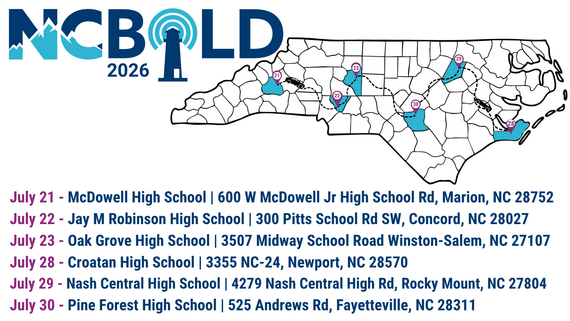
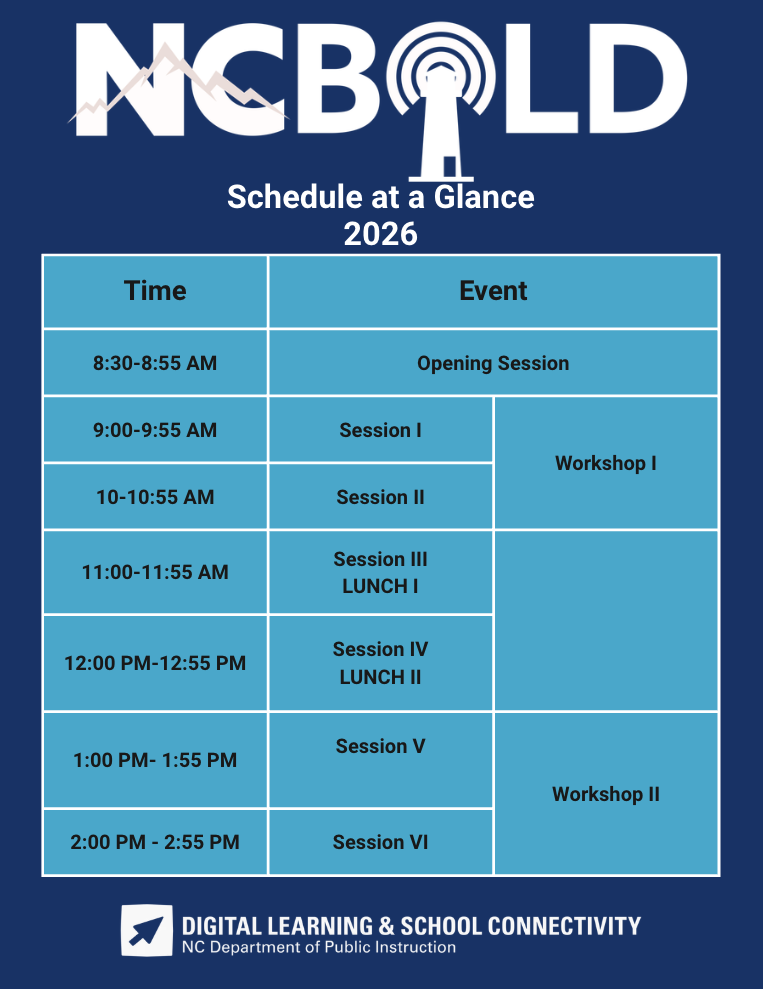
NCBOLD 2026 is Almost Here!*
The #NCBOLD2026 Session Guide Preview is NOW LIVE!
Want a sneak peek at the incredible learning opportunities waiting for you this summer? Explore the preview and start planning your NCBOLD experience today:
go.ncdpi.gov/NCBOLD2026SessionPreview
From AI and digital learning to leadership, literacy, STEM, school improvement, and more, you'll find sessions designed to inspire new ideas and provide practical strategies you can bring back to your school, district, or classroom.
 Have you registered yet? Have you registered yet?
Choose the location that works best for you:
 West Week | July 21–23 West Week | July 21–23
Marion • Concord • Winston-Salem
East Week | July 28–30
Newport • Rocky Mount • Fayetteville
Join educators from across North Carolina for a summer of learning, collaboration, and innovation. Don't just hear about it—be part of it.
 NCED Connect Symposium*
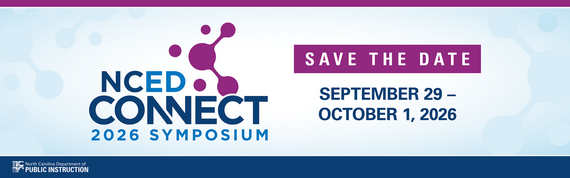
We’re excited to announce the next NCED Connect Symposium—a premier statewide event connecting people, platforms, and possibilities across North Carolina’s education community.
📅 September 29 – October 1, 2026
📍 Koury Convention Center | Greensboro, NC
The NCED Connect Symposium brings together digital teaching and learning leaders, technology directors, central office teams, instructional coaches, NCSIS data managers, district innovators, and more—for three days of powerful collaboration and forward-thinking sessions.
🤝 Connect with peers
💡 Explore new ideas
🚀 Shape the future of education
✨ This year, we are planning an even larger symposium and expanding our offerings around:
- AI in Education
- NCSIS for All (Data Managers, SIS Coordinators, Teachers, Coaches, Admins, Central Office & Support Staff)
- EdTech Innovation+
- SLMC sessions
- Instructional Strategies
- NCED Connect Services (NCEES, Schoolnet, Canvas, OER)
- Leadership tracks for CTOs, principals, coaches, and central office staff
Mark your calendar and stay tuned—more details coming soon!
REMINDERS:

Upcoming Training Information
Be sure to review the DTL Signature Events Calendar and Eventbrite for upcoming in-person and virtual regional meetings, webinars, and training sessions. These opportunities are designed to keep staff connected, informed, and supported throughout the school year.
*In the DTL Signature Events Calendar, use the arrows at the bottom of the screen to scroll to monthly event calendars, including upcoming NCSIS webinars!
NCSIS Teacher Training Information:
Please use the link below to access teacher training resources for NCSIS. Additional details can also be found at ncsis.gov.
Infinite Campus Training Resources
There will be NCSIS Webinars for School Based Administrators, Teachers, and Support Staff this summer!
NCSIS Webinars for School Based Administrators, Teachers & Support Staff
If you have any questions, please contact Erin Wolfhope at erin.wolfhope@dpi.nc.gov with questions.
|

NCSIS 2619.14 Upgrade
NCSIS, powered by Infinite Campus, was upgraded to 2619.14 on June 23, 2026. Please ensure this information is shared with the appropriate staff members.
Please see these articles for a comprehensive list of updates:
HIGHLIGHTED UPDATES included in Release Pack Campus.2619.14:
Campus Instruction
Deleting Assignments with Student Work and/or Scores (SIS-47334) [Enhancement]
Assignments can now be deleted even if they have student work submitted and/or have been scored. If the assignment has student work or score records associated with it, a confirmation pop-up displays when a user attempts to delete the assignment, stating that once the assignment is deleted, it cannot be recovered. The user must mark the "I understand and wish to continue" checkbox to delete the assignment.
Path: Instruction > Curriculum > Curriculum > open an assignment > Delete
Seating Charts Redesigned - Limited Release (SIS-197759) [Enhancement]
The Seating Charts tool has been redesigned to improve the usability, flexibility, and accessibility of the tool. Improvements include:
- Greater flexibility in seat placement to more closely mirror non-traditional classroom layouts and larger seating arrangements.
- Option to copy a seating chart between sections and years, allowing teachers to reuse a classroom setup rather than recreating it every term.
- Enhanced keyboard navigation.
To avoid disruption at a time when many school years are ending, this update is not being automatically enabled on customer sites. If a district is interested in this new functionality for training and planning purposes, they can submit a request with Campus Support to have the new functionality enabled. Note: the change will apply to the entire district and once new Seating Charts are enabled, a district cannot go back to the previous Seating Charts tool.
These changes will be released to all customers this summer, targeting the Campus.2627 release at the end of June.
Path: Instruction > Students > Seating Charts
Scheduling
New Course Rules for Precedes/Follows and Before/After (SIS-174393) [Enhancement]
New Scheduling Rules have been added for the Precedes/Follows and Before/After rules, allowing the rules to apply to either Terms or Periods. Previously, the rules only applied to the Term. Logic for rules with ‘(by Term)’ in the name has not been changed.
See the Course Rules article for information on adding course rules. See the Scheduling Rules Descriptions and Examples for details on the new and existing rules.
Path: Scheduling & Courses > Courses > Course Rules > Scheduling Rules
Scheduling Board, Staff Planner - Teacher Role Assignment (SIS-174395) [Enhancement]
The Scheduling Board and the Staff Planner now include the option to assign a Role to the staff person. When the Role is populated in the Staff Planner, it is automatically populated on the Scheduling Board.
In the Scheduling Board, right-click on a Section and select a value for the new field Assign Primary Teacher Role.
In Staff Planner, select a staff person and enter a Role for them. Or filter the staff list and apply the same role to the selected staff using the Batch Edit Staff option.
Options for Roles cannot be modified.
Path: Scheduling & Courses > Scheduling > Scheduling Board, Staff Planner
End Date Logic in Requests & Rosters, Walk-In Scheduling (SIS-194119)
The Batch Edit Student Rosters process and the Roster Builder in Requests & Rosters have been updated to prevent the entry of an end date on roster records that matches the end of the term. This matches logic in the Walk-In Scheduler.
When such a date is entered in Request & Rosters, a message displays indicating the end date cannot be the same date as the last day of the term.
Path: Student Information > General Student Information > Schedule > Walk-In Scheduling; Scheduling & Courses > Scheduling > Requests & Rosters
Student Information
Student Summary Title bar Not Displaying Student Suffix (SIS-160523)
When searching for and selecting a student, the student’s suffix was not displayed in the Summary title bar. This issue was corrected.
Path: Student Information > General > Summary
North Carolina
North Carolina – PMR FATAL-15 Updates (SIS-197066)
Students with an R6 enrollment start code were appearing in FATAL-15 when the prior enrollment had a W2T exit code. This has been corrected.
North Carolina – Updates to PMR FATAL-23
PMR FATAL-23 determines whether a student with a membership status of MED1 or MST1 is scheduled for less than 50% of the Student Day Minutes.
To meet those requirements, the following updates have been made to the logic for FATAL 23:
- PossibleStudentDayMinutes calculation was updated to:
- Review calendar day events and include indicated instructional minutes when a day event with a standard code of 'AD' was used.
- Reference the Student Day minutes from the Calendar Information screen if no day event with a standard code of 'AD' was added.
- The column PossiblePeriodScheduleMinutes was removed.
Path: Reporting > Data Validations > Data Validations Reporting
|

Arts Ed Graduation Requirement Update
In response to continued feedback from Cooperative Innovative High School (CIHS) educators/administrators and community college arts faculty, NCDPI is expanding the approved Visual Arts course combinations available to students completing the arts graduation requirement through Career & College Promise (CCP).
Previously, the approved Visual Arts pathway consisted of ART-111 (Art Appreciation) and ART-131 (Drawing). To provide greater flexibility for colleges and students while maintaining the intent and rigor of the arts requirement, NCDPI is adding ART-121 (Two-Dimensional Design) as an additional approved studio arts option.
ART-121 is widely offered across North Carolina community colleges and provides students with a strong foundation in the elements and principles of design, visual organization, creative problem-solving, and critical analysis. Community college partners identified ART-121 as a course that aligns well with a broad range of student interests and instructional delivery models while complementing the content of ART-111.
The following options are now approved for CIHS students to satisfy the arts graduation requirement through CCP:
Visual Arts
- ART-111 (Art Appreciation-5C015X0) and ART-121 (Two-Dimensional Design-5C075X0)
- ART-111 (Art Appreciation-5C015X0) and ART-131 (Drawing-5C065X0)
Theatre Arts
- DRA-111 (Theatre Appreciation-5C115X0) and DRA-130 (Acting I-5C145X0)
Music
- MUS-110 (Music Appreciation-5C045X0) and MUS-111 (Fundamentals of Music-5D325X0)
Please note that students must complete both courses within an approved pathway. Individual courses do not independently satisfy the arts graduation requirement. Please reach out to Brandon Roeder at NCDPI for more information (brandon.roeder@dpi.nc.gov).
|
Arts Education Graduation Requirements HS Validation Report Issues
NCDPI has heard from PSUs that the Arts Education Graduation Requirements HS Validation reports are not pulling student data after the school year end date and are also pulling retained students with a 9th grade entry date prior to 2025-2026. This requirement applies to students with a 9th grade entry date of 2025-26 and future.
NCDPI will be working to correct these reported issues this summer and will also add the new pairing of courses that will meet the Arts Graduation requirement.
- ART-111 (Art Appreciation-5C015X0) and ART-121 (Two-Dimensional Design-5C075X0)
Corrections will apply to
- (NC) Arts Education Graduation Requirement HS Validation
- (NC) Arts Ed Grad Req - HS Met
- (NC) Arts Ed Grad Req - HS Not Met - No Qualifying Course is Scheduled
- (NC) Arts Ed Grad Req - HS Not Met - Qualifying Course is Scheduled
Navigation:
- Reporting > Data Validation > Data Validation Report > State Owned
Resources:
NCDPI will communicate when the HS Arts Education Graduation Requirements validation reports have been updated.
|

New EL Report
The Report Listing Students Required to Participate in MMT is in Infinite Campus
The Expect MMT Test Report is now available in Infinite Campus. SIS Coordinators will need to make this validation report available to those that need to run it.
This report identifies students who are eligible for the MMT pathway based on the following criteria:
- An overall composite score of 4.2, 4.3, or 4.4, and
- Only one domain score below 4.0.
To access the report in Infinite Campus:
- Navigate to Reporting from the Main Menu.
- Select Data Validation.
- In the report search box, look for (NC) EXPECT MMT Test Report.
- Select the report to view eligible students.
Appropriate staff will need to review this report to identify students who meet these eligibility requirements and will participate in the MMT pathway for exiting the English Language Development program.
Questions about the students on the report can be directed to susan.walz@dpi.nc.gov
|
 |
|
ALPS Deadline Extended
Due to upcoming fixes to the state report NC ALPS Extract in version 2623 of Infinite Campus, the report due date will be extended. More information will be shared once this release is in production.
|

NCSIS Resources
PSUs have access to the Campus Community, where they can acquire product knowledge, glean tips and tricks, and engage in networking opportunities with other districts. The Campus Community offers convenient single sign-on access from the Campus system to a wealth of resources, including the knowledge base, forum discussions, learning tools, support site, upcoming events, and more.
Campus Community contains the information you need to learn how to use Infinite Campus through product documentation, videos & simulations, study guides, forums, and much more. Whether you are a teacher, data manager, or Infinite Campus user, you will find the learning resources in a clearly defined pathway for a seamless transition from PowerSchool.
Campus Passport is a collection of on-demand, self-paced courses that can be assigned to new and existing staff. Accessed through the Campus Community, you will find Instructor-Led Training, specific E-Learning courses, or select a learning plan based on your district role.
NCSIS Knowledge Base | NC Department of Public Instruction contains articles, video recordings and other resources about North Carolina processes.
GitHub Vendor Integrations Repository is a website where examples of 3rd party extract formats can be found (these are crowd sourced and should be vetted fully before implementing in your PSU).
Ad Hoc Filter Sharing Community is a shared Google folder for Ad Hoc filters that PSUs have created. Please add any helpful filters/reports you have created, and use others as you need. These are not guaranteed to work in your PSU and should be vetted fully.
-
Naming Convention: Ad Hoc Name - PSU Name
- You’re welcome to include your email address within the document (optional).
-
Permissions: You have editing access—please proceed with caution!
-
PII: Do not upload any PII to the shared folder
NCSIS website (http://ncsis.gov) contains links to previous bulletins, as well as the latest information about events held throughout the year.
Click on the link below to learn how to sign up to receive this weekly NCSIS bulletin.
How to Subscribe to a NC DPI DTL Bulletin/Newsletter
|

Requesting Technical Support Points of Contact
Please review the information below on how to submit support tickets:
Contact Infinite Campus for assistance with:
NCSIS Application/Support Issues
Submit a case: https://support.infinitecampus.com
Infinite Campus Enhancement Requests—Please use the link below to share the areas of the product your PSU would most like to see improved, suggest new functionality, and indicate whether you’d like to participate in future discussions.
Infinite Campus Enhancement Requests
Contact DPI for assistance with:
- NCDPI Business Questions
- Duplicate Students
- Amplify/Missing Students
Submit a request: https://go.ncdpi.gov/help
For additional technical support contacts, please refer to the document below:
Requesting Help
|
|