 December 2025
It is hard to believe we are already in December. The first MAST testing window has closed, and we are grateful for the time, care, and support you provided as students worked through their testlets. We wanted to give you all a bit of breather as we know how wonderfully hectic December can be. So read this over break or wait until January, either way we wanted to make sure you have what you need handy!
As testlet score reports were released this month, several educators reached out with questions about the difference between Levels and Bands. To support you as you review and use these reports, we want to ensure you have clear, easy-to-use information readily available.
- Understanding MAST Testlet Levels and
|
2024-2025 - BANDS
|
2025-2026 - LEVELS
|
|
Peer Comparison (normative)
|
Standards-based
|
|
Always split into thirds
|
Based on overall proficiency
|
|
Not tied to overall scale score
|
Directly tied to summative scale score
|
|
Weak instructional meaning
|
Strong instructional signal
|
As always, please do not hesitate to reach out if you have questions or need additional support.
This month's issue features:
- Access QUICK LINKS for educators
- Finding and using MAST Score reports
- Quick and Timely Instructional Strategies
-
Professional Learning Opportunities
- Key Resources for Leadership
- MAST Science Pilot Information
We wish you a restful winter break and happy holidays. Thank you for all you do to support Montana students!
- OPI Assessment & Standards, Instruction, and Professional Learning Teams

Montana’s Voices, Montana’s Vision
Educators from around the state applied to become part of the Assessment Implementation Committee (AIC), bringing a wide range of experiences and perspectives. From large and very small schools, from teachers in every grade to parents and superintendents, the committee truly represents the diversity of Montana’s educational community. The AIC’s purpose is to guide assessment implementation, share insights from the field, and help ensure that the system reflects the needs of Montana students and educators. By including such a wide range of voices, every perspective has a seat at the table.
Have something to share? Feedback or stories of success? 👉 Tell us here!
|

Tech Support: ACCESSING SCORE REPORTS
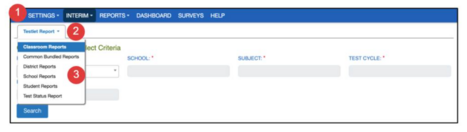
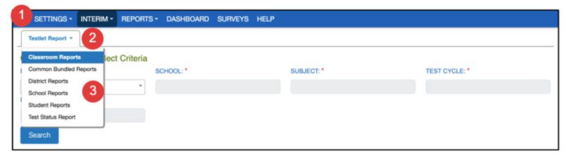
💻To access student and classroom reports, educators can navigate to:
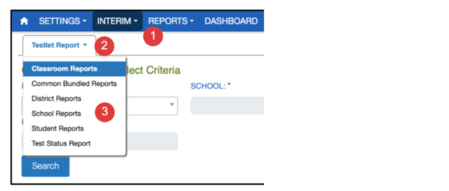
- INTERIM > VIEW RESULTS
- Click the dropdown arrow on the Testlet Report tab.
- Select the desired report. Fill out the organizational dropdowns then click on Search.
|
BUNDLING STUDENT REPORTS
Navigate to:
- INTERIM > VIEW RESULTS
- Click the dropdown arrow on the Testlet Report tab.
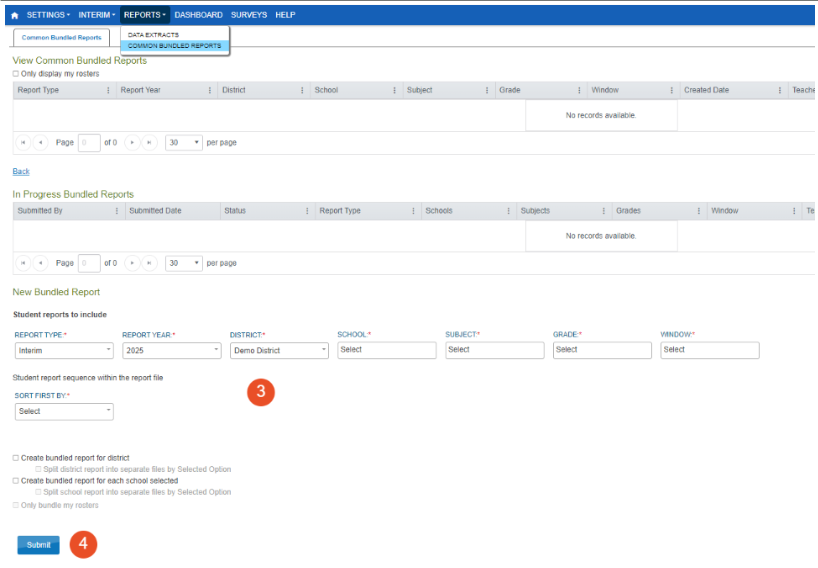
For student bundling, select Common Bundled Reports.
This will take you to the Common Bundled Reports in the Reports section of Kite. Scroll to the bottom of the page. Select 'Create New Bundled Report'.
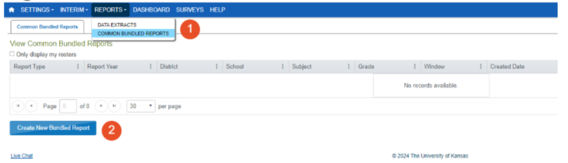 An In-Progress Bundled Reports section will appear.
- Fill out the organizational information for the school, subject, grade, testing window, and the student report sequence within the report file you are interested in. Multiple selections can be made in each of the dropdowns.
Click Submit and name the report. The report will appear in the In-Progress Bundled Reports section with a In Queue status. Once generated, the report will appear in the View Common Bundled Reports at the top of the page. Click on the pdf icon to download the report to your computer for printing. Further instructions can be found in the Kite Educator Portal Manual on page 29.
EXCEL REPORTS
Navigate to:
-
Interim > View Results. Click on the Testlet Report dropdown and select the Classroom Reports.
Be sure to select 2026 for the Report Year dropdown. The Excel reports can be accessed by selecting the icon next to the PDF icon in the far-right column of the table.
 In the Excel report, multiple tabs can be found at the bottom of the spreadsheet—one for the summary, one for cluster information for ELA (or misconceptions for math), and a third tab with individual student performance.

Maximizing Score Reports:
This Month’s Focus: Performance Levels
🔍 MAST Testlet Performance Levels give teachers a quick, standards-aligned snapshot of where students are performing right now—not compared to peers, but in relation to grade-level expectations. Use Performance Levels to Target “Just-Right” Instruction.
1. Identify the “instructional sweet spot.”
- Level 1: Focus on foundational skills and misconceptions.
- Level 2: Provide scaffolds and practice that move students toward proficiency - they may be very, very close!
- Level 3: Enrich and extend learning with deeper applications.
2. Pair MAST data with classroom observation.
Performance Levels tell you what students can currently do; your day-to-day observations tell you why. Using both together creates a fuller, more accurate picture.
3. Plan one small instructional adjustment.
Choose one cluster, standard, or misconception highlighted in the report and adjust instruction for the week, such as:
- A targeted small-group lesson
- A quick reteach cycle
- A practice opportunity aligned to the standard
- An extension task for students already meeting expectations
|

Instructional Strategies that Work
ELA Essentials: High-Impact Instructional Strategies
📝Featured Resource: and have students use these test taking strategies in conjunction with the MAST ELA practice tests, which you can find under the Systems tab in the MAST Portal.
💡Strategy Spotlight: ELA Test Taking Strategies. Click the image below to watch this QUICK video on this strategy!
|
Click to access short instructional support video!
Math Matters: High-Impact Instructional Strategies
🧮Featured Resource: Which One Doesn't Belong?: This free resource offers a bank of classroom-ready Which One Doesn’t Belong prompts teachers can use to help students build mathematical proficiency through the application of the mathematical practice and content standards. A great resource to support student engagement for grades K–12!
💡Strategy Spotlight: Which One Doesn’t Belong?!: Click the image below to watch this QUICK video on this strategy!
Click to access short instructional support video!

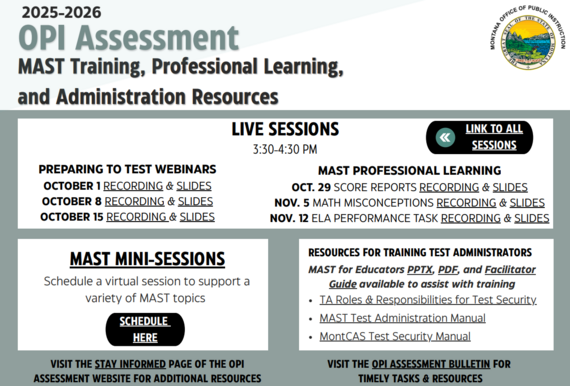
Professional Learning & Engagement Opportunities
|
Click image to access embedded links

Parent Connection:
Don't forget! Parents should receive their child’s testlet reports after each administration, either by printing them or through the Kite Parent Portal. Sharing this MAST Parent One-Pager helps families understand the assessment. Don’t forget, students should see their own reports too!
|

Leadership Lens:
Quick tips to support teachers with MAST:
Performance Tasks Begin in Window 2: Prepare teachers and students for Performance Tasks by providing guidance, practice opportunities, and clear expectations.
Communication:
- Share clear updates and expectations so teachers feel prepared. Share this newsletter with your 3-8 ELA and Math educators! They can subscribe here.
- The MAST Educator one pager is a great resource to share for easy access.
- Trying to help your school board, superintendent, or community members better understand MAST? Check out our MAST Overview document below!
|
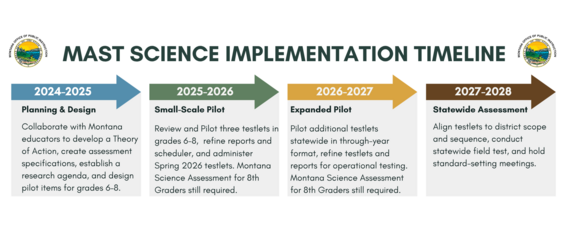
Become a part of MAST Science—a new, Montana-grown through-year science assessment. Pilot testlets, share feedback, and help build a system that supports powerful classroom learning in grades 6–8. Learn more at the pilot webpage!
MAST Science Pilot Timeline

New to MAST? We've got you!
We know that there is so much to learn and understand about Montana's statewide assessment, and we don't want it to be a mystery. So where do you start?
- Review the MAST Educator Slides - these take you from the beginning to know what to expect, through the assessment blueprints, student accommodations, preparing for assessments, data chats, and more.
- Bookmark the MAST PORTAL. Teacher resources, support videos, and more can all be found here.
- Save the Educator Resources Page! Easy access to resources!
- Ask Questions! We're here to help! OPIAssessmentHelpDesk@mt.gov
|
 |
|
Stay Connected & Share your Story!
Got a question or success story to share? Want something covered in the next Memo? Tell us here!
|
Direct questions to the OPI Assessment Help Desk at OPIAssessmentHelpDesk@mt.gov, or 1-844-867-2569.
Instructional Questions? Email content specialists at OPICSI@mt.gov
The OPI is committed to providing reasonable accommodations to people with disabilities. If you need a reasonable accommodation, require an alternate format, or have questions concerning accessibility, contact the OPI ADA Coordinator, 406-444-3161, opiada@mt.gov, Relay Service: 711.
|