 November 2025
 We’re excited to share the latest MAST updates, resources, and classroom-ready strategies to help you make the most of the Through-Year Assessment.
As the first window wraps up, several rounds of reports have already gone out, thank you for your hard work! We look forward to the first set of progress reports coming out in December, giving teachers and students meaningful insight into learning so far.
In our second year of statewide implementation, your stories and feedback continue to shape tools, training, and supports, keeping MAST practical, flexible, and focused on learning that matters. This edition includes classroom highlights, tips for using reports and data, professional learning updates, and answers to common questions.
Thank you for all you do to support Montana students and strengthen MAST. Please don’t hesitate to reach out if you have any questions or need support!
- OPI Assessment & Standards, Instruction, and Professional Learning Teams

MAST in Action
We love hearing how educators are using MAST in their classrooms! Your stories can inspire, offer new ideas, and show others what’s possible. Please share your experiences so we can highlight them for fellow educators.
👉 Tell us your story here!
|
This month we are proud to share our most recent episode of the OPI Content Specialists 'Last Best Learning Podcast Ep. 15 - MAST in Motion: Lessons from Implementation.' In this episode, our special guest Rachel Barkell, a 4th grade teacher at Anaconda School District, joined us to share lessons and insights she and her team have gained from the first official year implementing MAST.
📹 Podcast Episode & Episode Slides

MAST Watch: Active Monitoring Made Easy
Active monitoring helps students stay focused, pace themselves, and get the most out of MAST. Teachers can support students by circulating the room and checking the Monitoring tab in real time. We know that it takes time to set up and login to the platform, prepare for that as a part of the time and create routines to make it
⏲️Set a Time Guide
⏱️Encourage self-monitoring: remind students to check the clock at natural pauses. Pacing is a guide, not a source of stress.
⏳Testlets aren’t timed, but most students finish within a predictable range. Use the Test Timing docs to help students plan their work.
📝To help plan instructional time, we’ve provided estimated testlet durations based on how long 50–80% of students took during the MAST pilot. Use these as flexible guides; some students may finish sooner, others may need more time!
⏱️Work with the Clock
- Try giving testlets toward the end of the learning period for a natural finish line.
- Check in regularly to keep students focused, on pace, and confident!
By combining clear timing guidance, gentle check-ins, and active monitoring, you help students stay on track, feel confident, and make the most of their MAST experience!
|

Tech Support
Having trouble logging into Kite? Try these steps:
💻 Be sure to use and bookmark the unique MT Kite login: https://educator-testlet.kiteaai.org/AART/logIn.htm [educator-testlet.kiteaai.org]. If users are Googling Kite, they’ll be taken to the incorrect login page and receive errors when trying to log in. Users will need to use multi-factor authentication when logging into Kite, so be sure to check email inboxes or junk/spam folders for the Access Code.
📧 Use your full district email address as the username.
📤If you have forgotten your password, enter your full district email address into the username field then follow the 'Forgot Password' prompts.
|
Trying to access Testlet and/or Through-Year (summative) student and classroom results?
Once logged in to the Kite Educator Portal, navigate to:
- INTERIM > VIEW RESULTS
- Click on the small blue dropdown menu associated with the desired Testlet Report or Through Year Report (summative) tab.
- Select the desired Student or Classroom Report within the dropdown then fill out the organizational dropdowns and click on Search. The file icon can be clicked on to download to your computer. *See the image below for steps!
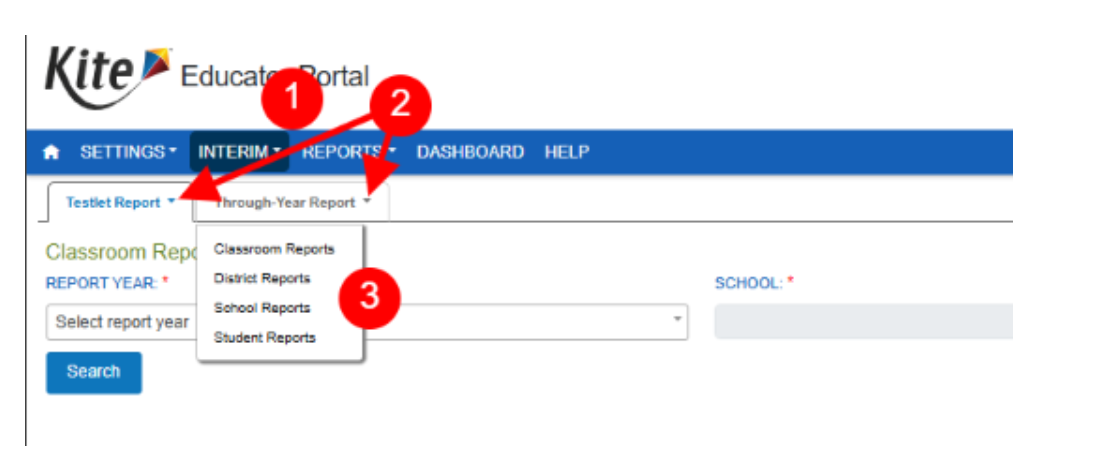 Kite Educator Portal - Accessing Through Year Score Reports

Maximizing Score Reports
This Month’s Focus: Interpreting Progress Indicators
🔍 What does student work look like at the “meeting,” “approaching,” and “developing” levels?
📊 How do students move from one level to the next?
Use this quick three-step routine to dive deeper:
-
Scan: Identify trends (are most students in one level?)
-
Zoom: Choose 3–5 students across levels
-
Act: Plan one specific instructional next step
Now, work with your students to set a goal around the skills needed to reach proficiency.
Why Goal Setting Matters
🎯Goal setting—especially when done with students—is one of the most powerful practices we can use to improve learning outcomes. When educators and learners analyze data together and set clear, attainable goals, they cultivate ownership, motivation, and clarity about what success looks like.
According to John Hattie’s research on Visible Learning (2009, 2012, 2018), student goal setting and self-assessment have an effect size of 0.68, well above the 0.40 threshold for practices that significantly accelerate achievement. This means that when students understand where they are in their learning, where they’re going, and the steps to get there, they learn nearly twice as much in the same amount of time.
The Goal Setting Activity linked below is designed to help both teachers and students use MAST data to identify strengths, set focused goals, and monitor progress—turning data into meaningful action that drives continuous improvement. This information can then be used to drive instructional decisions and conversations with families about next steps.
🗂️ Resources:
|

Instructional Strategies that Work
ELA Essentials:
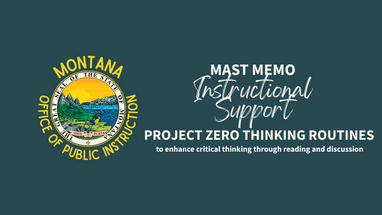
💭Featured Resource: Harvard’s Project Zero Thinking Routines Toolbox features thinking routines designed to foster discussion and critical thinking for a variety of purposes. Searchable categories allow educators to find a routine to fit their instructional needs.
📝Featured Resource: November’s ELA instructional strategy highlights the Project Zero activity Circle of Viewpoints, which can be used or adapted to support student learning about point of view, characterization, inference, and more!
💡Strategy Spotlight: Project Zero Thinking Routines. Click the image below to watch a short video on this strategy and how you can use this in your 3rd - 12th grade classrooms!
|
Click to access short instructional support video!

✍️ Don’t Forget! Performance Tasks are part of Window 2. Join Claire Mikeson, our ELA Instructional Coordinator, on November 12 from 3:30–4:30 PM for tips on preparing for Performance Tasks!
No need to register, just join us on Teams at this link!
|
Math Matters:
🔢Updated Resource: The Math Assessment Specification Guide has been updated to include an appendix (pages 64-81) describing all of the Math Misconceptions codes aligned to the titles! This was requested by educators to make it easier to navigate the reports and plan targeted interventions.
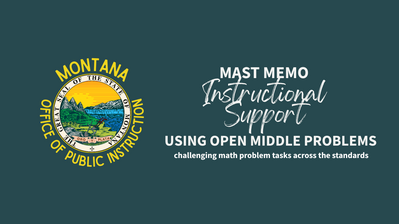
🧮Featured Resource: Open Middle Problems - Challenging math problem tasks for almost every standard K-12! Created by educators for educators to support deep thinking and classroom discussion.
💡Strategy Spotlight: Using Open Middle Problems Click the image below to watch a short video from our Math Instructional Coordinator, Katrina Engeldrum, on how the tasks on this website can support your work in the classroom!
Click to access short instructional support video!

Professional Learning & Engagement Opportunities
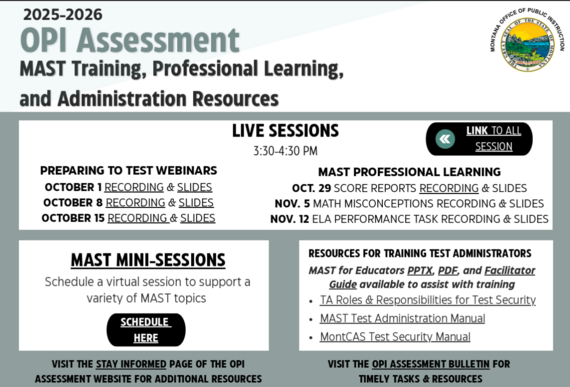
Did you know there is a whole suite of previous professional learning sessions available? We know you're busy and you can't get to everything, so all of our sessions are recorded! The Assessment Stay Informed page has focused support videos and professional learning videos linked.
Recorded Professional Learning Includes:
- MAST 4 Teachers
- Preparing to Test Webinars
- Utilizing and Understanding Score Reports
- Math Misconceptions
Click the image below to see our upcoming Live Professional Learning Sessions, schedule a personalized 'MAST Mini Session', Links to previous sessions, and pdfs of all slides!
|
Click image to access embedded links

Parent Connection:
Don't forget! Parents should receive their child’s testlet reports after each administration, either by printing them or through the Kite Parent Portal. Sharing this MAST Parent One-Pager helps families understand the assessment. Don’t forget, students should see their own reports too!.
|
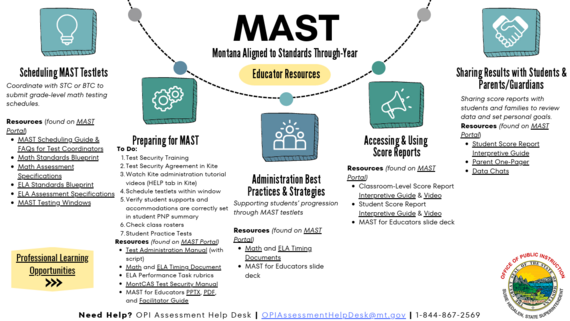
MAST Educator Resources at Your Fingertips
Click the image below to quickly access key educator resources!
Click image to access embedded links

Leadership Lens:
Quick tips to support teachers with MAST:
-
Scheduling: Build flexibility within assessment windows to reduce anxiety and protect instructional time. Remember, testlets don't have to be pushed to the end of the windows! We transitioned to 8 windows to provide more flexibility for taking testlets close to instruction.
-
Performance Tasks: Prepare teachers and students for Performance Tasks by providing guidance, practice opportunities, and clear expectations. Check out the Student Rubrics and Exemplars on the MAST Portal!
-
Communication: Share clear updates and expectations so teachers feel prepared. Share this newsletter with your 3-8 ELA and Math educators! They can subscribe here. The MAST Educator one pager is a great resource to share for easy access.
-
Celebration & Goal Setting: Highlight successes, recognize growth, and encourage students and teachers to set goals for the next assessment window.
|
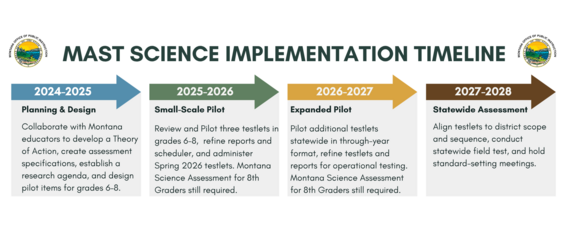
Become a part of MAST Science—a new, Montana-grown through-year science assessment. Pilot testlets, share feedback, and help build a system that supports powerful classroom learning in grades 6–8. Learn more at the pilot webpage!
MAST Science Pilot Timeline

New to MAST? We've got you!
We know that there is so much to learn and understand about Montana's statewide assessment, and we don't want it to be a mystery. So where do you start?
1. Review the MAST Educator Slides - these take you from the beginning to know what to expect, through the assessment blueprints, student accommodations, preparing for assessments, data chats, and more.
2. Bookmark the MAST PORTAL. Teacher resources, support videos, and more can all be found here.
3.Save the Educator Resources Page! Easy access to resources!
4. Ask Questions! We're here to help! OPIAssessmentHelpDesk@mt.gov
|
 |
|
Stay Connected & Share your Story!
Got a question or success story to share? Want something covered in the next Memo? Tell us here!
|
Direct questions to the OPI Assessment Help Desk at OPIAssessmentHelpDesk@mt.gov, or 1-844-867-2569.
Instructional Questions? Email content specialists at OPICSI@mt.gov
The OPI is committed to providing reasonable accommodations to people with disabilities. If you need a reasonable accommodation, require an alternate format, or have questions concerning accessibility, contact the OPI ADA Coordinator, 406-444-3161, opiada@mt.gov, Relay Service: 711.
|