 October 2025 - Vol. 1
 Introducing The MAST Memo! Our brand-new monthly newsletter is here to bring you classroom-ready tools, updates, and strategies to make the most of MAST.
Our top priority is simple: to make MAST work for you. That means ensuring you have the tools for smooth implementation, strategies to make the data actionable, and resources you can count on to fit into your busy day.
As we move into our second year of MAST as Montana’s statewide assessment, we’re reflecting on everything we’ve learned together. Your feedback, questions, and ideas have been invaluable in shaping how we support schools and educators across the state.
This first edition of the MAST memo includes: MAST in Action; Tips for MAST Administration; Finding, Using, and Sharing Score Reports; Math & ELA Strategies That Work; New to MAST Information, Upcoming Professional Learning Opportunities; and Leadership Insights & Guidance.
We also want to keep hearing from you. Your ongoing feedback and insight help us understand classroom needs and guide the next steps in providing the right support and resources. Share your thoughts, questions, and feedback here! We'll follow up in another MAST edition or connect with you directly!
Thanks for all you do for Montana students!
 |
|
MAST in Action
Educators across Montana are asking for ideas from other schools on how they’re using MAST to support instruction. Have a great example, classroom tip, or success story? Share how you’re using MAST—we’d love to highlight your work in an upcoming MAST Memo!
👉 Tell us about it here!
|

New to MAST? We've got you!
We know that there is so much to learn and understand about Montana's statewide assessment, and we don't want it to be a mystery. So where do you start?
1. Review the MAST Educator Slides - these take you from the beginning to know what to expect, through the assessment blueprints, student accommodations, preparing for assessments, data chats, and more.
2. Bookmark the MAST PORTAL. Teacher resources, support videos, and more can all be found here.
3.Save the Educator Resources Page! Easy access to resources!
4. Ask Questions! We're here to help! OPIAssessmentHelpDesk@mt.gov
|

Tips for MAST Administration
This video will help you navigate and plan for MAST testing administration!
- How to enter the KITE Portal (testing platform)
- Assessment Window Overview
- Best Practices for Preparing Students and Scheduling Testlets
- Monitoring & Making Up Testing
|
Slides from Video
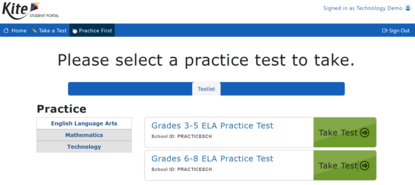
Introducing Practice Tests!
The practice tests include sample question types that will appear on the MAST testlets and all available universal tools.

Score Reports: Accessing, Using, and Sharing
|
Through-Year Reports for the 2024-2025 School year will be posted October 16th!
MAST Through-Year Reports will be available in the KITE Educator Portal on October 16th. These reports give you a full picture of student achievement by combining results from all testlets taken during the school year. You’ll see both the overall achievement and details from each testlet.
Each report includes:
- A summary of results from all testlets administered during the academic year.
- Summative scale scores and achievement levels.
- A breakdown of student performance on each individual testlet
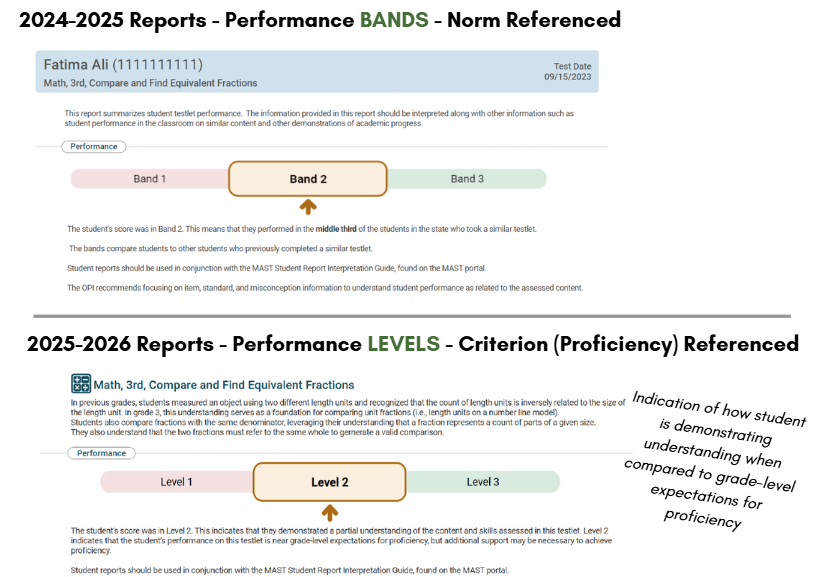
NEW for 2025-2026: Shifting from Performance BANDS to Performance LEVELS
You’ll notice a big change in the testlet reports for the ‘25–’26 school year! The reports will now show the distribution of student performance across the three performance levels. These levels are standards-referenced and reflect each student’s performance relative to expectations for proficiency on grade-level content. In short, the new testlet reports provide a clear picture of how students are performing against the standards.

Accessing Score Reports:
|
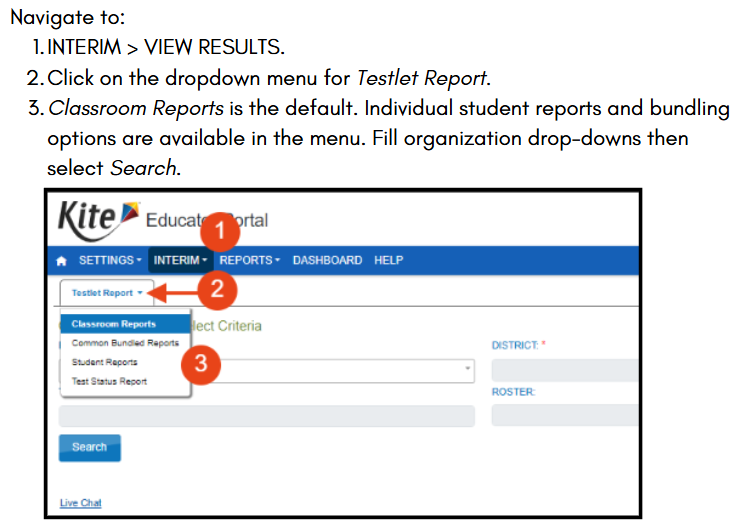 Did you know you can also bundle score reports?
Common bundled reports are PDF files that contain Individual Student Reports where a combination of subjects, grades, and test cycles can be selected and generated in one file. The reports can further be sorted by school, subject, grade, student last name, and test cycle.
All users can navigate to:
- INTERIM > VIEW RESULTS
-
Click the dropdown arrow on the Testlet Report tab.
- For student bundling, select Common Bundled Reports.
Refer to the Kite Educator Portal Manual (pg. 26) for further instructions on bundling.

Using Score Reports:
This clip from the MAST 4 Teachers session walks through the different components of this year’s score reports. You’ll get a clear overview of what each section means, how to interpret the data, and ways you can use the information to guide instruction.
As you watch, consider:
- What do these reports tell you about your students’ learning?
- Which skills or content areas seem strongest?
- Are there patterns or trends across your class or groups of students?
- What questions do these results raise for your planning?
- How could you adjust instructional strategies or activities based on what the data tells you?
- Are there areas where students need more practice or support?
The goal is to make the reports practical tools to inform your teaching and support student success.
Click the image below to watch the MAST 4 Teacher clip on score reports!
|
 |

Sharing Score Reports:
Parents should receive their child's testlet reports after each administration. There are two ways to share testlet reports with families, either printing them off or giving them access to the Kite Parent Portal. Talk to your Testing Coordinator to learn more on how your district is sharing this information!
- Sharing this MAST Parent One-Pager with Families will help communicate the ins and outs of MAST.
-
Don’t forget—students should see their score reports too!
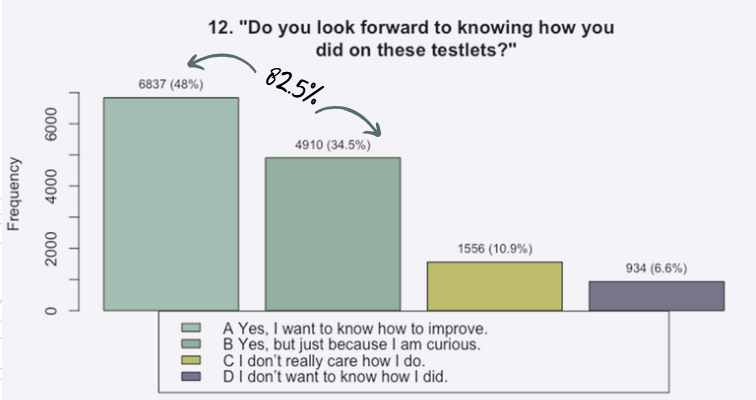
In last year’s survey after the second window, more than 10,000 students said they like viewing their reports. Sharing results is a powerful way to help students understand their progress, celebrate achievement, and set new goals.
|
 |

Instructional Strategies that Work
MAST is all about supporting teachers and the learners in our classrooms. Each month, we’ll highlight key strategies to support your work—sharing quick tips and resources aligned with best practices to make a real impact in your teaching.
ELA Essentials:
-
Featured Resource: MAST Performance Task Exemplars and Student Friendly Rubrics have arrived!
-
Featured Instructional Resource: The Writing Revolution’s Sentence Expansion template: Edit this template to have your students practice expanding their sentences based on the content they’re learning about. You can find many more free templates by navigating through the book chapters on The Writing Revolution website.
-
Strategy Spotlight: Sentence Expansion - See the clip below to learn more!
|
Math Matters
-
Coming soon: A Math Misconceptions Index that connects each Misconception Code to the explain misconception!
-
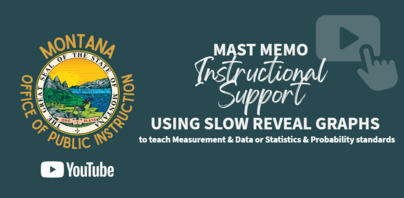
Featured Resource: Slow Reveal Graphs: This free resource offers a bank of classroom-ready slow reveal graphs teachers can use to help students engage with those Measurement & Data or Statistics & Probability domain standards.
-
Professional Learning Opportunity: Data Science 4 Everyone Webinar Series: If you enjoyed this instructional strategy and would like to see more like it, be sure to enroll in the webinar series we offer that brings new strategies monthly! You can register for October and November today, or access previous recordings on the Math Standards Webpage.
-
Strategy Spotlight: Slow Reveal Graphs! Click the image below to watch a short video on how to use Slow Reveal Graphs in the classroom!
 |

Professional Learning & Engagement Opportunities
Did you know there is a whole suite of previous professional learning sessions available? We know you're busy and you can't get to everything, so all of our sessions are recorded! The Assessment Stay Informed page has focused support videos and professional learning videos linked.
Featured Session - MAST 4 Teachers: Recording | Slides
- Best Practices for Scheduling & Administration of MAST Testlets
- Report Access and Report Interpretation
- Understanding the Writing Performance Task Requirements
- Addressing Math Misconceptions through MAST
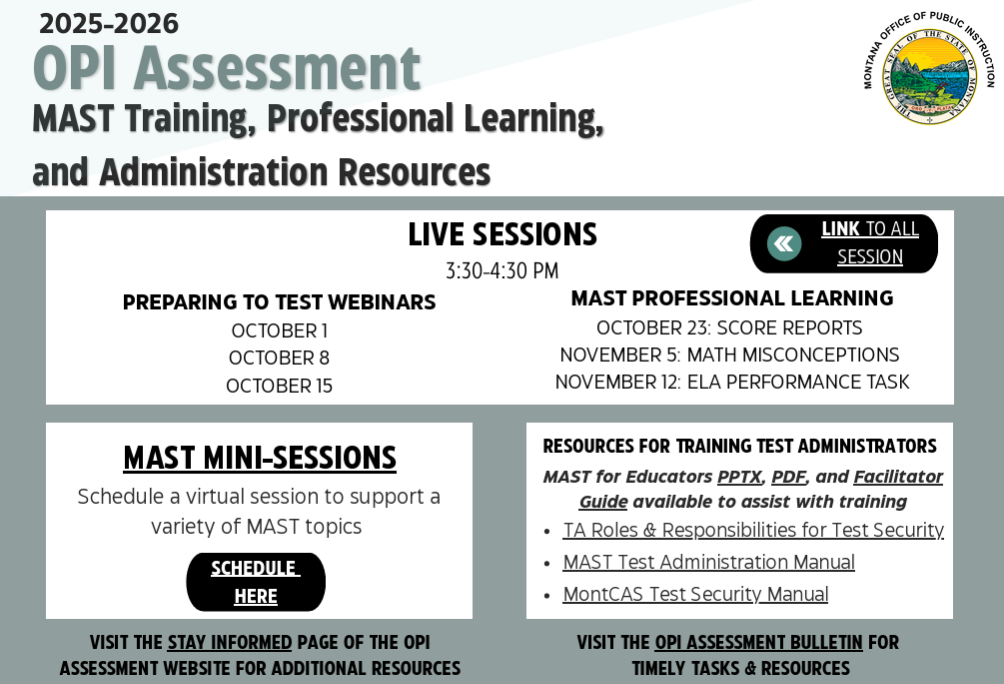
Upcoming Professional Learning:
Click the image below to see our upcoming Live Professional Learning Sessions, schedule a personalized 'MAST Mini Session', and more!
|
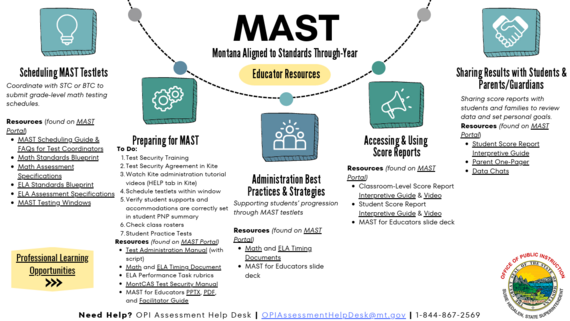
MAST Educator Resources at Your Fingertips
Click the image below to quickly access key educator resources!

Leadership Lens:
There’s a lot to juggle as a building or district leader. Here are a few quick tips to support teachers with MAST this year:
-
Access: Give educators timely access to score reports and guidance on how to use them. Setting up the KITE Parent Portal will help put the testlet reports right in parents' hands!
-
Scheduling: Allow flexibility within assessment windows to reduce stress and protect instructional time. Make sure they have their testlet schedules also!
-
PLCs & Data Time: Build dedicated time into PLCs for teachers to analyze MAST data and make instructional decisions together.
-
Assessment Review: Review current assessments to avoid overlap. Use our Assessment Audit Tool to support this work!
-
Communication: Share clear updates and expectations so teachers feel prepared. Share this newsletter with your 3-8 ELA and Math educators! They can subscribe here.
-
Celebration: Recognize successes to keep momentum and positivity strong.
|
 |
|
Stay Connected & Share your Story!
Got a question or success story to share? Want something covered in the next Memo? Tell us here!
Know anyone else that may benefit from the MAST Memo? They can subscribe here.
|
Direct questions to the OPI Assessment Help Desk at OPIAssessmentHelpDesk@mt.gov, or 1-844-867-2569.
Instructional Questions? Email content specialists at OPICSI@mt.gov
The OPI is committed to providing reasonable accommodations to people with disabilities. If you need a reasonable accommodation, require an alternate format, or have questions concerning accessibility, contact the OPI ADA Coordinator, 406-444-3161, opiada@mt.gov, Relay Service: 711.
|