|
View this as a webpage
Happy National Mammography Day, HRD! October is Breast Cancer Awareness Month, and we encourage you and your loved ones to make sure you are regularly checked for symptoms. 1 in 8 women in the U.S. will be diagnosed with breast cancer in their lifetime, and while it is rare, men can get breast cancer too. Early detection is key!
Have you completed the MDH Inventory Survey? Today is the deadline to complete the MDH Asset Bi-Annual Inventory Survey. It only takes a few minutes and allows us to understand who has what kinds of equipment.
Collaborative Safety Coffee and Conversation continues next week: Our next batch of Collaborative Safety conversations’ theme is The Language of Psychological Safety. Psychological safety is what makes people feel included and comfortable in a group, and gives them space to learn new things, give and receive feedback, and advocate for change – but it’s something that needs to be actively built in teams. Join the Collaborative Safety team for a discussion on what this looks like and how it will inform our work implementing safety science.
ASPEN will be unavailable this weekend (Saturday, Oct. 22 and Sunday, Oct. 23): The new ASPEN upgrade will be available starting at 7 p.m. on Friday, October 21, and the system will be down over the weekend. This release provides updates to ACO, ACTS, and ASE-Q LTCSP, and includes a new LTC regulation set and updates for LTCSP Phase 2 and 3. Please wait for the all-clear email from Brenda Boike-Meyers before logging in to the system on Monday, October 24, and ensure that everyone has logged in to ASE-Q and updated their software before your team goes out to survey.
The next SSIS release cycle begins on Wednesday, October 26. SSIS will be down from 6pm to about 8pm on October 26. Beginning on Thursday, October 27, staff who work in SSIS should use the icon labeled “SSIS Worker Pilot” to do their work. The SSIS Worker Pilot environment will be used until the end of the workday on Tuesday, November 29.
Correction! Last week we got Sarah Grebenc’s areas of responsibility incorrect. Sarah manages the following teams: Metro A, Metro C, Duluth, and Rochester. Thanks to those of you who flagged that for us, and apologies for the mixup.
Effective Monday, October 17, MMB developed new Well at Work guidance (HR/LR Memo #2022-1). The guidance provides a helpful framework for promoting healthy workplaces at a time when COVID-19 remains a serious and ongoing threat, but levels of immunity and effective treatments have reduced associated hospitalizations and deaths.
Stay Home When Sick
The primary focus of the new guidance is to keep the workplace healthy by encouraging employees to stay home when they are sick.
It is particularly important that employees stay home if they have symptoms associated with COVID-19 and have not been tested or are awaiting results. Staff entering Health Care facilities should NOT enter facilities if they have symptoms, and should implement use of PPE as required. Updated guidance for staff entering health care settings is pending. Symptoms of COVID include:
-
Fever of 100.4° Fahrenheit or higher, or feeling feverish (e.g., chills or sweating)
-
A new cough
-
New shortness of breath or difficulty breathing
-
Unusual fatigue
-
Muscle or body aches unrelated to exercise
-
New headache
-
New loss of taste or smell
-
A new sore throat
-
New congestion or runny nose
-
New nausea/vomiting or diarrhea
Employees with any of those symptoms are encouraged to use accrued sick time, take a COVID-19 viral test as soon as possible, and follow Centers for Disease Control and Prevention (CDC) guidance. Workers who have been exposed to COVID-19 or have been told by a healthcare provider or public health authority that they were exposed should follow current CDC guidance for individuals exposed to the virus.
The new Well-at-Work guidance is simple and consistent with what we’ve been saying all along. If you wake up not feeling well, notify your supervisor and consider taking the day off. The best way to ensure a well workplace is for people who are unwell to take a sick day and rest comfortably at home.
Remember remaining up to date with COVID-19 Vaccines and boosters can offer protection against infection or serious illness.
Employee Health Screening Electronic Form Entry Discontinued
A requirement that employees complete a health screening and workplace status form before coming into the State offices helped employees get into the habit of assessing their health and staying home if they had COVID-19 symptoms. Employees should continue to self-assess, however will not be required to complete the electronic screening tool before going to the State office.
Options for Work or Leave
Employees who have symptoms of COVID-19 or who have received a positive COVID-19 test result and are able to perform work despite their illness should discuss with their supervisor whether their job duties can be performed through telework. Approval for telework is at the discretion of the employee’s supervisor/manager. Employees should use accrued sick leave if they are unable to report to work and unable to telework. Employees who do not have accrued sick leave may request to use accrued vacation or accrued compensatory time or take unpaid time off if they are unable to report to work and unable to telework.
Test-and-Treat Options Available
As a reminder, many COVID-19 testing sites in Minnesota and across the country also offer prescriptions to those who test positive so they can get medications to treat the virus right away. You can search a federal website for the test-and-treat location nearest you.
Hey there HRD! Erik Holmberg here, bringing you another edition of Have You HRD?: Data Edition. This month I’d like to discuss a simple yet important topic: data requests.
As the data analyst for the division, I handle all data requests that concern HRD data (as well as data practices requests). Data requests can come from HRD internal staff, staff from other divisions of MDH, staff from other areas of state government (other state agencies, the legislature, the governor’s office, etc.), media outlets, provider organizations, or even members of the public.
While data requests don’t have any legal timelines or requirements to complete them, HRD responds to all data requests in a timely manner. The standard procedure that I undergo for data requests is pretty simple. Once I receive a request I go through the following steps:
- I ask any clarifying questions that I have,
- Create a folder for this specific data request in the data team network drive’s data requests folder,
- Write any necessary queries to retrieve the data from the databases,
- Save the data in an excel spreadsheet,
- Send the data to the requestor and answer any follow-up questions that come through.
Though I often respond to data requests in the same day, I try to complete any data requests within 3 days of receiving them. The only times in which requests are ever late are if the requests are too detailed or complex to be completed in a couple of days, or I have other urgent matters to attend to. If you need data by a specific deadline, please submit it a few days ahead of when you’ll need it so that I can be sure to get it done ahead or on the deadline.
If you have any requests for data, please reach out and I’ll get working on it. If you have any questions about this or anything else, feel free to reach out!
Contact Info: erik.holmberg@state.mn.us
In August, we talked about the 2022 update of the MDH Retention Schedule; every 3 years, we make changes to the schedule to make sure it complies with changes to statutes, rules, and business practices. Chris Johnson, MDH’s Records Manager, covers the basics of the retention schedule in this video: Records Retention Schedule (YouTube 0:39).
On November 4, we’ll be doing a presentation and Q&A session about the changes to the retention schedule and what it means for your work within HRD, but to prepare for that, let’s talk about how to read the retention schedule.
If you’ve ever looked at the MDH retention schedule, your first response might have been something like, “Whoa. That’s a lot.” It’s a little overwhelming, but once you know how to navigate, it gets much easier. If you want to follow along, I’m looking at this in the desktop app, cause it’s a bit easier to navigate than the browser. This week, we’re just going to talk to find things in the schedule, and next week, we’ll look at the record series itself.
Finding what you need in the retention schedule
The first couple of pages of the retention schedule are basic information – a revision history, some notes about how to use the schedule and an explanation of some of the fields you see in the schedule.
What we’re focusing on today is the Table of Contents, which lists every record series in the document. A record series is like a folder or a bucket – each series has a topic, and a schedule (how long we keep things) and a disposition (what we do with something when it has reached its schedule). MDH has about 300 record series, so they are grouped into topics that make it easier to navigate through things.
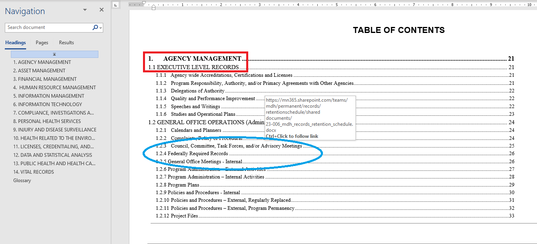
In the image below, you can see the first page of the table of contents, showing the higher level topics (Agency Management and Executive Level Records, outlined in red), and then the individual record series: Council, Committee, Task Forces, and/or Advisory Meetings, Federally Required Records, and General Office Meetings – Internal (circled in blue). Each record series is identified by a 3-part number in addition to the topic.
We’re going to use Advisory Council documents as an example. I have some meeting minutes from an advisory council that are pretty old, but I’m not sure what to do with them or how long they should be kept. So how do I find that information? There are a few options:
Use the Table of Contents
Scroll through the table of contents until you find something that looks similar to what you’re looking for. In the retention schedule, record series that apply to records across the entire agency are at the top, and division specific record series are at the bottom. Because advisory councils are something that are common across the agency, we can find the record series for them on the very first page here.
When we find the item we’re looking for, you can go directly to that part of the document by holding Ctrl on your keyboard and clicking the title of the item you want to go to. You can see in the image above (right above the blue circle) there’s a little pop-up that says “Ctrl+Click to follow link.” No need to scroll through all the pages!
Search the document
Use the Find feature in Word to search for keywords related to what you’re looking for. I have my Navigation Pane open in the image above, so I can just click in the Search Document field, type “advisory”, and it will bring up the results. You can press Ctrl+F on your keyboard to open up the navigation pane and search for things.
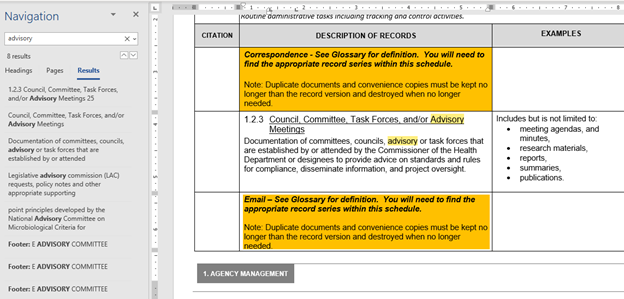
Word will show you a list of all of the places in the document that have the keyword you just searched for, and automatically take you to the first one, as shown in the image below. If there’s more than one result, you might need to check and see which option is the best fit for the record that you are trying to research. You can click the items in the Results list to jump between each item within the document.
Next week, we will look more in depth at this record series and learn how to read the schedule itself. The MDH retention schedule is a read-only document, so feel free to open up and look around in it. Which record series are relevant for your work?
This week, we have the following positions available, and more are coming soon. Please share them with anyone that you think would help make HRD a better place to work!
-
Federal Enforcement Supervisor (Federal Operations), Job ID: 59871: This position will be responsible for administration and oversight of federal enforcement and administrative functions related to protecting the rights of vulnerable Minnesotans in accordance with federal regulations. Closes October 27, 2022.
-
Survey and Review Unit Supervisor (Federal Operations), Job ID: 58792: This position will supervise the Metro A federal evaluation team, a unit of surveyors responsible for the evaluation of health care provider organizations to ensure regulation compliance and the provision of quality care. Closes October 28, 2022.
-
Policy and Rules Coordinator (Shared Services), Job ID: 60058: These two positions will provide legislative and policy research and analysis to support HRD in fulfilling regulatory responsibilities; they will also oversee the development, promulgation, and adoption of rules related to HRD’s work. Closes October 31, 2022.
-
Nursing Evaluator (Federal Operations), Job ID: 59463, 59461, 59420, 59421, 59383: These positions provide surveillance and evaluation of healthcare providers to confirm compliance with federal and state laws and rules related to the provision of nursing and health services. These postings will be used to fill positions based in the St. Cloud, Marshall, Rochester, St. Paul, and Duluth offices. Closes December 30, 2022.
These positions are open to internal and external candidates. If you would like to apply, please follow the steps below:
- Sign into Employee Self Service
- On My Homepage, click on Careers and enter the Job Opening ID in the Search Jobs box and click >> (Search).
- Click on the Job Title to view the job posting.
- Click Apply for This Job in the top right-hand corner.
This week, HRD welcomed the following people to the division. Send them a message to say hello!
- Terry Wynne, State Operations (Engineering)
|