|
This message has been sent to subscribers of the Provider Hub Newsletter. If someone forwarded you this email, we encourage you to subscribe directly.
Read this newsletter in:
Welcome to the Provider Hub Newsletter, published by the State of Minnesota Provider Hub team! We’re glad you’re here.
In this edition of the newsletter, you’ll find:
In January, a provisional license application launched in the Provider Hub for providers enrolled with Minnesota Health Care Programs (MHCP) as Early Intensive Developmental and Behavioral Intervention (EIDBI) agencies.
The EIDBI benefit is a Minnesota Health Care Program (MHCP) that offers medically necessary treatment for children, youth and young adults up to age 21 with autism spectrum disorder (ASD) or related conditions. The Minnesota Legislature is requiring all enrolled EIDBI agencies to have a provisional license.
EIDBI provisional license applications are due in the Provider Hub by May 31, 2026. EIDBI agencies that have not submitted an application by this date must not operate and will be disenrolled from providing EIDBI services. Organizations with multiple center locations must submit an application for each location.
More information
Back to top
Providers who currently use the Provider Hub are invited to complete the Provider Hub Quarterly Usability Survey:
-
Share how the online tool is working for you.
-
Complete in 5-10 minutes in your preferred language — English, español (Spanish), Soomaali (Somali) and Hmoob (Hmong) available.
- Responses are anonymous — your name and email address are not attached to your answers.
If you’d like to share feedback directly with the Provider Hub team, email us at providerhub@state.mn.us.
About the survey
We share this survey with current Provider Hub users about four times per year. Results help us keep improving the Provider Hub.
Past results
Thank you to everyone who shared their thoughts in the survey last fall. Results show that users are able to navigate the Provider Hub with enough time and practice. However, the behavior of the online tool is often confusing — users mentioned unfamiliar language and unexpected changes from one screen to the next.
In this next round, we’re hoping to learn more about how to improve user experience through more straightforward processes, helpful text and training materials.
Back to top
User access levels define who can do what in the Provider Hub. Understanding your unique user access level — and those of other Provider Hub users in your organization — can help work in the online tool go more smoothly.
Who is a Provider Hub "user"
A Provider Hub user is a person who has their own unique email and password to log in to the online tool.
Each user’s access level defines what that person can see, create, edit and/or approve in the Provider Hub. Access is based on a person’s responsibilities related to licensing and their business’ participation in other government programs, and the tasks they need to complete in the Provider Hub.
Why user access levels matter
Different access levels for different kinds of Provider Hub users:
-
Helps prevent mistakes: When access matches responsibilities, there are fewer errors and clear accountability.
-
Gets you the right support: The Product Success team can better help you if user access levels are clear.
-
Keeps the Provider Hub secure: The right access helps protect sensitive information and meet compliance expectations.
Available access levels
The Provider Hub has a variety of user access levels. Each level of access allows users to do more or fewer tasks based on their responsibilities.
Authorized Agents (AAs) can complete all tasks in the Provider Hub — including applying for a new license/certification or closing a program.
AAs may give permission for managing their license/certification in the Provider Hub to other people. To delegate some of their authority, AAs may give some users Delegated Authority access.
Other access levels limit users to editing some information and/or just viewing information, such as Create/Submit, Clerical, Read Only and Attendance Entry.
Get complete definitions of each user access level in the User Access Levels article.
Check your user access
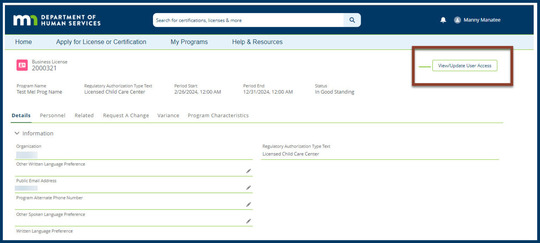
Manage user access from the Business License page.
Example Business License screen in the Provider Hub
Only Authorized Agents can give and remove Delegated Authority access. Users with Delegated Authority access can add and edit users with Create/Submit and Read Only permissions.
Users can have access to more than one program/license. However, access does not automatically carry over from program to program. If you’re a license holder with multiple programs, you must add each user separately to each program/license (“business license”) they need access to.
Learn more
Check out the User Access Levels Learning Library for more details — including step-by-step instructions for adding/editing users and a comprehensive chart of what each access level can do in the online tool.
Back to top
The Product Success team — the group of local experts here to help you find success with the Provider Hub — share a tip based on recent conversations with users:
Licensed child care centers: Submitting a Track 2 variance request for an assistant teacher, teacher or director? Make sure to upload documentation!
Documentation of education hours is an important part of Track 2 variance requests for the assistant teacher, teacher and director roles.
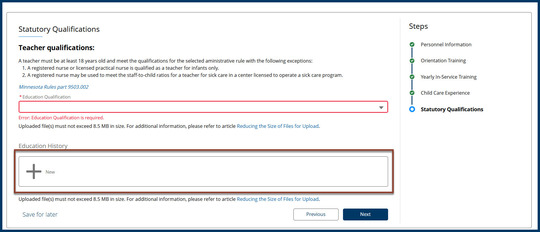
To make sure your licensor gets this documentation, upload evidence of education hours in the Statutory Qualifications step of the Personnel tab. After you select the applicable option from the Education Qualification dropdown menu, select + New to add a new education entry.
Example Statutory Qualifications screen of the Personnel tab
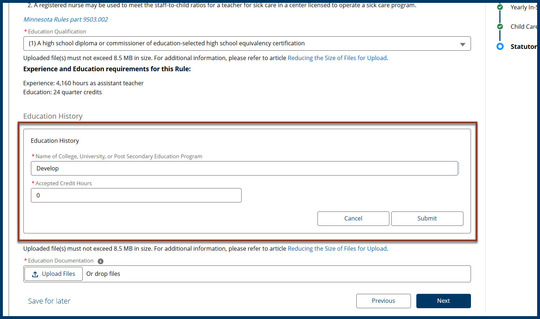
If a staff person has completed education hours from the list of approved training organizations — rather than a college course — in the Education History section, enter:
Example Education History section on the Statutory Qualifications screen
After you select Submit, you can upload files – the documents you upload should show the number of actual training hours to your licensor.
These articles can help:
Get more information about variances for licensed child care centers.
Connect with the team
If you need assistance with these or other tasks in the Provider Hub, call 651-431-6075 or submit a case when you’re logged in. We respond to cases Monday through Friday between 8 a.m. and 4:30 p.m.
If someone isn’t available when you call, please leave a message, including as much of the following as possible:
We don’t receive information from callers who don’t leave a voicemail. So, any information you leave in a message helps us return your call effectively and efficiently.
Whether you leave a message or submit a case online, we aim to respond to cases within 24 hours — this may vary depending on the number of cases we’re receiving.
Back to top
The Provider Hub team will not host an information session in March.
Future sessions will be communicated via this newsletter.
Couldn’t make the January session? Review the recording of the previous Provider Hub Information Session hosted Jan. 20, as well as the handout: English (PDF), español (PDF), Soomaali (PDF) and Hmoob (PDF).
Back to top
Improvements made to the Provider Hub over the last two months included:
Check out the December release notes and January release notes for details on these updates and more.
Back to top
NEW: EIDBI Licensing Learning Library
EIDBI agencies can use the new Provider Hub EIDBI Licensing Learning Library. Here you’ll find instructions on each step of completing an EIDBI provisional license application in the Provider Hub.
UPDATED: Introduction to the Provider Hub
All users may check out the updated Introduction to the Provider Hub course — it’s now inclusive of all social service licensing types (not just child care).
Back to top
The Provider Hub is an online tool for social service providers to apply for and manage licenses/certifications, funding opportunities and other available government programs.
We continue to improve the online tool and build new features. As we do so, more providers will get access. Check out the Provider Hub webpage for details on current availability.
Back to top
This newsletter shares general information about the Provider Hub for both current and future users of the online tool, as well as other interested folks. We send a new Provider Hub Newsletter about every two months. Find previous editions on the Provider Hub webpage.
We don’t intend for the newsletter to replace information sent directly to specific groups —such as alerts for current Provider Hub users or onboarding information for future users. We’ll keep sending those separately.
Share this newsletter with others
Know others who may be interested in receiving news about the Provider Hub? Forward this email and encourage them to subscribe to the newsletter directly.
Back to top
|