|
September 22, 2020
 |
|
MOVE Ballots
|
As you are aware, this past Saturday was the MOVE deadline. As a result of your hard work and dedication, staying late, and working on Saturday, you issued a total of 17,139 ballots to military and overseas voters. Currently, there are 17,280 requests that were submitted by the deadline; this equals out to a 99.2% compliance rate. This is more than double the total number of ballots that were issued for the August primary. Your work and efforts are greatly appreciated, and you and your staff should be commended for this success.
 |
|
Happy National Voter Registration Day |
Today, Tuesday, September 22, is National Voter Registration Day. Please continue your efforts to encourage residents in your community to register to vote, update their voter registration, or verify that their registrations are up to date by visiting Michigan.gov/Vote.
 |
|
Accessible Electronic Absent Voter Applications and Ballots |
For the November election (and future elections), voters with print disabilities apply for and complete electronic accessible absent voter ballots through the Democracy Live OmniBallot program, which is available at Michigan.gov/Vote. When voters complete the application for an accessible ballot, the Bureau verifies the information provided matches the voter’s QVF information and the application is added to the voter’s QVF record. The Bureau then generates a link for the clerk and a link for the voter for the voter’s accessible ballot on the Democracy Live OmniBallot platform and emails the links to the clerk from the MDOS-Accesible@michigan.gov email. Emails started going out on Friday, and are continuing go out this week. This is different from the August process, in which the ballot generated out of QVF and emailed to the voter.
When the clerk receives the links, the clerk should click on the clerk link for the ballot (do not click on the voter link) to verify it is the correct ballot for the voter, e-mail the link to the voter, and mark the voter as having been sent an accessible ballot and record the ballot number prefaced with an “A”. If a voter has also requested a regular AV ballot, the clerk should attempt to contact the voter and verify whether the voter wants a regular AV ballot or an accessible ballot. Clerks should not ask whether voters have a disability; they should only ask which ballot the voter wants. If the clerk is unable to reach the voter, the ballot corresponding to the more recent request date should be sent. If a clerk has already sent a regular AV ballot to the voter and needs to send an accessible ballot instead (or the opposite), QVF requires the previous ballot to be spoiled to ensure the voter can vote only one ballot.
After the voter receives his or her accessible ballot, the voter can complete the ballot electronically and then print the ballot, place it in an envelope, sign the back of the envelope, and return it to the clerk. Ballots cannot be returned electronically.
 |
|
Notice of Registration and Saturday/Sunday Hours Due Oct. 5! |
Oct. 5 is the deadline to report the hours the clerk's office will be open for absentee voting the Saturday and/or Sunday prior to the November election in QVF. Clerks must maintain a minimum of eight hours in some combination over those two days. The time may be split between Saturday and Sunday or all conducted on one day. Clerks should also enter their drop box locations in QVF at this time. For instructions on how to enter this information please see the QVF Manual Chapter 11 - Clerk Contacts.
Oct. 5 is also the deadline to post the Notice of Registration for the Nov. 3 election. A sample Notice of Registration is in the eLearning Center.
 |
|
QVF Software Release for September 22, 2020 |
The release includes the following:
- If a voter has returned an absent voter ballot and has completed an intermediate or long move (to a different city/township, or to a different precinct or different district within the precinct) by the 15-day deadline for registering in any way other than in person with the clerk, the ballot will automatically be rejected with the message of Voter Ballot is Rejected – #0000001 (or corresponding ballot number). The rejected reason will be “Voter moved and is eligible to vote in new jurisdiction.” The voter will have to vote in their new jurisdiction. Voters who have returned an AV ballot and register in days 0-14 have the option to have their AV ballot count in the old jurisdiction and have their new registration effective after Election Day.
-
AV Details and AV Scan. Amber warning message appears for voters who have an absent voter ballot application received in and then perform a short move (same precinct and same district within the precinct), to alert the clerk that the voter address changed and the clerk should review the address to which the ballot will be sent. The message reads “The voter address may have changed since the av app was returned.”

 |
|
Voters who Return an AV Ballot, Then Register Elsewhere |
After a software release and server process update on September 22, 2020, QVF will automatically reject absent voter ballots from voters who have updated their voter registration reflecting a long move (from one city/township to another) or intermediate move (within the city or township, from one precinct or district within the city/township to another) by the 15-day deadline for registering in any method other than in person with the clerk. Such voters automatically become eligible to vote in their new city or township as soon as they update their voter registration. Previously, clerks received inbox notifications of such moves with outstanding AV applications/ballots, and the moves showed on the Cancelled/Rejected/Moved Out Report. If you have voters who have moved and registered in a new jurisdiction prior to this change (9/22/2020), you will need to mark their ballots rejected in AV Details. These ballots will still display on the Cancelled/Rejected/Moved Out Report, and the AV Rejected Report details rejection reasons.
As explained further in the software update release notes for today, if a voter is listed with an AV application received and registers a short move (within the same jurisdiction, same precinct, and same districts within the precinct), the clerk will see an amber colored warning in AV Scan and AV Details while sending their ballot to alert you that their address may have changed and that their Ballot Address may need to be updated to send the ballot elsewhere:
 If the voter moved to a different city/township or to a different precinct or district within the precinct, QVF will require you to update the address before issuing a ballot because the voter will be getting a different ballot style.
AV Ballot Tips from the QVF Help Desk
As you issue ballots, review the 8/31/20 News Update for tips on Profile Preferences, Ballot Style Aliases, Daily AV Reports, and more. See also QVF Manual Chapter 6 on Absentee Voting.
- Ballot number auto-increment and lockout settings are set in your Profile Preferences/AV Preferences.
- Please remember QVF automatically generates your ballot labels as you record sending the ballots. It will print now (to a Dymo printer) or print later (from Reports>Print Queue onto sheets of labels) depending on your Profile Preferences. Your preferences also specify 2 across or 3 across label size, whether precinct or ballot style prints on the label, and whether the ballot number is printed. Labels generated via other methods are missing out on information available from QVF’s AV ballot labels.
Utilizing AV List Versions for November 2020
The AV List is a relatively comprehensive list of AV Ballots which is important for use on Election Day or for detailed review of activity in a precinct. This article introduces new features and shows sample reports to identify where you may be out of balance, how to balance through each day, and how to run the AV List as you would for Election Day (both on Monday night and for Election day ballot deliveries to precincts).
New features have been added to assist you.
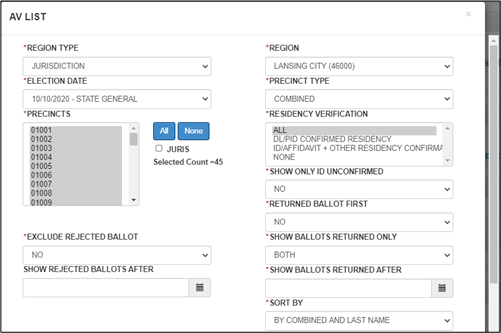
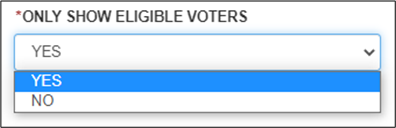
- A new default setting to Only Show Eligible Voters helps you focus your efforts on ballots that can be counted on Election Day. You can change that selection to see more information here, and other reports provide additional details on voters’ situations (such as the Cancelled/Rejected/Moved Out report and the AV Rejected Report).
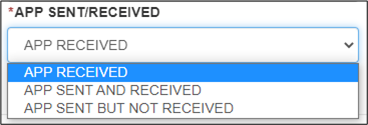
- To help you ensure ballots have been sent to all qualified voters who have requested them, the App Sent/Received dropdown lets you review voters with apps received, apps sent and/or received, or apps sent but not received.
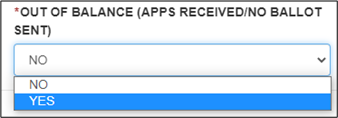
- To help you ensure ballots have been sent to all qualified voters who have requested them, a yes selection in Out of Balance (apps received/no ballot sent) returns a report of those apps received where no ballot has been sent.
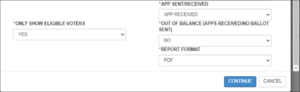   For more details on other QVF reports, see QVF Manual Chapter 7 in QVF under Help, QVF Reference Manuals.
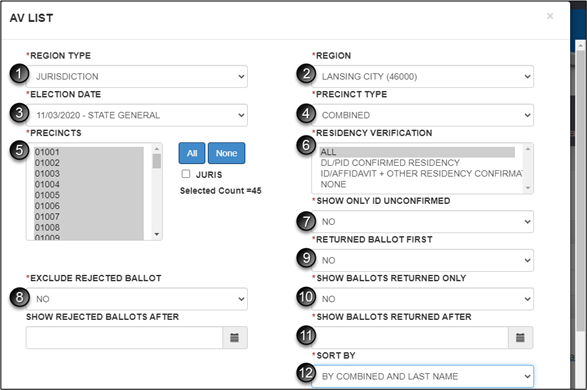
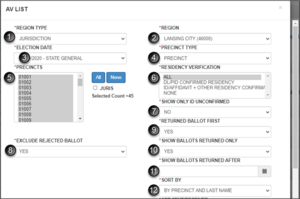
AV List: App Sent/Received and AV List: Out of Balance:
- Region type: JURISDICTION (autofill from Profile Preferences)
- Region: pick your jurisdiction from the drop list (autofill from Profile Preferences)
- Election date: 11/03/2020 – STATE GENERAL (autofill from Profile Preferences)
- Precinct type: COMBINED or PRECINCT, or even BALLOT STYLE if precincts have splits
- Precincts involved in election: highlight individual precincts, highlight multiple using the shift key, select the blue ALL to select all or click None to clear all selections.
- Residency verification: ALL
- Show only ID confirmed: NO
- Exclude rejected ballot: NO
- Returned ballot first: NO
- Show ballots returned only: NO
- Show ballots returned after: leave blank for this report.
- Sort by: (your local preference for combined/precinct/ballot style and name or ballot number)
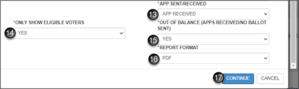
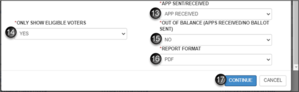
- App Sent/Received: APP RECEIVED
- Only Show Eligible Voters: YES
- Out of Balance: YES
- Report format: PDF
Click CONTINUE and your report will open in a separate browser window for printing.
  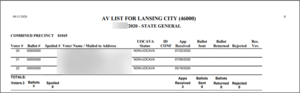 AV List for daily balancing of the day’s returned ballots:
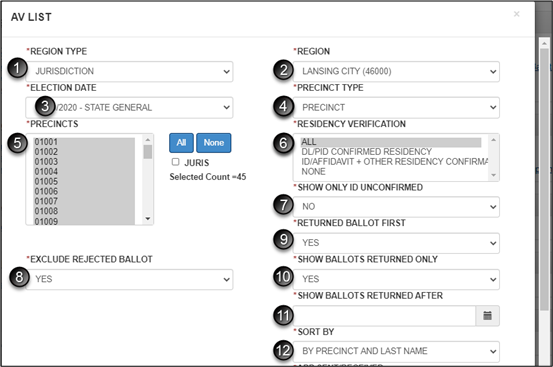
- Region type: JURISDICTION (autofill from Profile Preferences)
- Region: pick your jurisdiction from the drop list (autofill from Profile Preferences)
- Election date: 11/03/2020 – STATE GENERAL (autofill from Profile Preferences)
- Precinct type: COMBINED or PRECINCT, or even BALLOT STYLE if precincts have splits
- Precincts (or ballot styles) involved in election: highlight individual precincts, highlight multiple using the shift key, select the blue ALL to select all or click None to clear all selections. During times of heavy traffic, try printing one or a few precincts rather than a large quantity at once.
- Residency verification: ALL
- Show only ID confirmed: NO
- Exclude rejected ballot: YES
- Returned ballot first: YES
- Show ballots returned only: YES
-
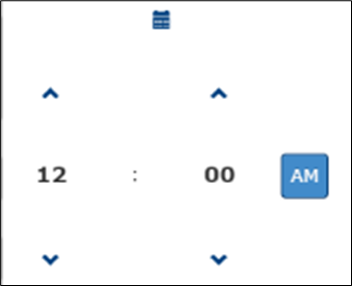
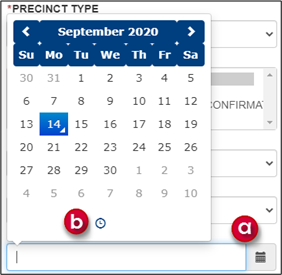
Show ballots returned after: desired date and time, probably date and time of opening office that day
- Click on calendar to select date
- Click on clock to select
- Sort by: (your local preference for combined/precinct/ballot style and name or ballot number)
- App Sent/Received: APP RECEIVED
- Only Show Eligible Voters: YES
- Out of Balance: NO
- Report format: PDF
- Click CONTINUE and your report will open in a separate browser window for printing.
    AV List for Election Day:
- Region type: JURISDICTION (autofill from Profile Preferences)
- Region: pick your jurisdiction from the drop list (autofill from Profile Preferences)
- Election date: 11/03/2020 – STATE GENERAL (autofill from Profile Preferences)
- Precinct type: COMBINED or PRECINCT (either is fine this time)
- Precincts involved in election: highlight individual precincts, highlight multiple using the shift key, select the blue ALL to select all or click None to clear all selections. During times of heavy traffic, try printing one or a few precincts rather than a large quantity at once.
- Residency verification: ALL
- Show only ID confirmed: NO
- Exclude rejected ballot: YES
- Returned ballot first: YES
- Show ballots returned only: YES
- Show ballots returned after: leave blank for the first run of this report to give to the AV processing board with the initial load of ballots to be processed. Subsequent ballot deliveries to the board can be tracked this way, down to the time of the report. How often you run these reports is up to your process and volume; it is recommended that a jurisdiction adopt a routine to avoid multiple reports and election worker confusion. These subsequent reports will be aggregated with the initial report to get total ballots processed numbers and will reside in the pollbook as the List of Voters.
- Sort by: COMBINED AND LAST NAME or PRECINCT AND LAST NAME
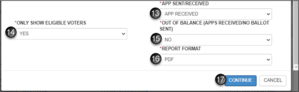
- App Sent/Received: APP RECEIVED
- Only Show Eligible Voters: YES
- Out of Balance: NO
- Report format: PDF
Click CONTINUE and your report will open in a separate browser window for printing.
|