|
August 31, 2020
 |
|
November 2020 AV Application Reminders from the QVF Help Desk |
Proper, consistent use of QVF is essential to helping keep track of AV applications and ensure that all AV ballots are issued timely. This article includes answers to popular recent questions, including tips on how to:
- Review your Profile Preferences, where you set up application format, label format, and more
- Review your Ballot Style Aliases for November, if you have more than one in a precinct (Basic users should coordinate with their county)
- Run a Daily AV Report reviewing which apps were recorded as received in QVF
- Use AV Scan or AV Details to record any AV apps that were not yet recorded for November
- Use Mass AV Application to search for and generate apps and/or labels for:
- Perm AV Application List voters: Only those with unsent applications
- (If desired—not required!) Perm AV Application list voters: Only those with unreturned applications
- Print Online AV Applications from the Print Queue
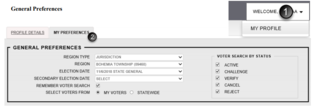
Updating Profile Preferences: Help QVF remember how to help you!
Are you constantly selecting the election date in QVF? What size of labels do you want to print? Do you want your AV apps to have the precinct code or your ballot style alias print on them? Choose and save these options and more in your Profile Preferences (General Preferences, Printing Preferences, and AV Preferences) in QVF.
 Customizing your Ballot Style Aliases if you have splits in any precinct
Once county and state staff have completed Ballot Administration, Complete users can edit Ballot Style Aliases for precincts with splits. It is best to avoid unnecessary characters, spaces, or symbols but to include the precinct number. For example, your aliases might look like 1, 2, 3A, 3B, 4, etc. Or, you might have initials for districts, such as 1LW, 1HA, and 1VILL.
Step-by-step Election Geography instructions are available on page 7 of the current EPB Manual or in your QVF Complete class handouts. Basic users would need to coordinate with a Complete user locally or at the county. Again, each user’s Profile Preferences determine where these aliases appear in addition to the EPB screen for inspectors on Election Day.
“Daily” AV Report: What applications have been tracked in QVF so far?
Most QVF users successfully tracked their dual AV applications, but others still need to record the November AV applications they’ve already received. Some users aren’t sure what got recorded, and want a report to review. Your AV List won’t display information until you have sent ballots, but you can use the Daily AV Report.
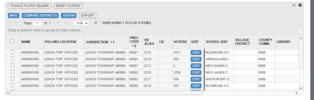
In this example, Lenox Township wanted a breakdown not just by precinct but also by school district.
- We reviewed their Election Geography to see which Ballot Style Aliases appeared for which precinct and district.
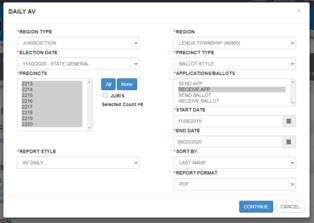
- Then we looked at running the Daily AV report (Reports>Reports, Absentee Voter reports, Daily AV):
- for the November election
- with the Precinct Type of Ballot Style,
- a selection of Receive App under applications/ballots,
- a start date of 11/6/2019 (to catch early military and overseas apps since last November’s election), and
- an end date of today.
- Depending on your needs, see other Precinct Type choices including Combined, Ward, or Counting Board.
  Receiving November AV applications
- Election dates should now be set in Profile Preferences with November as the main election and the secondary/general election as SELECT.
- Remember that you can’t save an alternate ballot address until you’re recording sending the ballot.
- If you need to record it now, however, you could update the alternate application address now and that would become the default alternate ballot address.
See QVF Manual Chapter 6 for more details on how to use AV Scan or AV Details efficiently.
Searching Mass AV for Unsent Applications
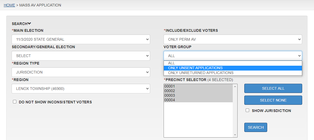
Who has joined your Perm AV Application list and still needs an application? Under Absentee Voter>Mass AV Application, you can search among your Only Perm AV voters. Under Voter Group, instead of All, you can select Only Unsent Applications. In the search results, you can select your output format to generate av apps, labels, a CSV spreadsheet file, or more.
If your jurisdiction wishes to follow up on only unreturned applications, that’s another voter group search option. This is not required, nor is following up with non-perm AV voters. They can be selected under include/exclude voters as All Registered Voters (except Perm AV), and the same Voter Group options are available to choose only unsent applications or only unreturned applications.
 Printing Online AV Applications
August 20 was 75 days prior to the November elections, and the online AV application is available again now through Friday, October 30.
- You receive an Inbox Notification for each online AV application.
- The applications are already received in QVF.
- You may print the apps from the Print Queue (Reports>Print Queue, note that these are ONLINE AV APPS that you search for).
More detailed instructions can be found in our guide to Receiving and Printing Online AV Applications.
Other Reminders:
- Remember that you can easily access QVF and EPB manual and video links in QVF under Help or in the Elections eLearning Center.
- Search eLearning’s News Update archives for News Update gems (like that one from 6/10/20 about how to add new users)!
- The QVF Help Desk will be experiencing periods of high call volume through November. To help us research or redirect your concern, please leave one detailed message or email including name, jurisdiction, contact info, and the topic (and possibly details) of your question.
Thank you so very much for all your hard work in this busy and challenging year!
|