|
Summer is winding down and back to school is right around the corner! The school supplies are purchased, backpacks are packed, and children are filled with anticipation as they look forward to seeing friends after a fun-filled summer. As parents prepare for the first day of school, this is a great time to talk to kids about digital safety and discuss rules and expectations regarding the use of devices, both at home and at school.
This month we will share safety tips for school-issued devices, offer guidance on safely sharing back-to-school photos, and discuss important digital safety conversations to have with children as we enter the new school year. This month’s Social Spotlight features everything you need to know about the popular photo and video editing app, CapCut!
School-Issued Devices

School-issued laptops and tablets offer many benefits to students by allowing access to a variety of tools and software to enhance learning. However, constant access to a digital device may also pose potential risks.
It is important for parents/guardians to be aware of what the school device will be used for and understand the programs and apps children may have access to. Additionally, certain rules that may apply to personal devices at home should apply to school devices as well. Here are some safety tips and considerations when it comes to a child’s school-issued device:
|
Have the “tech talk”
A new school year is a great opportunity to review device and social media rules with your child, explain why you have these rules, and let them know they can always come to you with any problems or questions — no matter what.
The best thing you can do to keep kids safe online is build trust with open, honest conversations. Explain who is safe or unsafe to befriend online, what apps they are and are not allowed to use, and why your family has the rules you have regarding tech use. Be sure to teach children what to do if they see upsetting content and remind them that they can always come to a trusted adult for help.
Check the settings on their school-issued devices
There may not be official guidelines for schools to follow when setting up school-issued tech. It may be up to parents to make sure parental controls are enabled on the device and on each app your child is using on it. Check the apps available on the device and set controls on the individual apps as well. With this in mind, monitoring children’s use on school-issued devices at home is still important.
Know what apps your child is using -- and why

It is important to ask what apps are on their school device, how they were selected, and what the learning purpose is. There's a huge range of educational apps, websites, and games available, and teachers may use a variety of ways to find the ones that will really benefit students' learning. Some teachers have a lot of latitude in choosing software. Others must use a particular platform.
Schools may also have control over what apps are blocked and which are accessible to children. Kids may be able to access platforms like YouTube for learning purposes, during free time or at home. Understanding which apps children have access to will help guide parents as they monitor use at home and have safety conversations with their children about appropriate use.
Give tech a “bedtime"
Many online risks like sexual exploitation, bullying, and dangerous challenges can be exacerbated when kids use their phones late at night, alone in their rooms. By setting a time to put down devices and charge them in a common area, you can help children set healthy boundaries and improve their sleep. Consider giving all devices, including school devices, a bedtime.
Know that browsing activity may be monitored by the school system
School monitoring systems may be in place to keep children safe and ensure that kids are using the devices appropriately. This may include the information children are searching for and browsing online. Be sure to find out how student privacy is addressed and what types of data are being collected.
|
Back-to-School Photos

The start of each new school year marks a milestone for children, and it is natural as proud parents to want to document this moment in time and share it with family and friends.
Chalkboards and letter boards displaying children’s names, schools, and other identifying information flood social media every year when kids go back to school. While these posts are well-intended and make great keepsakes, posting them online has potential dangers that many parents don’t realize.
Be cautious of posting a child's name, age, grade, or any information about their favorite things, as these details can help predators get to know the child online and in person. Online predators may use these clues to try to groom children, find out what they like, and even determine their physical location.
______________________________
|
The Child Rescue Coalition encourages parents/guardians to Pause Before You Post and consider these four tips for safe back-to-school photos:
-
Don’t share your child’s SCHOOL name. All schools have websites that include addresses and it would only take a simple Google search to locate your child’s school. If you do choose to share, be sure your settings are turned to private to ensure only friends and family can see this personal information.
-
Don’t share their TEACHER’S name. Staff and employees are included in most school directories making your child easy to find. Try not to publicly post too many details about where your children go to school.
-
Don’t share their FAVORITE’S. If your child is contacted online, a predator may use their “favorites” to gain their trust or pretend to be friends of the family.
-
Make sure to hide LOGOS of the school or location. These can be easily blurred on today’s smart phones. Be sure to check your background to make sure you aren’t accidentally snapping location identifiers, logos, or other children who may not have consented to being posted online.
When it comes to posting photos of children online, be sure to always pause before you post, and make sure this is a photo that you and your child both want on the internet. Be aware of predator attracting hashtags if you do choose to post those chalkboard photos, and if you take selfies with your children, consider these safety tips.
Important Discussion Topics
Artificial Intelligence (AI)

Artificial intelligence (AI) is increasingly becoming part of children’s everyday lives. The key is to build AI literacy and ensure that students use it to support their learning, not replace it.
Children who approach AI with curiosity and healthy skepticism will use it far more effectively than children who are either afraid of it or blindly trusting. Some topics to discuss include:
Deepfakes and synthetic media. Many children are on YouTube and social media. They need to know that AI can generate realistic fake images, videos, and audio. Show them examples. Teach them to question what they see.
Academic honesty. Be direct: using AI to write your essay isn't learning, and it isn't honest. AI is a tool for understanding, not a shortcut for producing work. Students can use it to refine their own ideas and arguments, but the core work and critical thinking must remain their own.
Data privacy. Explain that when they type something into an AI, that text often gets stored and may be used to train future models. Help them understand why they shouldn't share personal information with AI tools.
______________________________
|
Sextortion
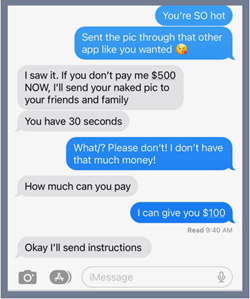
Sextortion continues to be one of the greatest risks that children and teens face online today. It is critical that parents/caregivers talk openly about this issue and make sure that children know they can come to them if something happens and they will be there to help.
Per the National Center for Missing & Exploited Children (NCMEC), sextortion is a form of child sexual exploitation where children are threatened or blackmailed, most often with the possibility of sharing with the public nude or sexual images of them, by a person who demands additional sexual content, sexual activity or money from the child.
This crime may happen when a child has shared an image with someone they thought they knew or trusted, but in many cases they are targeted by an individual they met online who obtained a sexual image from the child through deceit, coercion, or some other method. In many cases, the blackmailers may have stolen or taken images of another person and they are communicating through a fake account. The blackmailer may have sent images as well.
The rise and ease-of-use of generative artificial intelligence (AI) exacerbates this threat. Now, offenders can use AI to morph a benign image of a minor (perhaps an image taken from their social media page) to create a highly-realistic deepfake that makes it seem as though the minor is engaging in sexually explicit conduct, and then threaten to release that image unless the minor pays the offender, or produces and shares authentic sexually-explicit imagery.
_____________________________
|
How to Get Help
If a child is experiencing sextortion, they are not alone and help is available!
- Remember, this is not your fault!
-
STOP responding.
-
DO NOT send money.
-
GET HELP from a parent or trusted adult.
-
BLOCK the suspect but DO NOT DELETE your profile or messages.
-
REPORT the crime to law enforcement and to the CyberTipline.
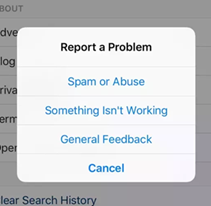
*It is also important to report online child exploitation directly through the safety feature on the platform that the incident occurred on. By doing so, you not only stand up for yourself, but also help protect other children from possible victimization!
If you know of a child in immediate danger, notify law enforcement right away!
If a child does not feel that they have trusted adults in their life that they can confide in, they can reach out to NCMEC for support at gethelp@ncmec.org or they can call 1-800-THE-LOST.
|

Social platforms are constantly changing and evolving and it can be challenging to stay on top of the latest trends in technology.
There are millions of apps available, therefore, it is important to focus on the various types of apps and their respective functions in order to help keep children/teens safe across all platforms.
Each month, we highlight a different app, game, or social platform and discuss how it works, possible safety risks, and ways to keep kids safe.
Here is everything parents need to know about CapCut!
______________________________
|
What is CapCut?

CapCut is a popular AI-powered video and photo editing app widely used to create short-form social media content for platforms like TikTok, Instagram Reels, and YouTube Shorts. CapCut was developed by ByteDance, the same company that created TikTok. It lets users create and edit short videos directly on their phones using a wide range of tools—filters, transitions, music, text effects, and templates. Because it connects easily with TikTok, many kids use CapCut to polish their videos and make them more eye-catching.
|
How does CapCut work?
CapCut can be downloaded from Google Play or the Apple Store, and can also be used on a PC as a desktop app or directly in your browser. The app offers a free version with basic editing tools like trimming, music, text, filters, stickers, and more, while a paid subscription unlocks premium features such as advanced editing options and high-resolution exports.
Users can create videos from scratch or use templates that allow you to drop your clips into pre-designed videos. Once you finish a video, you can export and save it on your device or upload it directly to TikTok, Instagram, or YouTube.
How old do you have to be to use CapCut?

Per CapCut’s Terms of Service the services are only intended for individuals 13 years old and older. The terms further state that if you are above this age threshold but are under 18 years old or the applicable age of majority in the jurisdiction you reside in, you may only access or use the services with the consent of your parent or legal guardian. Users must be 13 or older to create a CapCut account.
|
Is there direct messaging on CapCut?
CapCut is not a social media platform and it does not allow private messaging between users. However, strangers can still potentially contact teens through the public comment section on each individual video. By making contact in these comment sections, a stranger may be able to convince a child to move the conversation over to another app with a private messaging feature, increasing the risk to the child.
Are there parental controls on CapCut?
CapCut does not have any built-in parental controls. Parents can set controls directly on their child’s device using the device’s built-in settings, allowing them to manage how long their child can spend on the app to avoid too much screen time. However, there is no way to control what the child can access or do on the app itself.
What are the risks for youth on CapCut?

CapCut can be a good tool for teens to exercise their creativity and for those looking to start creating and editing video content. However, there are some risks to consider.
CapCut offers a large library of video templates and audio clips, many created by other users. While some are fun and harmless, others can include mature themes, language, or suggestive images.
CapCut is often used alongside apps like TikTok, where kids might share their edited videos, thus teens risk accidental oversharing, especially if they include personal details in the video or in a linked profile.
Like many free apps, CapCut also collects user data. This may include the device a child is using, how they use the app, and even the content they create. If your child doesn't understand how their data is being used, it raises potential privacy issues.
Children and teens may face self-esteem issues. CapCut offers face-smoothing filters, reshaping tools, and other beauty effects. These can encourage children to feel they need to "fix" how they look, which can affect self-esteem—especially at an age when they're still developing confidence.
|
Moose's Corner

________________________________________________________
Moose is an Electronic Storage Detection (ESD) canine that alerts to the chemical component found in many electronic storage devices. Moose officially joined the Wisconsin ICAC Task Force in August 2023, and one of his roles will be sharing cyber safety tips in Moose's Corner each month!
_______________________________________________________
Moose's Safety Tip: Be sure to monitor children's access on school-issued devices and have frequent open discussions about current online trends!
Stay Safe!
|
 |
|
~ Moose
|
|