|
When it comes to the places kids connect online, there is a lot to learn and understand. For parents, it can be overwhelming trying to stay up to date on the latest apps and make decisions about which platforms are safe for their children to use. All apps have potential risks, and it is impossible to know everything there is to know about every social media app or game – understanding how different platforms and features work will help you keep your kids safe.
This month we will discuss app features that parents should be aware of, the importance of privacy settings, and tips for keeping children safe across all platforms. This month’s Social Spotlight highlights everything you need to know about the Locket Widget app.
App Features
Parents commonly want to know which apps are the most dangerous and which ones are safe for kids. The reality is that there are potential risks on any online app or platform. Even seemingly harmless apps may still have risky features. It is important to talk to children about online safety and understand the functions of different types of apps.
Parents should be aware of six critical, and sometimes deceptive, app features:
Information hiding apps

There are multiple information- and photo-hiding apps available for web-enabled devices, including smartphones, tablets, and computers. These apps may mimic harmless tools, such as calculators or note-taking functionalities, but their intention is to hide selected information (i.e., pictures, texts, and other compromising items).
|
Anonymous Messaging Apps
Anonymous chat platforms let people connect with strangers instantly. Often, there are limited registration and age check requirements. If there is no age verification, children can slip into adult spaces with ease. With anonymous apps, users are matched with strangers, often without filters, thus predators can hide their identity and intentions behind this perceived anonymity. Live video poses additional risks as inappropriate content can appear in seconds, without warning. Conversations can also be saved and misused without consent.
Disappearing Messages
Disappearing messages are messages that automatically delete after being read, or after a set timer runs out. They are marked as a privacy feature and are now built into many platforms. While temporary messages may seem harmless, they can pose risks to children and teens. Key risks with disappearing messages include:
-
False sense of security: Young people may feel that it is safe to share more risky content as it will disappear. However, the recipient can still screenshot or record the content before it disappears without the sender’s knowledge or consent.
-
Evidence Erasure: Disappearing messages make it harder to report inappropriate contact or content and makes it more difficult for enforcement agencies to capture evidence of child exploitation or abuse, such as grooming.
-
Encourages Risky Behavior: Young people may feel that there is less risk of getting caught using disappearing messages, which can encourage peer on peer abuse and bullying.
-
Undetectable Grooming: Predators often use apps with temporary messaging features to target children, as the disappearing texts may prevent parents from catching on to predatory conversations.
A child or teen's use of disappearing messages is not always malicious, so it’s best not to assume and react as if it is. Sometimes it’s just a matter of kids being kids. But without guidance, disappearing messages may offer a false sense of security and can encourage risky behavior because users believe conversations or photos won’t be saved.
Livestreaming

Livestreaming or ‘going live’ is the broadcasting of video online in real time. All a user needs to stream live is access to the internet and a webcam or camera on their smartphone. The videos are live and unmonitored, which makes it easy for people to say (or show) whatever they want.
Due to the real-time nature of livestreams (and perceived impermanence of them), a child might share something intimate or private if asked, that they otherwise wouldn’t share as a photo or video. Children may also respond to viewers by divulging personal information including where they go to school, their phone number and even their home address—which opens the door to grooming and could also potentially pose a risk to the entire family.
Feedback received through comments during livestreams or on vlogs may also negatively impact a child’s wellbeing. Cyberbullying, hate or comments on their appearance could lead to negative self-image. Due to the real-time nature of livestreams, children risk coming across any type of inappropriate content.
|
Live Location Broadcasting
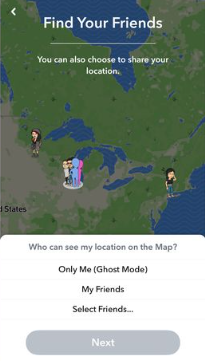
Many online platforms have a feature that allows users to share their location or “check in” at various locations, alerting users on the platform to your exact whereabouts at any given time. Many teens share their real-time location with their friends and often keep track of where their friends are located.
Even though location sharing may be popular, it does come with potential emotional and physical risks. Constant exposure and comparison can intensify FOMO (fear of missing out). Teens may see a group of friends hanging out without them and experience feelings of loneliness or rejection.
In addition to emotional risks, there are physical risks, too. A teen’s location data could be available to someone who might wish them harm. In the wrong hands, it can make teens more vulnerable to stalking, harassment or even predatory behavior.
AI Companions
AI companions are chatbot apps powered by artificial intelligence, designed to simulate personal relationships through human-like conversations. The conversations can be via text or spoken word. The chatbots adapt to inputs from users and learn to respond in ways that feel personal and realistic.
AI companions pose many risks to young users as they can share harmful content, distort reality and give advice that is dangerous. Children and teens are particularly vulnerable to mental and physical harms from AI companions as they are still developing the critical thinking and life skills needed to understand how they can be misguided or manipulated by computer programs. The risk is even greater for those who struggle with social cues, emotional regulation and impulse control.
|
Privacy Settings

One of the most important things parents can do to keep children safe on their devices is to help them set their privacy settings.
A great way to start this conversation is by setting up their new device together. This not only gives parents the opportunity to make sure the settings are updated appropriately for the child's age, but also allows for the opportunity to have a conversation about online safety and about why these settings are important.
Be sure to take a look at your children's privacy settings within the social media platforms they are using online and adjust them per your comfort level. These privacy settings allow you to limit who can view their information, control who children can potentially interact with in the app, and more. Social media, and other apps, may also track your online activity. Go to your account settings to see how they use your information and adjust the settings to match your preferences.
Think about non-traditional social media as well, such as public transactions on Venmo or music activity on Spotify. These site-specific security pages can help you get started. If you have an internet-connected TV or streaming device, review the privacy settings and permissions on those as well.
______________________________
|

Accessing the privacy settings on devices and social platforms will vary based on the specific device or platform. However, generally, these can be accessed by locating the Settings app and navigating to the Privacy & Security section of the devices. From here, users can update app permissions, location services, and more.
Check out the National Cybersecurity Alliance for direct links to manage your privacy settings on popular platforms and apps.
|
Parental Controls
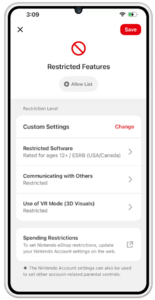
Even when you’ve talked to children about screen time limits and being responsible on their devices, it can still be difficult to monitor what they are doing when you are not there and limit exposure to potentially inappropriate or dangerous content.
Parental controls can be a tool to help keep children's internet experiences safe, fun, and productive. There are a variety of parental controls and monitoring tools available to parents to help manage children’s technology use. Some of these may be free and already present on your phone, tablet, or computer. Others are products or apps that you must buy or subscribe to. The decision to use such tools is unique to each family and is based on what works best for your children.
If parental controls or monitoring tools are right for your family, consider having an open conversation with your child about how and why these are being used (to keep them safe) and how your ultimate goal is for them to learn how to interact responsibly online and regulate their own usage independently.
While these tools can be useful, ultimately the best parental control is you! A combination of modeling healthy tech habits and frequent discussions about safe social media and tech use will help empower children to make safe choices and build the skills necessary to stay safe online.
Check out ConnectSafely’s Family Guide to Parental Controls for information on parental control options and tools available.
|
How Parents Can Help Kids Stay Safe Online

There are risks on any online app or platform – the goal is not to ban every app. It’s to help children build healthy digital habits while creating an environment where they feel comfortable asking for help, and helping children navigate the digital world with confidence, good judgment, and support from trusted adults.
By staying involved, asking questions, and keeping communication open, parents can help their children enjoy technology while reducing the risks that come with it.
Stay Informed: Technology changes quickly. Be aware of the apps your kids are using and research their safety concerns. Block specific apps or limit time on them.
Keep the Conversation Open: Children are more likely to speak up when they know they won't immediately lose access to their devices. Lead with curiosity instead of criticism and talk to your kids about the apps they’re using and why they like them.
Set Clear Expectations: Every family should establish digital guidelines that match their child's age and maturity. These might include:
- Keeping accounts private
- Only accepting friend requests from people they know in real life
- Asking permission before downloading new apps
- Avoiding conversations with strangers
- Coming to a trusted adult if something feels wrong
Monitor your Child’s Activity: Monitor your child’s devices, including their app usage and web browsing history. Set limits on how much time your kids can spend on their devices, apps, games or specific websites.
Teach your kids about cyberbullying, online predators, and other dangers associated with the internet.
______________________________
|
Informational Resource Hubs
Most online platforms have a safety center geared toward families. These are great resources for parents to learn more about a platform your child might be using, as well as their safety features and parental control options.
Here are links to the information centers for some of today’s most popular platforms:
Meta Safety Center
TikTok Safety Center
Google Safety Center
Snapchat Family Center
Discord Safety Center
Roblox Safety Center
X Help Center
Microsoft Family Safety

Social platforms are constantly changing and evolving and it can be challenging to stay on top of the latest trends in technology.
There are millions of apps available, therefore, it is important to focus on the various types of apps and their respective functions in order to help keep children/teens safe across all platforms.
Each month, we highlight a different app, game, or social platform and discuss how it works, possible safety risks, and ways to keep kids safe.
Here is everything parents need to know about Locket Widget!
______________________________
|
What is Locket?

Locket is a social app designed to let people share photos instantly with other users they have connected with. Instead of sending photos via an app, the photos automatically appear on the other person’s phone screen on the ‘widget.’
It’s a bit like a private social media platform right there on your home screen. Locket is free to download but offers in-app purchases.
|
How does Locket work?

Locket syncs with your phone contacts to let you invite friends. Once you add a friend, Locket will then sync whatever name and profile picture you have saved for that person in your contacts.When you share a photo on Locket, it will be sent to all the contacts you have added on the app or to selected contacts, and open right on their home screen.Your contacts will be able to see this photo in real-time in their Locket widget.
Locket does not let you share videos. It also only lets you take photos within the app, rather than share photos from your camera roll.
Users can choose up to 20 friends to connect with, all of whom must also have downloaded the Locket Widget app. Once connected, the users’ photos are shared with each other via their phone’s home screen widget.
|
What features are available in Locket?
Users can send a ‘locket reaction’ to friends to notify them that they’ve seen their photo. Users can personalize widgets and dedicate widgets to specific people, labelled as either a ‘Crush’ or ‘Best Friend.’ This means that the widget will only show photos from the assigned user. Another feature is the locket history – as two users trade locket snaps, they’ll build up a history of images sent. Locket will use this to create monthly ‘recap’ videos or users can generate them using the ‘recap’ feature.
How old do you have to be to use Locket?
Locket’s terms of service indicate that users must be 13 years of age or older to create an account or use the services. However, there is no age verification process. Users simply have to check a box agreeing that they have parental permission to use it. |
|
 |
Is there a chat feature on Locket?
Yes, there is now a chat feature on Locket allowing users to chat with their friends and respond to the Lockets they've sent. Every Locket can serve as a conversation starter. Locket is intended to be used with close friends only. Typically, users only have 10-20 friends on the app. This means the platform is dedicated to communicating with friends you already know in real life, not for meeting new people or seeing content from strangers.
Is Locket safe for teens?

As with any app, there are potential risks involved, particularly with Locket being a photo-sharing app. There are no parental controls available on Locket, therefore, a child could be vulnerable to seeing inappropriate images as photographs will appear instantly on their phone, without further permission needed to send, receive, or view them.
The lack of age verification means that children who are eager to use the widget, could simply check the box indicating they have parental consent and continue on to use Locket.
In the terms and conditions, it states that all photos uploaded can be reused by Locket for other purposes, such as for marketing use. Users may not fully understand how their images might be used.
|
Moose's Corner

________________________________________________________
Moose is an Electronic Storage Detection (ESD) canine that alerts to the chemical component found in many electronic storage devices. Moose officially joined the Wisconsin ICAC Task Force in August 2023, and one of his roles will be sharing cyber safety tips in Moose's Corner each month!
_______________________________________________________
Moose's Safety Tip: Be sure to learn about the features and functions of apps in order to keep children safe on all platforms!
Stay Safe!
|
 |
|
~ Moose
|
|