|
June is Internet Safety Month, which is dedicated to raising awareness around online safety among youth. Online gaming is a popular activity for many children and teens. Video games are not only fun and entertaining, but they also offer a way for youth to socialize and even learn new skills. Online games can be fun, but virtual predators can be very problematic. To keep their gaming experience safe and positive, it is important to be aware of the risks.
We will discuss the growing risk of online enticement within gaming platforms, how to spot unsafe online acquaintances, and ways to stay alert and stay safe while gaming. This month’s Social Spotlight highlights everything you need to know about the popular video game, Fortnite!
Gaming and Online Enticement

Online gaming involves any video game that allows players to connect with one another over the internet. Gaming includes video games played on physical consoles such as a PlayStation or XBox and also games accessed online.
As online gaming has grown in popularity and continues to reach new audiences, it has also become a target for perpetrators seeking to exploit children. Gaming environments often encourage real-time interaction between players and new features like immersive environments make gaming platforms vulnerable to abuse and exploitation.
The voice communication within video games creates familiarity, which may make children feel safer and more comfortable with potential predators. They feel like they know, like, and trust these people, when they really don’t know them at all. This perceived trust can make children and teens more vulnerable to doing things they wouldn’t normally do. Children in these types of friendships or relationships can more easily be exposed to grooming behaviors. Grooming is a pattern of behavior and interactions designed to build the trust of a victim so they can be exploited.
______________________________
|
Warning Signs
Per the Child Rescue Coalition, here are some warning signs to help children identify “Tricky People” online and signal that an online acquaintance may be dangerous or untrustworthy:
- Asking for personally identifiable information. Abusers might ask for your child’s name, age, or location. Make sure your kids know not to share that information with people they meet on the internet.
- Asking to take the conversation to a different place. An abuser might ask your child to talk to them through an app or some other communication method other than the gaming platform where they first met. Agreeing to such a request is not a good idea.
- Sending gifts. Receiving gifts from strangers on the internet is a bad sign, particularly from adults. This is grooming behavior and a way predators gain the trust of their victims and create a sense of obligation.
Online games can be fun, but it is important for kids to be aware of the risks of online gaming relationships so they can enjoy their activities and gaming safely.
______________________________
Virtual Reality and Augmented Reality Games

Virtual reality (VR) games are video games that use a headset and controller to immerse players in a three-dimensional environment. VR games can make people feel like they’re in a different place or another world. Augmented reality (AR) games combine the physical world with virtual elements. AR games use sensors like cameras, microphones, and global positioning systems (GPS) to detect the player’s environment and overlay digital elements while they play the game.
Immersive games like VR and AR pose the same potential risks for children as regular video games, but immersive games also include additional possible risks like motion sickness, eye strain, and distress from a psychological or emotional connection with the heightened realism of the virtual environments.
If your child is interested in playing VR or AR games, consider researching the game, checking the age ratings, setting clear play time limits, setting up a safe play area, taking breaks, and monitoring for potential motion sickness. Also talk with your child about potentially harmful content or aggressive language and behavior from other players in immersive games.
|
Ratings and Parental Controls

The Entertainment Software Rating Board (ESRB) is the non-profit, self-regulatory body for the video game industry. Their primary responsibility is to help consumers – especially parents – make informed choices about the games their families play.
The rating system includes rating categories to suggest age-appropriateness, content descriptors to indicate what type of content may have triggered the rating, and interactive elements, to advise about sharing the user’s location with other users, in-game purchases, user interactions, and unrestricted internet access.
-
Rating Categories suggest age-appropriateness. ESRB uses age-based categories including E (Everyone), E10+ (suitable for ages 10 and older), T (Teen, generally suitable for ages 13 and up), M (Mature, 17+), AO (Adults Only, 18+), and RP (Rating Pending).
-
Content descriptors indicate content that may have triggered a particular rating and/or may be of interest or concern such as violence, suggestive themes, language, gambling, controlled substances and more. ESRB currently uses close to 30 different descriptors.
-
Interactive elements notify parents about other features that can be found in games such as users' ability to interact with each other, the sharing of users' location with other users, if purchases of digital goods or services are offered, and/or if unrestricted internet access is provided.
Rating Summaries are assigned to many physical games and provide more detailed information about the content in a game and its context. Rating summaries can be found by conducting a ratings search on the ESRB site or by downloading the free ESRB Rating Search App.
______________________________
|
Parental Controls
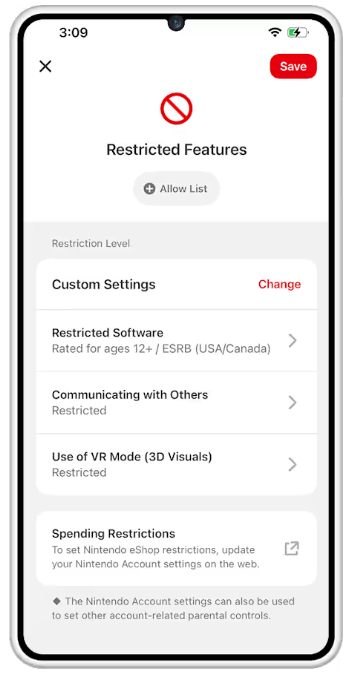
Virtually every device that plays video games (consoles, PCs, smartphones, etc.) includes parental controls to help manage children’s video game experiences. Setting parental controls on your family’s gaming consoles and other devices can help limit your child’s video game use and allow parents/guardians to easily block games by rating, control spending, limit the time your children play, and restrict online communication.
Check out Parental Controls for Video Games for quick links to popular gaming consoles and platforms and instructions for setting parental controls on these devices.
_____________________________
Per the Federal Trade Commission, video game parental controls focus primarily on content and time restrictions. Most do not have dedicated features to limit the ads your child sees when they’re searching for, downloading, or playing a video game. Studies have found that younger and neurodivergent children may have difficulty telling the difference between advertising and other content because their cognitive abilities are still developing.
Look for games labeled as ad-free in the app store or find games with fewer ads by reading Common Sense Media or app store reviews. Sometimes, you may limit the ads your child sees by buying the paid version of the game, by putting the phone or tablet in airplane mode for simple games that don’t need an online connection, or by using a third party adblocker.
_____________________________
Having an open conversation with children about how and why parental controls are being used is always encouraged. ESRB’s Family Gaming Guide has conversation starters to help set household rules around video games and helpful tips for managing screen time, preserving your child’s privacy, picking appropriate games, and more!
|
Tips for Safe Online Gaming

The world of online gaming is not all bad! Playing video games has many benefits for children as well. Gaming offers a way for kids to relax and enjoy themselves, facilitates teamwork and bonding, and can be a place for social connection with others who share their interests. With a bit of balance and guidance, online games can help kids grow and learn in a fun environment.
To keep this experience safe and fun, here are 6 tips for safe online gaming from internetmatters.org:
Take an active interest in the games your children are playing: Learn how they work and why they enjoy playing them.
Ask who they play with online, and who they meet and talk to: Make sure your child knows how to report inappropriate behavior.
For younger children, use “airplane mode” settings: This allows the child to play offline without making accidental purchases or connecting with someone they don’t know.
Use ESRB rating and App store ratings to ensure your children are playing age-appropriate games: Help children understand why some games are allowed and others are not.
Set boundaries and how long children are allowed to play: Agree on time limits and discuss who they are allowed to play with online. Remind them that people may hide behind fake profiles and may not be who they say they are.
Teach children to think critically: Remind them not to share personal information and never to follow people to other platforms.
______________________________
|
Know How to Report!

Children and teens may come across inappropriate behavior from other players while playing videos games – like bullying, requests for personal information, adult content, etc.
If this happens, it is important that they stop playing the game and talk to a parent or trusted adult who can help them report this behavior. Most games have an option to block or mute another player. Another option is to help children report the player to platforms like like Xbox, PlayStation, and Nintendo through the reporting function within the app.
Other reporting options and resources regarding things that make you feel uncomfortable or unsafe online include:
CyberTipline: If you believe you or someone you know is a victim of exploitation, report it to the National Center for Missing & Exploited Children’s CyberTipline.
TakeItDown: Free service that can help remove or stop the online sharing of nude, partially nude, or sexually explicit images or videos taken of you when you were under 18 years old.
988: If you are thinking of hurting yourself, reach out to the Suicide Prevention Lifeline.
|
Live Webinar - Video Games and Your Child: Spotting Red Flags and Staying Safe Online
Interested in learning more? Join the ICAC Task Forces on June 23rd at 2:00 PM Eastern Time in a live webinar, Video Games and Your Child: Spotting Red Flags and Staying Safe Online. Register below!
Key Takeaways will include:
- A deeper understanding of how games have evolved and why they may benefit offenders.
- How to recognize red flags in online gaming behavior, including suspicious communication, requests for personal information, and attempts to move conversations off the platform.
- Ways to implement practical tools at home to support safe gaming.

Social platforms are constantly changing and evolving and it can be challenging to stay on top of the latest trends in technology.
There are millions of apps available, therefore, it is important to focus on the various types of apps and their respective functions in order to help keep children/teens safe across all platforms.
Each month, we highlight a different app, game, or social platform and discuss how it works, possible safety risks, and ways to keep kids safe.
Here is everything parents need to know about Fortnite!
______________________________
|
What is Fortnite?

Fortnite is a popular survival video game developed by Epic Games where 100 players fight against each other in player versus player combat to be the last one standing. It is a fast-paced, action-packed game, where strategic thinking is a must in order to survive.
This version, known as Fortnite Battle Royale, is one of the most popular, however, there are now multiple games within Fortnite created by Epic Games that can be played including, LEGO Fortnite, Rocket Racing, and Fortnite Festival. In addition to games made by Epic, there are thousands of other games built by other Fortnite creators.
|
How does Fortnite work?

Players skydive onto a small island, are equipped with an axe and must scavenge for more weapons, while simultaneously avoiding a killer electrical storm. As players are eliminated, the field of play also gets smaller, meaning players are put closer together.
Updates regularly flash on screen detailing how another player was killed “X killed Y with a grenade”, adding to the sense of urgency. While the game is free to play, you do need to create an account with Epic Games.
|
What platforms can you play Fortnite on?
Fortnite can be played on game consoles (PlayStation, Xbox, and Switch), computers (Mac and Windows), and Android mobile devices. Users need an internet connection to play. Players can play "cross-platform," which means, for example, that a Windows player can be on a team with a console player. Gamers can also create an account on any device and carry over their progress in a game to another system. For example, you could start on a cell phone, then pick up a game on a computer or console later in the day and continue where you left off.
What is the age rating for Fortnite?

Fortnite is rated T for Teen by the Entertainment Software Rating Board (ESRB) and has a new Content Descriptor that means Fortnite offers access to a variety of content for people of all ages. The descriptor is: Diverse Content: Discretion Advised, which means the game, app, or platform in question offers access to a variety of content. All of the games available within Fortnite also have ESRB-assigned age and content ratings, ranging from E for Everyone to a maximum rating of T for Teen.
|
Can players chat with each other in Fortnite?
Live, unmoderated chat is possible between users in Fortnite. Options include voice chat and on-screen text chat. This may expose players to random strangers and the likelihood of profanity. Users can manage their party, voice chat, and text chat options in Fortnite.
Is Fortnite appropriate for kids?

Fortnite: Battle Royale contains violence, but it it is all cartoonish rather than bloody or gory. Since the object is to be the last one standing, you'll constantly shoot other players and dodge fatal storms. However, there's no blood; defeated enemies simply vanish.
Per Common Sense Media, for some parents, the cartoonish, bloodless style of the action in Fortnite makes the violence less problematic than the aggressive gore in other popular shooter games. But the game's online chat feature—especially in Battle Royale mode—could expose younger players to offensive language or mature content from random strangers.
With the right controls and parental guidance, Fortnite can be enjoyed safely.
|
Moose's Corner

________________________________________________________
Moose is an Electronic Storage Detection (ESD) canine that alerts to the chemical component found in many electronic storage devices. Moose officially joined the Wisconsin ICAC Task Force in August 2023, and one of his roles will be sharing cyber safety tips in Moose's Corner each month!
_______________________________________________________
Moose's Safety Tip: Be sure to teach children never to follow other users to another platform to communicate as this may be a red flag of an unsafe online acquaintance!
Stay Safe!
|
 |
|
~ Moose
|
|