|
Having trouble viewing this email? View it as a Web page.
 In This Issue
April 28, 2026
All Employers | All Insurance Benefits
Welcome to My Benefits Employer News, a newsletter to keep you informed about ETF’s new insurance administration system. Save time by only reading the articles relevant to you—the first line of each article identifies which employers and benefits the article applies to. View previous issues.
All Employers | All Benefits
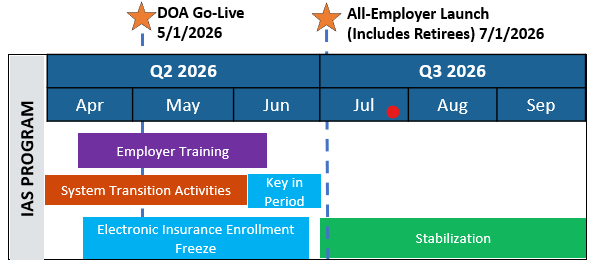
Stay on track with the transition to the new My Insurance Benefits platform. Use the graphic below to follow progress, monitor upcoming milestone dates, and prepare for go-live events. DOA will go live in the system on May 1, 2026, and UWHC and local employers will go live on July 1, 2026.
All Employers | All Benefits
To ensure a smooth transition to our new benefits platform, we have outlined a timeline of essential dates, including system launches, electronic enrollment freeze dates, and key actions required by employers. With all electronic enrollment freezes officially concluding upon the all-employer go-live on July 1, 2026, please review the timeline below to track the milestones leading up to the launch and the resumption of full functionality.
|
Date
|
Topic/Benefit
|
Event
|
|
4/17/2026
|
Life Insurance (EOI)
|
Last day for Securian to accept/process life insurance applications requiring Evidence of Insurability (EOI).
|
|
5/1/2026
|
Launch for State Agencies which use STAR*
|
DOA transitions to My Insurance Benefits. State employees who report payroll through STAR gain access to My Insurance Benefits in the My Benefits portal.
|
|
5/6/2026
|
Life Insurance (No EOI) *
|
Last day to submit life insurance applications that do not require evidence of insurability (EOI), including changes and terminations.
|
|
5/7/2026
|
New Life Insurance Rules
|
Coverage and premium effective dates align, and the retiree continuation window changes from 31 to 30 days.
|
|
5/8/2026
|
Income Continuation Insurance (ICI)*
|
Last day to accept standard ICI applications. EOI paper applications are not frozen.
|
|
5/20/2026
|
Supplemental Dental*
|
Last day for Delta Dental to accept current paper applications and enrollment files.
|
|
5/20/2026
|
New ETF Forms
|
Employers begin using the new ETF Supplemental Insurance Application (ET-2339) and new pre-tax savings account enrollment forms, available on the ETF website.**
|
|
5/21/2026
|
Supplemental Vision*
|
Last day for MetLife to accept current paper applications.
|
|
5/21/2026
|
Health Insurance Freeze
|
Hard Deadline: At 5:00 p.m., employers stop submitting health insurance enrollments into the existing myETF Benefits system (MEBS). The coverage effective date is based on normal rules.
|
|
7/1/2026
|
All-Employer Launch (Includes Retirees)
|
My Insurance Benefits system goes live for all remaining employers and members, including retirees.
|
* Note: There is NO FREEZE for supplemental insurances for state agencies. (This includes ICI, Delta Supplemental Dental, MetLife Vision, TASC for pre-tax savings account, and Securian Accident Plan.)
**Note: There is no freeze for pre-tax benefit program enrollments. Employers will continue to send census files to TASC. Employers will send their last census file before My Insurance Benefits goes live. The coverage effective date is based on normal rules.
Important Reminders for Employers
-
Employers (and ETF for retirees) will hold enrollment and change documents until an Employer Verification and Correction Period during June, when they will access My Insurance Benefits to enter enrollments and changes received during the freeze.
- Applications received after the freeze deadlines will be returned to employers to be entered into My Insurance Benefits when available and before June 30, 2026.
- There is no enrollment freeze for the Accident Plan; enrollments and changes continue without interruption.
High-Level Changes in Billing and Payment (Locals who offer Health Insurance)
Local Employers | Billing and Payment/Health Insurance
With the launch of My Insurance Benefits on July 1, local employers who offer health insurance should plan to attend upcoming trainings to stay aware of significant changes to ETF’s billing and payment process. Please review the changes below and sign up for training for all of the details.
-
Move to “month of” billing
Currently, local employers are invoiced for health insurance premiums one month ahead of coverage. With the launch of My Insurance Benefits, local employer invoicing will move to “month of” billing to better align premiums and coverage. The June invoice will be generated in the current system myETF Benefits (MEBs) in May. The July invoice will be generated in My Insurance Benefits in July. The first invoice in My Insurance Benefits will be created on July 6, 2026.
For a more detailed look at changes to life insurance billing, please see this previous article in an earlier Employer News.
-
Invoices cannot be adjusted for health-related premiums
One of the most noteworthy changes for local employers is that employers can no longer adjust the invoice before payment. In My Insurance Benefits, balances, late fees, and adjustments for retroactive benefit changes will roll forward to the next month’s invoice.
Any coverage changes must be made by the second day of the month. The invoice will be generated on the fifth day of each month. If dates fall on a weekend or holiday, the dates adjust to the next business day. This is one of many reasons timely updates in the system are important.
-
Visibility to premiums in My Insurance Benefits
For health insurance, all members will have increased visibility into premium components that make up their current premium. Premiums and fees are not changing, but members will be able to see the itemized costs for medical, pharmacy, the wellness fee, and standard administrative fee, plus uniform dental if applicable. For more details, visit the ETF website.
-
For local employers, members will see the total premium
While members will see the itemized cost components, they will only be able to see the total premium – not the premium broken out by employer and employee share. To help employees make informed choices, employers will need to communicate the monthly premium employees will pay.
Please sign up and attend My Insurance Benefits training to learn more.
New Process: Use Employer-Paid Retiree Life Insurance Form to Notify ETF
Local Employers | Life Insurance
To ensure accurate record-keeping and a smoother experience for retiring employees, employers must use the Local Employer Paid Life Insurance Coverage (ET-1660) form to notify ETF when the employer will be billed for an employee’s life insurance coverage during retirement.
What has Changed? Previously, employers often notified ETF of these arrangements via email. Moving forward, please discontinue email notifications and use this form instead. This new process is effective immediately and does not need to wait for any upcoming system launches.
Key Details for Employers:
-
Billing Responsibility: Please use the ET-1660 form whenever the employer is the intended party to be billed for coverage. This applies whether the employer is paying for the full cost of coverage or only specific levels.
-
Partial Coverage: If the employer is only paying for a portion of the coverage, either the member or the employer must pay the entire premium due and reimbursement arrangements must be managed directly between the employee and the employer. Please use this form if the employer should receive the direct bill from Securian. Securian will issue a single bill to the designated party. If the full payment is being made by the employee and the employer will reimburse, the payment will be set up as an annuity deduction.
-
Ending Payments: If an employer decides to stop paying the premiums for a retiree, they must complete Part C of the Local Employer Paid Life Insurance Coverage (ET-1660) and submit it to ETF.
-
Manual Updates: The Employer Life Insurance Program Administration Manual (ET-1117) is currently being updated to include these instructions.
You can find and download this form on the ETF website. We appreciate your help in adopting this standardized process to better serve our members.
Supporting Your Employees: Life Insurance Transitions in Retirement
All Employers | Life Insurance
With the upcoming launch of My Insurance Benefits, members will soon have direct access to view and manage their life insurance coverage information online. As your employees prepare for the future, understanding how life insurance benefits transition, whether into retirement or upon separation from employment, remains a vital part of their financial planning.
As participants in the Wisconsin Public Employers (WPE) Group Life Insurance Program, your employees have the valuable opportunity to carry their coverage into retirement.
How Coverage Continues: Upon retirement - For employees retiring with an immediate retirement benefit, the continuation of coverage is automatic. A member’s Basic coverage will continue at 100% of their final insured amount (the highest calendar year earnings with their last employer, rounded up to the next $1,000). If the member is enrolled in Supplemental coverage (an additional 1x earnings) or Additional coverage (up to 3x earnings), those levels will also continue. During this stage, coverage remains at the full level, and premiums are conveniently deducted from the member’s ETF retirement annuity until they reach age 65.
Upon separation from Employment (Non-Retiring) - Employees with 20 or more years of service who separate from employment but are not yet taking an immediate retirement benefit also have the option to continue their existing life insurance coverage. To maintain this coverage:
- Submit the ET-2154 Form: Members must complete the Authorization for Continuation of Group Life Insurance (ET-2154) form.
- HR Sign-off: If submitted to ETF while the member is still actively employed, this form requires signature approval from HR/Talent Management
If the member submits this form after they have terminated employment, it must be received by ETF prior to the end of the last month for which premiums have been paid. Forms submitted after employment has ended do not require HR sign-off.
Direct Pay: Once established, members maintain their coverage by paying premiums via direct pay.
Age-Based Reductions It is important for members to be aware of the scheduled changes to their life insurance policy as they age:
-
At Age 65: Supplemental and Additional coverage ends. Basic coverage reduces to 75% of the original amount, and the member no longer owes premiums.
-
At Age 66: Basic coverage reduces to 50% for all state and local retirees.
- At Age 67:
-
State Retirees: Coverage continues at the 50% rate.
-
Local Retirees: Coverage typically reduces to 25%. However, local government employers may elect to maintain a 50% continuation of Basic coverage if they agree to fund the increased employer contributions. Please verify your agency’s specific election regarding these contributions to ensure you are providing accurate information to your retiring members.
Please note that any Spouse and Dependent coverage will end when the employee reaches age 70, terminates employment, or retires, whichever occurs first.
Resources for Your Staff
For comprehensive details, you can direct your employees to the life insurance resources on the ETF website. For more details on the Wisconsin Public Employers Group Term Life Insurance Program, please see the Securian Financial Summary of Plan Provisions.
MFA (multi-factor authentication) Instructions Updated
All Employers | All Benefits
MFA helps us keep your accounts and data secure, and remains a requirement for accessing different business applications, such as the Employer Transaction Application (ETA) and your local employer SharePoint site. To make your login experience as smooth as possible, ETF has updated the Employer Multi-Factor Authentication Guide with clearer instructions based on your feedback. If you haven’t finished your setup or have questions, please review the latest version.
Have you Signed up for My Insurance Benefits Training?
Local Employers | All Insurance Benefits
Live virtual training is underway for local employers, with two learning paths based on which benefits you offer. If you have not already, sign up today!
Additional Resources
All Employers | All Insurance Benefits
ETF is regularly updating the Employer Q&A Resource to incorporate employer questions from the My Insurance Benefits training sessions. We encourage all employers to check this document regularly for new questions you may have.
Other Resource Links
Frequent Questions
All Employers | All Insurance Benefits
Q: How will changes in My Insurance Benefits, like enhancements or new functionality, be communicated to employers after the system launches for all employers?
A: Each month, vendors update the systems with changes. ETF’s team reviews these updates and shares any applicable changes by email. Watch for these updates, known as “Release Notes” to learn about the latest changes in the system. To see previously communicated updates to My Benefits and related tools, click here. This also appears monthly in this newsletter under the “Resource Links” section.
All Employers | All Insurance Benefits
Prepare in advance for My Insurance Benefits by signing up for a My Benefits account. To streamline the upcoming transition, this is a good time to remind staff, members, and employees that they can register now for the My Benefits portal, so they’re ready to login to My Insurance Benefits when available. Please share the following resources with your staff to help them get started:
|