|
Having trouble viewing this email? View it as a Web page.
 December 18, 2025
In This Issue
All Employers | All Insurance Benefits
Welcome to My Benefits Employer News, a newsletter to keep you informed about ETF’s new insurance administration system. Save time by only reading the articles relevant to you—the first line of each article identifies which employers and benefits the article applies to. View previous issues.
All Employers | All Benefits
In October, which included the open enrollment period for 2025 insurance benefits, more than 27,000 Universities of Wisconsin (UWs) employees logged into My Insurance Benefits. Of those taking the satisfaction survey, more than 84% reported they were either neutral or satisfied with the process of enrolling or changing their benefits. This is a positive result with most individuals being first-time users of My Insurance Benefits. ETF has conducted lessons learned activities and will look at the individual feedback received through the survey to continually improve the system for the 2026 launches.
Qualifying Life Events
All Employers | All Benefits
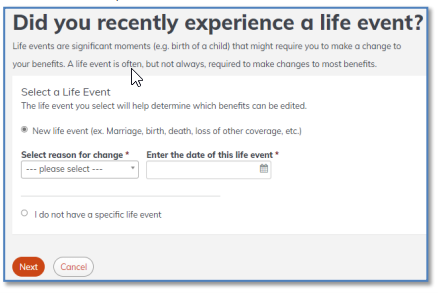
Qualifying life events (QLEs) refer to events like marriage, birth, divorce, and many others that allow a member to make a benefit change outside the member’s initial or open enrollment periods. With the launch of My Insurance Benefits, members are encouraged to enter their own QLEs in the system.
After a member submits a QLE, the HR administrator reviews the changes and supporting documentation to approve or deny the change.
In the event a member cannot complete the QLE themselves, an HR admin can initiate the QLEs.
Automatic Continuation of Life Insurance Retiree Requirement
All Employers | Life Benefits
Currently, retiring members have up to 31 days from the date their life insurance coverage terminates to take their annuity and have their life insurance automatically continue into retirement. On May 7, 2026, the rule will be updated to shorten the allowed number of days to 30 days. This will align the definition of immediate annuity and the timeframe for automatic continuation of both life and health insurance into retirement. This change only impacts retirees who take an immediate (within 30 days) WRS retirement benefit. Terminating employees who will not begin an immediate WRS retirement benefit will still have 31 days from the date their coverage terminates to file a Group Life Insurance Continuation Application (ET-2154).
Changes to Billing Cycles
Local Employers | Life and Health Benefits
Currently, local employers are invoiced for life and health insurance premiums one month ahead of coverage. After the transition to My Insurance Benefits, local employers will pay life and health insurance premiums for the month of coverage. This means consistent timeframes across benefits for employer invoicing. The benefit to this change is less confusion. Health, life and income continuation insurance premiums will be deducted for the same month as the benefit coverage, which will make it easier for members to understand their deductions. State employers already pay the month of coverage, so they won’t see any changes. The payment due dates will also synch up with health, life and ICI premiums due on the 24th of each month (unless the 24th is on a weekend or a bank holiday).
Employer Transaction Application and Demonstration Video Available
Local & Non-STAR Employers | All Insurance Benefits
The Employer Transaction Application (ETA) is now available for most employers to update employee demographic and eligibility information, new hires, and employee terminations*. You are required to make these updates, and ensuring your employees’ information is accurate will make for a smoother transition to My Insurance Benefits next year. If you missed the demonstration that walked through ETA functionality earlier this month, you may watch it here:
View the Local Demo
If you did not receive an email inviting you into the ETA to proceed with updates, expect to receive further directions soon.
*Note: ETA data validations will prevent you from entering terminations that are more than 90 days in the past. If you have a termination that is older than the 90-day limit, use this Term 90+ Days template to enter your employee information, and email it to ETFSMBIASEmployerSetupQuestions@etf.wi.gov. ETF staff will then key these transactions.
Introducing the My Benefits Employer News Index
All Employers | All Insurance Benefits
A new webpage is now available to help IAS Program stakeholders quickly find information shared in ETF’s monthly My Benefits Employer News. The My Benefits Employer News Index catalogues all articles by topic—System Benefits & Features, Future State Processes & Guidance, Policy Changes, and Talking Points—making it easier to locate the information most relevant to your team.
My Benefits Marketing Toolkit
All Employers | All Insurance Benefits
Utilize these updated, ready-to-use resources to help promote the new My Benefits system to your employees. The My Benefits marketing toolkit includes materials such as handouts, posters, PowerPoint slides, and web banners for intranet sites and social media platforms.
Frequent Questions
All Employers | All Benefits
Q: Will all HR administrators need to have an email with the @wisconsin.gov extension to use My Insurance Benefits?
A: Yes. Each HR administrator will need to complete the ETF Online Access Security Agreement – IAS (ET-8928i). Once submitted, they will receive an Identity Access Management (IAM) ID. HR administrators will use the IAM ID to log into the employer portal. Their username is their IAMID@wisconsin.gov.
Q: If an employer has more than one HR administrator, will all of them see all the tasks on the to-do list (learn more about the to-do list)?
A: What an HR administrator is able to see in the system is based on their permission level. Everyone with the same access to the same organization will see the same tasks.
All Employers | All Benefits
Talking Points to Share with Your Staff
The following article will appear in the next WRS News Online for employees. Please share the newsletter with your staff when you receive it next month:
My Insurance Benefits Coming Soon
After its successful launch with the Universities of Wisconsin last summer, My Insurance Benefits will soon be rolled out to the rest of active state and local employees.
My Insurance Benefits is an online application that allows employees to securely manage their ETF-administered insurance benefits 24/7.
With My Insurance Benefits, employees can enroll in, change, or review their current insurance information, including health, dental, vision, accident, income continuation, and life insurance. State employees can also manage their pre-tax savings accounts using My Insurance Benefits.
Note: Long-term care insurance is not included in the application.
Active employees will access My Insurance Benefits through the My Benefits portal. This is the same portal where employees currently log in to get PDF copies of their WRS Annual Statement of Benefits.
Watch for future updates on My Insurance Benefits from your employer’s human resources office or benefits specialist.
You may also get the latest news from ETF by subscribing to ETF E-mail Updates. Enter your email address, follow the instructions provided, and be sure to check the box for “Member Updates.”
Talking Points to Share with Your Staff
All Employers | All Benefits
- When My Insurance Benefits is live in 2026, employees can enroll in, change, or review their current insurance information, including health, dental, vision, accident, income continuation, and life insurance.
- The 2026 WRS Annual Statement of Benefits will deliver in late spring. Employees may log in to get PDF copies of previous WRS Annual Statement of Benefits through the My Benefits portal.
ETF will continue to provide more detail on the above, communicate additional changes, and ensure you are prepared for the transition.
Local Employers: If you need support related to My Insurance Benefits, please contact ETF’s employer liaisons at ETFSMBIASEmployerSetupQuestions@etf.wi.gov.
State Employers: If you need support related to My Insurance Benefits, please contact the IAS Project Manager with whom you currently work.
|