|
Having trouble viewing this email? View it as a Web page.
 October 28, 2025
In This Issue
All Employers | All Insurance Benefits
Welcome to My Benefits Employer News, a newsletter to keep you informed about ETF’s new insurance administration system. Save time by only reading the articles relevant to you—the first line of each article identifies which employers and benefits the article applies to. View previous issues.
All Employers | All Insurance Benefits
As employees approach retirement or separation, employers will need to guide them on a few topics related to My Insurance Benefits.
-
When an employer submits terminations through the Employer Transaction Application, those employees will no longer be able to access My Insurance Benefits. Retirees who continue their insurance benefits will have a few weeks of interrupted access to the system before they are able to log in again as a retiree. ETF encourages employers to provide terminating employees a copy of the Employee Benefit Summary Report from My Insurance Benefits or recommend they download it themselves before their last day.
-
Retiring employees should ensure their personal email address is saved in My Insurance Benefits so they can access the system in the future as a retiree. Within My Insurance Benefits, retirees will be able to view their enrollments and make some changes in the system, such as canceling or reducing their health and supplemental benefits coverage, and editing their profile information. They may also receive reminder messages through My Insurance Benefits if their email address is up to date.
-
Retirees automatically continue their ETF-administered health and life insurance. State employers, please note that you play a key role in submitting sick leave certifications promptly to ensure a smooth transition to the retiree’s retirement health insurance. Once My Insurance Benefits goes live for all employers in July 2026, supplemental dental and supplemental vision will continue automatically into retirement as well. Retired employees who wish to newly enroll in supplemental insurance during open enrollment will complete new enrollment forms, which will be available at the launch.
-
Starting July 1, 2026, ETF’s new COBRA administrator Voya will issue COBRA notifications to those who become eligible when they terminate or experience a qualifying life event, including those terminated for retirement. Please advise those retiring that while they may receive COBRA notices, they should not elect COBRA if they are continuing benefits with ETF as a retiree.
-
Once My Insurance Benefits goes live, the surcharge that a limited number of local annuitant retirees currently pay on their health insurance will no longer apply.
Identity Proofing Offers Extra Layer of Security to My Benefits
All Employers | All Benefits
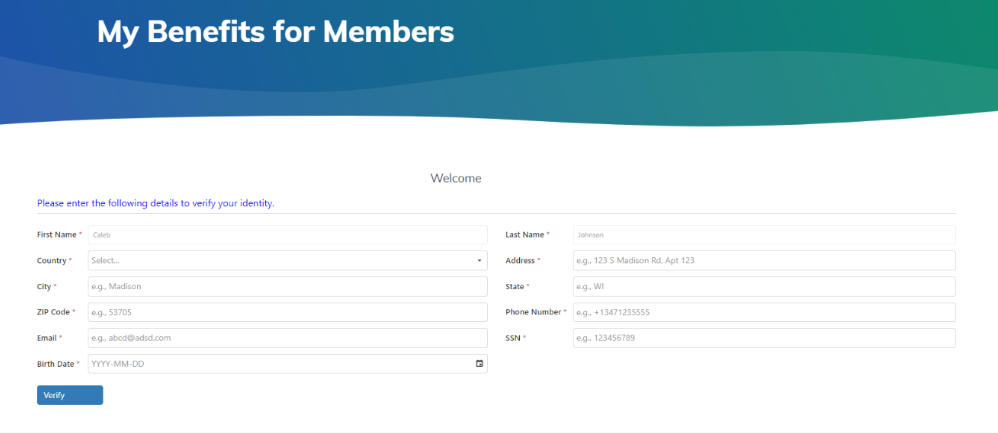
As ETF opens up the My Benefits portal for members to access My Insurance Benefits, ETF is ensuring that safeguarding member data and security is paramount. One industry-acclaimed level of security is the identity verification process ETF members will go through the first time they enter My Benefits with their MyWisconsin ID. This identity proofing is the process of verifying that an individual is who they claim to be. Members will fill out fields on the identity verification screen (above).
In a small number of cases, the data entered may require an additional step to prove an individual’s identity, typically by assessing and validating various forms of official identification. This extra step does something that security codes and password requirements cannot — it proves who the user is. In very limited instances, some members will also be asked to contact ETF’s identity verification team to complete the process. Identity verification plays a crucial role in mitigating identity theft, account takeover, and other fraudulent activities.
Customer Experience Improvement to My Insurance Benefits
All Employers | All Benefits
September’s My Benefits Employer News reported that benefit plan detail integration within My Insurance Benefits was an area where member survey feedback encouraged improvements. To enhance this experience, ETF worked with our vendor partner to add new content directing members to the specific page on the ETF website where they can access detailed benefits information. This update was made just before open enrollment in My Insurance Benefits began for approximately the 40,000 Universities of Wisconsin employees. We will continue to monitor member feedback with an aim for continuous improvement.
Fill Out New ET-8928I for Future Access to Securian’s New Billing Application
All Employers | Life Insurance & Accident Plan Benefits
Beginning in August 2026, Securian will use their new LifeBenefitsExtra (LBE) system to bill employers for life insurance and the Accident Plan. ETF updated the ETF Online Access Security Agreement – IAS (ET-8928i) form including new check boxes for employer access for life and Accident Plan billing. New employer agents who will need access to view and pay future Securian bills should complete the updated form and return it to ETF. Securian will provide access by the end of July. As you consider who from your organization should have this access and other insurance administration system access, note that it is a best practice to have more than one individual listed for times when the primary individual is out of office and who you would send to training to use the system. Each individual requesting access must complete a new form.
Introducing Release Notes for My Insurance Benefits and the ETA
All Employers | All Insurance Benefits
As part of our ongoing modernization program, we’re committed to continually improving the My Insurance Benefits experience for employers. To help you stay informed, monthly Release Notes are now available and provide a quick overview of recent updates, enhancements, and fixes made to My Insurance Benefits, the Employer Transaction Application and other tools you will use with the new insurance administration system.
Checking the Release Notes each month ensures you’re aware of new features and improvements that can make managing benefits easier and more efficient. Visit the Release Notes page to see what’s new and stay up to date on the evolution of My Insurance Benefits and other modernization tools.
Frequent Questions
All Employers | All Insurance Benefits
Q: Will both employees and employers be using My Insurance Benefits?
A: Yes, My Insurance Benefits offers both a member view and an HR Administrator view. Employers will interact with their employees’ insurance benefits in the HR administrator view and also be able to view My Insurance Benefits as a member does.
Q: Will My Insurance Benefits or the Employer Transaction Application (ETA) replace the need to update the WRS account for Social Security number updates on the correction form?
A: Employers will submit any updates for employees in both the WRS Account Update Application (if they are a WRS-participating employer) and the ETA. The two systems are separate, and employee updates must be made in both. ETA will not replace updates in the WRS account update application or the Employee Identification Correction (ET-2810) form.
Talking Points to Share with Your Staff
All Employers | All Insurance Benefits
-
When you login to My Benefits for the first time, you will confirm your identity by providing demographic information. Some members may also be required to validate with official identification. These identity proofing steps ensure that ETF is securing your member data.
-
When adding a new dependent in My Insurance Benefits, the system will allow you to upload the required verification documents.
ETF will continue to provide more detail on the above, communicate additional changes, and ensure you are prepared for the transition.
Local Employers: If you need support related to My Insurance Benefits, please contact ETF’s employer liaisons at ETFSMBIASEmployerSetupQuestions@etf.wi.gov.
State Employers: If you need support related to My Insurance Benefits, please contact the IAS Project Manager with whom you currently work.
|