|
Having trouble viewing this email? View it as a Web page.
 July 15, 2025
In This Issue
All Employers | All Insurance Benefits
Welcome to My Benefits Employer News, a newsletter to keep you informed about ETF’s new insurance administration system. Save time by only reading the articles relevant to you—the first line of each article identifies which employers and benefits the article applies to. View previous issues.
All Employers | All Insurance Benefits
The Universities of Wisconsin (UWs) HR administrators began working in My Insurance Benefits in mid-June verifying employee data and keeping the system up to date with changes. On July 1, employees of the UWs began logging in to My Benefits and interacted with My Insurance Benefits for the first time. Though there were a few issues, the launch went smoothly. ETF logged all reported issues and will analyze them to improve the outcomes for the 2026 all-employer go live. The knowledge and experience gained during this effort will be valuable as we move forward to focus on the launch of My Insurance Benefits for the remaining employers.
Targeted Messaging Creates Additional Ways to
Communicate with Members
All Employers | All Insurance Benefits
When it’s launched for all employers in 2026, My Insurance Benefits will offer new ways for members to engage with their coverage, and targeted messaging is one of the features aimed at boosting that customer experience. Targeted messaging includes a mix of automated and on-demand messages that provide an additional way to push messages to members. For context, here are a few examples of automated messages configured in the system:
- A reminder that required document(s) were not received in My Insurance Benefits,
- A proactive message about Medicare eligibility and your ETF health benefits triggered 90 days before the employee’s or dependent’s 65th birthday, and
- A reminder that a member’s benefits enrollment window will end in 5 days.
HR Administrators and ETF teams will be able to push on-demand messages to members, as well.
Targeted messaging is not a replacement for normal methods of communicating with members, primarily because the messages come from a “do not reply” email. It also isn’t available to members who do not have an email address in My Insurance Benefits, so it is not a replacement for required communications.
Employer Transaction Application Available in Fall 2025
All Employers | All Insurance Benefits
ETF continues to request that employers track updates to employee demographic and eligibility information, new hires, and employee terminations for future input in the Employer Transaction Application (ETA). ETF’s development team is working on new features for the ETA to improve your experience with the tool. We anticipate reopening the ETA to employers this fall to provide an extended timeline for employers to make employee updates before the 2026 launch. We will share more details on the ETA timeline and its new features soon.
Members Use of My Statement of Benefits Grows
All Employers | All Insurance Benefits
More than 21,000 ETF members have logged into ETF’s My Benefits portal to view their balances through the My Statement of Benefits application since it launched in March 2025. Users are signing up at a rate of approximately 500 per week. To access the app, members create a MyWisconsin ID. My Insurance Benefits member users will also login through the My Benefits portal using their MyWisconsin ID.
MyWisconsin ID began offering a voice multi-factor authentication option to users. Those who choose this option will receive a voice phone call message offering a code to use for authentication when logging in. This is a great option for people who do not have a smartphone and for individuals who are visually impaired.
Frequent Questions
All Employers | All Insurance Benefits
Q: Is there a way to see what my employee’s experience will be in My Insurance Benefits?
A: Yes. ETF recently posted a My Insurance Benefits video to illustrate the employee experience.
Q: How will dependent verification change for employees who enroll dependents with My Insurance Benefits?
A: When your organization begins using My Insurance Benefits, employees will provide verification documents for all dependents. Also, rather than using the Employer Attestation for Documentation Received (ET-1908) to verify the employer review of the required documents as is done today, employees will use the system’s document upload feature to upload the appropriate documents into My Insurance Benefits. Employees of the UWs began providing documents for dependent verification through My Insurance Benefits with the UWs July 1 launch.
Website Updates for the My Insurance Benefits UWs Launch
All Employers | All Insurance Benefits
For the July 1 launch of My Insurance Benefits for employees of the UWs, a few updates were made to the ETF website to support the new experience. These changes are designed to improve navigation and make it easier for users to access the tools they need.
“My Info” is Now “My Benefits”
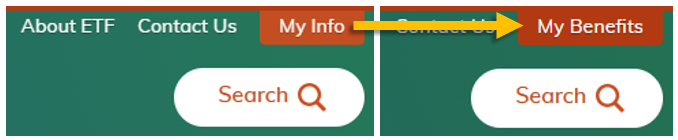 One of the most visible changes is that the “My Info” tab in the top right corner of the ETF website is now labeled “My Benefits.” Employees of the UWs will use this page to sign in and access the My Insurance Benefits application.
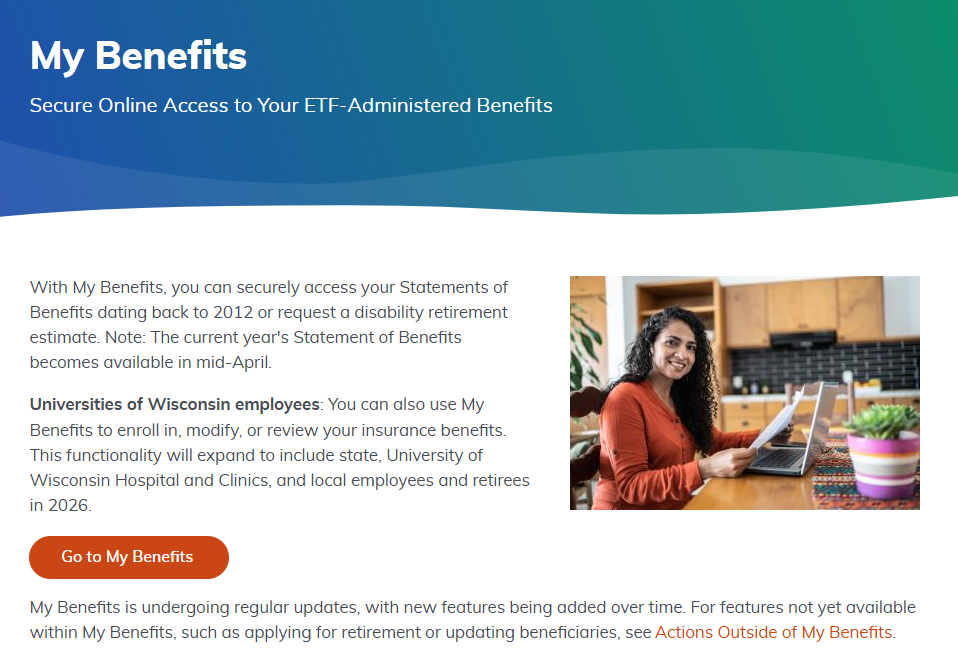
The page also includes a note clarifying that, for now, only employees of the UWs will use the system to enroll in, modify, or review their insurance benefits. Other employees can still use My Benefits to access their Statements of Benefits. Access to My Insurance Benefits will expand to all members in 2026.
 Updated Help Page
The My Benefits Help page has been refreshed with new resources to support users. These include a short member experience video demonstrating the new application, as well as the My Insurance Benefits User Guide (ET-1109), which provides detailed instructions for getting started.
These tools are designed to help employees of the UWs navigate the new system and will continue to be available when the application becomes accessible to all members in the future.
Talking Points to Share with Your Staff
All Employers | All Insurance Benefits
- To see your 2025 Annual Statement of Benefits, login to ETF’s My Benefits.
- You can quickly navigate to ETF’s My Benefits portal from “My Benefits” button that appears at the upper-right corner of ETF’s website.
ETF will continue to provide more detail on the above, communicate additional changes, and ensure you are prepared for the transition.
Local Employers: If you need support related to My Insurance Benefits, please contact ETF’s employer liaisons at ETFSMBIASEmployerSetupQuestions@etf.wi.gov.
State Employers: If you need support related to My Insurance Benefits, please contact the IAS Project Manager with whom you currently work.
|