Time
to file your quarterly report (and make sure your 2018 rates are correct)!
This is a reminder to file your Quarterly Report and premiums
(if you haven't already) which are due for the 4th quarter (October 1, 2017 –
December 31, 2017) no later than
January 31, 2018.
Everyone must file a report — even if you don't have any hours to report or premiums due.
If you don't file your report by the deadline, a late filing penalty (and possible interest charges) will be assessed. To file, just enter "0" for worker hours and payroll.
Did you update your rates for 2018 yet? Did you let your payroll company know your new rates?
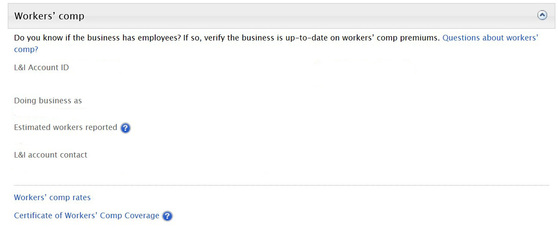
L&I sent each account a new rate notice for 2018. Need to look up your rates again? Go to L&I's Verify application and search by your business name, account ID, or UBI number. Click on the links under Workers' comp to find your rates, risk classifications, experience factor, or print a copy of your Certificate of Coverage. You can also save this page as a favorite bookmark and link right to your business in the future.
 File your quarterly report
Go to www.Lni.wa.gov/QuarterlyReports and file your quarterly report now.
Did you know?
- Filing online at www.Lni.wa.gov/QuickFile is quick and easy. You can file your quarterly report in 3 minutes or less, even from your mobile device.
- You can also manage your claims, mail preferences, or look up previous quarterly reports filed at https://secure.lni.wa.gov/.
- When you pay online, you can select the payment date.
(If you already filed your report, please disregard this email and thank you for filing.)
Need to close your account? Please fill out the 'Please close this account' section of your quarterly report. If you've already closed your account, you will need to unsubscribe from these email reminders.
Want to make a payment? If you owe money and want to make a payment online, grab your Monthly Account Statement and go to www.lni.wa.gov/main/makeapayment/.
New to online filing? Welcome!
Online filing is quick and easy, and here are some tips to help you file successfully.
-
Watch a tutorial and see step by step how easy it is to file online.
- Don't wait until the deadline — file early. If you have any issues or questions, you won't be pressured by time constraints.
-
Look up your Account ID or UBI number.
- There are multiple payment options. You can schedule your payment in advance (up until the deadline), mail in your check, or pay with a credit card.
- Don't forget to hit the submit button, and then print a copy of your report for your records.
|



