|
Our records indicate that you or someone associated with this email address purchased a 2026 summer Puget Sound crab catch record card.
If you did not catch any Dungeness crab, you still must submit a report by Thursday, Oct. 1.
Failure to report will result in a $10 penalty added to the purchase of your 2027 Puget Sound Dungeness crab endorsement.
Please do not reply to this email to report your harvest. See instructions below on how to submit your crab catch record card information.
Thank you for taking the time to report. The information you provide is critical to the management of this important resource.
How do I report?
There are multiple ways to report:
-
Online through the WILD system — must be completed by Thursday, Oct. 1.
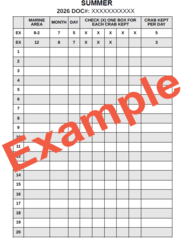
- To report online you will need to log in to your WILD account. You will also need your crab catch record card document number. This is located at the top of the document just above the barcode (see image).
- By mailing your summer Dungeness crab catch record card, postmarked by Thursday, Oct. 1, to:
WDFW CRC Unit
P.O. Box 43142
Olympia, WA 98504-3142
3. Mobile licensing customers, must be completed by Thursday, Oct. 1:
-
For mobile licensing customers who’ve harvested crab this summer: The MyWDFW and Fish Washington® mobile applications features functionality to ensure crabbers can report their catch directly while in the field, using the following steps. If mobile licensing customers have already completed these steps, no additional action is required.
- Immediately upon harvesting crab, navigate to the “Home” page in the MyWDFW mobile app.
- Select the “Add catch/harvest” section at the top of the home page.
- Scroll to find the correct associated active catch card and select “Add catch.”
- Fill out the required information and click submit. Note: WDFW reminds eCRC users to confirm their submission once they return to cell service or are connected to Wi-Fi to ensure they have successfully submitted any catch they reported while offline. While the Fish Washington mobile app syncs automatically when service returns, MyWDFW users must be in service and toggle “Field Mode” off via the app’s upper‑right menu. To see reported catch within the MyWDFW mobile app select “View” under the catch card.
-
For mobile licensing customers who didn't harvest crab this season but have a catch record card: These licensing customers must report their catch, even if they didn’t retain any crabs. Fish Washington® mobile application customers can submit their report online. Mobile licensing customers can do this by:
- Logging into the , also referred to as WILD.
- Selecting “Harvest Reporting” on the left-hand side of the screen.
- Selecting “Summer crab” report.
- Entering catch and selecting “Submit.”
|
Problems reporting?
For problems logging into the online reporting system, contact the Licensing Division at:
Phone: 360-902-2464 (8:30 a.m. to 4:45 p.m.)
Email: licensing@dfw.wa.gov
For any other questions about reporting your catch, contact the Catch Record Card (CRC) Unit at:
Phone: 360-902-2707 (8:30 a.m. to 5 p.m.)
Email: Catch.Reporting@dfw.wa.gov.
Lost your crab catch record card?
If you don't have your crab catch record card, you'll still need to report your catch information by Thursday, Oct. 1. You can do so by emailing the information requested below to Catch.Reporting@dfw.wa.gov or by mailing the harvest report to:
WDFW CRC Unit
P.O. Box 43142
Olympia, WA 98504-3142
Provide the following information:
|