|
"Data is a precious thing and will last longer than the systems themselves."
-Tim Berners-Lee, English computer scientist best known as the inventor of the World Wide Web, the HTML markup language, the URL system, and HTTP.
Please ask your staff and coworkers to sign up for our GovDelivery notifications. This will ensure they receive the latest updates about the ESIT DMS system as well as our monthly Known Issues Document.
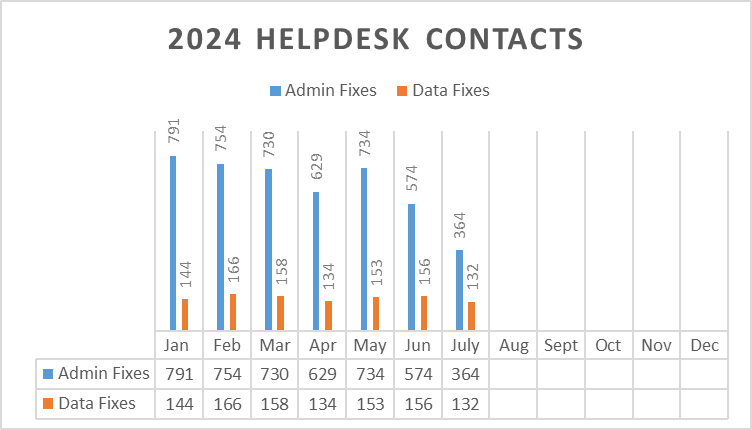
In the month of July, ESIT Help Desk staff processed a total of 761 requests:
- 132 data fixes,
- 364 administrative changes,
- 117requests to give school districts access to IFSPs,
- 148 ACORN Support related requests.
2024 Help Desk Data Fixes
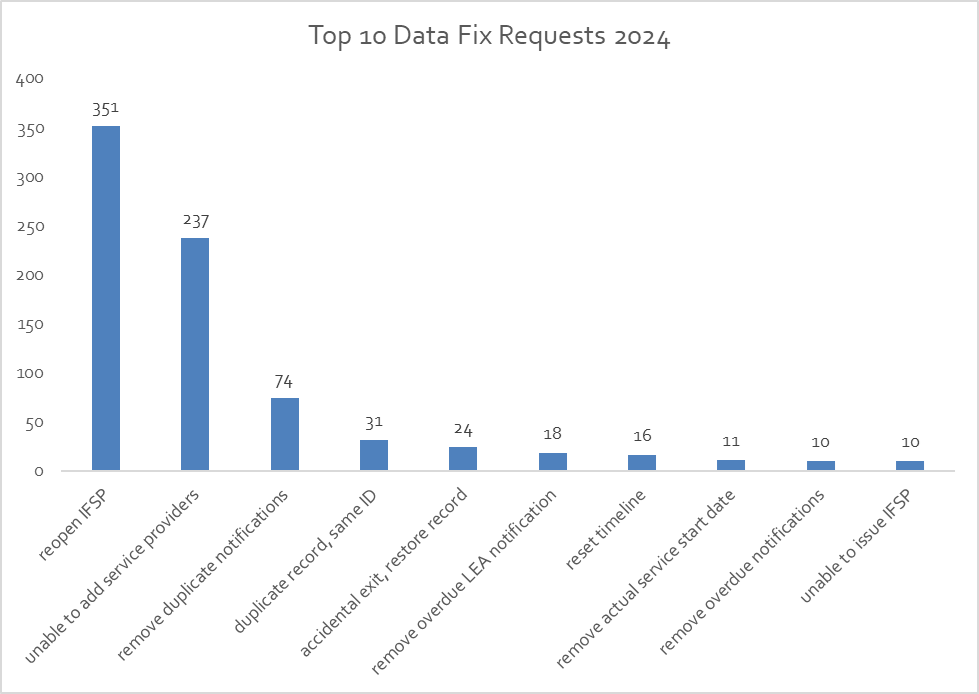
Top 10 Data Fix Requests 2024
If your program is implementing changes and you can anticipate that administrative changes in child records will be required, please notify the ESIT Help Desk ahead of time so we can anticipate the influx in requests.
As we continue with our transition from the current data system to the ACORN system, users can still use DMS messaging to reach the helpdesk team. However, we recommend using direct email for quicker responses. Your patience is greatly appreciated!
Our data fix schedule has shifted to a weekly release. Data fix requests will be addressed every Thursday morning. To ensure timely resolution, kindly submit your data fix request by Wednesday at 4 p.m. We’ll notify users once the data fixes are released, unless the fix is removing overdue or duplicate notifications. For those requests, please look at the record to see removed notifications.
We are fielding a high yield of reopening IFSP requests, so we kindly ask that you check and recheck your work before clicking that issue button. You can review your work by clicking “print IFSP” button prior to clicking the issue IFSP button. This will pull up a PDF copy for you to look closely at your work. Common reopen IFSP requests include: one or more services were not added, added an incorrect service by mistake, issued the IFSP with the wrong issuance date, changing end dates for outcomes and/or services, and spelling/grammatical errors.

T-DMS Modules
We are all eagerly anticipating the launch of our new ACORN Data System. The ESIT T-DMS modules are available as an optional training resource until we make the transition to ACORN. We previously communicated these modules were archived; however, they have been restored to the DCYF Training Portal. While the completion of T-DMS modules is optional, the ACORN self-guided training modules must be completed by system users as part of the ESIT Initial Training Requirements.
|
Updated SAW FAQ Available
An updated SAW FAQ is available on ESIT's ACORN Data Management System page. Please use this updated guide to help create your SAW account and access ACORN. The changes to the process outlined in this document will help us reduce the number of duplicate accounts in ACORN and will reduce errors with caseload migration.

ACORN Office Hours/ Mini Training Webinars
The ACORN Office Hours will conclude with the Office Hour meeting scheduled for July 26. We appreciate the engagement of Users and the input provided during the Office Hours series.
We are pleased to announce the launching of a series of Mini Training Webinars that will take place on Wednesdays from 12:30 - 1:30 p.m., beginning Wed., July 31.
The Training Webinars are going to be hosted as Zoom webinars. We will provide a 10-15 min targeted training in the beginning of our meeting and will answer any questions that were submitted by COB Tuesday of each week.
The ACORN FAQ will be updated following the Mini Training Webinars and posted to the ESIT Website.
ACORN Bugs, Glitches and Improvements
We have two forms available to submit feedback.
The first form collects bugs and glitches that users encounter while exploring the system. If you would like to report bugs or glitches, please submit these here.
The second form collects all feedback for system improvements. If you would like to submit ideas for improvements and changes, please submit these here.
|
ACORN Go-Live Date and DMS Blackout Dates
The go-live date for Phase I of ACORN, has not been set and will not be established until the final work product has been completed by the Public Consulting Group.
Supplemental activities currently under development that will support an effective launch include new system-based trainings for specific User roles, a timeline extension to increase the percentage of Users accessing the features in the training environment (sandbox), and tiered support systems post launch.
The Go-Live date will be announced through a formal GovDelivery, with ample notice for “blackout” planning to ensure timely data entry.
ACORN Trainings
These supplemental training resources are currently available on our website:
We continue to develop new training content weekly. In the upcoming weeks, we will release trainings that cover the following topics:
- Adding a Provider to the Evaluation Panel (Aug. 7),
- Acorn for Transition Service Partners.
Questions?
If you have specific questions about ACORN development and support activities, please contact ESIT Data Systems and Analysis Manager, Kim Hopkins, at Kim.Hopkins@dcyf.wa.gov.
For technical assistance with accessing and/or navigating the ACORN training environment please contact ESIT.Help@dcyf.wa.gov.
Writing a good service ticket is not only helpful for the Helpdesk staff, but also for yourself. It can save you time and frustration by getting you the right solution faster. Here are some key points to remember when emailing the help desk:
-
Provide relevant details: The more information you can provide about the issue, the easier it will be for the help desk to identify and fix it. For example, include the ChildID when available, or child name/dob when necessary. Also, mention the steps you took before encountering the issue, and the expected and actual outcomes.
-
Use screenshots: A picture is worth a thousand words. Sometimes, a screenshot can show the issue more clearly than words. You can use the Snipping Tool or the Print Screen button on your keyboard to capture a screenshot of your screen. Then, attach it to your service ticket using the Attach File option.
-
Avoid jargon: Try to use simple and clear language that anyone can understand. Avoid using acronyms or technical terms that might confuse the help desk staff. If you have to use them, make sure to explain what they mean.
We hope these tips will help you write effective service tickets that can get you the best possible response. Remember, details matter! The more details you provide, the faster and better the Helpdesk can help you.
For Assistance with ESIT DMS, email dcyf.esithelp@dcyf.wa.gov.
- This is the most efficient way to get in the queue for assistance.
- Send a description of your problem and include the child ID.
- In some cases, it may be helpful to send a screenshot.
- You may send a message directly through ESIT DMS if you do not need to attach screenshots to resolve the issue.
|