|
“Things get done only if the data we gather can inform and inspire those in a position to make a difference.” -Dr. Mike Schmoker, Author
Please ask your staff and coworkers to sign up for our GovDelivery notifications. This will ensure they receive the latest updates about the ESIT DMS system as well as our monthly Known Issues Document.
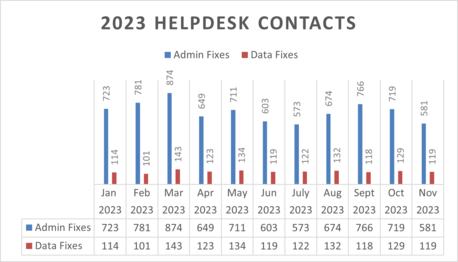
In the month of November, ESIT Help Desk staff processed:
- 119 data fixes
- 396 administrative changes
- 178 requests to give school districts access to IFSPs
2023 Help Desk Admin and Data Fixes
If your program is implementing changes and you can anticipate that administrative changes in child records will be required, please notify the ESIT Help Desk ahead of time so we can anticipate the influx in requests.
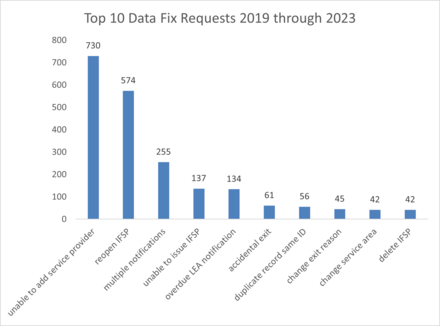
Top 10 Data Fix Requests, 2019 through 2023
ESIT’s Resource & Sustainability Team is excited to announce that we have filled the Resource Allocations Specialist position, and our newest team member is Kali Wraspir! Previously ESIT’s Data Coordinator, Kali will officially begin her new position on Fri., Dec 1. We are thrilled to have Kali’s skills, expertise and positive energy joining ESIT’s Resource & Sustainability Team and are excited for the work ahead!
Please direct any questions related to Kali’s role on the Data Systems and Analysis Team directly to ESIT Data Systems and Analysis Manager, Kim Hopkins, at kim.hopkins@dcyf.wa.gov.
Our annual December 1 Count Reports are being pulled on December 18. We are running the reports a little later than we have done in previous years to accommodate the DMS outages at the beginning of the month. Please ensure that all data entry has been completed by COB, Dec. 17, so that we can get an accurate count for December 1.
If you have questions or concerns, please reach out to ESIT Data Systems and Analysis Manager, Kim Hopkins, at kim.hopkins@dcyf.wa.gov.
Please note that our average turnaround time for your request might take up to 24 business hours. Send Help Desk requests directly to dcyf.esithelp@dcyf.wa.gov to ensure that we can answer your service tickets in the order received. As a heads up, our staff reallocation might impact our response time.
During peak hours or high-activity periods, a surge in the number of users accessing the system can lead to increased demand on the system’s performance. We tend to see surges around the tenth of the month and at the end of the month. We understand the frustration that this causes at critical data entry points in the month but want you to be aware that this is happening more frequently and is more widespread.
We are aware that some users may experience unexpected logouts from our data system without a clear indicator. If you are in a record and typical actions are not functional, you are most likely logged out. Please log out, close your browser and reopen a new Edge browser tab to log back in.
Users with administrative roles in the DMS (Lead FRC, Agency Manager, Lead Agency Manager) can create new user accounts in the DMS. Once the account is created in the respective organization, please contact the Help Desk to activate the account. The Help Desk Coordinator will send out a temporary password to the email associated with the new account and the new user will be able to access the DMS production environment immediately. If you need guidance on how to create user accounts, please contact the Help Desk directly at dcyf.esithelp@dcyf.wa.gov.
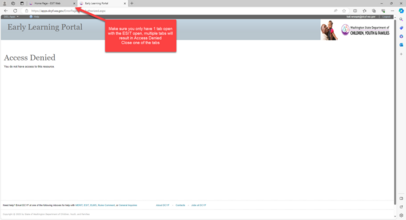
As we continue to work in ESIT DMS, we have been receiving an increase of service tickets that users are experiencing the access denied page when logging in. If this occurs, please close the Edge browser, and reopen one new tab. Use this URL to log in: https://apps.dcyf.wa.gov.
Note: Multiple open Early Learning Portal tabs will result in Access Denied. Close other open portal tabs and refresh page.
The compliance period for FY 2023 is from January 1 - March 31, 2024. During this time, we will pull reports from Indicator 1, 7 and 8 (compliance indicators) from the DMS and vet them for accurate data entry. Users can be proactive in anticipation of the upcoming compliance period and ensure that all data is entered accurately and in a timely manner. If data fixes are needed, these should be requested as soon as possible to allow time for the work to be completed prior to the beginning of our compliance monitoring work. Users have access to the federal indicator reports in the DMS and can pull the data at any time. For assistance with accessing the reports, please contact the ESIT Help Desk.
Writing a good service ticket is not only helpful for the help desk staff, but also for yourself. It can save you time and frustration by getting you the right solution faster. Here are some key points to remember when emailing the help desk:
- Provide relevant details: The more information you can provide about the issue, the easier it will be for the help desk to identify and fix it. For example, include the ChildID when available, or child name/dob when necessary. Also, mention the steps you took before encountering the issue, and the expected and actual outcomes.
- Use screenshots: A picture is worth a thousand words. Sometimes, a screenshot can show the issue more clearly than words. You can use the Snipping Tool or the Print Screen button on your keyboard to capture a screenshot of your screen. Then, attach it to your service ticket using the Attach File option.
- Avoid jargon: Try to use simple and clear language that anyone can understand. Avoid using acronyms or technical terms that might confuse the help desk staff. If you have to use them, make sure to explain what they mean.
We hope these tips will help you write effective service tickets that can get you the best possible response from the help desk. Remember, details matter! The more details you provide, the faster and better the help desk can help you.
For Assistance with ESIT DMS, email dcyf.esithelp@dcyf.wa.gov.
- This is the most efficient way to get in the queue for assistance.
- Send a description of your problem and include the child ID.
- In some cases, it may be helpful to send a screenshot.
- You may send a message directly through ESIT DMS if you do not need to attach screenshots to resolve the issue.
|