|
"Maybe stories are just data with a soul."
- Brene Brown, American professor, author and podcast host
Please ask your staff and coworkers to sign up for our GovDelivery notifications. This will ensure they receive the latest updates about the ESIT DMS system as well as our monthly Known Issues Document.
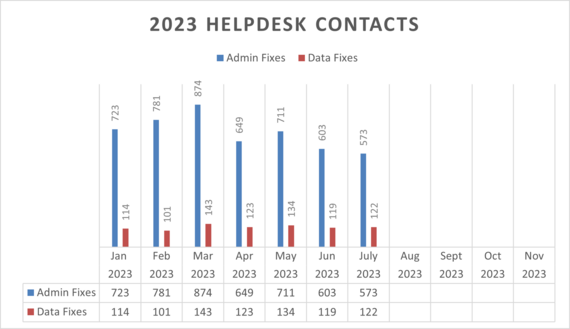
In the month of July 2023, ESIT Help Desk staff processed:
- 122 data fixes
- 425 administrative changes
- 148 requests to give school districts access to IFSPs
2023 Help Desk Admin and Data Fixes
If your program is implementing changes and you can anticipate that administrative changes in child records will be required, please notify the ESIT Help Desk ahead of time so we can anticipate the influx in requests.
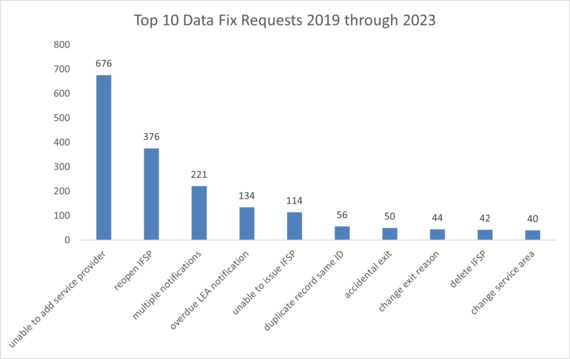
Top 10 Data Fix Requests, 2019 through 2023
Initial Launch Date Updated
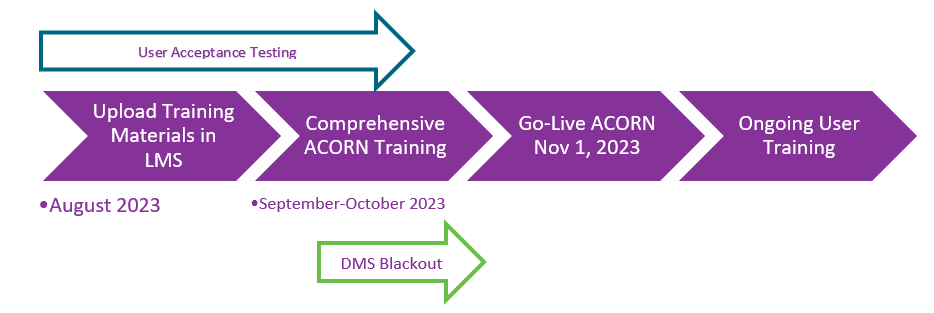
With support from the Public Consulting Group, DCYF IT Leaders, and the ESIT State Leadership Team, we have evaluated progress made to date with key ACORN Migration milestones, reviewed and analyzed the remaining work yet to be completed on this critically important initiative. As a result, consistent with recent recommendations received from the State Interagency Coordinating Council’s Data Committee, we have moved the launch date to November 1. Prior to the launch date, we will work on data migration and testing. User access to the ESIT DMS will be turned off at the close of business October 26th, followed by the DMS Blackout from Oct 27th through October 31, 2023.
Graphic Highlighting the 2023 ACORN Timeline: from Finalization, to Development, to Training.
With this timeline, we will be able to provide comprehensive ACORN Training Sessions to all Users in the month of October and provide direct access to the ACORN training (sandbox) environment to support interactive, explorative, relational learning activities focused on the system and its functionality. Additionally, we will have the time necessary to effectively test and verify Data Exchanges and test and validate the migrated data and companion reporting functions.
If you have questions, please contact ESIT Data Systems and Analysis Manager, Kim Hopkins, at kim.hopkins@dcyf.wa.gov.
Instructions for DMS Users to Reactivate a Child Record
Create the Referral and Child Record
- Click Create New Referral on the Referrals tab of the Main Dashboard.
- Leave the Initial contact date as it is.
- If you belong to more than one agency, select the applicable one from the Agency list.
Choose a Referral source of Parent.
- Select a Contact method
- Select a Reason for referral.
- Enter data in the Primary Contact and Child sections. Important: In the Primary Contact Section, make sure you select something for Relation to Child.
- Click Continue to Match.
- The Child Match screen now displays a possible duplicate that has been transitioned out. You can tell by the Reactivate icon ( ) next to it.
- Rather than continuing with the current referral and creating a duplicate, simply click the Reactivate icon next to the child’s name.
- Click OK on the resulting screen. The system closes the window, saves the record, and takes you to the Child Info tab of the Child Dashboard.
- Close the dashboard tab for that child.
If the child does not have an IFSP on file, please contact the Help Desk to update the referral date and reset the timelines.
If a child re-enters services and did not previously have an IFSP on file, we need to reset the timelines, so all events populate correctly. Please contact the Help Desk with the referral date and the childID so that we can correct the date in the child’s record. For all other children, timelines do not need to be reset. The FRC should issue an annual IFSP and the timeline will automatically populate the correct dates.
When reporting errors to the Help Desk, please include the child ID or the child’s DOB and the first two initials of the child’s first and last name in the subject line of your email. Screenshots are also helpful to problem-solve issues where error messages are displayed. Inquiries to the Help Desk email inbox and messages through the DMS have the fastest turn-around.
Please note that our average turnaround time for your request is 24 business hours. As always, we do appreciate your patience.
For Assistance with ESIT DMS, email esit.help@dcyf.wa.gov.
- This is the most efficient way to get in the queue for assistance.
- Send a description of your problem and include the child ID.
- In some cases, it may be helpful to send a screenshot.
- You may send a message directly through ESIT DMS if you do not need to attach screenshots to resolve the issue.
|