|
“It is a capital mistake to theorize before one has data.”
- Sherlock Holmes
Please ask your staff and coworkers to sign up for our GovDelivery notifications. This will ensure they receive the latest updates about the ESIT DMS system as well as our monthly Known Issues Document.
In the month of April 2023 ESIT Help Desk staff processed:
- 123 data fixes
- 377 administrative changes
- 265 requests to give school districts access to IFSPs
2023 Help Desk Admin and Data Fixes
If your program is implementing changes and you can anticipate that administrative changes in child records will be required, please notify the ESIT Help Desk ahead of time so we can anticipate the influx in requests.
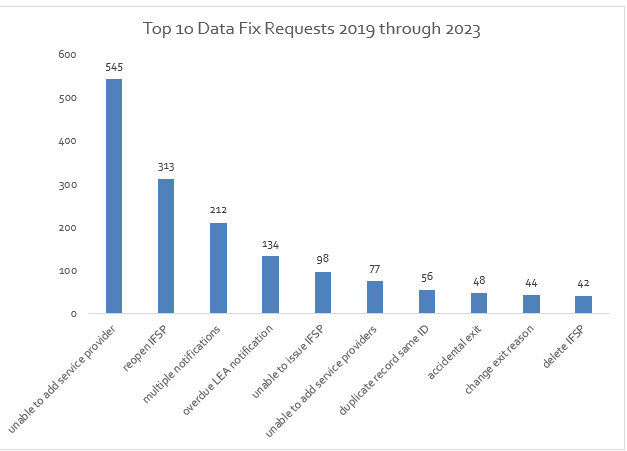
Top 10 Data Fix Requests, 2019 through 2023
The Help Desk continues to see a high rate of reactivations occurring a month or more after the referral date. Please reactivate a record as soon as the referral is received. The 45-day timeline applies to all referrals. Failing to reactivate the file on time will impact your data entry and compliance.
You can edit child information in the DMS
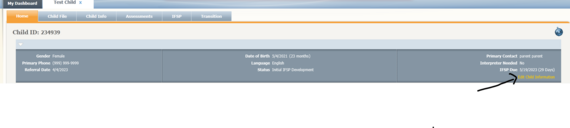
To edit a child’s name, click edit child information at the top right-hand side of the home page of the record. If there is not an issued IFSP in the record, you can correct the date of birth as well! If there is an IFSP on file and the date of birth needs correcting, please reach out the help desk for assistance.

You can Print an IFSP prior to issuing the IFSP
When creating an IFSP, the PDF print version will not reflect any changes made to the IFSP after the initial information is applied. The only way to correct the PDF print version of an IFSP is to discard (delete) the IFSP and create a new IFSP. We are not able to correct PDFs through a data fix.
To verify the PDF print version is correct before issuing the IFSP, please click on the PRINT option in the Summary Subtab. You can review a Draft Version before the IFSP is issued to identify any corrections needed.
|

For Assistance with ESIT DMS, email esit.help@dcyf.wa.gov.
- This is the most efficient way to get in the queue for assistance.
- Send a description of your problem and include the child ID.
- In some cases, it may be helpful to send a screenshot.
- You may send a message directly through ESIT DMS if you do not need to attach screenshots to resolve the issue.
|