|
English | Español | አማርኛ | 中文 | 한국어 | Tiếng Việt | العربية | فارسی | اردو
The Feather Report
November 6, 2026
Photo of the Week
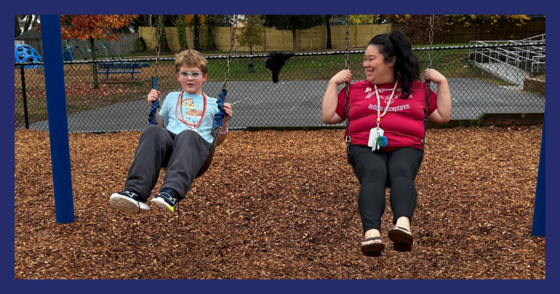 We are swinging into Quarter 2 at Westlawn! Teachers and students made the most of this shortened week, including taking the time to get outside.
Leadership Ledger
Westlawn Families,
What a wonderful, though shortened, week it has been for our Westlawn Eagles! With a little extra time to catch our breath, I wanted to share a few news items and upcoming events with our community, along with this week’s Zoom into the Room classroom feature: Ms. Muniz’s 3rd grade! It is always a joy to see the learning, collaboration, and excitement happening across our school.
As we head further into fall, we are beginning to see illnesses such as the flu flare up in our community. We encourage everyone who is eligible to get vaccinated to help keep our students, staff, and families healthy throughout the fall and winter months. We are also grateful for the wonderful turnout at Tuesday’s bake sale supporting our 6th grade students as they raise money for an exciting field trip. The treats were delicious, and it was such a pleasure to see so many Eagles families and students together on Election Day!
Looking ahead, we are excited to kick off the Kids Heart Challenge in support of the American Heart Association from November 9 through December 5. More information is included below. A special thank-you to our amazing PTA and PTA liaison, Ms. Michelle White, for organizing this opportunity for our students to learn, participate, and make a difference.
Thank you, as always, for the incredible partnership and support you show our school. I am so proud of our Westlawn community and grateful for the care we continue to show one another!
In partnership,
Christoph Hill, Stephanie Carpenter, and Erin Theiss
Proud Principals
News
Sign Up for the American Heart Association’s Kids Heart Challenge
Hello, families! Westlawn’s Kids Heart Challenge benefiting the American Heart Association (AHA) begins November 9, and additional information will be sent home with students that day. Students can sign up, complete learning modules, and earn prizes.
Participating students can sign the AHA poster with Sharpies, and our top three fundraisers will get to add googly eyes in the Health Room! Donations are due December 5, when the challenge culminates at our Free Health and Wellness Fair. Sign up today!
Thank you for supporting the Kids Heart Challenge!
Help Us Stay Healthy this Season
We have noticed an uptick in the amount of illness at Westlawn, including flu. Here’s how you can help our community stay healthy:
- Get vaccinated if you are eligible. FCPS maintains a list of free vaccine clinics. There are some for students only and others for the entire family. Local businesses, such as Target, CVS, and Walgreens, are also able to offer vaccines. Many of these businesses also offer coupons or discounts on merchandise for using their in-store pharmacies.
- If your child is sick, please keep them at home. FCPS maintains a list of typical student illnesses and whether or not students with those symptoms should be absent. The list is monitored and updated periodically.
- Consider masks. A sick child wearing a mask is much less likely to spread germs as quickly or as far as an unmasked one.
- Encourage hand washing and (possibly) changing clothes. When your child comes home from school, encourage them to wash their hands thoroughly with soap and water. You might also want them to change their clothes, especially if they are coming from a classroom or grade level with significant absences. (Mr. Hill will message impacted families with this information if warranted.)
- Open windows and spend time outside. Illness spreads more easily in the fall and winter because more people are inside, with stale, shared air. Opening windows when the weather allows is an easy way to help bring fresher, cleaner air to your family, and to help your child stay healthy. Also: it is a folk legend that cold air causes colds. That is not medically accurate. Viruses cause colds.
- If possible, use an air purifier, or change your air purifier’s filter. We know these can be expensive. Some of them are eligible for FSA/HSA reimbursement, especially if connected to preventing or treating a pre-existing illness, such as allergies. Talk with your healthcare provider about getting the documentation you need to get a reimbursement if you or your child qualifies.
Reminder: Submit Outstanding Westlawn Staff Members for the Fancy FCPS Awards!
Each year we are able to nominate staff members for Outstanding Employee Awards. Nominees from our school go on to compete against nominees in the same category from the other elementary, middle, and high schools that make up the Falls Church and McLean pyramids. Then those winners go on to compete against the winners from the other 5 Regions and special zones. The ultimate winner in each category is honored at a very swanky evening event.
To nominate staff member(s), simply fill out a Google Form with a brief paragraph or two about why you think that person deserves to win the award. Ms. Theiss will read all nominations and then work with nominees to gather evidence. A description about which staff members belong in each category, along with the link to the nomination form, is available on our website. Nominations are due by November 10.
Reminder: Summit K12 for Multilingual Learners
Most Westlawn students who are multilingual learners once again have access to Summit K12, a computer program that helps students with their English proficiency. If your child qualifies for this program, their multilingual learner teacher will reach out via TalkingPoints.
Summit K12 was critical to the success that our multilingual learners had last year on the WIDA exam. It gave them extra opportunities to practice reading, writing, listening, and speaking. Additionally, Summit K12 comes with access for the whole family, so adults can also practice alongside their child!
If you have any questions about Summit K12, send a message to your child’s teacher.
FCPS News
In case you missed it in FCPS This Week, the school division shared updates on the following topics:
- SAT School Day Results
- Family Engagement Opportunities
- SIS Quarterly Outage
Read FCPS This Week to learn more about these topics. If you are not already receiving this weekly newsletter, please sign up today.
Dates and Events
November 11: Color Days: Wear Brown
November 11: Thomas Jefferson Investigative Science Fair Interest Meeting: Fifth and sixth grade students and families who might want to take part in the science fair should sign up for more information and attend the evening Zoom session.
November 12: Virtual PTA Meeting from 6:00-7:00; join on Zoom.
November 13: PTA Bingo Night from 6:30 - 8:00 PM at Westlawn. Volunteers are needed!
November 18: Color Days: Wear Gray
November 18: Multilingual Learner Family Breakfast: families of multilingual learners are invited to join us in the cafeteria at 9:00 AM to learn more about the WIDA exam from the Multilingual Learner Team.
November 18: 3-Hour Early Release (Early Release Wednesday)
November 19: Thanksgiving Luncheon for Families: join your child for a turkey lunch with all the trimmings! More details coming soon.
To see more schoolwide and community events, remember to check out our website calendar! You can also subscribe to our calendar to make it even more convenient. Click on the little calendar icon in the top right corner of the calendar page of our website to add all current and future events to your cell phone calendar.
Engage with Westlawn
Volunteer at Bingo Night
Beyond the usual food salespeople and ticket salespeople, we need a few innovative individuals to serve as our liaisons in the sensory-friendly zone in the library. Sign up for your preferred role now.
Ongoing Opportunities: Join Mr. Hill and Ms. Dushok for Westlawn’s Community Conversation each Wednesday at 11 a.m. via Zoom, and visit our website for archives of the three most recent conversations. If you plan to volunteer regularly in FCPS during the 2026–2027 school year, please register through the FCPS volunteer portal to complete any required background checks and fingerprinting.
Tech Talk
Let’s Talk Tech Gifts
With October behind us, ‘tis the season of thoughtfulness, thankfulness, good food, and (often) great gifts. This year, possibly more than in the past, technology (and tech gifts) is a hot topic. Are tech gifts ok? What makes a good tech gift? How do you know when a child is ready for a certain tech gift? Here are my (Alanna’s) thoughts.
Are tech gifts ok?
I think the answer, sometimes, is yes. These days it seems like the news is full of “all or nothing” opinion pieces about technology and the impact it has on children. But, like with most things, thoughtful technology use cannot be boiled down to an “all or nothing” argument.
When it comes to tech gifts, the structures you put in place around the gift help keep it from becoming an “all or nothing” situation. For example: if you buy your child a new video game, you can help keep it from becoming all-encompassing by setting limits on the amount of time the child is allowed to play the game each day, or by creating a firm “screen shut down” time around dinner time to help your child unwind before bed. In creating structures around video games in this way, you can help your child have the excitement of a new adventure without the lethargy or burnout that comes from screentime without limits. As for the limits? That definitely depends on your child.
What makes a good tech gift?
I think a good tech gift is one that encourages joy, both in the sense of sheer fun or because it is something that helps your child enhance a desired skill.
For example, my 8-year-old daughter has been working on getting better at ice hockey during the course of the past few years. She recently joined a house league team and it is pretty apparent that many of the other players are more skillful. Getting practice on ice can be expensive and tricky since ice time is pretty limited in our area. So, we recently invested in an electronic stickhandling setup that is a “live action” video game. Basically a stand holds a phone camera facing down toward some panels of fake ice, and an app tracks the player gently whacking a special puck side-to-side or forward-and-backward using their actual hockey stick. To encourage the player to look forward instead of staring at the puck, the app is projected onto the TV screen, and the player’s movements help a virtual skater character navigate a terrain, similar to a downhill skiing video game.
Although this is a tech gift, it absolutely encourages joy for my child, who can see her skills improving. Does the “video game” portion of it encourage her to practice longer than she might otherwise? I think it does… but then again, practice is the point. And if she gets ornery from too much screen time, then we simply cut it back and send her down the hill to the park to work on the same skill with a street hockey ball.
How do you know when a child is ready for a certain tech gift?
I see this question come up a lot, especially in reference to cell phones. There are various movements to “Wait Until 8th (Grade)” to provide a child with a phone. However, for working parents, it gets more complicated. Few of us have land lines anymore, and we might not feel comfortable with children home alone without a means to contact us, or to call 911.
What many of those movements don’t tell you is that there is an entire ecosystem of devices out there that you can consider. It isn’t “smartphone or nothing.” You might not want your child to have access to a smartphone yet, so instead you might consider a smart watch for kids or an old-school flip phone. Many device manufacturers--sensing a hole in the market--are specifically developing these “bridge” devices and new ones come out all the time.
If you do decide to get a device for your child, please remember that none of these devices can be used in school, including kid smart watches, even if the features are turned off during the day. This is a policy across the entire Commonwealth of Virginia this year. Students are allowed to have the devices turned off and stowed away in backpacks during the school day, but the school is not responsible if devices are lost or stolen.
For what it’s worth, as a parent, I am currently in this “device or not” boat with you. My daughter is yearning for greater independence, which we want to facilitate. However, we also want her to be able to contact us or contact emergency services, minimally. GPS tracking might also be helpful, but it isn’t a requirement. We are considering a smart watch with minimal features, and currently shopping around for the best option. We might just go with the one that bundles with our phone plan because it meets our minimum criteria, integrates with the existing phone plan, and the activation of a new phone line kicks back some upgrades for other devices. If you ever want to pick my brain about this, or any other tech topic, send me a message!
SIS ParentVUE Quarterly Outage
SIS ParentVUE will be unavailable for students and parents during end-of-quarter updates through Monday, November 9, at 9 a.m.
Maintain Access to Your Child’s Grades and Assignments: Download the New ParentVUE App
New ParentVUE and StudentVUE mobile apps launched in July. Be sure to download the new app before winter break. After that, you will need to use the new mobile app or a web browser to access ParentVUE or StudentVUE.
For instructions on installing the new apps and learning more about the updated login process, view ParentVUE and StudentVUE mobile app resources. If you need assistance, please submit a Parent Support Request.
Is there a technology topic you want us to tackle in a future issue? Email your questions to Ms. Dushok (school based technology specialist) and Mr. Dinkins (technology support specialist).
Zoom into the Room
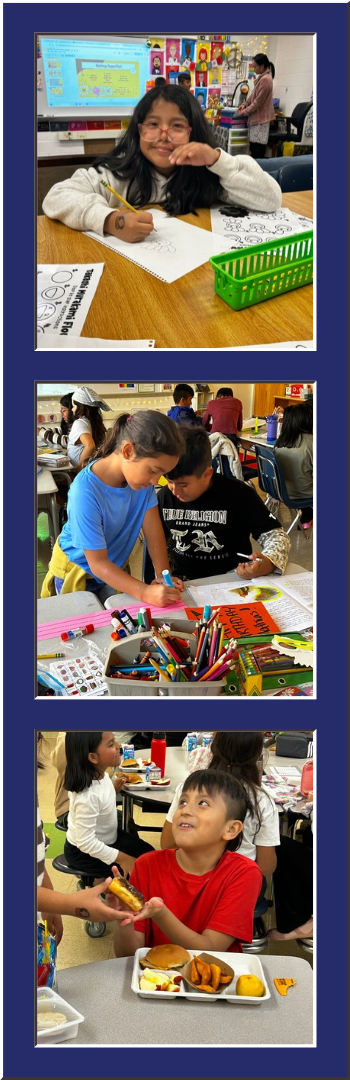 Top: For all Westlawn students, specials enhance the experience in the classroom, and give them extra opportunities to be creative and showcase their skills. In art this week, Ms. Muniz’ students began a two-week unit on creating Murakami-style flowers. Middle: Ms. Muniz’ students work collaboratively during a Benchmark lesson on sequencing the events from their story about King Midas. Bottom: Celebrations are part of the fun of being in third grade! Ms. Muniz class celebrates birthdays with treats in the cafeteria, careful to preserve learning time during the rest of the day!
This week in Zoom into the Room, we step inside Ms. Muniz’s third-grade classroom, where students are tackling exciting new academic milestones and building confidence as independent learners.
In literacy, the class is practicing story sequencing with The Tale of King Midas during Benchmark. Working collaboratively in pairs, students read through event strips from the text, determined the proper order together, and mounted their work to create a shared sequential poster on the class easel. Students are also launching into opinion writing, giving each child an opportunity to articulate their viewpoint and share their voice. Over in math, the class kicked off a brand-new geometry unit exploring the defining characteristics of polygons, building upon the foundational problem-solving and reasoning skills they have been honing through multiplication and division.
For Ms. Muniz, third grade represents a pivotal season of growth. She loves watching her students rise to the heightened expectations of third grade, connecting what they already know to challenging new concepts while their distinct personalities begin to shine. That enthusiasm and teamwork extend across every part of their week—from partnering up on complex classroom tasks and celebrating milestones together to exploring creative expression in art as they sketch vibrant Murakami-style flowers.
Connect With Westlawn
- Contact the main office: 703-241-5100
- Submit an absence: 703-241-5151 | email the absence box | using ParentVUE
- Contact Ms. Caballero (student information assistant): email Ms. Caballero | 703-241-5100 | TalkingPoints: Silvia Caballero
- Contact Ms. Reyes (family liaison): email Ms. Reyes | 703-241-5125 | TalkingPoints: Hilda Reyes
- Contact Ms. Cortez (social worker): email Ms. Cortez | 703-241-5190 | TalkingPoints: Pamela Cortez
Westlawn website | Westlawn Instagram | Westlawn Facebook | TalkingPoints
View The Feather Report archives | Contact the Newsletter Editor
|