|
English | Español | አማርኛ | 中文 | 한국어 | Tiếng Việt | العربية | فارسی | اردو
The Feather Report
October 23, 2026
Photo of the Week
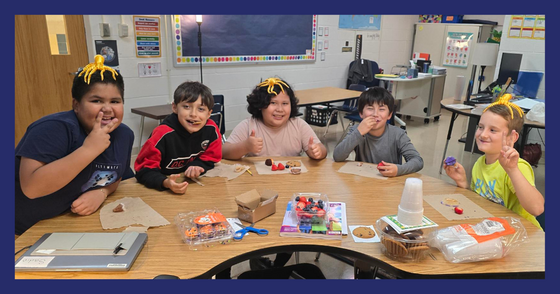 Small groups, big fun! At Westlawn we are lucky to have a plethora of educators who pull small groups. During small group time, small groups of students intensely focus on a particular topic over several sessions with a dedicated teacher. Inevitably special bonds form as teachers and students get to know each other more closely during their time together in the group. And when small groups soar? They celebrate!
Leadership Ledger
Westlawn Families,
It’s the little things that make our Westlawn community so amazing! One morning this week, as we were wrapping up kiss and ride, a car pulled up just as the bell was about to ring. Our staff was busy bringing the cart back inside and putting out the “Kiss and Ride Closed” sign when a Westlawn parent who happened to be walking by noticed that the student needed help getting his backpack out of the car. Without hesitation, the parent stepped in, helped the student get his bag, and made sure he was on his way into the building! It was such a simple act of kindness, but one that perfectly captures what makes Westlawn such a special place. Whether it’s our staff, students, or families, these little moments of looking out for one another are what make our community so strong. I am so grateful to be part of a school where we take care of each other!
Speaking of kiss and ride, I wanted to share a quick reminder to help keep our mornings running smoothly. Our wonderful student safety patrols are outside each morning helping open car doors, but they need to head inside at 8:40 so they can get to class on time. If you arrive between 8:40 and 8:45, please have your child be ready to open their own car door so we can keep cars moving safely and efficiently. If your child needs assistance opening the door, we encourage you to arrive between 8:30 and 8:40, when our safety patrols are available to help.
Thank you for all the ways, big and small, that you help make Westlawn such a caring and supportive community. It truly takes all of us, and I am so proud of our Eagles!
In partnership,
Christoph Hill, Stephanie Carpenter, and Erin Theiss
Proud Principals
News
Time to Label Clothes!
This is the season for students to bring jackets and hoodies to school in the cold morning, and then remove them mid-way through the day as the weather warms up. Please help us reunite items with children by writing their name inside with a Sharpie. Labeling your child’s outerwear, lunch box, water bottle, etc. is very helpful when items are left outside or in the cafeteria.
Our Lost and Found is located in our school cafeteria. If your child is missing any items, ask them to check the Lost and Found during lunch.
Sensory-Friend Bingo Night is Now Open to More Families
We are hosting a Sensory Friendly Bingo Night on Thursday, November 5 from 5:30-7. This event is separate from the PTA Bingo night on November 13. This event is to support students and families who require a more intentional environment in order to access school wide events. The event will take place in the gym in a smaller group setting, with reduced noise and intentional sensory support. If you are interested in attending this event, please fill out the Sensory-Friendly Bingo Night form and we will reach out to confirm your attendance. Please email Katie Marshall or send her a message via TalkingPoints with any questions.
Reminder: Keep Our Roads in Good Shape
If you ever see something wrong with one of our neighborhood roads, please tell the Virginia Department of Transportation! Fill out the form on the VDOT website so that road crews can be scheduled to fix things such as potholes, drainage problems, crumbling sidewalks, missing paint, and other issues.
Please Return Your Federal Impact Aid Survey
FCPS is asking all families to fill out a Federal Impact Aid Survey. The form is available in SIS ParentVUE under Online Packets, which is in the upper right corner of the screen after logging in. Please complete it as soon as possible. Schools will provide paper forms to families who have not completed the survey in ParentVUE starting Wednesday, October 28.
Completing this form for each school-aged child in every household is how we ensure we receive all the resources available to us from the federal government. For more information, please visit the Federal Impact Aid Survey page.
Register for ParentVUE
Learn how to activate your SISParentVUE account so you can easily submit your survey and have access to other helpful information about your child.
FCPS News
In case you missed it in FCPS This Week, the school division shared updates on the following topics:
- Literacy Resources
- Return Your Impact Aid Survey
- Download the New ParentVUE App
Read FCPS This Week to learn more about these topics. If you are not already receiving this weekly newsletter, please sign up today.
Dates and Events
October 26: A series of Community Conversations is being held across the school division. Share your thoughts with Dr. Reid and ask her questions. The closest school to Westlawn that Dr. Reid will appear at is Beech Tree. Register for the event at Beech Tree.
October 28: Color Days: Wear White
October 30: It’s Book Character Day! Students and staff are invited to wear a costume that shows their favorite book character. A book character parade will take place in the building during the day. Families are reminded that costumes cannot include masks or weapons. We ask for your help in ensuring that your child wears a costume that does not interfere with learning.
October 30: Two-Hour Early Release; all students will be dismissed at 1:30 PM. There is no afterschool care unless your child is in Beyond the Bell (SACC).
November 2: No School for Students
November 3: No School for Students
November 3: Election Day Bake Sale! Support our sixth grade students as they try to raise money for a big sixth grade field trip, end-of-the-year celebration, and other special events and activities. The bake sale booth will be open from 7 AM through 5 PM, or until goodies run out! The bake sale booth will be located at Westlawn, making it extra sweet to come and vote!
November 4: Color Days: Wear Black
November 5: Sensory-Friendly Bingo Night
To see more schoolwide and community events, remember to check out our website calendar! You can also subscribe to our calendar to make it even more convenient. Click on the little calendar icon in the top right corner of the calendar page of our website to add all current and future events to your cell phone calendar.
Engage with Westlawn
Ongoing Opportunities: Join Mr. Hill and Ms. Dushok for Westlawn’s Community Conversation each Wednesday at 11 a.m. via Zoom, and visit our website for archives of the three most recent conversations. If you plan to volunteer regularly in FCPS during the 2026–2027 school year, please register through the FCPS volunteer portal to complete any required background checks and fingerprinting.
Mind Matters
AAP Service Highlight: Twice Exceptionality (2e)
Twice Exceptional students (abbreviated as 2e) are those that are advanced in one or more subject areas and have special education needs. An example of a 2e student is one that might understand complex ideas, ask insightful questions, and be able to explain their thinking in detail, while finding decoding and spelling much harder than classmates do due to dyslexia.
2e student strengths can sometimes mask their needs, and the reverse is also true: struggles can make their advanced abilities harder to see. Our Special Education department chair, Ashley Claros, partners with our AAP department chair, Gretchen Maxwell, and they receive ongoing training to ensure these students receive services for both. They collaborate with classroom teachers to be sure individual challenges are addressed as well as providing opportunities to have their strengths nurtured.
You can learn more about it through this website and the handbook that is located at the same link.
Gretchen Maxwell is Westlawn’s Advanced Academic Resource Teacher, and she is passionate about creating opportunities for each Westlawn student to soar. You can email Mrs. Maxwell or reach her via TalkingPoints.
Tech Talk
NFCs: What You Need to Know
Did you know the “ability” of your phone to “talk” to the checkout device wirelessly has a name? It is a near-field communication, or NFC. It is similar to Bluetooth in that both are types of wireless communications between devices, but NFCs are special because they are very limited in distance. This is why you need to get your phone close to the checkout device box when checking out with your virtual wallet. Other types of NFCs include electronic badge access required for certain jobs and the ability that iPhones have to “talk” to each-other when you hold two of them so that the tops are within a few centimeters of each other.
Like with other types of electronic transactions, NFC transactions are vulnerable to thieves or other bad actors with the equipment necessary to steal information as it gets transmitted from your phone to another device.
Here is how to protect yourself and your information:
- Keep your phone’s operating system updated. Your phone provider has teams of cybersecurity professionals who are trained to monitor risks and build protection into operating systems. When they release updates, it is often to provide better protections.
- Use your face or your fingerprint as a secondary requirement to “open wallet” when you are offered a choice to do so. (Many new phones require this, but if you have an older model, it might be a choice.)
Maintain Access to Your Child’s Grades and Assignments: Download the New ParentVUE App
New ParentVUE and StudentVUE mobile apps launched in July. Be sure to download the new app before winter break. After that time, you will need to use the new mobile app or a web browser to access ParentVUE or StudentVUE.
For instructions on installing the new apps and learning more about the updated login process, visit ParentVUE and StudentVUE mobile app resources. If you need assistance, please submit a Parent Support Request.
Help Your Student Stay Focused and Engaged Without Digital Distractions
Please remind your student that personal electronic communication or computing devices should be off and personally stored (i.e., in backpacks) for the duration of the school day: bell to bell.
This includes personal laptops, tablets, smartwatches, smartphones, and similar devices. Students can only use FCPS-issued devices for school-related digital activities during the instructional day. There are exceptions for students with disabilities and those enrolled in specific courses.
If you need to reach your student during the school day, please call the school’s front office. Learn more about the FCPS cellphone policy and device policy.
Is there a technology topic you want us to tackle in a future issue? Email your questions to Ms. Dushok (school based technology specialist) and Mr. Dinkins (technology support specialist).
Zoom into the Room
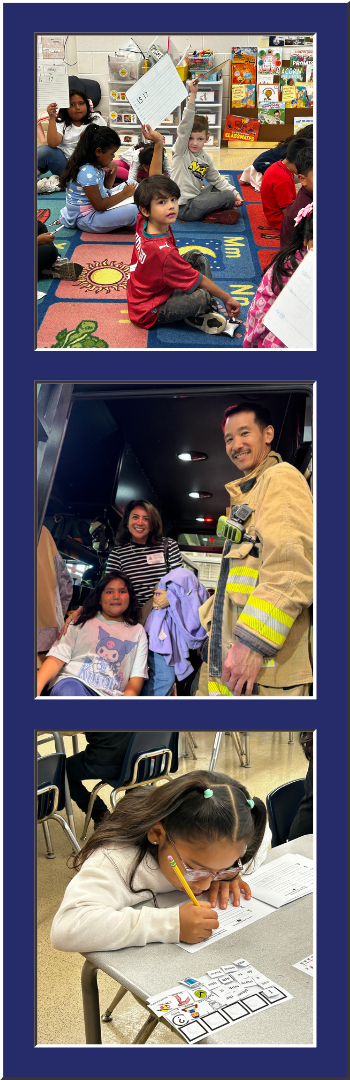 Top: During an auditory math activity, Ms. Whaley says a number, students write it on a small whiteboard, and then hold it up for Ms. Whaley to inspect. Middle: At the fire station field trip, students had the opportunity to walk through fire trucks and meet firefighters at the local fire station. Bottom: During a writing activity, students practiced writing a word that Ms. Whaley said aloud, and then checked their work against a copy of the word written on the board.
This week, Zoom into the Room visits Ms. Whaley’s first-grade classroom, where curious young learners are building strong foundational skills while lifting each other up every step of the way!
In literacy, students are diving into character analysis by examining what storybook characters do and say, followed by crafting written responses to the books they read together. During phonics work, students demonstrate their growing skills by differentiating between individual letter sounds, blends, and full words. In math, the class is exploring addition strategies within ten and engaging in daily calendar math, seamlessly translating numbers between ten-frames, coins, and base-ten models. During one coin review, two students named Thomas and Jefferson were thrilled to realize that together, their names matched the president on the nickel! To cap off an exciting week, the class took a field trip to the fire station.
Ms. Whaley’s classroom is a community where every child’s effort is celebrated. Students naturally recognize that a task easy for one person might be tricky for another, and they frequently break into spontaneous rounds of applause or offer encouraging compliments when a classmate works through a challenge. Supported by team members Mr. Sanchez (who leads their Express group), Ms. Tran, Ms. Truong, and Mrs. G, students benefit from small-group guidance and smooth daily transitions.
When independent work is complete, students transition into choice time designed to foster curiosity, critical thinking, and collaboration. Options range from hands-on exploration with mini microscopes and science bins to critical thinking puzzles, fine-motor building blocks, and collaborative board games—including a fan-favorite Ticket to Ride game generously gifted by Emily’s family.
Connect With Westlawn
- Contact the main office: 703-241-5100
- Submit an absence: 703-241-5151 | email the absence box | using ParentVUE
- Contact Ms. Caballero (student information assistant): email Ms. Caballero | 703-241-5100 | TalkingPoints: Silvia Caballero
- Contact Ms. Reyes (family liaison): email Ms. Reyes | 703-241-5125 | TalkingPoints: Hilda Reyes
- Contact Ms. Cortez (social worker): email Ms. Cortez | 703-241-5190 | TalkingPoints: Pamela Cortez
Westlawn website | Westlawn Instagram | Westlawn Facebook | TalkingPoints
View The Feather Report archives | Contact the Newsletter Editor
|