A Message from our Administrators
Dear Hunt Valley Families,
It is hard to believe we are already nearing the end of September! The school year is well underway, and our students and staff have been busy building on the strong foundation established during the first few weeks of school. Across the building, students are diving deeper into their learning, working collaboratively, and showing tremendous effort each day.
As teachers continue getting to know their students as learners, they are using classroom observations, assessments, and student work to help guide instruction and provide the support each child needs to be successful. We appreciate the important role our families play in this process and encourage you to continue talking with your child about what they are learning and experiencing at school.
The fall is always a busy and exciting time, with many activities and events on the horizon. Please continue to review information from your child’s teacher and the school so you are aware of upcoming dates and opportunities to participate.
Thank you for all you do to support our students and staff. We are grateful to have such engaged families and look forward to all that October will bring.
Have a fantastic weekend!
Warmly,
Keieownna Johnson, Principal
Eric Kopacz, Assistant Principal
 |
|
Mark Your Calendar
September 28th-October 2nd--Blue Star Welcome Week
September 30th--3-hour Early Release Wednesday
October 2nd--Fall Festival
October 12th--School Planning Day No School
October 30th--Trunk or Treat
|
Blue Star Welcome Week
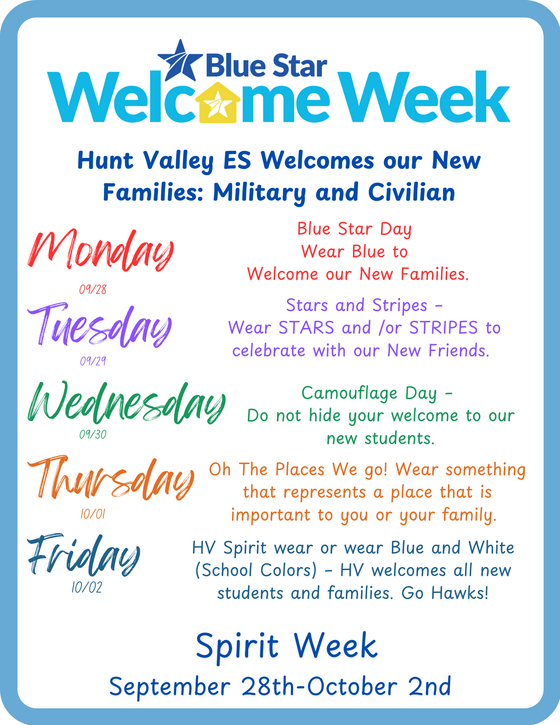
Families, please join us for Blue Star Welcome Week at Hunt Valley Elementary, September 28 - October 2! Each day will celebrate and welcome our new military and civilian families:
- Monday: Wear blue for Blue Star Day
- Tuesday: Wear stars and/or stripes
- Wednesday: Camouflage Day
- Thursday: Wear something representing a special place
- Friday: Wear HV spirit wear or blue and white
Spartans Dance Camp
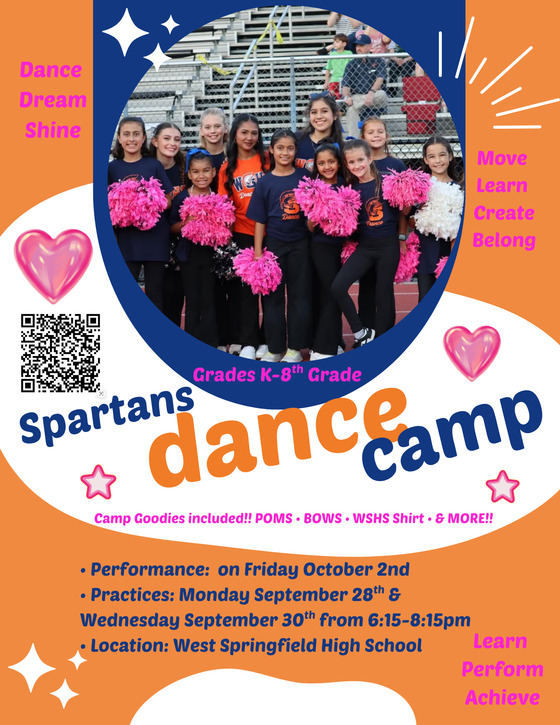
- Performance: on Friday October 2nd
- Practices: Monday September 28th &
Wednesday September 30th from 6:15-8:15pm
- Location: West Springfield High School
Talking Points
All Hunt Valley families are automatically enrolled in Talking Points to receive teacher and school communications when they give the school an active cell phone number per parent.
Families who use the TalkingPoints app can turn on ‘Share messages’ to change their conversation with a teacher into a group message. When you and other family contacts share messages, you see the same messages from the teacher, as well as all responses from each other. Please note that while shared messaging is turned on, you cannot send a private message to the teacher through TalkingPoints - messages go to everyone who is sharing messages for the student. You can turn off shared messaging at any time. *This feature is only available on the App Version of Talking Points.
Directions: In the Mobile App
Step 1: Tap the 'Settings' tab.
Step 2: Select the student you want to share messages for.
Step 3: Tap the 'Share messages' toggle.
A dark purple icon appears next to other family contacts who are using the app and have shared messaging turned on. When you turn on shared messaging, you will begin to share messages with any other contacts who have the dark purple icon next to their name.

Having trouble with shared messaging?
- If the other family contact(s) are using the app, but have a light purple icon, this means that they have not enabled shared messaging yet.
- If the other family contact(s) have 'Invite to app' next to their name, they are currently subscribed via text message. Tap 'Invite to app' to send them an invitation to download the TalkingPoints for Families app. Once they log in, they can follow the instructions in this article to turn on shared messaging.
- If you do not see any other family contacts listed, your messages cannot be shared. Contact your school to make sure all family contacts are added under the same student listing
Don't have the App? Download the Talking Points for Families App from the Apple or Google Play store.

Early Release Wednesdays
⏰ Limited Early Release Days for Elementary Schools
Limited early release days for elementary schools will shift to Wednesdays for the 2026-27 school year.
Three-hour early release days for our school will include:
- September 30
- November 18
- January 13
- April 7
Read more about the reasons for early release and the proposed early release dates.
NEW Visitor Check-in System - Raptor Safe App Setup
Hunt Valley ES has a NEW Visitor Check-in System. Downloading and registering on the Raptor Safe App is not required, you can still use your driver’s license in the building, but this is faster.
What is Raptor Safe?
Raptor Safe is a free mobile app designed to make school visits and student dismissals both faster and more secure. By using the app, you can create a Raptor Passport, which allows you to check in at the school entrance by simply scanning a QR code. A new QR code is generated each time so no screenshots.
A few notes for registration in the app: no code is needed so skip that step and foreign id's and passports can be used (as long as they are in English).
Setting Up Your Account
Getting started is straightforward. Here is the play-by-play:
-
Download: Search for "Raptor Safe" in the Apple App Store or Google Play Store.
-
Verification: To keep the community safe, the app will ask you to scan your driver’s license and take a live selfie to verify your identity.
-
Privacy: Don't worry about that selfie—it is used only for the initial verification and is not stored in the app.
-
Stored Info: The app only keeps necessary details like your name, date of birth, the photo from your ID, and the last four digits of your license or passport.
Quick Tips for Users
-
No Passwords to Memorize: The app uses your mobile phone number to log you in. You’ll receive a one-time code via text each time you need to access your account.
-
Need Help?: If you run into any technical snags, you can find troubleshooting guides at raptortech.com/raptorsafe-app/.
Raptor Safe FAQ Sheet
Make Lunchtime Special!
Come enjoy lunch with your child and help support our cafeteria during lunchtime. Sign up today for this special opportunity to connect, create memories, and lend a helping hand!
https://www.signupgenius.com/go/10C094DA5AF2EA6FECF8-51771041-lunch
Immunization Events for FCPS Students
FCPS, in partnership with Inspire Health Alliance, will provide school-required immunizations and optional flu shots for all FCPS students with no out-of-pocket costs. Multiple events will take place at designated FCPS locations. Additional dates will be available throughout the school year.
Parents or guardians may view upcoming events and schedule an appointment for their student. Participation is voluntary. View immunization resources on the FCPS website.
|