|
English | Español | አማርኛ | 中文 | 한국어 | Tiếng Việt | العربية | فارسی | اردو
Dear Belvedere Families,
We are excited to welcome you to Belvedere Elementary School for Back-to-School Night on Wednesday, September 23, from 6:00 to 7:45 p.m.
This evening is a wonderful opportunity to learn more about our school, connect with your child’s teacher, and begin building a strong partnership for the school year. We look forward to welcoming you into our classrooms and sharing more about the learning, support, and experiences your child will have this year.
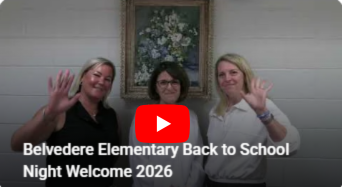
Please take a moment to watch this short welcome video.
We look forward to seeing you tomorrow evening!
Warmly,
Cecilia Vanderhye, Tara Boone, and Jess Duvel
Belvedere Elem Administration Team
You can follow the directions below to learn how to turn on closed captions and to have them auto translate to your needed language.
 |
|
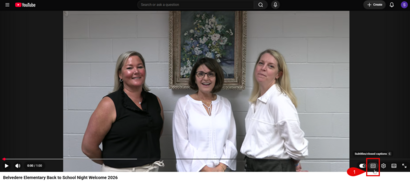
Step 1: Hover over the video to get the menu ribbon. Click on the CC to turn on closed captions. |
 |
|
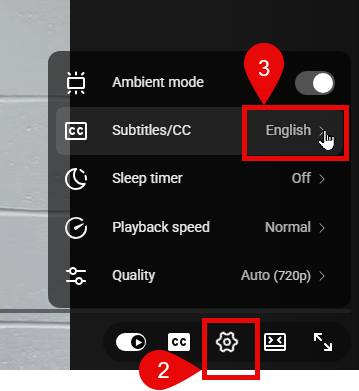
Step 2: Click on the Setting icon (a gear wheel).
Step 3: Next to Subtitles/CC, click the arrow to select the language you need.
|
 |
|
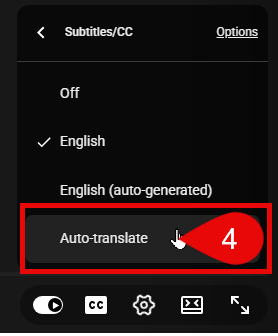
Step 4: Click on Auto-translate. |
 |
|
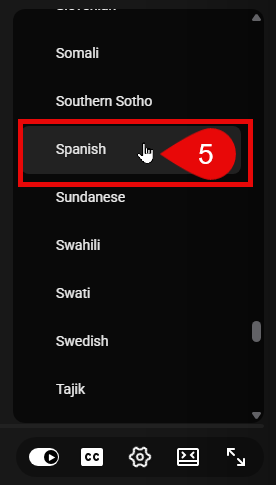
Step 5: Scroll until you find the language you need and click on it. |
|