|
Hello Lake Anne Families,
What a fantastic first week of school! Our halls and classrooms have been filled with excitement, energy, laughter, and so much learning. It has been wonderful to welcome our Dolphins back and see students settling into routines, building relationships, and getting to know their teachers and classmates.
We are incredibly grateful to our families for helping make the first week such a successful one. Your partnership, encouragement, and support mean so much as we begin a new school year together. We have loved hearing the positive feedback from families about how much students are enjoying their first days back at school!
As we head into our second week, we will continue to focus on building strong classroom communities, learning our routines, and creating an environment where every student feels known, valued, and ready to learn. We are off to a great start, and we can't wait to see all that this year will bring!
Thank you for being such an important part of the Lake Anne family. We are ready to make some waves together! 🌊💙
With appreciation,
Mrs. Jill D. Stewart, Principal
Mrs. Valencia Chenier, Assistant Principal
Mrs. Leslie Grumbach, Assistant Principal
 |
|
- Student Holiday - Labor Day
- September 4th & September 7th
- Walk and Roll
- Back to School Night
- PTA Movie Night
- 3-Hour Early Release
- Wednesday, September 30th
|
Arrival and Early Dismissal Reminders
We want to remind our families how important it is for our dolphins to arrive on time each day. Instruction begins promptly at 8:50 a.m., and it’s important that students are here and ready to learn from the very start of the day. School doors open at 8:35 a.m., allowing plenty of time for students to get settled in their classrooms before learning begins.
If you need to pick up your dolphin early, please remember to bring a photo ID with you. This helps us ensure the safety of all our students.
Thank you for your cooperation and for helping us support a safe and successful school day for every dolphin!
Recordatorios sobre la llegada y la salida temprana
Queremos recordarles a nuestras familias lo importante que es que nuestros delfines lleguen a tiempo cada día. La instrucción comienza puntualmente a las 8:50 a.m., y es fundamental que los estudiantes estén aquí y listos para aprender desde el inicio del día. Las puertas de la escuela se abren a las 8:35 a.m., lo que les da tiempo suficiente para acomodarse en sus salones antes de que empiece el aprendizaje.
Si necesita recoger a su delfín antes de la hora de salida, por favor recuerde traer una identificación con foto. Esto nos ayuda a garantizar la seguridad de todos nuestros estudiantes.
¡Gracias por su cooperación y por ayudarnos a mantener un día escolar seguro y exitoso para cada delfín!
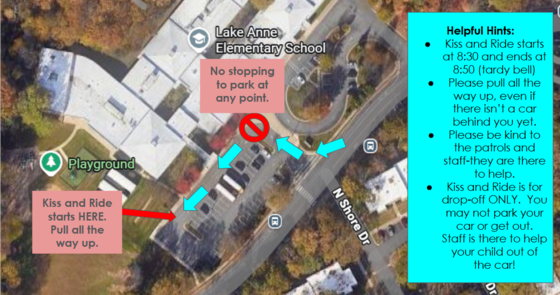
Kiss & Ride runs 8:30–8:50 a.m.
- Please pull all the way forward, even if no car is behind you yet.
- Please be kind and patient with our patrols and staff. They are there to help make arrival safe and smooth!
- Kiss & Ride is for drop-off only. Please stay in your car—staff will help your child out.
Thank you for helping us make arrival safe, smooth, and efficient for everyone! 🐬
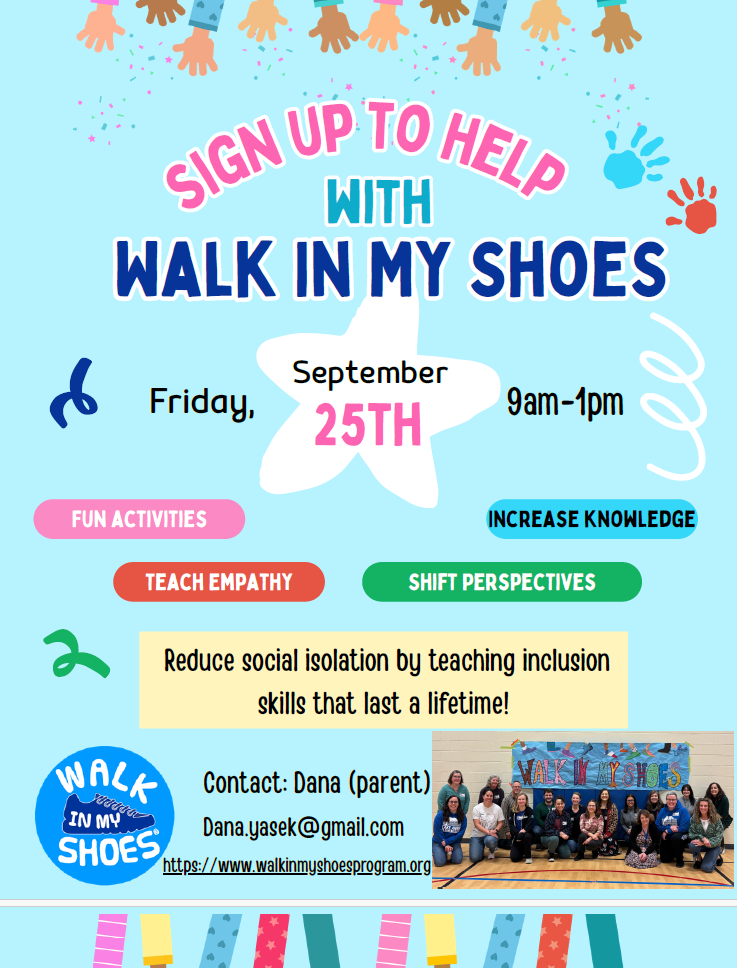
This will be our second year with the Walk in My Shoes program at Lake Anne. This program focuses on showing our children what is is like to "walk in someone else's shoes" with a focus on how to be kind and inclusive friends. K-3 will have a special program the week of September 21st in library where they will have a program specifically designed for younger children. Grades 4-6 will have an assembly on Friday September 25th where they will go through stations of fun activities, but this is where we need you! We cannot execute this program without the help of our amazing Lake Anne community members. Please see the attached flyer and reach out to Dana (email included) who is our parent volunteer that runs this program for Lake Anne if you are interested in helping out with this program.
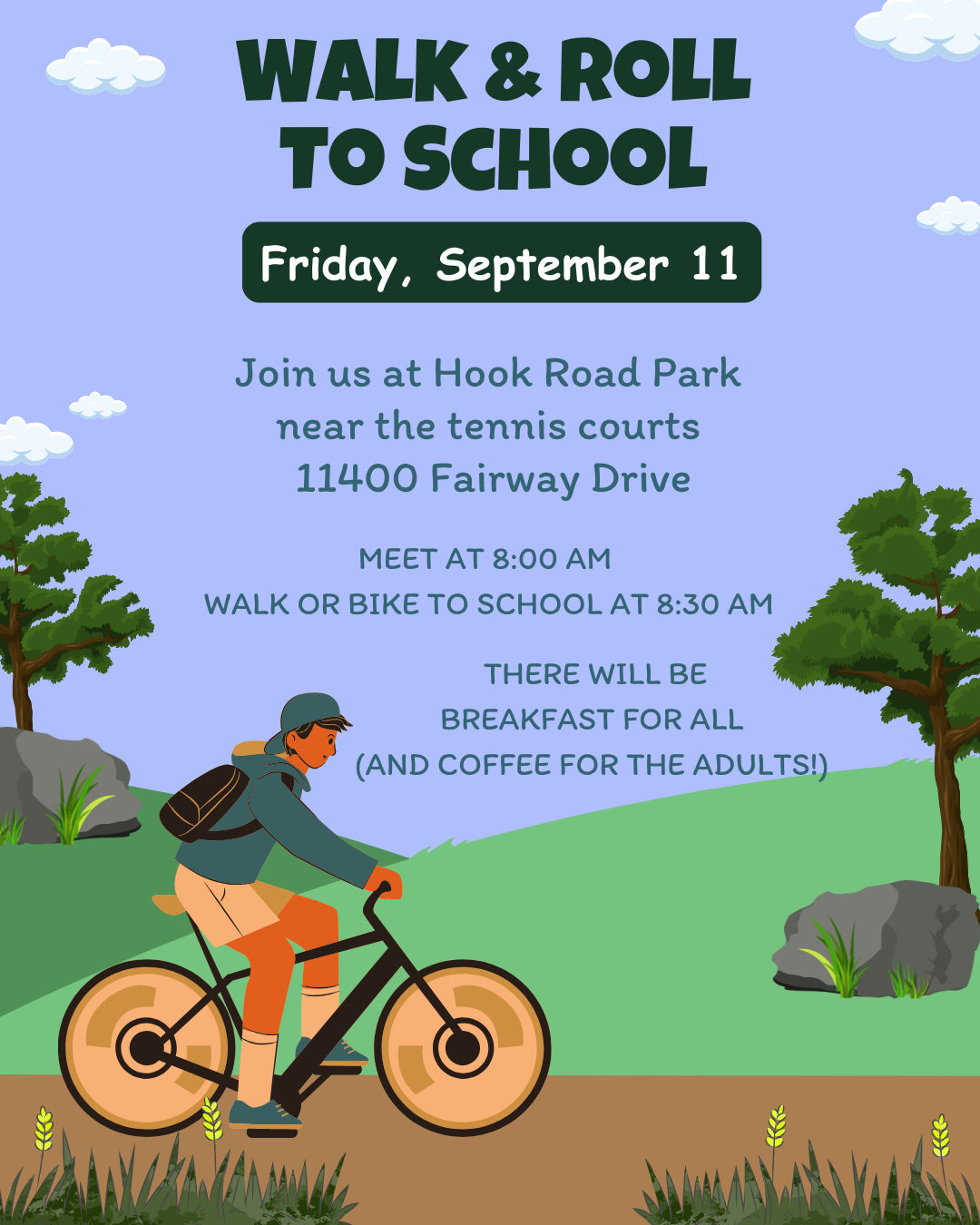
Please join us for the first Walk and Roll of the school year on September 11.
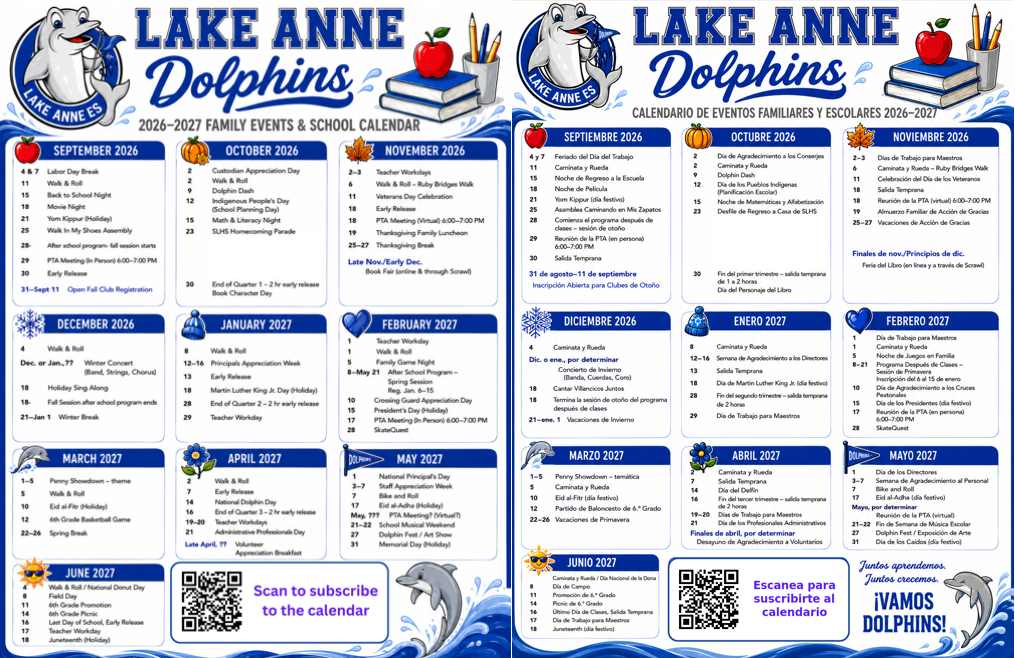
You will find the latest events calendar for our school and PTA sponsored events. You can scan the included QR code on the calendar and subscribe to the calendar to make it easier to follow.
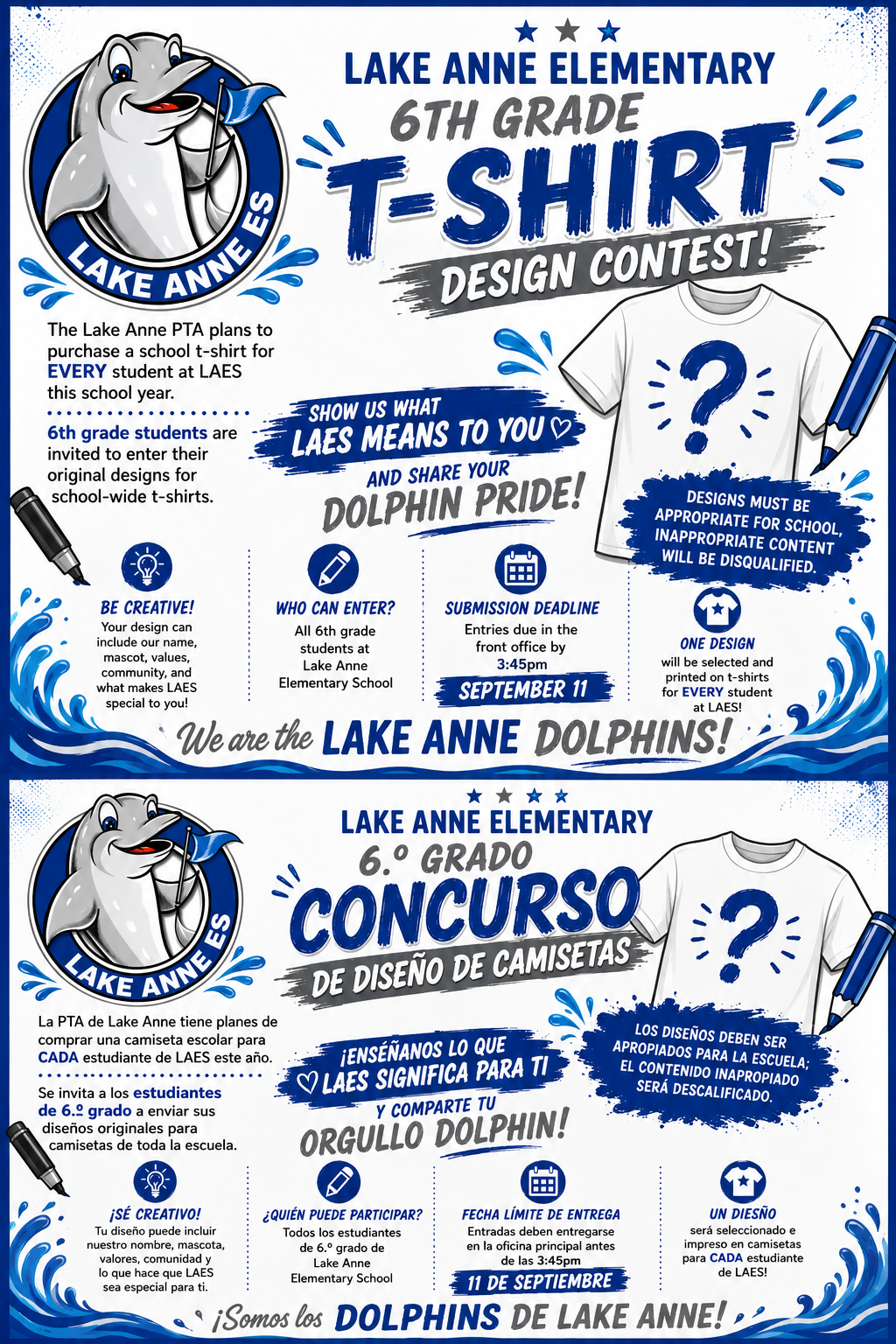
The PTA will be providing a school t-shirt to every student at Lake Anne. All 6th graders are invited to enter their original designs for the t-shirt.
 |
|
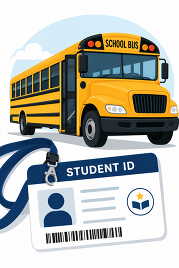
Student ID Cards for Lake Anne Bus Riders
We have distributed student ID cards to all our students who ride the school bus or use FCPS transportation services.
ID cards should be worn or attached to your child’s backpack and brought to the bus each day. [We will hold them during the day, then return them to students for their bus trip home./Ask your child to put their student ID card away until the end of the day.]
Students who have student ID cards should begin tapping as they board and exit the bus. Only students who use FCPS transportation services will be provided with a student ID card at this time.
We ask for your patience! Bus drivers are checking in students and may need some extra time at each bus stop while they do this. The transportation team is working hard to minimize any potential delays.
Learn more about the bus navigation and student ID cards.
|
Tarjetas de Identificación Estudiantil para los Estudiantes que Viajan en Autobús
Hemos distribuido tarjetas de identificación estudiantil a todos los estudiantes que viajan en autobús escolar o utilizan los servicios de transporte de FCPS.
Por favor, asegúrese de que su hijo(a) lleve la tarjeta de identificación puesta o sujeta a su mochila y la lleve al autobús todos los días. Los estudiantes deben conservar su tarjeta de identificación durante el día escolar y usarla al subir y bajar del autobús.
Los estudiantes que tengan una tarjeta de identificación deben comenzar a pasarla por el lector al subir y bajar del autobús.
En este momento, solo los estudiantes que utilizan los servicios de transporte de FCPS recibirán una tarjeta de identificación estudiantil.
¡Les pedimos paciencia! Los conductores de autobús están registrando a los estudiantes y es posible que necesiten un poco más de tiempo en cada parada mientras todos se acostumbran al nuevo proceso. Nuestro equipo de transporte está trabajando arduamente para minimizar cualquier posible retraso.
 |
|
Transportation Patience and Safety
Thank you for your patience as we all get used to new routines this school year. We appreciate our families following Kiss and Ride procedures and being patient while waiting for your child’s bus.
If your child’s bus is delayed, you may access the Bus Delay Notification System or use the Here Comes the Bus mobile app to receive the delayed bus report. Email messages will be sent to announce significant bus delays. Please contact the Transportation Office at [phone number] with any additional questions. For concerns after 5:30 p.m., contact the FCPS Office of Safety and Security at 571-423-2000.
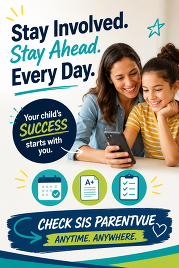
Update your contact information in SIS ParentVUE to make sure you receive email messages about bus delays.
|
Paciencia y Seguridad en el TransporteMuchas gracias por su paciencia mientras todos nos acostumbramos a las nuevas rutinas de este año escolar. Apreciamos que nuestras familias sigan los procedimientos de Kiss and Ride, y que sean pacientes cuando esperan a los autobuses de sus hijos. Si el autobús de su hijo está retrasado, los padres pueden acceder el sistema de notificaciones de retrasos de autobuses o usar la aplicación móvil Here Comes the Bus para recibir el reporte de retraso de autobuses. Para reportar retrasos considerables de autobuses se enviará un correo electrónico. Contáctese con la Oficina de Transporte llamando al [phone number] si tienen preguntas adicionales. Para cualquier preocupación después de horas (después de las 5:30 p.m.), comuníquese con la Oficina de Seguridad llamando al 571-423-2000.
Para asegurarse de que recibirán mensajes de correo electrónico cuando haya un retraso de autobuses, actualicen su información de contacto en SIS ParentVUE.
 |
|
Everything You Need to Do in SIS ParentVUE
Are you working your way through back-to-school forms and checklists? Make sure you have a SIS ParentVUE account for your family and log in to find important forms and updates.
- Be among the first to know about weather closings, bus delays, and other critical communications from your school and FCPS by providing your cell phone number and email in ParentVUE. To update your contact information in ParentVUE, click the “Online Packets” tab in the upper right of the screen, then click the “Online Verification/Update” icon.
- Submit daylong absences by clicking “Report Absence.”
If you do not have a ParentVUE account, contact your child’s school for an activation code and follow the directions on the SIS ParentVUE Account webpage.
|
Todo lo que necesita hacer en SIS ParentVUE
¿Está completando los formularios y las listas de verificación para el regreso a clases? Asegúrese de tener una cuenta de SIS ParentVUE para su familia e inicie sesión para encontrar formularios importantes y actualizaciones.
-
Manténgase informado sobre cierres de escuelas debido al clima, retrasos de autobuses y otras comunicaciones importantes de su escuela y FCPS proporcionando su número de teléfono celular y correo electrónico en . Para actualizar su información de contacto en ParentVUE, haga clic en la pestaña “Online Packets” en la esquina superior derecha de la pantalla y luego haga clic en el ícono “Online Verification/Update”.
-
Reporte las ausencias de todo el día haciendo clic en “Report Absence.”
-
Revise los registros de vacunación de su hijo(a) y envíe cualquier actualización. Visite la página para obtener instrucciones paso a paso.
Si no tiene una cuenta de ParentVUE, comuníquese con la escuela de su hijo(a) para obtener un código de activación y siga las instrucciones en la página .
 |
|
Remember to Complete Permission Forms for School Resources
Families can now easily grant consent for their children to access a variety of school resources through the Parent Digital Consent system. This online tool can be accessed using your SIS ParentVUE account login. Parents can easily opt their child in or out of a variety of resources, including online educational tools, school counseling services, and more.
Visit the Parent Digital Consent webpage to access the system. Watch this video to see how to use the tool.
Opt In or Out to Student Devices Being Sent Home for Grades 1-6
New this year, families can opt out of having student laptops sent home with their student.
- If you do not want your student to bring their FCPS-issued device home, please toggle the Opt Out button to a check mark and confirm by pressing Save Selection.
- If you would like your student to bring their FCPS device home, no toggle action is needed. Confirm by pressing Save Selection.
Students whose families opt out will continue to have access to an FCPS-issued device during the school day. Please reach out to your student’s teacher to understand expectations for homework and any learning activities that may require access to technology outside of the school day.
|
No olvide completar los formularios de autorización para recursos escolares.
Las familias ahora pueden autorizar fácilmente el acceso de sus estudiantes a diversos recursos escolares a través del sistema de Consentimiento Digital para Padres. Puede acceder a esta herramienta en línea con los datos de inicio de sesión de su cuenta de SIS ParentVUE. Los padres pueden autorizar o rechazar fácilmente el acceso de sus estudiantes a distintos recursos como recursos educativos en línea, servicios de consejería escolar y muchos más.
Visite la página de Consentimiento Digital para Padres para acceder al sistema. Vea este video para aprender a utilizar la herramienta.
¿Tiene un estudiante en los grados del 1 al 6? Usted puede decidir si lleva su dispositivo de FCPS a casa.
Como novedad este año, las familias pueden decidir que las computadoras portátiles de los estudiantes se queden en la escuela.
- Si no desea que su estudiante lleve a casa el dispositivo proporcionado por FCPS, active la opción Opt Out hasta que aparezca una marca de verificación y confirme su selección presionando Save Selection.
- Si desea que su estudiante lleve a casa el dispositivo proporcionado por FCPS, no necesita activar ninguna opción. Confirme su selección presionando Save Selection.
Los estudiantes cuyas familias decidan que el dispositivo se quede en la escuela seguirán teniendo acceso a un dispositivo proporcionado por FCPS durante el día escolar. Comuníquese con el maestro o la maestra de su estudiante para conocer las expectativas relacionadas con las tareas y cualquier actividad de aprendizaje que pueda requerir acceso a tecnología fuera del horario escolar.
Cub Scouts Pack 1169 — Adventure Awaits!
Looking for a fun way for your child to explore, learn, and build new skills? Cub Scouts Pack 1169 welcomes boys and girls in grades K–5 to join the adventure! Come learn more at the upcoming information meeting on Saturday, September 12, at 2:00 p.m. at the Temporary Road Pavilion in Reston. Visit pack1169.org or scan the QR code on the flyer to learn more!

FCPS News
In case you missed it in FCPS This Week, the school division shared updates on the following topics:
- Everything You Need to Do in SIS ParentVUE
- Permission Forms for School Resources
- Follow Multiple Schools in the App
Read FCPS This Week to learn more about these topics. If you are not already receiving this weekly newsletter, please sign up today.
Novedades de FCPS
En caso de que no haya visto el boletín Esta Semana en FCPS, la división escolar compartió novedades sobre los siguientes temas:
- Todo lo que necesita hacer en SIS ParentVUE
- Formularios de autorización para recursos escolares
- Cómo seguir a varias escuelas en la aplicación móvil.
Lea Esta Semana en FCPS para que conozca más acerca de estos temas. Si aún no recibe este boletín semanal, por favor, suscríbase hoy.
|