|
English | Español | አማርኛ | 中文 | 한국어 | Tiếng Việt | العربية | فارسی | اردو
Here's the answer to this week's riddle: It over-swept 🧹
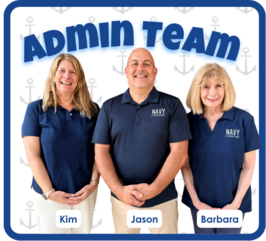
Dear Wonderful Navy Elementary Families,
I hope this email finds you well and ready to enjoy a beautiful weekend!
Our Dolphins seem to be adjusting so well to their first week of school—they are absolute cuties! While we've seen a few kindergarten tears, it has overall been a wonderfully successful start. Thank you for preparing your beautiful children so well!
Front Lobby World Map As part of our commitment to building a strong and transparent relationship with our community, we invite you to stop by our front foyer when you visit. We want everyone to learn a little more about our school-wide goals and celebrate the rich, diverse cultures of our staff and students.
We have a world map displayed in our lobby where you can pin your place of birth—yellow pins represent our staff, and blue pins represent our families. When you stop by, please ask our front office for a blue pin to mark your birthplace so we can celebrate our incredible community together!
Important Building Safety & Security Reminders We love seeing parents sign in to eat lunch with their children and volunteer at Navy. However, please remember that once lunch is over, parents are not permitted to walk the hallways or visit classrooms. When visiting the school, you are not permitted to take pictures.
Additionally, if you are picking your child up from SACC, you must refrain from entering the school building to search for teachers or staff. This is a major safety violation and could result in a trespass letter.
For the safety and security of all students and staff, any unescorted visitors in the building will be reported directly to administration. Failure to follow these visitor protocols will require a face-to-face meeting with myself and a member of the FCPS Safety and Security team. This could also result in a trespass letter.
Thank you for your cooperation in keeping Navy Elementary a safe environment for everyone.
Have a fantastic weekend!
Jason Pannutti
|

Kiss & Ride went so well week one. Please remember that your child will be late after 8:50 AM. So if you are dropping off at 8:50 AM your child will be rushing. Showing up on time each day gives students a calm, gentle start to their morning alongside their peers. Establishing a steady morning rhythm helps children feel secure, grounded, and ready to learn without feeling rushed. After 8:50 AM all families must enter through Door 1 and check their child in at the office.
Remember to Complete Permission Forms for School Resources
Families can now easily grant consent for their children to access a variety of school resources through the Parent Digital Consent system. This online tool can be accessed using your SIS ParentVUE account login. Parents can easily opt their child in or out of a variety of resources, including online educational tools, school counseling services, and more.
Visit the Parent Digital Consent webpage to access the system. Watch this video to see how to use the tool.
Opt In or Out to Student Devices Being Sent Home for Grades 1-6
New this year, families can opt out of having student laptops sent home with their student.
- If you do not want your student to bring their FCPS-issued device home, please toggle the Opt Out button to a check mark and confirm by pressing Save Selection.
- If you would like your student to bring their FCPS device home, no toggle action is needed. Confirm by pressing Save Selection.
Students whose families opt out will continue to have access to an FCPS-issued device during the school day. Please reach out to your student’s teacher to understand expectations for homework and any learning activities that may require access to technology outside of the school day.
Everything You Need to Do in SIS ParentVUE
Are you working your way through back-to-school forms and checklists? Make sure you have a SIS ParentVUE account for your family and log in to find important forms and updates.
- Be among the first to know about weather closings, bus delays, and other critical communications from your school and FCPS by providing your cell phone number and email in ParentVUE. To update your contact information in ParentVUE, click the “Online Packets” tab in the upper right of the screen, then click the “Online Verification/Update” icon.
- Submit daylong absences by clicking “Report Absence.”
If you do not have a ParentVUE account, contact your child’s school for an activation code and follow the directions on the SIS ParentVUE Account webpage.
We have responses from 57% of our families.
To help us prepare for our 3 hour early release days, all families need to complete the Google Form and select one plan for their child. The plan you choose will apply to all four early release days. You will need your child’s 7-digit student ID number and will indicate whether your child will:
-
Dismiss at 12:30 p.m., or
-
Remain at school until 3:30 p.m. due to a child care hardship.
After-school care: If your child normally attends after-school care, they will transition to their program at 12:30 p.m. This includes SACC and students who ride daycare buses.
We encourage families to save these dates and write down the option you select so you can easily remember your child’s early release plan throughout the 2026-2027 school year.
Thank you for planning ahead and helping us ensure we have an accurate plan for every student!
Complete the Early Release Plan Form
-
Event Details: Sunday Sept 20th, 2026. Fun Run at 8AM, 5K Run/Walk at 8:30AM
-
Location: 4250 Fairfax Corner Ave, Fairfax, VA 22030
-
Price: Regular Prices (April, 2026 - Sept 8th, 2026):
- Fun Run (13 and under) - 25$
- Fun Run (13+ years) - 30$
- 5K Run/Walk (all ages) - 30$
-
All prices increases by 5$ Sept 8th 2026.
Sign Up to Join Team Navy
Thank you for your patience as we all get used to new routines this school year. We appreciate our families following Kiss and Ride procedures and being patient while waiting for your child’s bus.
If your child’s bus is delayed, you may access the Bus Delay Notification System or use the Here Comes the Bus mobile app to receive the delayed bus report. Email messages will be sent to announce significant bus delays. Please contact the Transportation Office at 703-249-7000 with any additional questions. For concerns after 5:30 p.m., contact the FCPS Office of Safety and Security at 571-423-2000.
Update your contact information in SIS ParentVUE to make sure you receive email messages about bus delays.
We will begin distributing student ID cards to all our students who ride the school bus or use FCPS transportation services.
ID cards will be distributed to homerooms next week.
ID cards should be worn or attached to your child’s backpack and brought to the bus each day. Ask your child to put their student ID card away until the end of the day.
Students who have student ID cards should begin tapping as they board and exit the bus. Only students who use FCPS transportation services will be provided with a student ID card at this time.
We ask for your patience! Bus drivers are checking in students and may need some extra time at each bus stop while they do this. The transportation team is working hard to minimize any potential delays.
Learn more about the bus navigation and student ID cards.

🏫The FCPS mobile app lets you follow updates from all your children's schools in one place! Simply open the app, tap the teal pull-down menu, then tap the gear icon and select every school you want to follow. See this video of how to follow your school.
Find out about more features of the app. Download the app from the Apple App Store or Google Play Store.
-
Spanish: ¿Tiene estudiantes en diferentes escuelas de FCPS? 🏫
La aplicación móvil de FCPS le permite seguir las novedades de todas las escuelas de sus hijos en un solo lugar. Simplemente abra la aplicación, toque el menú desplegable de color verde azulado, luego toque el ícono del engranaje y seleccione todas las escuelas que desea seguir. Vea este video sobre cómo seguir a su escuela.
Aprenda acerca de las demás funciones de la aplicación móvil y cómo pueden hacer más sencillo mantenerse al día con la información de sus hijos y escuelas. Descárguela desde la Apple App Store o Google Play Store.
 September
-
Sept 4-7 | No School - Labor Day Break
-
Sept 16 | Back to School Night K-3 - Details to come
-
Sept 17 | Back to School Night 4-6 - Details to come
-
Spet 21| No School - Yom Kippur
-
Sept 24 | Fall Picture Day
  Back to school smiles!
Check it out and make sure to follow us on Facebook and Instagram!
Quick Links:
|