Table of Contents

-
Friday, September 4 and Monday September 7: Labor Day (Holiday)
-
Friday, September 11: Commemoration/ Patriot Day
-
Friday, September 11 - Sunday, September 13: Rosh Hashanah
-
Tuesday, September 15: Hispanic Heritage Month begins
-
Thursday, September 17: Back to School Night 5:30 - 7:30 pm
View the FCPS 26-27 School Year Calendar here.
|
Principal's Message
Dear Crestwood Families,
Happy Sunday! It has been such a joy seeing our Owls filling our halls with energy, laughter, and a love for learning. We are so grateful for your continued partnership as we kick off another wonderful school year together!
🎟️ Back to School Night Carnival!
Get ready for fun and mark your calendars for our Back to School Night Carnival on Thursday, September 17th! Stay tuned for more details coming soon about event timing and activities for our community.
📋 Student Rights & Responsibilities (SR&R) Updates
We shared some initial SR&R updates last week, and we plan to share more information about these changes soon! Stay tuned for upcoming newsletters to learn more.
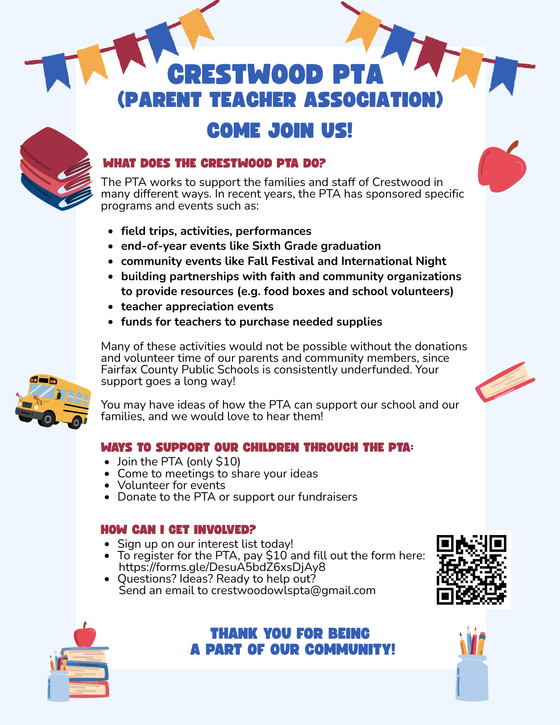
🤝 Join the Crestwood PTA!
Our PTA works hard to support Crestwood families and staff by sponsoring field trips, performances, teacher appreciation, community events, classroom supplies, and local partnerships. Because public school funding is often limited, parent donations and volunteer time make these programs possible.
You can support our school and get involved in several ways:
-
Join the PTA: Membership is just $10. Register using the link (https://forms.gle/DesuA5bdZ6xsDjAy8) or scan the QR code on our flyer.
-
Share Ideas & Volunteer: Attend meetings, bring your suggestions, or volunteer your time at upcoming events.
-
Donate: Support our PTA initiatives and community fundraisers.
If you have any questions, ideas, or are ready to help out, please reach out to us anytime at crestwoodowlspta@gmail.com.
Thank you for all you do to support our school community. Together, we are going to keep climbing to new heights this year!
Ms. Casablanca
SIS ParentVUE
Everything You Need to Do in SIS ParentVUE
Are you working your way through back-to-school forms and checklists? Make sure you have a SIS ParentVUE account for your family and log in to find important forms and updates.
- Be among the first to know about weather closings, bus delays, and other critical communications from your school and FCPS by providing your cell phone number and email in ParentVUE. To update your contact information in ParentVUE, click the “Online Packets” tab in the upper right of the screen, then click the “Online Verification/Update” icon.
- Submit daylong absences by clicking “Report Absence.”
If you do not have a ParentVUE account, contact your child’s school for an activation code and follow the directions on the SIS ParentVUE Account webpage.
Parent Digital Consent
Remember to Complete Permission Forms for School Resources
Families can now easily grant consent for their children to access a variety of school resources through the Parent Digital Consent system. This online tool can be accessed using your SIS ParentVUE account login. Parents can easily opt their child in or out of a variety of resources, including online educational tools, school counseling services, and more.
Visit the Parent Digital Consent webpage to access the system. Watch this video to see how to use the tool.
Opt In or Out to Student Devices Being Sent Home for Grades 1-6
New this year, families can opt out of having student laptops sent home with their student.
- If you do not want your student to bring their FCPS-issued device home, please toggle the Opt Out button to a check mark and confirm by pressing Save Selection.
- If you would like your student to bring their FCPS device home, no toggle action is needed. Confirm by pressing Save Selection.
Students whose families opt out will continue to have access to an FCPS-issued device during the school day. Please reach out to your student’s teacher to understand expectations for homework and any learning activities that may require access to technology outside of the school day.
Transportation Patience and Safety
Transportation Patience and Safety
Thank you for your patience as we all get used to new routines this school year. We appreciate our families following Kiss and Ride procedures and being patient while waiting for your child’s bus.
If your child’s bus is delayed, you may access the Bus Delay Notification System or use the Here Comes the Bus mobile app to receive the delayed bus report. Email messages will be sent to announce significant bus delays. Please contact the Transportation Office at 703-446-2150 with any additional questions. For concerns after 5:30 p.m., contact the FCPS Office of Safety and Security at 571-423-2000.
Update your contact information in SIS ParentVUE to make sure you receive email messages about bus delays.
Family Information Phone Lines
Family Information Line Available in Nine Languages
Parents/caregivers who speak Amharic, Arabic, Chinese, English, Farsi, Korean, Spanish, Urdu, or Vietnamese may call a telephone information line for general information about FCPS. View the list of phone numbers.
FCPS on WhatsApp
Follow FCPS on WhatsApp
Is WhatsApp one of the ways you stay connected with family, friends, and your community? Now you can use it to stay connected with FCPS, too.
Follow the new FCPS WhatsApp Channel for helpful information and reminders throughout the school year, including important announcements, upcoming dates, tips for families, and more.
District News/In Case You Missed It (ICYMI)
FCPS News
In case you missed it in FCPS This Week, the school division shared updates on the following topics:
- Everything You Need to Do in SIS ParentVUE
- Permission Forms for School Resources
- Follow Multiple Schools in the App
Read FCPS This Week to learn more about these topics. If you are not already receiving this weekly newsletter, please sign up today.
|