|
English | Español | አማርኛ | 中文 | 한국어 | Tiếng Việt | العربية | فارسی | اردو
8/28 - First Home Football Game
9/2 - Back to School Night
9/4 & 9/7 - Holidays | Labor Day Break
9/11 - Religious and Cultural Observance
9/21 - Holiday | Yom Kippur
Dear Lewis Families,
We have had a great first week back at Lewis! Our students are settling into routines, learning their way around the school, and getting back into the rhythm of the school year.
Our administrative team has been intentional about getting into classrooms throughout the week to see all of the exciting learning taking place. We have been so proud to see our students building community with their peers, learning classroom routines and expectations, and getting excited about the content they will be learning this year. It has been a great start, and we are looking forward to continuing the momentum!
📱 Reminder: Cell Phones & Personal Devices
Please continue to remind your student about our strict cell phone and personal device policy. As a reminder, devices are away for the day from 8:10 AM–2:55 PM. This includes cell phones, smartwatches, and wireless headphones.
If a device is out during the school day, it will be confiscated in accordance with FCPS expectations. We appreciate your partnership in reinforcing this expectation at home so that our students can remain present, engaged, and focused on learning.
🏫 Join Us for Back-to-School Night!
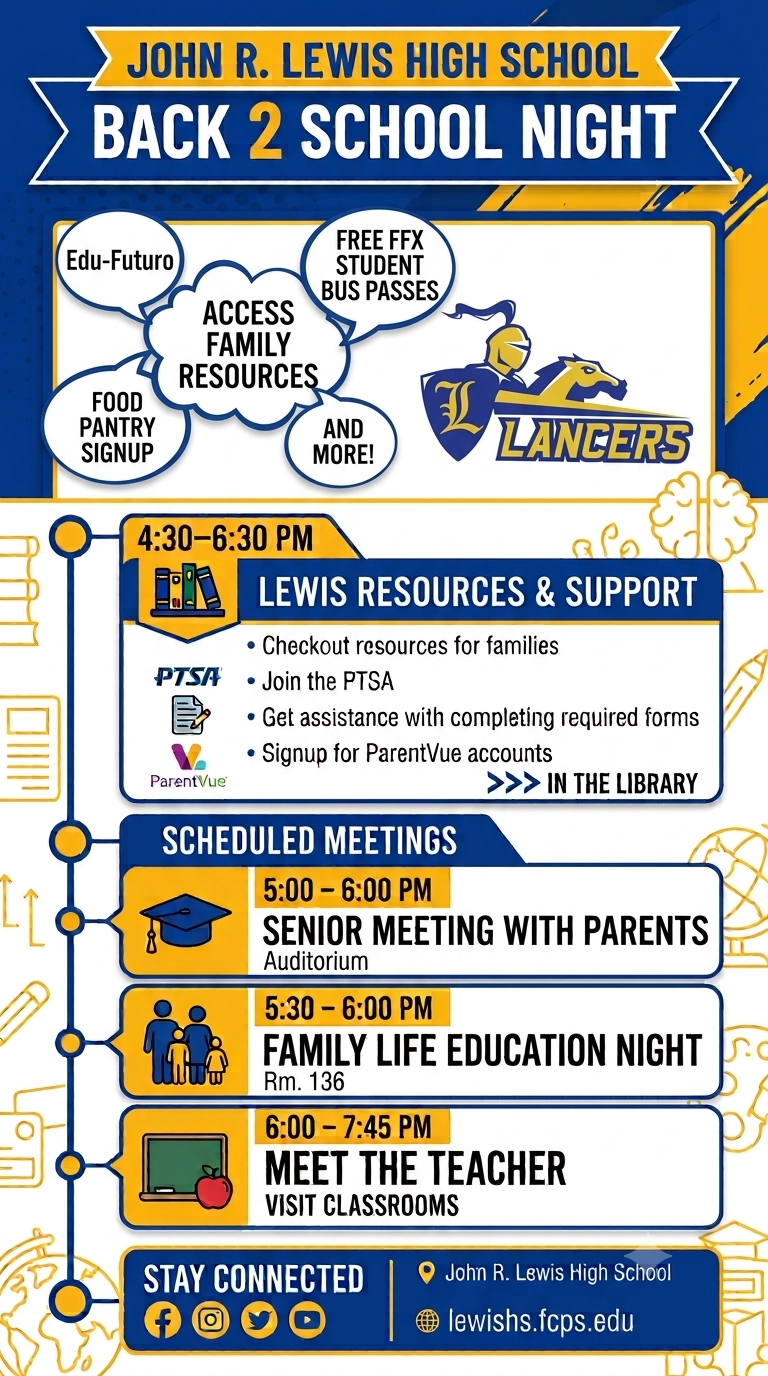
We are excited to welcome our Lancer families to Back-to-School Night! This is a great opportunity to meet teachers, visit classrooms, and learn about the many resources and supports available to our students and families.
4:30–6:30 PM | Lewis Resources & Support – Library Stop by the library to:
- Check out resources available for families
- Join the PTSA
- Get assistance completing required forms
- Sign up for a ParentVUE account
- Learn about Edu-Futuro, the Lewis Food Pantry, free FFX student bus passes, and other family resources
5:00–6:00 PM | Senior Meeting with Parents – Auditorium Families of seniors are invited to attend an important meeting to learn more about the year ahead.
5:30–6:00 PM | Family Life Education Night – Room 136 Families are invited to learn more about Family Life Education.
6:00–7:45 PM | Meet the Teacher – Classrooms Follow your student’s schedule, visit classrooms, meet their teachers, and learn more about their classes and expectations for the year.
We hope you will join us! Back-to-School Night is an important opportunity to connect with our staff and strengthen the partnership between home and school.
Thank you for helping us have such a strong start to the school year. We look forward to seeing our Lancer families at Back-to-School Night!
Go Lancers! 💙💛
Warmly, Serena Giron Principal John R. Lewis High School
Serena Giron | Principal | John R. Lewis High School
Please see chart below for administrative roles and supervision for the 2026-2027 school year. Caseloads for Assistant Principals are by student’s last name as listed in SIS. We are having to make a shift in caseload assignments schoolwide. While there are some unique exceptions, please see below for the new alpha shift.
|
Administrator
|
Supervises
|
Student Alpha
|
Email
|
|
Serena Giron, Principal
|
Administrative Assistants, Safety & Security
|
Schoolwide
|
sagiron@fcps.edu
|
|
Chris Cashman, Assistant Principal
|
Special Education, Junior Class Rep
|
A-FE
|
chcashman@fcps.edu
|
|
Dr. Lukisha Gibbs, Assistant Principal
|
Mathematics, Multilingual Learners, Advanced Academics, Freshman Class Admin
|
Fi-J
|
lbgibbs@fcps.edu
|
|
Ms. Camille Moore, Assistant Principal
|
Science, Career & Technical Education, Library, Sophomore Class Admin
|
K-Qua
|
cemoore@fcps.edu
|
|
Matthew Johnson, Assistant Principal
|
English, Fine & Performing Arts, World Languages, Senior Class Admin
|
Qub-Z
|
majohnson4@fcps.edu
|
|
Erik Giblin, Assistant Principal
|
Social Studies, AVID, Lewis Leadership Program
|
AVID Students
|
emgiblin@fcps.edu
|
Our team of professional school counselors, school social workers and school psychologists will be working with your students throughout the year in the areas of academics, college and career, and social-emotional support. Our team also consists of a College and Career Specialist, who can support students with postsecondary planning.
Caseloads for School Counselors and Clinical Team are by student last name as listed in SIS. We are having to make a shift in caseload assignments schoolwide. While there are some unique exceptions, please see below for the new alpha shift.
Welcome videos from Fairfax County School Board members are now available.
Starting this school year, students may only use FCPS-issued devices for school-related digital activities during the instructional day. This is in accordance with a new School Board requirement, approved on July 16, which states that students may not use personal electronic communication or computing devices, including personal laptops, tablets, smartwatches, smartphones, and similar devices. Students may only use a personal device if it is required as part of a necessary accommodation in their Individualized Education Program (IEP) or Section 504 Plan. A principal or the principal’s designee may approve a limited, course-specific exception for students enrolled in a specialized class when the curriculum requires a technology tool or software that isn’t available on a standard FCPS-issued device.
Families can help support this requirement by reminding students to bring their FCPS-issued device each day and use it for all school-related digital activities unless an approved exception applies.
Printable Flyer: English, Arabic, Chinese, Korean, Spanish, Urdu, Vietnamese
As we prepare for another exciting fall sports season, FCPS is implementing additional safety and security measures at all varsity football games.
Beginning this season, all spectators will participate in security screenings using the same weapons detection technology introduced in our middle and high schools last school year. A standardized bag policy will also be in place to help ensure a safe, efficient entry process for everyone attending our games.
These enhancements are designed to support a safe and welcoming environment while allowing families, students, and community members to enjoy Friday night football. We encourage attendees to arrive a little earlier than usual to allow time for screening. Get more information about weapons screening at football games.
The Fall Sports season is here! If your Lancer is interested in playing a sport, please take a look at the schedule below and have them come out for tryouts. If you have any questions, please reach out to our Director of Student Activities, Mr. John James, at JFJames@fcps.edu.
Everything You Need to Do in SIS ParentVUE
Are you working your way through back-to-school forms and checklists? Make sure you have a SIS ParentVUE account for your family and log in to find important forms and updates.
- Be among the first to know about weather closings, bus delays, and other critical communications from your school and FCPS by providing your cell phone number and email in ParentVUE. To update your contact information in ParentVUE, click the “Online Packets” tab in the upper right of the screen, then click the “Online Verification/Update” icon.
- Submit daylong absences by clicking “Report Absence.”
If you do not have a ParentVUE account, contact your child’s school for an activation code and follow the directions on the SIS ParentVUE Account webpage
The following weekly letters are sent to all members who have signed up for News You Choose. If you are not receiving these messages, please go to this link to sign-up. Below you will find which day messages are sent out to the community.
- Monday - Lewis HS News & Announcements
- Friday- Activities information
Social Media
- Follow us on Instagram
- School - @johnrlewishigh_lancers
- Activities - @lewisactivities
- Follow us on Facebook
|