|
English | Español | አማርኛ | 中文 | 한국어 | Tiếng Việt | العربية | فارسی | اردو
September 2nd: Picture Day
September 3rd: CAV Carnival-Woodson Feeder Night 5:00-7:00 PM
September 4th,7th: No School, Labor Day
September 9th: Back to School Night 6:00-7:30 PM
September 21st: Student Holiday- Yom Kippur
September 23rd: Introduction to AAP Parent Meeting-Virtual 5:00 PM
September 25th: Cougar Crawl 5:30 PM
September 30th: 3-hour Early Release 1:05 PM
Please bookmark the FCPS School Calendar to stay informed about school holidays, breaks, and observances.
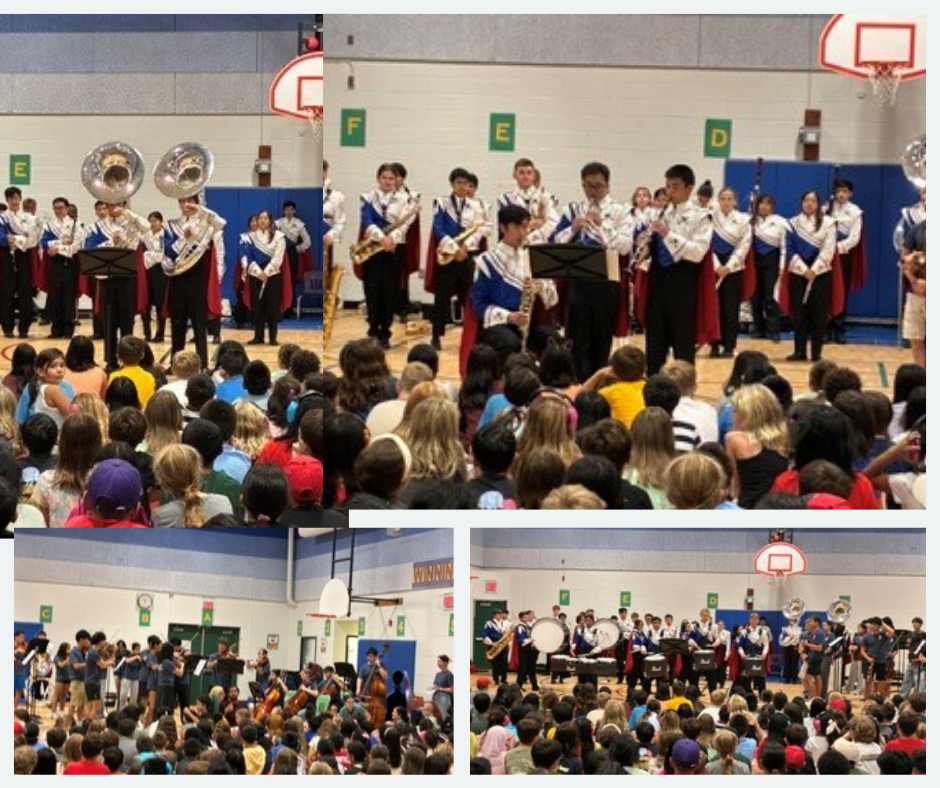 What a great visit from the W.T. Woodson High School Band and Orchestra today! Our students loved seeing their performances and learning more about the instruments!
It was especially wonderful to see so many of our former CWES students back in the building!
Dear Canterbury Woods Families,
What a wonderful first week of school! It has been so exciting to see our students back in the building. Throughout the week, students have been learning new routines, building community within their classrooms, and making new friends. We are so proud of how our students have jumped into the school year with enthusiasm, kindness, and excitement for learning!
A Few Important Reminders:
- Please make sure your student knows how they are getting home each day. If there is a change to your student’s dismissal plan, be sure to communicate that change with the office. This helps us ensure that every student gets home safely.
- If your student enters through Door 1, you may have noticed that we are working on making our morning entry as safe and smooth as possible. We have many students entering at the same time, and while we love seeing their excitement to get into school, we need everyone to walk, take turns entering the doors, and keep their hands to themselves. Please help us reinforce these expectations at home as we continue practicing them at school. A safe start to the day helps everyone begin their morning on a positive note!
- Our wonderful PTA will be providing a FREE Cougar Crawl T-shirt for every student! Please be sure to complete the shirt size form by September 4th so that your student receives the correct size.
Thank you for helping us make the first week of school such a success. We are looking forward to an amazing year!
Have a wonderful weekend,
Leslie Malkowski, Kaitlin Turzi, and Mindy Milliron
CWES Administrative Team
-
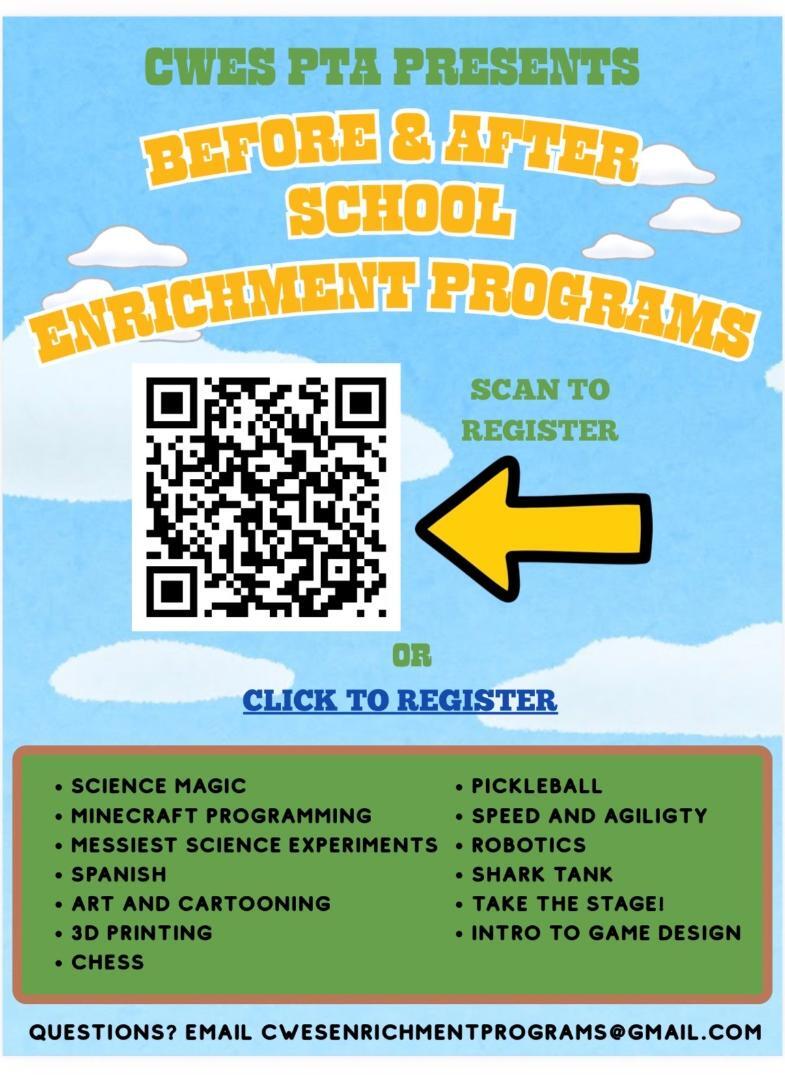
Organization: CWES PTA Presents
-
Event/Program: Before & After School Enrichment Programs
-
Action Steps: "Scan to register" using the provided QR code, or "Click to register" using the available link.
Enrichment Programs Offered: Science Magic, Minecraft Programming, Messiest Science Experiments, Spanish, Art and Cartooning, 3D Printing, Chess, Pickleball, Speed and Agiligty, Robotics, Shark Tank, Take the Stage!, Intro to Game Design
Contact Information:
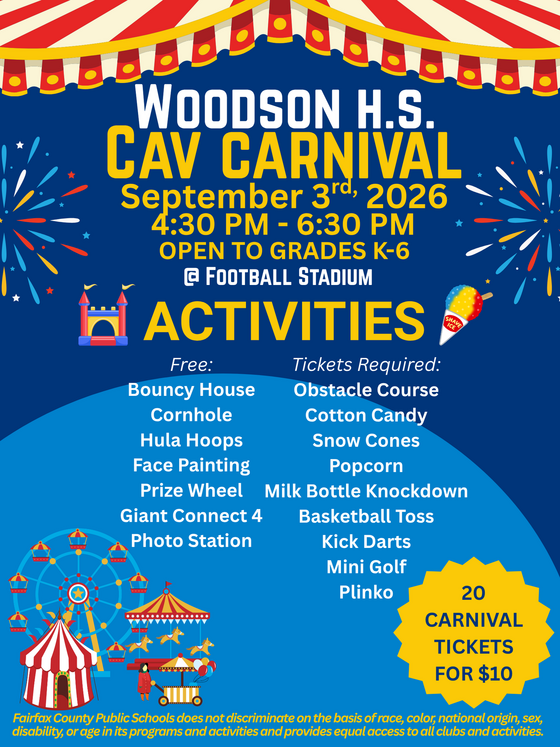 Cav Carnival and Woodson Pyramid Night – September 3rd - 4:30-7:00 p.m.
Come celebrate the new school year and Woodson Pyramid Night on Thursday, September 3rd at the Woodson Football Stadium! At our annual Cav Carnival we will have games, face painting, prizes, and finish with running of the field. Students K-6 get in free with a paying adult. Carnival Games start at 4:30pm, running of the field at 6:45. Our football game will start at 7:00pm against the Edison Eagles.
SIS ParentVUE
Everything You Need to Do in SIS ParentVUE
Are you working your way through back-to-school forms and checklists? Make sure you have a SIS ParentVUE account for your family and log in to find important forms and updates.
- Be among the first to know about weather closings, bus delays, and other critical communications from your school and FCPS by providing your cell phone number and email in ParentVUE. To update your contact information in ParentVUE, click the “Online Packets” tab in the upper right of the screen, then click the “Online Verification/Update” icon.
- Submit daylong absences by clicking “Report Absence.”
If you do not have a ParentVUE account, contact your child’s school for an activation code and follow the directions on the SIS ParentVUE Account webpage.
FCPS Mobile App
Have Children in Multiple FCPS Schools? 🏫
The FCPS mobile app lets you follow updates from all your children's schools in one place! Simply open the app, tap the teal pull-down menu, then tap the gear icon and select every school you want to follow. See this video of how to follow your school.
Find out about more features of the app. Download the app from the Apple App Store or Google Play Store.
Transportation Patience and Safety
Transportation Patience and Safety
Thank you for your patience as we all get used to new routines this school year. We appreciate our families following Kiss and Ride procedures and being patient while waiting for your child’s bus.
If your child’s bus is delayed, you may access the Bus Delay Notification System or use the Here Comes the Bus mobile app to receive the delayed bus report. Email messages will be sent to announce significant bus delays. Please contact the Transportation Office at [phone number] with any additional questions. For concerns after 5:30 p.m., contact the FCPS Office of Safety and Security at 571-423-2000.
Update your contact information in SIS ParentVUE to make sure you receive email messages about bus delays.
Parent Digital Consent
Remember to Complete Permission Forms for School Resources
Families can now easily grant consent for their children to access a variety of school resources through the Parent Digital Consent system. This online tool can be accessed using your SIS ParentVUE account login. Parents can easily opt their child in or out of a variety of resources, including online educational tools, school counseling services, and more.
Visit the Parent Digital Consent webpage to access the system. Watch this video to see how to use the tool.
Opt In or Out to Student Devices Being Sent Home for Grades 1-6
New this year, families can opt out of having student laptops sent home with their student.
- If you do not want your student to bring their FCPS-issued device home, please toggle the Opt Out button to a check mark and confirm by pressing Save Selection.
- If you would like your student to bring their FCPS device home, no toggle action is needed. Confirm by pressing Save Selection.
Students whose families opt out will continue to have access to an FCPS-issued device during the school day. Please reach out to your student’s teacher to understand expectations for homework and any learning activities that may require access to technology outside of the school day.
CWES will use Schoology for all Tuesday Folder contents. All flyers are posted to Schoology Course: Canterbury Woods Elementary School All Parents/Guardians and contents are listed below.
- CAV Carnival
- Chick Fil A Spirit Day

Want a quick way to recognize an employee or team? Share an FCPS CARES!! Families, colleagues, and students are all invited to submit. The FCPS CARES is automatically sent to the recipient(s) and their supervisor, and is posted on fcps.edu. Additionally, each month one school in our region wins a staff celebration from HR.
|