|
English | Español | አማርኛ | 中文 | 한국어 | Tiếng Việt | Français | Русский
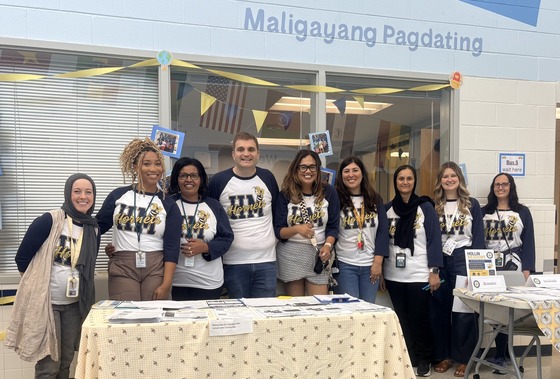 We were so excited to welcome families to our Open House and Block Party event!
A Message from Principal Crews
HMES Hornet Community,
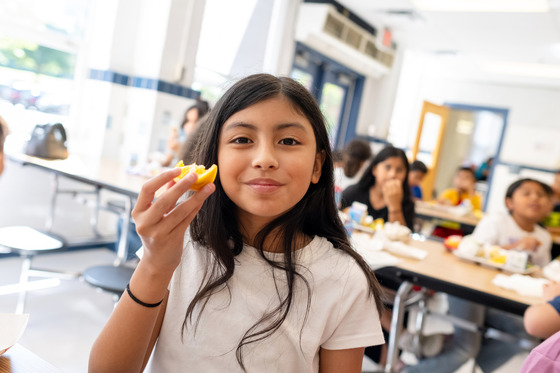
It was wonderful to see and meet students, parents and families at our Open House and Block Party on Friday. There was so much joy and excitement in our school building! Our Hornet staff are excited about our students' return to Hollin Meadows on Monday morning!
If you weren't able to make the event, that's okay. We are ready to welcome you on Monday for the first day of school! As a reminder school doors open at 8:05am and students are considered tardy after 8:20am. Breakfast is provided for our Hornets when they come into the school at the cafeteria and they are expected to eat it in the classroom. Lunch is also provided for all students. Click here for a lunch menu and a dietary restrictions menu key.
Our cones and signs will be back on Monday. There is no parking on Nordok Pl. on the school side. This allows for cars to line up to enter for Kiss & Ride. And it allows for cars and buses to pass. Thank you for being a good neighbor by not blocking driveways or making unsafe U-turns on Nordok Pl. We always model safe behavior for our students by crossing at the crosswalk, not in between cars or buses.
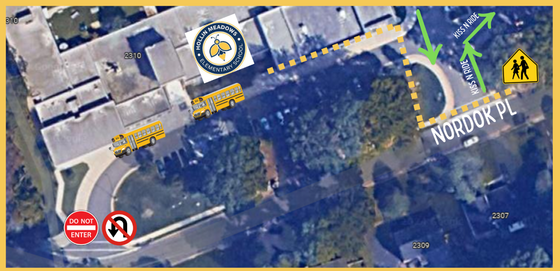 An aerial photo of the HMES bus loop and entrance to the Kiss and Ride line.
As always, thank you for your partnership with us in your child's education at Hollin Meadows!
Sincerely,
Jasibi Crews
Proud Principal
🐝Reminders:
- Teacher assignments and transportation information are accessible through SIS ParentVUE. You can access the FCPS website for support with SIS.
- Save the date for Back to School Night on Tuesday, September 15th from 5:00-7:00 p.m.
HMES School Supply Lists
✏️ Are you ready to go shopping for school supplies? You can see the list for each grade level on the HMES School Supply List webpage.

The HMES PTA has some great events planned! Please mark your calendars for the following events:
Fall Club registration will be from Sept. 7-21, 2026. Clubs begin the week of September 21. Click here for more information: HMES Fall Clubs
The Taste of Hollin Meadows PTA meeting will be on Sept. 23 at 6:00 p.m.
⭐You can learn more about the PTA and join by visiting the HMES PTA website. Please consider joining and volunteering for some of our events!
 |
|
Birthdays at HMES
We love celebrating birthdays! Families are welcome to drop off one packaged store-bought item that is allergy-friendly. Please communicate with your child's teacher as early as possible if you would like to drop off a item to share. Items should be dropped off in the front office of the school.
Celebrations take place at the end of the day. While we love our families, birthday celebrations are for students only.
|
Back to School Night
Back to School Night is Sept. 15, 2026. There will be a session for all families from 5:00 - 5:30 p.m. with Principal Crews in the cafeteria.
The first session with your child's classroom teacher will be from 5:40 - 6:10 p.m.
There is a second session that you may attend with a different teacher from 6:15 - 6:45 p.m.
|
|
 |
Student ID Cards for HMES Bus Riders
We will begin distributing student ID cards to all our students who ride the school bus or use FCPS transportation services.
Students who have student ID cards should begin tapping as they board and exit the bus. Only students who use FCPS transportation services will be provided with a student ID card at this time.
We ask for your patience! Bus drivers will begin checking in students next week and may need some extra time at each bus stop while they do this. The transportation team is working hard to minimize any potential delays.
Learn more about the bus navigation and student ID cards.
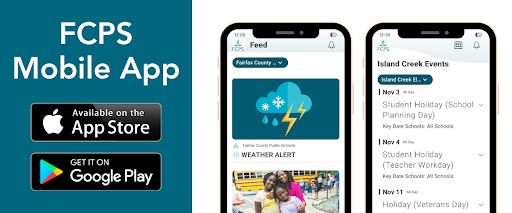
Get Ready for Day One with the FCPS App! 🎒
As we gear up for the first day of school, make sure you have the FCPS mobile app downloaded! It's the quickest way to check the school year calendar, view lunch and breakfast menus, find school contacts, and jump to ParentVUE or Schoology from your phone.
Download the app from the Apple App Store or Google Play Store.
¡Prepárese para el primer día de clases con la aplicación de FCPS! 🎒
Mientras nos preparamos para el primer día de clases, asegúrese de tener descargada la aplicación móvil de FCPS. Esta es la manera más rápida de consultar el calendario escolar, ver los menús de desayuno y almuerzo, comunicarse con su escuela y acceder a ParentVUE o Schoology directamente desde su teléfono.
Descargue la aplicación desde Apple App Store o Google Play Store.
Help Your Child Navigate the Lunch Line
Check out some tips to help your child get through the lunch line quickly and have more time to eat:
- Teach your child their student ID number to receive meals at school.
- Sign up for and add money to MySchoolBucks to purchase meals at school.
-
Apply for free and reduced-price meals. Students who were approved for free and reduced-price meals last year are eligible for the first 30 days of school this year (or until a new application is processed). Families should submit a new application as soon as possible, so eligible students continue to receive meals at no cost.
If your child has any food allergies, learn how to submit accommodations for dietary restrictions and allergens.
Access menus for breakfast, lunch, and other school meals, as well as allergen and nutrition information.
Ayude a su hijo a navegar por la fila del almuerzo
Ayude a su hijo a aprovechar bien el tiempo del almuerzo y a pasar rápido por la fila haciendo lo siguiente:
- Enséñele a su niño su número de ID de estudiante para que pueda recibir las comidas escolares (esto es nuevo para este año). Este número es el mismo que usan para entrar a sus dispositivos escolares y puede encontrarlo en SIS ParentVUE.
- Inscribiéndose y depositando dinero en “MySchoolBucks” para que pueda comprar comidas en la escuela.
-
Solicite comidas gratis o a precio reducido. Aquellos estudiantes que fueron aprobados el año pasado para recibir comidas gratis o a precio reducido, son elegibles para continuar recibiéndolas por los primeros 30 días de clases (o hasta que una nueva solicitud sea aprobada). Las familias deben hacer su solicitud lo más pronto posible, para que los estudiantes que sean elegibles continúen recibiendo sus comidas sin costo alguno.
Si su niño tiene cualquier alergia a algún alimento, aprenda cómo pedir Acomodaciones para restricciones alimentarias y alergias.
Encuentre los menús de desayuno, almuerzo, y otras comidas escolares, así como información sobre alergénicos y nutricional.
You Can Manage Student Web Access at Home
At Hollin Meadows, we acknowledge that parents are our students' first and most important teachers. Parents now have greater control over their child’s FCPS-issued device outside of school hours through Lightspeed Parent Portal.
In addition to monitoring weekly internet activity, parents can now also customize web access at home on FCPS devices through Lightspeed using Schedules and Web Rules.
With Schedules, you can set tailored times to automatically pause or restrict internet access. This makes it easier to enforce rules around homework time, family dinners, weekends, or bedtime.
In Web Rules, you can create Custom Block Lists to block specific, individual websites they do not want your child accessing at home. This allows parents greater control over what is happening online, under their own roof.
These new custom controls take effect at home, outside of school hours, and when the device is off the FCPS network. They will not override standard district filtering policies during the instructional day.
Customize Your Lightspeed Settings
All parents should be receiving weekly Lightspeed Online Student Activity Report emails. To set up these new features, click the “Log in or Register” button at the bottom of your weekly Lightspeed Online Student Activity Report email.
Visit the FCPS Lightspeed Parent Portal Guide for more information. If you have additional questions, submit a Parent Technology Support Ticket.
Parents are encouraged to discuss internet boundaries with their children so that they can understand the reasoning behind any limits and the differences between access at home and at school. Get tips on talking to your children about technology safety.
¿Sabía que puede administrar el acceso a internet de su estudiante en casa?
En Hollin Meadows sabemos que las familias tienen un papel fundamental en acompañar a sus estudiantes en el uso de la tecnología. Por eso, ahora los padres pueden tener mayor control sobre el acceso a internet desde los dispositivos de FCPS cuando sus hijos lo usan en casa, a través del Portal para padres de Lightspeed.
Además de recibir información sobre la actividad semanal en internet, ahora puede establecer límites de acuerdo con las necesidades y rutinas de su familia utilizando las funciones Schedules (Horarios) y Web Rules (Reglas web).
Con Schedules (Horarios), puede elegir en qué momentos desea pausar o restringir automáticamente el acceso a internet. Por ejemplo, puede establecer límites durante la hora de hacer tarea, las comidas en familia, los fines de semana o antes de dormir.
Con Web Rules (Reglas web), puede bloquear sitios web específicos que no desea que su estudiante visite mientras usa su dispositivo de FCPS en casa. Así, usted puede decidir qué tipo de acceso es apropiado para su familia fuera del horario escolar.
Estas opciones funcionan únicamente fuera del horario escolar y cuando el dispositivo no está conectado a la red de FCPS. Durante la jornada escolar, continuarán aplicándose las reglas y filtros de internet establecidos por FCPS.
Personalice la configuración de Lightspeed
Las familias deberían estar recibiendo cada semana por correo electrónico el Informe de Actividad en Línea del Estudiante en Lightspeed. Para configurar estas nuevas funciones, haga clic en el botón “Log in or Register” (Iniciar sesión o registrarse) que aparece al final de su informe semanal.
Visite la Guía del Portal para padres de Lightspeed de FCPS para obtener más información. Si tiene preguntas adicionales, envíe una solicitud de soporte tecnológico para padres.
También recomendamos hablar con sus hijos sobre los límites que establezca para el uso de internet. Ayudarlos a entender por qué existen estas reglas les permitirá comprender mejor las diferencias entre el acceso a internet en casa y en la escuela. Encuentre consejos para hablar con sus hijos sobre el uso seguro de la tecnología.
💻 Catch Up on Your Child’s Classwork in Schoology
Teachers use Schoology to post their classroom materials online; to provide a secure forum for students to discuss their ideas and collaborate on projects; and to assign and collect homework electronically. It helps students stay organized, and it keeps the class connected.
A Schoology Parent Account gives you access to:
- Your child’s classes.
- Your child’s upcoming assignments.
- School, class, and group announcements.
To access Schoology, parents will need to have an active SIS/ParentVUE account. Get more information on how to login and use Schoology.
💻 esté al Tanto de las Tareas de su Niño en “Schoology”
Los profesores usan Schoology para publicar en línea sus materiales del aula; ofrecer un foro seguro para que los alumnos discutan sus ideas y colaboren en los proyectos; y para asignar y recibir tareas electrónicamente. Esta plataforma ayuda a los alumnos a mantenerse organizados y mantiene a la clase conectada.Una cuenta Schoology para padres les da acceso a:
- Las clases de su hijo.
- Los deberes que su hijo debe entregar.
- Anuncios de la escuela, de la clase y de los grupos.
Para poder tener acceso a Schoology, los padres necesitan tener su cuenta SIS/ParentVUE activa. Pueden encontrar más información sobre cómo iniciar sesión y usar Schoology en internet.
SEL Screener Parent/Guardian Notification
The Fall Social and Emotional Learning (SEL) Screener will be administered to students in grades 3 through 12 in October. Students use the SEL Screener twice a year to share their perspectives on how well their school and community help them develop skills they need to succeed. The screener works by asking questions or presenting statements that students can think about and respond to. This gives students a way to share how well their school community makes them feel valued, included, and supported.
After each screening, results are available in the Documents tab of SIS ParentVUE and mailed to families without a ParentVUE account. For more information, including SEL Screener questions and opt-out information, please visit the Social-Emotional Learning (SEL) Screener webpage.
Información para padres y tutores sobre la evaluación del aprendizaje social y emocional (SEL)
En octubre, los estudiantes de 3.º a 12.º grado realizarán la evaluación de primavera de aprendizaje social y emocional (SEL). Esta evaluación se realiza dos veces al año y les da a los estudiantes la oportunidad de compartir cómo perciben el apoyo que reciben de su escuela y su comunidad para desarrollar las habilidades que necesitan para tener éxito, sentirse valorados, incluidos y apoyados.
Los resultados estarán disponibles en la pestaña Documents (Documentos) de SIS ParentVUE. Las familias que no tengan una cuenta de ParentVUE los recibirán por correo postal.
Para conocer más, consultar las preguntas o información sobre cómo solicitar que su hijo participe, visite la página de la Evaluación de aprendizaje social y emocional (SEL).
Family Information Phone Lines
Family Information Line Available in Nine Languages
Parents/caregivers who speak Amharic, Arabic, Chinese, English, Farsi, Korean, Spanish, Urdu, or Vietnamese may call a telephone information line for general information about FCPS. View the list of phone numbers.
Línea Telefónica de Información para Padres Disponible en Nueve Idiomas
Padres/cuidadores que hablan Amárico, Árabe, Chino, Farsi, Coreano, Español, Urdu o Vietnamita pueden llamar a una línea telefónica de información para obtener información general sobre FCPS. Vea la lista de números de teléfono.
Immunizations
Update Your Child’s Immunizations and Records
Please check with your healthcare provider as soon as possible to make sure your child is up-to-date on the immunizations required by the state of Virginia. Prior to the start of school on Monday, August 24, please submit your child’s immunization documentation. If your child has an appointment to receive their required immunizations after August 24, please submit an Immunization Action Plan to confirm the appointment.
You can check your child’s immunization compliance and submit their immunization record in SIS ParentVUE. Records may also be delivered to a school’s front office. If needed, families may also provide other immunization documentation including a healthcare provider’s written statement of a permanent or temporary medical exemption or a notarized Religious Exemption Form. Please visit the FCPS How to Submit Immunization Documentation webpage for step-by-step instructions on how to submit each of these items.
Immunization Events for FCPS Students
FCPS, in partnership with Inspire Health Alliance, will be providing school-required immunizations and optional flu shots for all FCPS students, ages 18 and under, with no out-of-pocket costs. Multiple events will take place at designated FCPS locations. Additional dates will be made available throughout the school year. Parents or guardians may view upcoming events and schedule an appointment for their student. Participation is voluntary.
Additional immunization resources are also available.
Mantenga al día las vacunas y los registros de su estudiante
Consulte con su proveedor de atención médica lo antes posible para asegurarse de que su estudiante esté al día con las vacunas requeridas por el estado de Virginia.
Antes del inicio de clases, el lunes 24 de agosto, envíe la cartilla de vacunación de su estudiante. Si tiene una cita para recibir alguna vacuna requerida después del 24 de agosto, envíe un Plan de Acción de Vacunación.
Puede revisar el estado de vacunación de su hijo y enviar sus registros en SIS ParentVUE. También puede entregarlos en la oficina principal de la escuela.
Si corresponde, puede presentar otros documentos de vacunación, como una extensión médica o un Formulario de Excepción por Motivos Religiosos notariado. Visite la página de FCPS sobre como enviar la documentación de vacunación para obtener instrucciones al respecto.
Jornadas de vacunación para estudiantes de FCPS
FCPS, en colaboración con Inspire Health Alliance, ofrecerá las vacunas requeridas para asistir a la escuela y vacunas opcionales contra la gripe para estudiantes de FCPS de 18 años o menos, sin costo para las familias.
Habrá varias jornadas en distintas comunidades de FCPS y se agregarán más fechas durante el año escolar. Los padres o tutores pueden consultar las próximas fechas de jornadas y programar una cita. La participación es voluntaria.
También puede consultar estos recursos adicionales sobre vacunación.

The Hollin Meadows Leadership Team
The Hollin Meadows team is dedicated to making our school a safe and supportive place to learn for your child. We know that the best results come from families and our school team working together. Since you often hear about your child’s day-to-day experiences before we do, please reach out with questions or concerns that you may have.
-
Principal Jasibi Crews is our school leader. She is available for questions and concerns by email at jcrews1@fcps.edu.
-
Assistant Principal Francesca Gilley (flgilley@fcps.edu) is the team leader for Pre-kindergarten, Grade 2, Grade 4, and Grade 6.
-
Assistant Principal Daniel Seidenberg (dpseidenberg@fcps.edu) is the team leader for Grade 1, Grade 3, and Grade 5.
AP Gilley and AP Seidenberg both work with the Kindergarten team.
 |
|
Hollin Meadows Important Times
Arrive on campus: 8:00 am
Doors Open: 8:05 am
Tardy Bell: 8:20 am
Dismissal Bell: 3:05 pm
Main Office Hours: 7:45 am to 4:00 pm
|
FCPS Cares
FCPS Cares is an opportunity for parents, staff, and community members to recognize FCPS employees for going above and beyond to help others and show they care. We invite you to submit your story so we can all acknowledge the good work of our Hollin Meadows staff members.
|
|
|
 |
Quick Links
Hollin Meadows Attendance Information
FCPS Breakfast and Lunch Menus
FCPS Calendars
FCPS Family Resource Center (FRC)
|