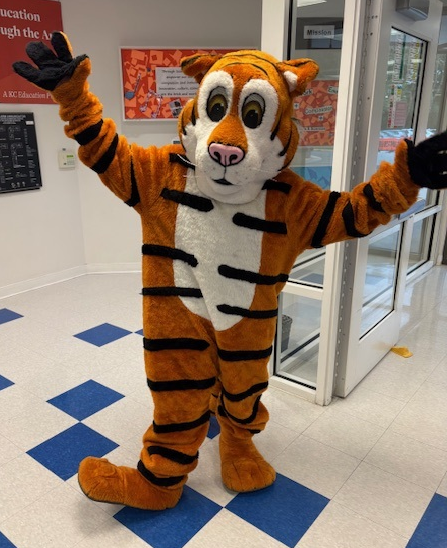
 It was wonderful to see our Bailey’s Tigers families enjoy themselves at our Open House. We cannot wait to welcome our students back this Monday!
Dear Bailey’s Upper Families,
Tomorrow is the day!!! We are SO excited to welcome our Tigers back to Bailey’s Upper and officially kick off the 2026–27 school year!
Before tomorrow morning, please take a few minutes to review our Welcome Back videos if you have not already done so. They include really important information about arrival, dismissal, Kiss & Ride, buses, and what to expect during the first few days of school.
English: https://youtu.be/JyMk_wtNoCA
Spanish: https://youtu.be/Zkz5sFSMACk
A few especially important reminders for tomorrow:
-
Families will NOT be able to walk students into the building on the first day of school. Please do not park and walk your child to the doors. We will have lots of staff outside and throughout the building ready to welcome students, help them find their classrooms, and make sure they get where they need to go!
- Please send your child to school the way you plan for them to regularly arrive—either by bus or Kiss & Ride. This helps everyone learn and practice our routines from the very first day.
- Make sure your child knows how they are getting home. If they ride the bus, please make sure they know their bus number.
- Write it down! Put a note in your child’s backpack with their bus number or dismissal plan so they have something to reference if they forget. The first day is exciting, and even things they know well can be easy to forget!
We know that the first day can bring a lot of emotions—for students and grown-ups! Please know that we are ready for them. There will be smiling faces everywhere, helping hands throughout the building, and a whole school full of people excited to welcome your children back.
We are going to have an AMAZING year together. I cannot wait to see our Tigers tomorrow morning!!!
See you soon!
With excitement,
Bailey’s Upper Admin Team
💙Ms. Dowling
🧡Ms. Wayland
🐯Ms. Wiley
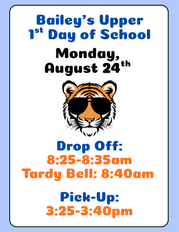
We can't wait to welcome our Tigers back for another exciting school year! Please review the arrival times below to help ensure a smooth and successful start to the first day of school.
📅 First Day of School
🐯 Bailey's Upper (Grades 3–5)
- 🚗 Drop-Off: 8:25–8:40 AM
- ⏰ Tardy Bell: 8:40 AM
- 🚗 Pick-Up: 3:25 PM-3:40 PM
💙 First Day Reminder
To help students settle into their classrooms, parents WILL NOT be permitted inside the building on the first day of school. We know the first day can bring lots of excitement (and a few nerves!), but our amazing teachers, staff, and administrators will be throughout the building ready to welcome, support, and guide every student to their classroom. Your child will be in caring hands from the moment they arrive.💙🧡
|

Help your child start the school year prepared! School supply lists are now available for each grade level. Simply use the link below to find your child's list and begin shopping.
📦 Ordered a School Supply Kit?
If you purchased a school supply kit, no further action is needed! Your child's supplies will be delivered directly to their classroom and waiting for them on the first week of school.
Please contact amy@campussurvivalkits.com for assistance with your order.
|
Thank you to Chris Siles, a Bailey’s Primary family member, for sharing his talents and creating the beautiful balloon arch for our Open House! It was the perfect welcome for our students and families. #StylesbySiles
-
Monday, August 24th- 1st Day of School for 2026-2027!
- Kiss & Ride: 8:25am-8:35am
- Late bell rings at 8:40am
-
Friday, September 4th- No School: Labor Day Weekend
-
Monday, September 7th- No School: Labor Day
-
Thursday, September 10th- Parent Coffee: Students' Rights & Responsiblities:
- 9:45am-10:45am @ Bailey's Primary Cafeteria
- 6:00pm via Zoom
-
Monday, September 14th- PTA General Meeting at Bailey's Primary Cafeteria. Doors Open at 6:00pm, Meeting begins 6:30pm
-
Wednesday, September 16th- Back to School Night
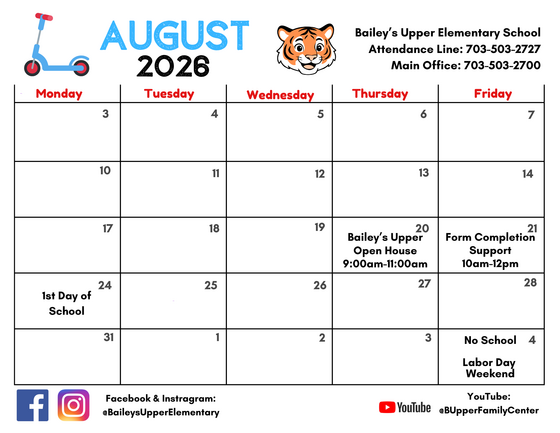 Bailey's Upper August 2026 Calendar


At Bailey's Upper, we acknowledge that parents are our students' first and most important teachers. Parents now have greater control over their child’s FCPS-issued device outside of school hours through Lightspeed Parent Portal.
In addition to monitoring weekly internet activity, parents can now also customize web access at home on FCPS devices through Lightspeed using Schedules and Web Rules.
With Schedules, you can set tailored times to automatically pause or restrict internet access. This makes it easier to enforce rules around homework time, family dinners, weekends, or bedtime.
In Web Rules, you can create Custom Block Lists to block specific, individual websites they do not want your child accessing at home. This allows parents greater control over what is happening online, under their own roof.
These new custom controls take effect at home, outside of school hours, and when the device is off the FCPS network. They will not override standard district filtering policies during the instructional day.
Customize Your Lightspeed Settings
All parents should be receiving weekly Lightspeed Online Student Activity Report emails. To set up these new features, click the “Log in or Register” button at the bottom of your weekly Lightspeed Online Student Activity Report email.
Visit the FCPS Lightspeed Parent Portal Guide for more information. If you have additional questions, submit a Parent Technology Support Ticket.
Parents are encouraged to discuss internet boundaries with their children so that they can understand the reasoning behind any limits and the differences between access at home and at school. Get tips on talking to your children about technology safety.
|
 |
Teachers use Schoology to post their classroom materials online; to provide a secure forum for students to discuss their ideas and collaborate on projects; and to assign and collect homework electronically. It helps students stay organized, and it keeps the class connected.
A Schoology Parent Account gives you access to:
- Your child’s classes.
- Your child’s upcoming assignments.
- School, class, and group announcements.
To access Schoology, parents will need to have an active SIS/ParentVUE account. Get more information on how to login and use Schoology.
Simplify your back-to-school prep!
Download the FCPS mobile app to check school calendars, breakfast/lunch menus, and school contacts all in one place with no login required.
Plus, get quick access to ParentVUE, Schoology, and the bus app.
Download the FCPS mobile app in the Apple App Store or Google Play, and make sure to subscribe to our school in the app settings.
|

The Fall Social and Emotional Learning (SEL) Screener will be administered to students in grades 3 through 12 in October. Students use the SEL Screener twice a year to share their perspectives on how well their school and community help them develop skills they need to succeed. The screener works by asking questions or presenting statements that students can think about and respond to. This gives students a way to share how well their school community makes them feel valued, included, and supported.
After each screening, results are available in the Documents tab of SIS ParentVUE and mailed to families without a ParentVUE account. For more information, including SEL Screener questions and opt-out information, please visit the Social-Emotional Learning (SEL) Screener webpage.
|
Fairfax County Public Schools is committed to challenging all students through talent development and differentiated instruction. A continuum of Advanced Academic Programs (AAP) services is available to students in Grades K to 12 and is designed to match services to each student’s unique academic needs.
Identification for Subject-Specific and Part-Time AAP services occurs throughout the school year. Full-Time AAP services have two identification cycles:
-
Fall identification: Students in grades 3 to 7 who have enrolled in FCPS since January may be referred by October 15.
-
Spring identification: Any FCPS student in Grades 2 to 7 may be referred by December 15.
FCPS uses ability testing as one consideration in the holistic identification process for AAP services:
- All students in Grade 2 take the Naglieri General Ability Test (NGAT).
- Students in Grades 3 to 6 who do not have a multi-domain ability test score take the NGAT.
- Students in Grades 3 to 6 may retake an ability test one time. Families may request the ability test retake by contacting Hugo Duran, school testing coordinator, at haduran1@fcps.edu by September 30.
Families are invited to attend two AAP information meetings led by Sue Lackey, our Advanced Academic Resource Teacher (AART):
-
AAP Continuum of Services: Families will learn about the continuum of advanced academic services available to FCPS students.
-
Full-Time AAP Identification: Families will learn about the referral and identification processes for Full-Time AAP services.
For more information, please contact Sue Lackey, AART, at salackey@fcps.edu or visit the FCPS Advanced Academic Programs webpage.
|