English | Español | አማርኛ | 中文 | 한국어 | Tiếng Việt | العربية | فارسی | اردو
Dear Bull Run Families,
As many of you know, our school family faced a profound loss this week with the passing of our beloved colleague, Patricia Lucas. In the midst of our shared grief, the strength, compassion, and resilience of this community have been nothing short of extraordinary. We took time to cry together, honor her memory, and support one another in ways that truly define what it means to be a family.
As the week continued, we were able to turn our focus to the important work of preparing for our students' return. Over the past few days, our team engaged in meaningful professional development, held meetings, and even shared a few fun moments together to recharge. We are fully prepared, deeply united, and eager to welcome your children back into a safe, warm, and inspiring environment next week.
I hope to see you tomorrow, Friday, August 21st, at our Open House (see details below). We can't wait to welcome both our returning and our new students and their families into the building!
Please see some important information in the Highlights section below.
Have a wonderful weekend!
-Mr. Marotta

August 21:
Popsicles on the playground and Open House (PreK and Kindergarten only) 10:30am-11:30am
Open House (Grades 1-6 only) 12:30pm-2:30pm
August 24: FIRST DAY OF SCHOOL!
September 04 and 07: NO SCHOOL (Labor Day Holiday)
|
*The full FCPS 2026-2027 calendar can be accessed here.
 |
|
We can't wait to see all of our students back officially on August 24th! Check out these back-to-school tips to make sure your child gets off to a great start. |
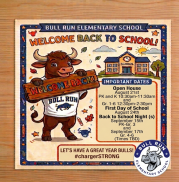
Welcome Back to Bull Run Elementary!
We are so excited to kick off another fantastic school year! As we gear up for day one, here are a few key dates to mark on your calendar:
Open House (August 21st):
-
Pre-K & Kindergarten: 10:30 AM – 11:30 AM
-
Grades 1–6: 12:30 PM – 2:30 PM
First Day of School: August 24th
Back to School Nights (Times TBD):
-
Pre-K – Grade 3: September 15th
-
Grades 4–6: September 17th
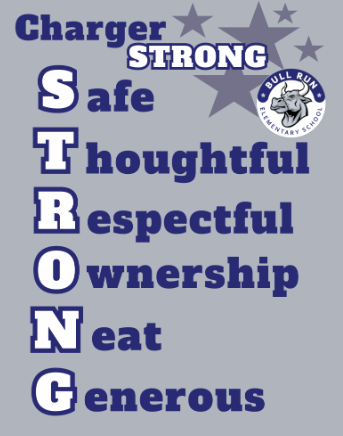
Let’s make this a great year! #chargerSTRONG
|

Updated Visitor & Entry Protocols at Door 1
To align with new county-directed safety guidance and enhance security across our building, we are updating our main entry procedures.
The inner vestibule doors at Door 1 will remain locked at all times. Please review how to navigate Door 1 based on the purpose of your visit:
Scenario 1: Dropping Off Items for a Student
- Press the buzzer at Door 1 for access into the front vestibule.
- Place the item (clearly labeled with your student's full name and grade) on the drop-off shelf located inside the vestibule.
- Office staff will retrieve the item from the shelf and deliver it to your student.
Scenario 2: Early Student Pick-Up
- Press the buzzer at Door 1 for access into the front vestibule and wait inside.
- Office staff will communicate via the intercom to verify dismissal details (e.g., doctor’s note, prior email) and call your student to the main entry.
- Remain in the secure vestibule until your student is brought down to meet you.
Scenario 3: Meetings & Volunteer Opportunities
- Press the buzzer at Door 1 for access into the front vestibule.
- A staff member will unlock the inner entry door to welcome you into the main office or direct you to your destination, after you scan your ID and check in using the Raptor Security System kiosk in main office.
These updated steps are part of a county-wide effort to keep our students and staff safe while maintaining an organized, secure learning environment. We appreciate your partnership and cooperation in following these new guidelines!
TIPS AND REMINDERS:
|

Help Your Child Navigate the Lunch Line
Check out some tips to help your child get through the lunch line quickly and have more time to eat:
- Teach your child their student ID number to receive meals at school.
- Sign up for and add money to MySchoolBucks to purchase meals at school.
-
Apply for free and reduced-price meals. Students who were approved for free and reduced-price meals last year are eligible for the first 30 days of school this year (or until a new application is processed). Families should submit a new application as soon as possible, so eligible students continue to receive meals at no cost.
If your child has any food allergies, learn how to submit accommodations for dietary restrictions and allergens.
Access menus for breakfast, lunch, and other school meals, as well as allergen and nutrition information.
|
Good News! There is still time to get a jump start on the new school year! 😊
Check out these fun activity boards and have your students hand them in to their new teachers OR to Mrs. Brown (Literacy Specialist) and Mrs. McPherson (Elementary Math Resource Teacher) when they return to school!
Math Board PDF
Math Board PDF (SPANISH)
Reading Board (SPANISH)
Reading Board
 |
|
We would like to welcome our new PTA Board Members for the 2026-2027 School Year!
President: Whitney Bell
Vice President of Ways & Means: Carlin Ferraro
Vice President of Programs: Libbie Shah
Treasurer: Matt Wylan
Secretary: Jessica Kollaros
|
Recognizing BRES staff who go above and beyond
The FCPS CARES Program is an opportunity for families, staff, and community members to recognize FCPS employees for going above and beyond to help others and show they care. We invite you to submit your story, so we can all acknowledge the good work of FCPS employees at Bull Run Elementary. We love our staff members; let's tell them how we feel!
|
|
 |
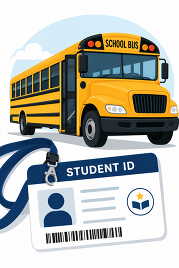
New Student ID Cards Coming This Fall
As part of the ongoing commitment to strengthening layered safety and security programs, FCPS will implement a new student ID system for students who ride our school buses.
The implementation of the student IDs is designed as an additional safety measure for our 130,000 FCPS students who ride the bus each day, ensuring they are on the right bus and that they get on and off at the correct bus stop, as well as making sure only authorized students are on our buses.
The IDs will be provided to students who ride the bus. Those students will be expected to tap on and tap off the bus. The student IDs do not track student movement. The only information available is when a student taps on or off a bus. Much like our Here Comes the Bus app, our new app will allow parents/guardians to track the progress of the school bus.
It is possible that the ID program will expand in the future to include uses such as library cards and meal payment. Learn more about the new transportation system and student ID cards.
|
New ParentVUE Mobile App
On Tuesday, July 28, a new ParentVUE mobile app become available in the Apple and Google app stores. This new app provides parents and caregivers with a more secure sign-in. The current “classic” app will remain active for about six months. Families must download the new app by December 2026 to ensure they have continued mobile access to their child’s school data.
In the new app, families can enroll in multi-factor authentication (MFA) for FCPS Single Sign-On. While enrollment is optional, we strongly recommend that everyone enable this security feature.
Learn more about installing the new ParentVUE app. Parents needing assistance should submit a Parent Support Request.
You Can Manage Student Web Access at Home
At Bull Run, we acknowledge that parents are our students' first and most important teachers. Parents now have greater control over their child’s FCPS-issued device outside of school hours through Lightspeed Parent Portal.
In addition to monitoring weekly internet activity, parents can now also customize web access at home on FCPS devices through Lightspeed using Schedules and Web Rules.
With Schedules, you can set tailored times to automatically pause or restrict internet access. This makes it easier to enforce rules around homework time, family dinners, weekends, or bedtime.
In Web Rules, you can create Custom Block Lists to block specific, individual websites they do not want your child accessing at home. This allows parents greater control over what is happening online, under their own roof.
These new custom controls take effect at home, outside of school hours, and when the device is off the FCPS network. They will not override standard district filtering policies during the instructional day.
Customize Your Lightspeed Settings
All parents should be receiving weekly Lightspeed Online Student Activity Report emails. To set up these new features, click the “Log in or Register” button at the bottom of your weekly Lightspeed Online Student Activity Report email.
Visit the FCPS Lightspeed Parent Portal Guide for more information. If you have additional questions, submit a Parent Technology Support Ticket.
Parents are encouraged to discuss internet boundaries with their children so that they can understand the reasoning behind any limits and the differences between access at home and at school. Get tips on talking to your children about technology safety.
Back-to-School Immunization Requirements
Make sure your child has all of their required immunizations before the first day of school. Check their immunization records to see what they might be missing. You can:
- Request immunization records online through the Virginia Immunization Information System (a free service).
- If your child was immunized outside of Virginia, get records from those states’ systems.
- Request records from your health care provider. Some may charge for copies.
Review school-required immunizations to verify that your child is up to date.

Get to Know FCPS and the Resources Available to Families
Being connected to your school community helps you stay informed and support your child’s success. Take some time to get familiar with the many resources and tools available to FCPS families, including:
-
School Age Child Care (SACC) – This Fairfax County government program provides a safe and fun environment before and after school for elementary school-age children.
-
FCPS Communications for Families – FCPS shares news and information to support student learning and promote family involvement.
- The FCPS Family Academy is where families can learn and get support for their child’s school journey. Check out its catalog for upcoming classes, workshops, and webinars to help families learn about FCPS, parenting, early literacy, and how to partner with schools.
-
Do You Know About Family Liaisons – Family liaisons serve as a link between families and schools. Find out how family liaisons can support you and your family.
-
Study Help and Support Available to Students in Schoology: A new Schoology Study and Support Hub is available for students in Schoology. This space was developed by the FCPS Educational Technology Team with input from students. It is designed to provide essential study tools and academic support resources directly to our learners. Students can log in to Schoology and read their Schoology announcements or watch this video on the support hub for more information
|

Parent Information Lines Available in Eight Languages
Family Information Line Available in Nine Languages
Parents/caregivers who speak Amharic, Arabic, Chinese, English, Farsi, Korean, Spanish, Urdu, or Vietnamese may call a telephone information line for general information about FCPS. View the list of phone numbers.
|
FCPS This Week
In case you missed it in FCPS This Week, the school division shared updates on the following topics:
- Get Ready for Day One With the FCPS App!
- Learn About School Meals
- Managing Technology at Home
Read FCPS This Week to learn more about these topics. If you are not already receiving this weekly newsletter, please sign up today.
|
#chargerSTRONG
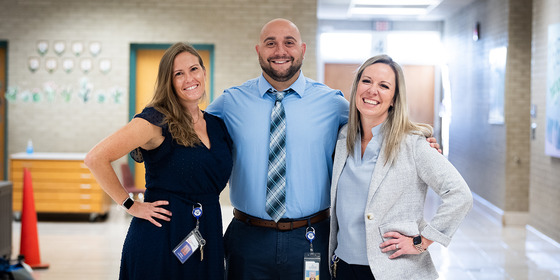 Mr. Marotta, Mrs. Campbell and Mrs. Rozzoni are proud of our #chargerSTRONG community!
Want to view previous Bull Run Bulletins? Click here.
|