|
English | Español | አማርኛ | 中文 | 한국어 | Tiếng Việt | العربية | فارسی | اردو
A Message From Your Administration
Dear Woodley Hills Family,
Welcome back to what promises to be a wonderful new school year! I am so thrilled to welcome all of our students and families back to campus on August 24, with our official school hours being 8:45 AM to 3:30 PM, with doors opening at 8:25 AM daily. Our team has worked hard to prepare a warm, engaging, and inspiring environment for our children, and we cannot wait to see their bright smiles fill our hallways again.
As we prepare for a great first day, please keep in mind that arrival and dismissal will be very busy as everyone adjusts back into their school routine. To keep all of our students, families, and staff safe, we kindly ask that you follow the directions of our team members on duty during these times. Thank you so much for your partnership, patience, and support as we embark on this exciting year together!
LaChelle Williams and Patrice Wade
Student ID Cards
If your child uses FCPS Transportation, including riding the bus, be on the lookout for information from your child's school about how they will provide you with a new student ID card. Click here for more information.
AAP Information
Advanced Academic Programs
Fairfax County Public Schools is committed to challenging all students through talent development and differentiated instruction. A continuum of Advanced Academic Programs (AAP) services is available to students in Grades K to 12 and is designed to match services to each student’s unique academic needs.
Identification for Subject-Specific and Part-Time AAP services occurs throughout the school year. Full-Time AAP services have two identification cycles:
-
Fall identification: Students in grades 3 to 7 who have enrolled in FCPS since January may be referred by October 15.
-
Spring identification: Any FCPS student in Grades 2 to 7 may be referred by December 15.
FCPS uses ability testing as one consideration in the holistic identification process for AAP services:
- All students in Grade 2 take the Naglieri General Ability Test (NGAT).
- Students in Grades 3 to 6 who do not have a multi-domain ability test score take the NGAT.
- Students in Grades 3 to 6 may retake an ability test one time. Families may request the ability test retake by contacting Alex Keightley, school testing coordinator, at akeightley@fcps.edu by September 30.
Families are invited to attend two AAP information meetings led by Jessica Stebbins, our Advanced Academic Resource Teacher (AART):
-
AAP Continuum of Services: September 9th at 5pm in the Woodley Hills Library. Families will learn about the continuum of advanced academic services available to FCPS students.
-
Full-Time AAP Identification: November 5th at 6pm in the Woodley Hills Library. Families of students in grades 2-6 will learn about the referral and identification processes for Full-Time AAP services.
For more information, please contact Jessica Stebbins, AART, at jsstebbins@fcps.edu or visit the FCPS Advanced Academic Programs webpage.
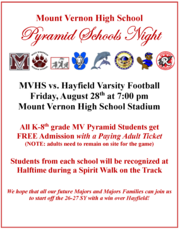
MVHS Pyramid Night MVHS vs Hayfield Varsity Football
 |
|
Friday, August 28th at 7:00 pm
Mount Vernon High School Stadium
|
FREE ADMISSION
All K-8th grade MV Pyramid Students get FREE Admission with a Paying Adult Ticket
Adults need to remain on site for the game.
|
Halftime Recognition
Students from each school will be recognized at halftime during a Spirit Walk on the track.
|
The information above about MVHS Football is also contained within the flyer above.
FCPS Mobile App
The image below contains a screenshot of the FCPS Mobile App.
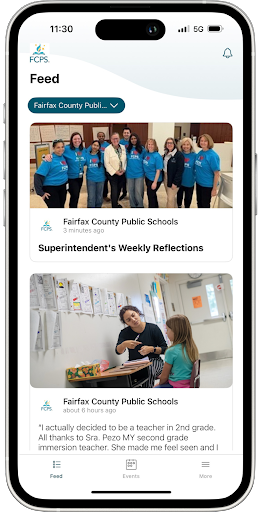
Get Ready for Day One with the FCPS App! 🎒As we gear up for the first day of school, make sure you have the FCPS mobile app downloaded! It's the quickest way to check the school year calendar, view lunch and breakfast menus, find school contacts, and jump to ParentVUE or Schoology from your phone.
Download the app from the Apple App Store or Google Play Store.
School Meals
The image below shows a student eating lunch.

Help Your Child Navigate the Lunch Line
Check out some tips to help your child get through the lunch line quickly and have more time to eat:
- Teach your child their student ID number to receive meals at school.
- Sign up for and add money to MySchoolBucks to purchase meals at school.
-
Apply for free and reduced-price meals. Students who were approved for free and reduced-price meals last year are eligible for the first 30 days of school this year (or until a new application is processed). Families should submit a new application as soon as possible, so eligible students continue to receive meals at no cost.
If your child has any food allergies, learn how to submit accommodations for dietary restrictions and allergens.
Access menus for breakfast, lunch, and other school meals, as well as allergen and nutrition information.
Lightspeed Updates
You Can Manage Student Web Access at Home
At Woodley Hills, we acknowledge that parents are our students' first and most important teachers. Parents now have greater control over their child’s FCPS-issued device outside of school hours through Lightspeed Parent Portal.
In addition to monitoring weekly internet activity, parents can now also customize web access at home on FCPS devices through Lightspeed using Schedules and Web Rules.
With Schedules, you can set tailored times to automatically pause or restrict internet access. This makes it easier to enforce rules around homework time, family dinners, weekends, or bedtime.
In Web Rules, you can create Custom Block Lists to block specific, individual websites they do not want your child accessing at home. This allows parents greater control over what is happening online, under their own roof.
These new custom controls take effect at home, outside of school hours, and when the device is off the FCPS network. They will not override standard district filtering policies during the instructional day.
Customize Your Lightspeed Settings
All parents should be receiving weekly Lightspeed Online Student Activity Report emails. To set up these new features, click the “Log in or Register” button at the bottom of your weekly Lightspeed Online Student Activity Report email.
Visit the FCPS Lightspeed Parent Portal Guide for more information. If you have additional questions, submit a Parent Technology Support Ticket.
Parents are encouraged to discuss internet boundaries with their children so that they can understand the reasoning behind any limits and the differences between access at home and at school. Get tips on talking to your children about technology safety.
Schoology
The image below shows a screenshot of a Schoology Youtube video and also links to the relevant video.
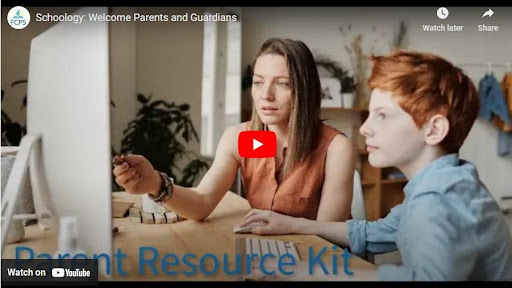
💻 Catch Up on Your Child’s Classwork in Schoology
Teachers use Schoology to post their classroom materials online; to provide a secure forum for students to discuss their ideas and collaborate on projects; and to assign and collect homework electronically. It helps students stay organized, and it keeps the class connected.
A Schoology Parent Account gives you access to:
- Your child’s classes.
- Your child’s upcoming assignments.
- School, class, and group announcements.
To access Schoology, parents will need to have an active SIS/ParentVUE account. Get more information on how to login and use Schoology.
SEL Screener
SEL Screener Parent/Guardian Notification
The Spring Social and Emotional Learning (SEL) Screener will be administered to students in grades 3 through 12 in October. Students use the SEL Screener twice a year to share their perspectives on how well their school and community help them develop skills they need to succeed. The screener works by asking questions or presenting statements that students can think about and respond to. This gives students a way to share how well their school community makes them feel valued, included, and supported.
After each screening, results are available in the Documents tab of SIS ParentVUE and mailed to families without a ParentVUE account. For more information, including SEL Screener questions and opt-out information, please visit the Social-Emotional Learning (SEL) Screener webpage.
Family Information Phone Lines
Family Information Line Available in Nine Languages
Parents/caregivers who speak Amharic, Arabic, Chinese, English, Farsi, Korean, Spanish, Urdu, or Vietnamese may call a telephone information line for general information about FCPS. View the list of phone numbers.
WhatsApp
Follow FCPS on WhatsApp
Is WhatsApp one of the ways you stay connected with family, friends, and your community? Now you can use it to stay connected with FCPS, too.
Follow the new FCPS WhatsApp Channel for helpful information and reminders throughout the school year, including important announcements, upcoming dates, tips for families, and more.
Immunizations
Update Your Child’s Immunizations and Records
Please check with your healthcare provider as soon as possible to make sure your child is up-to-date on the immunizations required by the state of Virginia. Prior to the start of school on Monday, August 24, please submit your child’s immunization documentation. If your child has an appointment to receive their required immunizations after August 24, please submit an Immunization Action Plan to confirm the appointment.
You can check your child’s immunization compliance and submit their immunization record in SIS ParentVUE. Records may also be delivered to a school’s front office. If needed, families may also provide other immunization documentation including a healthcare provider’s written statement of a permanent or temporary medical exemption or a notarized Religious Exemption Form. Please visit the FCPS How to Submit Immunization Documentation webpage for step-by-step instructions on how to submit each of these items.
Immunization Events for FCPS Students
FCPS, in partnership with Inspire Health Alliance, will be providing school-required immunizations and optional flu shots for all FCPS students, ages 18 and under, with no out-of-pocket costs. Multiple events will take place at designated FCPS locations. Additional dates will be made available throughout the school year. Parents or guardians may view upcoming events and schedule an appointment for their student. Participation is voluntary.
Additional immunization resources are also available.
|