|
English | Español | አማርኛ | 中文 | 한국어 | Tiếng Việt | العربية | فارسی | اردو
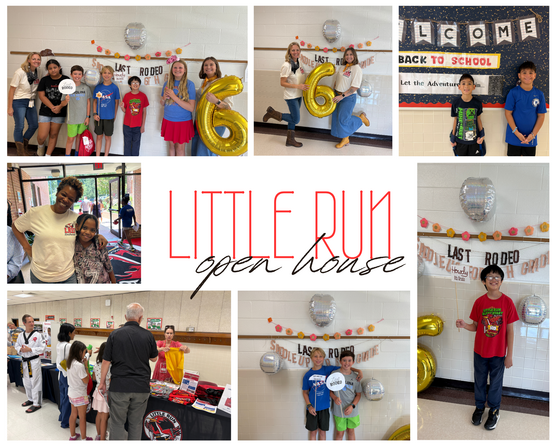 Open House was an absolute blast!
The excitement in the air was contagious as our students, families, and teachers gathered to kick off the new school year! From checking out new classrooms and dropping off supplies to snapping photos at our 6th grade "Last Rodeo" photo booth, our school community was buzzing with energy. Seeing all the big smiles, warm hugs, and old friends reconnecting made us even more eager for the first day of school!
Upcoming Dates
August 24 - First Day of School - 8:15 AM
September - Cav Carnival and Woodson Pyramid Night
September 4 & 7 - NO SCHOOL - Labor Day
September 10 - PTA Meeting 6:30-7:30
September 30 - 3 Hour Early Release - 12:15 Dismissal
October 1 - Back to School Night - 6:00 - 7:30 PM
LRES News

Roadrunner Roundup
Dear Roadrunner Families,
Thank you so much for coming to our Open House and taking the time to meet your children's classroom teachers! It was wonderful to see our hallways filled with so many familiar and new faces. Our students looked so happy and excited to be here, and it is amazing to see how much they have grown over the summer!
We are thrilled to officially kick off the new school year and cannot wait to see everyone on Monday morning. Starting on the very first day, families should have students arrive and dismiss according to their established daily plan (bus, walker, or car driver/kiss-and-ride).
Thank you for your partnership and support. We are looking forward to a fantastic school year together!
Warmly,
Christie Yarn and Julia Haywood
Administrators, Little Run Elementary School
|
Help Us Make Next Year Even Better!
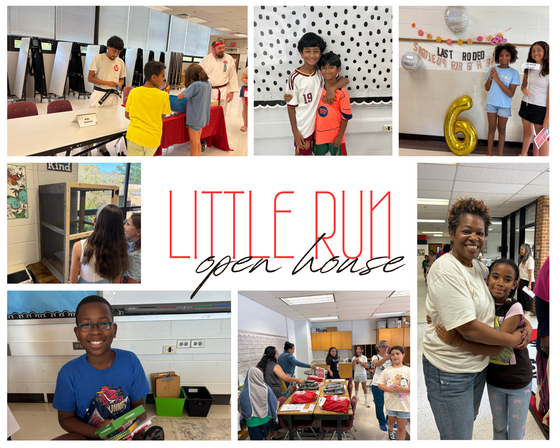
Thank you so much to everyone who joined us for our summer events and Open House! We loved seeing so many new and returning faces, and we hope you felt welcomed and ready for the new school year.
To help us continually improve, we would love your quick feedback. Please take a few moments to fill out our short survey to let us know what worked well and what you'd like to see in the future.
Your input directly shapes our school community, and we truly appreciate your time and support!
Family Handbook
This year, all K-6 Little Run families will receive a hardcopy of our Family Handbook!
Designed as a key resource for the entire school year, your handbook contains essential information on important topics such as attendance, bell schedules, arrival and dismissal procedures, contact information, and more.
One handbook has been prepared for each family, and your copy will be distributed during Open House to your oldest or only child.
For your convenience, we also have a digital version available! Please be sure to look for your labeled handbook and keep it, along with the digital link, handy as your go-to guide for all things Little Run!
We're Eager to Welcome You Back to School!
As summer winds down, we are looking forward to welcoming students back to our classrooms. Use the following list to help make sure your child is ready!
☑️ Sign Up for SIS ParentVUE
Access your student’s attendance records, grades, and assignments at any time with SIS ParentVUE. Contact our registrar at nruffner@fcps.edu or call Little Run at 703-503-3500 if you need an activation code. Find out more about SIS ParentVUE.
Update Your Contact Information
Be sure you receive important information! Update your phone number(s) and/or email address(es) by clicking “My Account” and reviewing the “Online Verification/Update.” On that form, you can also update immunization records, health information, and emergency contacts.
☑️ Update Immunizations and Records
Immunizations are required for all students to attend school in Virginia. This is an important part of protecting them from certain diseases and keeping them healthy.
When your child is immunized, remember to request a copy of their immunization record and bring that to our front office or submit the record via SIS ParentVUE as soon as possible. Find more information on FCPS’ website.
☑️ Learn About School Meals
Families need to provide their children with money to purchase meals at school or send them with a packed lunch. Alternatively, families may apply to receive free and reduced-price meal benefits, pending approval.
☑️ Bookmark the School Year Calendar
Be sure to bookmark the FCPS school year calendar to keep track of school holidays, breaks, and observances:
- Days marked blue with an “H” are student holidays. Schools are closed on these days.
- Days marked orange with an “O” are religious and cultural observance days (or evenings, if only half marked). There is school on these days, but certain events that cannot be made up may not be scheduled on these days.
- Days marked as TW, SD, and SP and in pink are holidays for students but working days for teachers and staff.
Please note that some holidays and observances, such as Eid al Fitr, may shift, and the calendar may be adjusted.
Early Release Wednesday
Little Run will release students at 12:15 PM on the following days:
- September 30
- November 18
- January 13
- April 7
Please note: While we anticipate that most students will be dismissed at 12:15 on limited early release Wednesdays, we recognize that some families may require childcare. These students will be supervised by school-based staff. No new instruction will take place, as after-school care is strictly supervision.
ACTION REQUIRED: Elementary school parents and caregivers should use the Online Verification/Update (OVU) packet in SIS ParentVUE to review and provide consent for Early Release Wednesday Childcare. Make sure to scroll to the very bottom for Online Verification Update.
There will be 7 modules you will need to review and/or update before submitting your packet. As you complete each area, use the Previous or Save and Continue buttons at the bottom to navigate between pages. Do not use the browser back and forward buttons. A green check mark means the module is complete. An orange exclamation mark means the module is in progress.
- OPT IN if you require childcare on our limited early release Wednesdays.
- OPT OUT if your child will go home (or to childcare arranged with SACC or another provider) at the early release time.
Read more about the three-hour early releases here.
Woodson Pyramid News
Cav Carnival and Woodson Pyramid Night
September 3rd - 4:30 - 7:00 p.m.
Come celebrate the new school year and Woodson Pyramid Night on Thursday, September 3rd at the Woodson Football Stadium! At our annual Cav Carnival we will have games, face painting, prizes, and finish with running of the field. Students K-6 get in free with a paying adult. Carnival Games start at 4:30pm, running of the field at 6:45. Our football game will start at 7:00pm against the Edison Eagles.
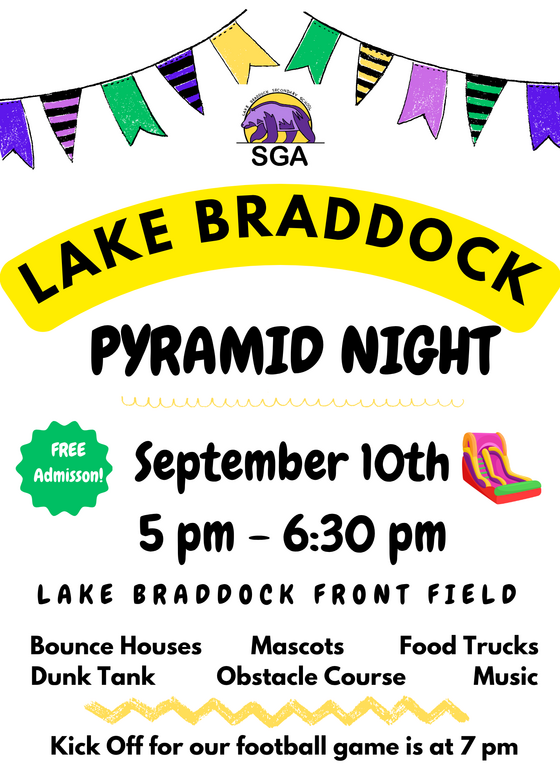 Lake Braddock Pyramid Night
Activities & Attractions:
-
Bounce Houses, Mascots, Food Trucks, Dunk Tank, Obstacle Course, Music
Note: Kick-off for the football game follows immediately at 7:00 PM.
FCPS News
FCPS News
In case you missed it in FCPS This Week, the school division shared updates on the following topics:
-
- Get Ready for Day One With the FCPS App!
- Learn About School Meals
- Managing Technology at Home
Read FCPS This Week to learn more about these topics. If you are not already receiving this weekly newsletter, please sign up today.
Student ID Cards for Little Run Bus Riders
We will begin distributing student ID cards to all our students who ride the school bus or use FCPS transportation services.
Students who have student ID cards should begin tapping as they board and exit the bus. Only students who use FCPS transportation services will be provided with a student ID card at this time.
We ask for your patience! Bus drivers will begin checking in students next week and may need some extra time at each bus stop while they do this. The transportation team is working hard to minimize any potential delays.
Learn more about the bus navigation and student ID cards.
 |
|
FCPS Mobile App
Get Ready for Day One with the FCPS App! 🎒As we gear up for the first day of school, make sure you have the FCPS mobile app downloaded! It's the quickest way to check the school year calendar, view lunch and breakfast menus, find school contacts, and jump to ParentVUE or Schoology from your phone.
Download the app from the Apple App Store or Google Play Store.
|
School Meals
Help Your Child Navigate the Lunch Line
Check out some tips to help your child get through the lunch line quickly and have more time to eat:
- Teach your child their student ID number to receive meals at school.
- Sign up for and add money to MySchoolBucks to purchase meals at school.
-
Apply for free and reduced-price meals. Students who were approved for free and reduced-price meals last year are eligible for the first 30 days of school this year (or until a new application is processed). Families should submit a new application as soon as possible, so eligible students continue to receive meals at no cost.
If your child has any food allergies, learn how to submit accommodations for dietary restrictions and allergens.
Access menus for breakfast, lunch, and other school meals, as well as allergen and nutrition information.
Lightspeed Updates
You Can Manage Student Web Access at Home
At Little Run, we acknowledge that parents are our students' first and most important teachers. Parents now have greater control over their child’s FCPS-issued device outside of school hours through Lightspeed Parent Portal.
In addition to monitoring weekly internet activity, parents can now also customize web access at home on FCPS devices through Lightspeed using Schedules and Web Rules.
With Schedules, you can set tailored times to automatically pause or restrict internet access. This makes it easier to enforce rules around homework time, family dinners, weekends, or bedtime.
In Web Rules, you can create Custom Block Lists to block specific, individual websites they do not want your child accessing at home. This allows parents greater control over what is happening online, under their own roof.
These new custom controls take effect at home, outside of school hours, and when the device is off the FCPS network. They will not override standard district filtering policies during the instructional day.
Customize Your Lightspeed Settings
All parents should be receiving weekly Lightspeed Online Student Activity Report emails. To set up these new features, click the “Log in or Register” button at the bottom of your weekly Lightspeed Online Student Activity Report email.
Visit the FCPS Lightspeed Parent Portal Guide for more information. If you have additional questions, submit a Parent Technology Support Ticket.
Parents are encouraged to discuss internet boundaries with their children so that they can understand the reasoning behind any limits and the differences between access at home and at school. Get tips on talking to your children about technology safety.
Schoology
💻 Catch Up on Your Child’s Classwork in Schoology
Teachers use Schoology to post their classroom materials online; to provide a secure forum for students to discuss their ideas and collaborate on projects; and to assign and collect homework electronically. It helps students stay organized, and it keeps the class connected.
A Schoology Parent Account gives you access to:
- Your child’s classes.
- Your child’s upcoming assignments.
- School, class, and group announcements.
To access Schoology, parents will need to have an active SIS/ParentVUE account. Get more information on how to login and use Schoology.
|
SEL Screener
SEL Screener Parent/Guardian Notification
The Spring Social and Emotional Learning (SEL) Screener will be administered to students in grades 3 through 12 in October. Students use the SEL Screener twice a year to share their perspectives on how well their school and community help them develop skills they need to succeed. The screener works by asking questions or presenting statements that students can think about and respond to. This gives students a way to share how well their school community makes them feel valued, included, and supported.
After each screening, results are available in the Documents tab of SIS ParentVUE and mailed to families without a ParentVUE account. For more information, including SEL Screener questions and opt-out information, please visit the Social-Emotional Learning (SEL) Screener webpage.
PTA News
Get involved and make a difference at Little Run! We encourage all families to join our fantastic PTA. The PTA plays a vital role in our school community, leading important initiatives like family engagement events and fundraising activities. To join and learn more about what our PTA does, please visit their website.
 |
|
Like and Follow Us on Instagram and Facebook
Click on the links below to follow us on Social Media. Like, follow, and share to see what's happening at Little Run!
Instagram
Facebook
|
Be Informed, Stay Involved!
Visit the Little Run ES Website
Monitor your student's academics with a SIS ParentVUE Account
Sign up for Little Run News
Join the Little Run PTA
PTA homepage
Recognize a FCPS Employee at FCPS Cares
|