|
English | Español | አማርኛ | 中文 | 한국어 | Tiếng Việt | العربية | فارسی | اردو
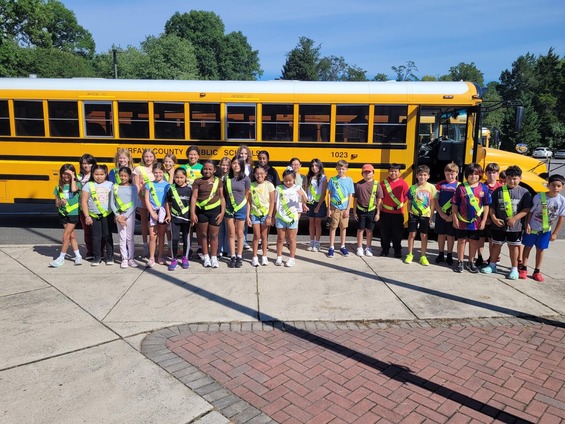
Our Safety Patrols are ready for a great new school year!
Dear Woodburn Families,
I am honored to join the Woodburn Elementary community as your interim principal while your principal is on leave. I want to reassure you that our school is in wonderful hands—I have already been so impressed by the dedication, warmth, and energy of our staff, who are fully prepared and excited for a fantastic school year ahead.
By way of background, I retired after a long career in education, having served as principal at Halley Elementary (2010–2018) and Fort Belvoir Upper School (2018–2023). Since retiring, I’ve had the privilege of supporting school communities as an interim principal at Lane Elementary, South County Middle, and Holmes Middle. While this is my first interim assignment in Region 2, my passion remains the same: ensuring a safe, joyful, and strong learning environment for every child. I can already see that this vision is shared by our staff and community.
I look forward to partnering with you over the next several weeks. Please feel free to say hello when you see me—I am eager to get to know the Woodburn community! “Together We Grow!”
Warmly,
Jamey Chianetta
Interim Principal, Woodburn Elementary School
Upcoming Events
August 24 - First Day of School
August 28 - PTA Food Truck - Turkish Kabob
September 4 - No School - Labor Day Break
September 7 - No School - Labor Day Break
September 15 - Back to School Night, 6:00pm-7:30pm
September 21 - No school - Yom Kippur

Thank You for Joining Us at Open House!
It was wonderful seeing so many of our Woodburn families at Open House! We enjoyed welcoming you back, reconnecting, and giving students the opportunity to meet their teachers and visit their classrooms. Thank you for spending time with us and helping us kick off the new school year with excitement and a strong sense of community. We are looking forward to a great year together!
Be First-Day Ready
The first day of school, Monday, August 24, is just around the corner! Check out these back-to-school tips to make sure your child gets off to a great start.
Also find out what will be new this school year.
Update Your Child’s Immunizations and Records
Please check with your healthcare provider as soon as possible to make sure your child is up-to-date on the immunizations required by the state of Virginia. Prior to the start of school on Monday, August 24, please submit your child’s immunization documentation. If your child has an appointment to receive their required immunizations after August 24, please submit an Immunization Action Plan to confirm the appointment.
You can check your child’s immunization compliance and submit their immunization record in SIS ParentVUE. Records may also be delivered to a school’s front office. If needed, families may also provide other immunization documentation including a healthcare provider’s written statement of a permanent or temporary medical exemption or a notarized Religious Exemption Form. Please visit the FCPS How to Submit Immunization Documentation webpage for step-by-step instructions on how to submit each of these items.
Immunization Events for FCPS Students
FCPS, in partnership with Inspire Health Alliance, will be providing school-required immunizations and optional flu shots for all FCPS students, ages 18 and under, with no out-of-pocket costs. Multiple events will take place at designated FCPS locations. Additional dates will be made available throughout the school year. Parents or guardians may view upcoming events and schedule an appointment for their student. Participation is voluntary.
Additional immunization resources are also available.
Remember to Complete Consent Forms
Families can easily grant permission for their children to access a variety of school resources through the Parent Digital Consent system. Opt your child in or out of a variety of online educational tools and choose how student information is managed.
Please visit the Parent Digital Consent webpage today to access the system.
Give Your Kids a Strong Start: Apply for Early Childhood Education Programs
FCPS Pre-K and Early Head Start programs provide a high-quality early learning experience for qualifying children ages 6 weeks to 4 years living in Fairfax County with economic and educational risk factors.
- The pre-K program prioritizes 4-year-old applicants but also accepts applications for children who will be 3 years old by September 30.
- Early Head Start is located at three elementary schools — Clearview, Crestwood, and Dogwood — and accepts applications from expectant mothers and parents/guardians of children 6 weeks to 2 years old.
Families are encouraged to apply as soon as possible. However, space is limited and provided based on need, not on a first-come, first-served basis. Applications are accepted online, by email, by postal mail (printable application), or in person at 7423 Camp Alger Avenue, Falls Church, Virginia 22042. If you have a question about the application process or status, please call 703-208-7900 (English) or 703-208-7901 (Spanish).
Kindergarten Registration Process
There’s an easy five-step process for parents wanting to register their child for kindergarten:
- Determine eligibility.
- Identify your local school.
- Gather documents.
- Fill out forms.
- Schedule an appointment (the student and one caregiver must be present).
If your student does live in the Woodburn ES boundary, please fill out the new student registration intake form. This form will be submitted to our school registrar, Jackie Garcia, who will be able to assist you with the new student registration process.

Join Our PTA Family!
Be a part of something special. Our Parent-Teacher Association is more than meetings and fundraising, it's a chance to connect, support, and make a real impact on your child's school experience. Whether you have little time or a lot, your voice and energy matter. Let's work together to build a stronger, more vibrant school community for our kids and each other! Please click here to join today!
Clean Kitchen Night at Silver Diner in Merrifield
Wednesday, September 9 | 5:00–8:00pm
Take the night off from cooking and support Woodburn at the same time! Join us at Silver Diner in Merrifield for Clean Kitchen Night. Whether you dine in or order to go, 20% of sales will be donated back to our school. Enjoy a delicious meal while supporting our Woodburn community!
PTA Membership Meeting
Thursday, September 10 | 6:30–8:00pm
Join us for our first PTA Membership Meeting of the school year in the Woodburn Cafeteria! Learn more about how the PTA supports our Woodburn community, meet the PTA Board, vote on this year’s budget, and hear important updates from Woodburn leadership, including information about what it means to be a Title I school.
Dinner: 6:30–7:00pm
Meeting: 7:00–8:00pm
Childcare and Spanish interpretation will be provided.
2nd Annual Hispanic Heritage Festival
Friday, September 25 | 5:30–7:30pm
The PTA is excited to welcome families to our 2nd Annual Hispanic Heritage Festival! Come celebrate with an alpaca petting experience, inflatable obstacle course, crafts, a dance performance, a parade of traditional clothing, and more! Food and drinks will be available for purchase.
Transportation will be provided from Fairmont Gardens. Stay tuned for more details!

Student ID Cards for Woodburn ES Bus Riders
We will begin distributing student ID cards to all our students who ride the school bus or use FCPS transportation services.
Student ID cards will be distributed to students next week. Additional information will be shared as needed.
Students who have student ID cards should begin tapping as they board and exit the bus. Only students who use FCPS transportation services will be provided with a student ID card at this time.
We ask for your patience! Bus drivers will begin checking in students next week and may need some extra time at each bus stop while they do this. The transportation team is working hard to minimize any potential delays.
Learn more about the bus navigation and student ID cards.

Help Your Child Navigate the Lunch Line
Check out some tips to help your child get through the lunch line quickly and have more time to eat:
- Teach your child their student ID number to receive meals at school.
- Sign up for and add money to MySchoolBucks to purchase meals at school.
-
Apply for free and reduced-price meals. Students who were approved for free and reduced-price meals last year are eligible for the first 30 days of school this year (or until a new application is processed). Families should submit a new application as soon as possible, so eligible students continue to receive meals at no cost.
If your child has any food allergies, learn how to submit accommodations for dietary restrictions and allergens.
Access menus for breakfast, lunch, and other school meals, as well as allergen and nutrition information.
|
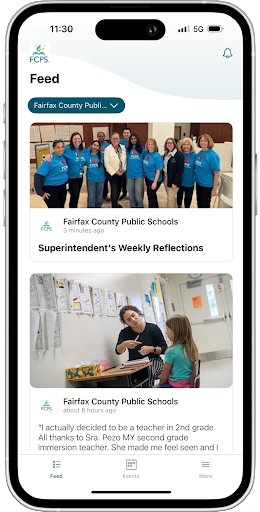
Get Ready for Day One with the FCPS App!
🎒As we gear up for the first day of school, make sure you have the FCPS mobile app downloaded! It's the quickest way to check the school year calendar, view lunch and breakfast menus, find school contacts, and jump to ParentVUE or Schoology from your phone.
Download the app from the Apple App Store or Google Play Store.
|
|
 |
You Can Manage Student Web Access at Home
At Woodburn, we acknowledge that parents are our students' first and most important teachers. Parents now have greater control over their child’s FCPS-issued device outside of school hours through Lightspeed Parent Portal.
In addition to monitoring weekly internet activity, parents can now also customize web access at home on FCPS devices through Lightspeed using Schedules and Web Rules.
With Schedules, you can set tailored times to automatically pause or restrict internet access. This makes it easier to enforce rules around homework time, family dinners, weekends, or bedtime.
In Web Rules, you can create Custom Block Lists to block specific, individual websites they do not want your child accessing at home. This allows parents greater control over what is happening online, under their own roof.
These new custom controls take effect at home, outside of school hours, and when the device is off the FCPS network. They will not override standard district filtering policies during the instructional day.
Customize Your Lightspeed Settings
All parents should be receiving weekly Lightspeed Online Student Activity Report emails. To set up these new features, click the “Log in or Register” button at the bottom of your weekly Lightspeed Online Student Activity Report email.
Visit the FCPS Lightspeed Parent Portal Guide for more information. If you have additional questions, submit a Parent Technology Support Ticket.
Parents are encouraged to discuss internet boundaries with their children so that they can understand the reasoning behind any limits and the differences between access at home and at school. Get tips on talking to your children about technology safety.
💻 Catch Up on Your Child’s Classwork in Schoology
Teachers use Schoology to post their classroom materials online; to provide a secure forum for students to discuss their ideas and collaborate on projects; and to assign and collect homework electronically. It helps students stay organized, and it keeps the class connected.
A Schoology Parent Account gives you access to:
- Your child’s classes.
- Your child’s upcoming assignments.
- School, class, and group announcements.
To access Schoology, parents will need to have an active SIS/ParentVUE account. Get more information on how to login and use Schoology.
|
SEL Screener Parent/Guardian Notification
The Spring Social and Emotional Learning (SEL) Screener will be administered to students in grades 3 through 12 in October. Students use the SEL Screener twice a year to share their perspectives on how well their school and community help them develop skills they need to succeed. The screener works by asking questions or presenting statements that students can think about and respond to. This gives students a way to share how well their school community makes them feel valued, included, and supported.
After each screening, results are available in the Documents tab of SIS ParentVUE and mailed to families without a ParentVUE account. For more information, including SEL Screener questions and opt-out information, please visit the Social-Emotional Learning (SEL) Screener webpage.
Family Information Line Available in Nine Languages
Parents/caregivers who speak Amharic, Arabic, Chinese, English, Farsi, Korean, Spanish, Urdu, or Vietnamese may call a telephone information line for general information about FCPS. View the list of phone numbers.
Follow FCPS on WhatsApp
Is WhatsApp one of the ways you stay connected with family, friends, and your community? Now you can use it to stay connected with FCPS, too.
Follow the new FCPS WhatsApp Channel for helpful information and reminders throughout the school year, including important announcements, upcoming dates, tips for families, and more.
New Student Device Requirement
Starting this school year, students may only use FCPS-issued devices for school-related digital activities during the instructional day. This is in accordance with a new School Board requirement, approved on July 16, which states that students may not use personal electronic communication or computing devices, including personal laptops, tablets, smartwatches, smartphones, and similar devices.
Students may only use a personal device if it is required as part of a necessary accommodation in the students’ Individualized Education Program (IEP) or Section 504 Plan. A principal or the principal’s designee may approve a limited, course-specific exception for students enrolled in a specialized class when the curriculum requires a technology tool or software that isn’t available on a standard FCPS-issued device.
Families can help support this requirement by reminding students to bring their FCPS-issued device each day and use it for all school-related digital activities unless an approved exception applies.

FCPS News
In case you missed it in FCPS This Week, the school division shared updates on the following topics:
-
- Get Ready for Day One With the FCPS App!
- Learn About School Meals
- Managing Technology at Home
Read FCPS This Week to learn more about these topics. If you are not already receiving this weekly newsletter, please sign up today.
Follow Us
FCPS CARES
Do you want to celebrate a Woodburn employee who does ordinary things in an extraordinary way, or goes beyond what is expected? If so, then click here to share with everyone.
|