|
English | Español | አማርኛ | 中文 | 한국어 | Tiếng Việt | العربية | فارسی | اردو
 |
|
Upcoming Events
September 2: Late Buses Start - Wednesdays and Thursdays this year.
September 3: Unite & Excite, Field House parking lot, 5:30pm; First Home Football Game, 7pm
September 4 & 7: Labor Day Holiday, No School
September 14: Flag Football Tryouts
Sept. 16: Back to School Night, 6:30-8:30pm
Sept. 18: School Picture Day
Sept. 25: Homecoming Game, 7:00pm
Sept. 26: Homecoming Dance, info TBA
October 7: PSAT/SAT School Day
May 1: PROM! Info TBA
June 2: GRADUATION! 8:30am, Stadium
|
Included in this issue:
Calendar Reminders
- September is Attendance Awareness Month
- Labor Day Holiday Sept. 4 & 7
- Important BTS Dates for FHS - Prom and Graduation Added!
Fairfax Lions Need to Know
- Open Gate at Friday Night Football Games
- Crossing Guards to Remain at City Schools
- FHS Transportation Updates
- New Exception to Ride the School Bus Procedure
- Parent Digital Consent
- SIS ParentVUE
- SEL Screener
- BYOD Discontinued
Fairfax Lions Nice to Know:
- Math Textbooks
- Student Parking Pass
- FCPS Mobile App & WhatsApp
- Family Information Phone Lines
- Lightspeed Updates
- Schoology
- City of Fairfax Schools & FCPS Partnership
- Quick Links
Senior Sunrise 🌤️
August 28, 2026
Dear Fairfax Families,
What a PAWSome first week of school!
Seeing our halls, classrooms, and cafeteria filled with the vibrant energy of our Lions was the absolute best way to kick off the 2026–2027 school year. From day one, our focus has been building community and making intentional connections. Whether it was icebreakers in the classroom, connective discussions during advisory, or laughter shared at lunch and during morning drop-off, the spirit in our building set an incredible tone for the year ahead.
Highlights from Week 1
-
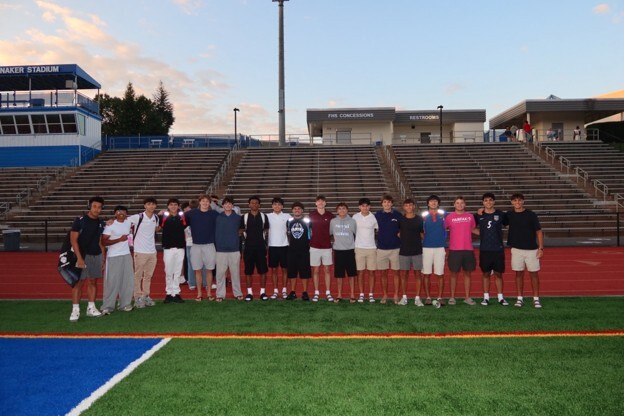
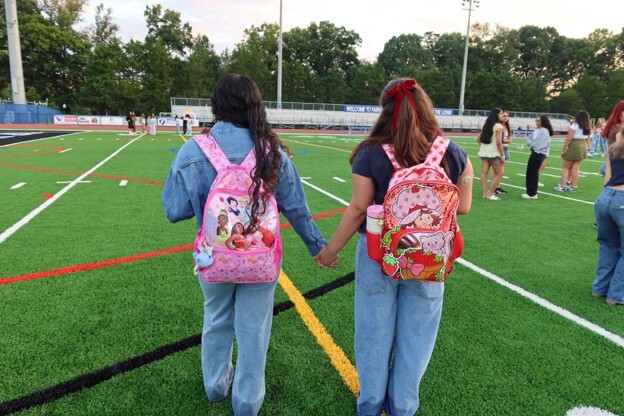
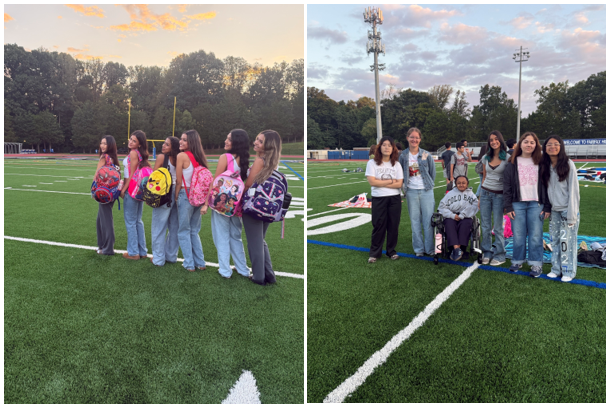
Class of 2027 Sunrise & Tradition: The sun officially rose on senior year for our Class of 2027! Our seniors gathered on the field at the break of dawn to celebrate their final year together. They also carried on the tradition of painting the rock and held an inspiring class meeting focused on all the PAWSitivity their senior year brings.
-
Bus IDs Distributed: All grade levels received their official Bus IDs this week. If your student hasn't picked theirs up yet, please have them stop by Student Services so they are ready to tap on and off the bus.
-
Locker Rollout: Our 9th and 12th graders had the opportunity to locate their lockers on Thursday. This coming Monday, our 10th and 11th graders will get their turn to find their locker locations and practice their combinations.
-
Class of 2030 "So Fresh" Academy: Our incoming freshmen were equipped with their official Freshman Binders! Through our "So Fresh" Academy, we are deeply focused on ensuring our youngest scholars build strong executive functioning skills and feel fully prepared for high school success.
-
Building a Foundation for Success: Throughout the week, students engaged in essential micro-presentations across their classes. These short, targeted sessions highlighted key school expectations and support systems, covering everything from our Off and Away All Day cell phone policy and hall/bathroom safety to PBIS expectations and transportation safety.
-
AP CAPSTONE: We learned today that 15 of our scholars were awarded the AP Capstone Diploma. This is our largest cohort to date and are so proud of our students and teachers.
We hope to see everyone next Thursday at our UNITE AND EXCITE Tailgate on September 3, from 4:30-6:30pm in the field house parking lot, where students can preview all of our clubs and activities and then you can head right into our game and ROAR for the Lions.
Enjoy a relaxing weekend with your families—get rest, recharge, and get ready to keep scoring big! We hope to see everyone next Thursday at our UNITE AND EXCITE Tailgate on September 3, 4:30-6:30, where students can preview all of our clubs and activities and then you can head right into our game and ROAR for the Lions.
There is no "ROAR" if we don't work together!
🗓️Calendar Reminders
September is Attendance Awareness Month
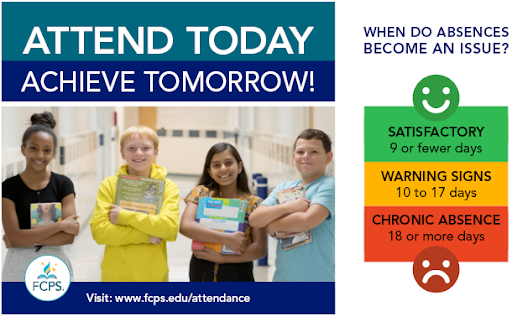
Attend Today, Achieve Tomorrow! The beginning of the school year is the best time to develop strong attendance habits! Students who attend school regularly are more likely to perform well in reading and math, develop strong social and emotional skills, and graduate from high school on time. Help prepare your child for future success. Visit the FCPS Attendance web page for tips and strategies.
Labor Day Holiday, Sept. 4 and 7
Friday, September 4, and Monday, September 7, are Labor Day holidays for all FCPS employees and students. Virginia legislation requires that schools opening prior to Labor Day must be closed the Friday immediately preceding Labor Day. We hope everyone takes the long weekend to celebrate a strong start to the school year and enjoy time with family and friends. See the complete school year calendar.
Important BTS Dates for Fairfax HS! ✅
Thursday, September 3
- FIRST HOME FOOTBALL GAME @ 7PM!! 💙 BLUE OUT 💙
Unite & Excite in the Field House parking lot starts at 4:30-6:30pm!!
Friday and Monday, September 4 and 7
- Labor Day Holiday - No School
Wednesday, September 16
- Back to School Night, 6:30 to 8:30pm
Friday, September 18
Friday Night Lights, September 25
- Homecoming Football Game; Kickoff @ 7pm
Saturday, September 26
- Homecoming Dance @ FHS; info TBA
NEW: Saturday, May 1, 2027 💃🏼
- PROM - Details to be Announced
NEW: Wednesday, June 2, 2027 🎓
- CLASS OF 2027 GRADUATION, 8:30am, Stalnaker Stadium
 |
|
Have you seen our new FHS Playbook?? (PDF download) Check it out for all things back to school @ FHS!! |
Open Gate at Football Games
Football Game Safety and Security Update
As we prepare for another exciting fall sports season, FCPS is implementing additional safety and security measures at all varsity football games.
Beginning this season, all spectators will participate in security screening using the same weapons detection technology introduced in our high schools last school year.
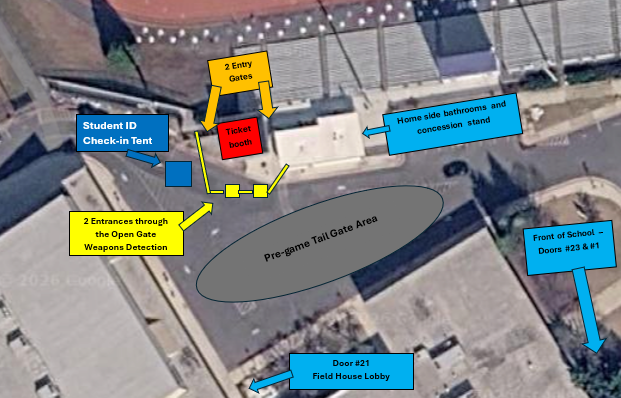 A diagram of the football parking lot explaining security screening at the football games.
- The field house parking lot will be the pre-game tailgate area.
- There will be two entrances through the OpenGate system.
- There will be a Student ID Check-In Tent.
- There will be two entry gates, one on each side of the ticket booth.
A standardized bag policy will also be in place to help ensure a safe, efficient entry process for everyone attending our games. The following items are prohibited:
- Backpacks
- Purse
- Fanny pack
- Tote bags
- Outside food and beverage
- Sporting equipment (balls, bats, sticks, etc.)
- Any item prohibited by FCPS policy, or determined by event staff to present safety concerns
Approved bags are limited to:
- Clear plastic, vinyl, or pvc bags no larger than 12”x6”x12”
- Small clutch bag no larger than 4.5” x 6.5”
- Medical and diaper bags permitted but subject to inspection
As a reminder, middle school students and younger, must be accompanied by a responsible adult who remains with the student(s) at the event.
These enhancements are designed to support a safe and welcoming environment while allowing families, students, and community members to enjoy Friday night football. We encourage attendees to arrive a little earlier than usual to allow time for screening.
See the Football Security flyer and get more information about weapons screening at football games.
Crossing Guards to Remain at City Schools 👮🏼♀️
You may have seen recent news about changes to crossing guard coverage at some Fairfax County Public Schools. At Fairfax High School, we are fortunate to continue to have Fairfax City-funded crossing guards supporting our students and families each morning and afternoon. The program is funded by the City of Fairfax and managed through the City of Fairfax Police Department.
FHS Transportation Updates 🚌
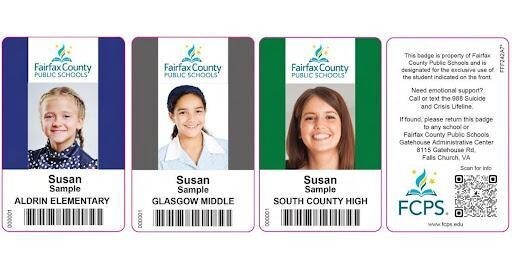
Examples of the new FCPS bus IDs for students.
FHS Bus IDs Distributed This Week
Fairfax HS Bus ID cards were distributed during lunches this week. If your student did not receive their ID, please have them go to the Student Services office to pick it up. Each ID comes with a pouch and a lanyard.
ID cards should be worn and brought to the bus each day. ID cards should then be put away until the end of the day.
Students who have student ID cards should begin tapping as they board and exit the bus. Only students who use FCPS transportation services will be provided with a student ID card at this time.
We ask for your patience! Bus drivers are checking in students and may need some extra time at each bus stop while they do this. The transportation team is working hard to minimize any potential delays.
Learn more about the bus navigation and student ID cards.
Transportation Patience and Safety
Thank you for your patience as we all get used to new routines this school year. We appreciate our families following Kiss and Ride procedures and being patient while waiting for your child’s bus.
If your child’s bus is delayed, you may access the Bus Delay Notification System or use the Here Comes the Bus mobile app to receive the delayed bus report. Email messages will be sent to announce significant bus delays. Please contact the Transportation Office at [phone number] with any additional questions. For concerns after 5:30 p.m., contact the FCPS Office of Safety and Security at 571-423-2000.
Update your contact information in SIS ParentVUE to make sure you receive email messages about bus delays.
Late Buses
Late Buses will be on Wednesdays and Thursdays this year, and will start next week, September 2. Students must be signed in with a teacher, coach or club sponsor in order to ride the late bus.
NEW "Exception to Ride the School Bus" Procedure starting in SY26-27 🚌
From the Office of Transportation Services:
A new electronic system is in place to submit request for an "Exception to Ride the School Bus," replacing the previous paper-based process. Families will now complete and submit the Exception to Ride request online. Once submitted, the request is automatically entered into a new tracking system, allowing us to monitor each step of the review process from submission through final approval or denial.
After a decision has been made, parents will automatically receive an email notification with the outcome. If the request is approved, the email will also include the student's bus assignment and transportation information.
https://www.fcps.edu/facilities-and-transportation-forms
Parent Digital Consent
Remember to Complete Permission Forms for School Resources
Families can now easily grant consent for their children to access a variety of school resources through the Parent Digital Consent system. This online tool can be accessed using your SIS ParentVUE account login. Parents can easily opt their child in or out of a variety of resources, including online educational tools, school counseling services, and more.
Visit the Parent Digital Consent webpage to access the system. Watch this video to see how to use the tool.
Opt In or Out to Student Devices Being Sent Home for Grades 1-6
New this year, families can opt out of having student laptops sent home with their student.
- If you do not want your student to bring their FCPS-issued device home, please toggle the Opt Out button to a check mark and confirm by pressing Save Selection.
- If you would like your student to bring their FCPS device home, no toggle action is needed. Confirm by pressing Save Selection.
Students whose families opt out will continue to have access to an FCPS-issued device during the school day. Please reach out to your student’s teacher to understand expectations for homework and any learning activities that may require access to technology outside of the school day.
Everything You Need to Do in SIS ParentVUE
Are you working your way through back-to-school forms and checklists? Make sure you have a SIS ParentVUE account for your family and log in to find important forms and updates.
- Be among the first to know about weather closings, bus delays, and other critical communications from your school and FCPS by providing your cell phone number and email in ParentVUE. To update your contact information in ParentVUE, click the “Online Packets” tab in the upper right of the screen, then click the “Online Verification/Update” icon.
- Submit daylong absences by clicking “Report Absence.”
If you do not have a ParentVUE account, contact your child’s school for an activation code and follow the directions on the SIS ParentVUE Account webpage.
SEL Screener Parent/Guardian Notification
The Fall Social and Emotional Learning (SEL) Screener will be administered to students in grades 3 through 12 in October. Students use the SEL Screener twice a year to share their perspectives on how well their school and community help them develop skills they need to succeed. The screener works by asking questions or presenting statements that students can think about and respond to. This gives students a way to share how well their school community makes them feel valued, included, and supported.
After each screening, results are available in the Documents tab of SIS ParentVUE and mailed to families without a ParentVUE account. For more information, including SEL Screener questions and opt-out information, please visit the Social-Emotional Learning (SEL) Screener webpage.
BYOD Discontinued 💻
New Student Device Requirement
Starting this school year, students may only use FCPS-issued devices for school-related digital activities during the instructional day. This is in accordance with a new School Board requirement, approved on July 16, which states that students may not use personal electronic communication or computing devices, including personal laptops, tablets, smartwatches, smartphones, and similar devices.
Students may only use a personal device if it is required as part of a necessary accommodation in the students’ Individualized Education Program (IEP) or Section 504 Plan. A principal or the principal’s designee may approve a limited, course-specific exception for students enrolled in a specialized class when the curriculum requires a technology tool or software that isn’t available on a standard FCPS-issued device.
Families can help support this requirement by reminding students to bring their FCPS-issued device each day and use it for all school-related digital activities unless an approved exception applies.
Fairfax Lions Nice to Know:
Math Textbooks and Workbooks Update 📚
Algebra, Geometry, and Algebra 2 students will be receiving Savvas enVision Mathematics materials soon. Students will receive workbooks and textbooks. AFDA teachers and students will receive Algebra 2 materials to be used as supplements to the published AFDA curriculum.
Student Parking Pass Info 🚗
All information to buy a parking pass is available on the Fairfax High School website. To find the information, search Student Parking.
Students will need to use their school Google account --- @fcpsschools.net to access the parking form.
Questions, please email Asst. Principal Brian Plancich, baplancich@fcps.edu.
FCPS Mobile App - and Follow us on WhatsApp!
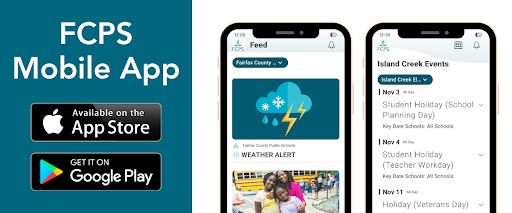 The new FCPS mobile app as displayed on a mobile phone.
All Your FCPS Links in One Spot
There are a lot of school and FCPS webpages to bookmark, but the FCPS mobile app serves as your central hub!
Check daily meal menus and calendars with no login required, or use one-tap quick links to launch SIS ParentVUE, Schoology, and MySchoolBucks.
Download the FCPS mobile app from the Apple App Store or Google Play Store.
Follow FCPS on WhatsApp
Is WhatsApp one of the ways you stay connected with family, friends, and your community? Now you can use it to stay connected with FCPS, too.
Follow the new FCPS WhatsApp Channel for helpful information and reminders throughout the school year, including important announcements, upcoming dates, tips for families, and more.
Family Information Phone Lines Available in Nine Languages 📞
Parents/caregivers who speak Amharic, Arabic, Chinese, English, Farsi, Korean, Spanish, Urdu, or Vietnamese may call a telephone information line for general information about FCPS. View the list of phone numbers.
Lightspeed Updates
You Can Manage Student Web Access at Home
At Fairfax High School, we acknowledge that parents are our students' first and most important teachers. Parents now have greater control over their child’s FCPS-issued device outside of school hours through Lightspeed Parent Portal.
In addition to monitoring weekly internet activity, parents can now also customize web access at home on FCPS devices through Lightspeed using Schedules and Web Rules.
With Schedules, you can set tailored times to automatically pause or restrict internet access. This makes it easier to enforce rules around homework time, family dinners, weekends, or bedtime.
In Web Rules, you can create Custom Block Lists to block specific, individual websites they do not want your child accessing at home. This allows parents greater control over what is happening online, under their own roof.
These new custom controls take effect at home, outside of school hours, and when the device is off the FCPS network. They will not override standard district filtering policies during the instructional day.
Customize Your Lightspeed Settings
All parents should be receiving weekly Lightspeed Online Student Activity Report emails. To set up these new features, click the “Log in or Register” button at the bottom of your weekly Lightspeed Online Student Activity Report email.
Visit the FCPS Lightspeed Parent Portal Guide for more information. If you have additional questions, submit a Parent Technology Support Ticket.
Parents are encouraged to discuss internet boundaries with their children so that they can understand the reasoning behind any limits and the differences between access at home and at school. Get tips on talking to your children about technology safety.
Schoology
Cover photo of a parent and student for a YouTube video about Schoology
💻 Catch Up on Your Child’s Classwork in Schoology
Teachers use Schoology to post their classroom materials online; to provide a secure forum for students to discuss their ideas and collaborate on projects; and to assign and collect homework electronically. It helps students stay organized, and it keeps the class connected.
A Schoology Parent Account gives you access to:
- Your child’s classes.
- Your child’s upcoming assignments.
- School, class, and group announcements.
To access Schoology, parents will need to have an active SIS/ParentVUE account. Get more information on how to login and use Schoology.
City of Fairfax Schools and FCPS Partnership🏫
 A flyer for City of Fairfax Schools and FCPS agreement
Fairfax High School is a City of Fairfax school. What does that mean for your student and your family? Explore the unique partnership between the City of Fairfax and FCPS and discover the programs, opportunities and investments that make our schools special. Click here to find out more.
Quick Links
 |
|
Do you want to celebrate a Fairfax employee who does ordinary things in an extraordinary way? Or goes beyond what is expected? If so, then click here to share with everyone. |
throughout the year:
|