|
English | Español | አማርኛ | 中文 | 한국어 | Tiếng Việt | العربية | فارسی | اردو
August 18: Popsicles with the Principals for rising Kindergarteners, 10 AM
August 20: Open House. Times Listed Below
August 24: First day of School!
September 4 and 7: Labor Day Holiday - No school
September 9: Back to School Night. Times TBD
September 17: PTA meeting 6 to 7 pm in OHES cafeteria
September 21: Yom Kippur - No School
Week of September 27: Blue Star Welcome Week
📅 Open House & Important Dates
Our Open House will take place on Thursday, August 20, 2026. To help manage parking and ensure everyone has a great experience, we are using a staggered schedule by last name:
-
12:15 PM to 1:00 PM | Open House (Last Names A through K)
- Visit classrooms, meet teachers, and drop off school supplies.
-
1:00 PM to 1:30 PM | New Family Orientation (Cafeteria)
- Families new to the Oak Hill community are invited to join us in the cafeteria for a brief overview and welcome.
-
1:30 PM to 2:15 PM | Open House (Last Names L though Z)
- Visit classrooms, meet teachers, and drop off school supplies.
First Day of School: Monday, August 24, 2026!
📌 Getting Ready for Open House & Week One
-
School Supply Kits: If you pre-ordered supply kits through the PTA, they will already be placed directly in your student's classroom for Open House.
-
Medication Drop-Off: Parents may turn in required student medications and forms to our School Health Aide during Open House.
-
PTA Partnership: Stop by the PTA tables in the cafeteria during Open House to sign up for membership, purchase spirit wear, and explore volunteer opportunities.
-
School Communication: Please review our weekly newsletter communications carefully to stay up to date.
📱 FCPS Cellphone & Smart Device Policy
To maintain a focused and distraction-free learning environment, please note the following FCPS expectations for all students:
-
Across all grade levels, cellphones, cellphone accessories, and all smart devices (including smartwatches) must be off and personally stored for the duration of the school day. See more details below!
Open House - Thursday, August 20
We hope you will be able to join us on Thursday, August 20th for an opportunity to meet your child's teacher and see the classroom. This Open House is for grade K to 6. There will also be a new family orientation in the cafeteria. You will receive an email on Wednesday, August 19th letting you know your child's teacher's name and room number. Staff will also be posted around the building to help you find the classroom.
12:15 to 1:00 P.M. Last names starting with A through K
1:00 to 1:30 P.M. New Family Orientation in the Cafeteria
1:30 to 2:15 P.M. Last names L through Z
*Preschool and pre-K have separate Open Houses which will be communicated to you by your child's teacher.
2026-2027 School Supplies!
School supply lists for K through 6 are available on the Oak Hill ES website and in the school office. If you need financial assistance with school supplies, please contact our counselor Mr. Mitchell at asmitchell@fcps.edu
☑️ Sign Up for SIS ParentVUE
Access your student’s attendance records, grades, and assignments at any time with SIS ParentVUE. Contact our registrar at [email/phone number] if you need an activation code. Find out more about SIS ParentVUE. Also, download the new ParentVUE mobile app so you can access your child’s records easily from anywhere!
Update Your Contact Information
Be sure you receive important information! Update your phone number(s) and/or email address(es) by clicking “My Account” and reviewing the “Online Verification/Update.” On that form, you can also update immunization records, health information, and emergency contacts.
☑️ Update Immunizations and Records
Immunizations are required for all students to attend school in Virginia. This is an important part of protecting them from certain diseases and keeping them healthy.
When your child is immunized, remember to request a copy of their immunization record and bring that to our front office or submit the record via SIS ParentVUE as soon as possible. Find more information on FCPS’ website.
☑️ Learn About School Meals
Families need to provide their children with money to purchase meals at school or send them with a packed lunch. Alternatively, families may apply to receive free and reduced-price meal benefits, pending approval.
- New School Lunch Menu Platform
Experience an easier way to view your child’s school menus using MealViewer:
- View what is being served each day.
- View the nutritional information for each meal.
- See if any specific allergens are being served.
- Get notified when your student’s favorite meal is being served.
Printable menus are always available on the Food and Nutrition Services webpage.
☑️ Bookmark the School Year Calendar
Be sure to bookmark the FCPS school year calendar to keep track of school holidays, breaks, and observances:
- Days marked blue with an “H” are student holidays. Schools are closed on these days.
- Days marked orange with an “O” are religious and cultural observance days (or evenings, if only half marked). There is school on these days, but certain events that cannot be made up may not be scheduled on these days.
- Days marked as TW, SD, and SP and in pink are holidays for students but working days for teachers and staff.
Please note that some holidays and observances, such as Eid al Fitr, may shift, and the calendar may be adjusted.
Understanding Student Rights and Responsibilities Updates: New Universal Grade Matrices for Families
Families are encouraged to review the updated FCPS Student Rights and Responsibilities (SR&R) document, which explains expectations for student behavior and adult responses in order to enhance school safety and to create a fair, equitable, and supportive school environment.
Updates for the 2026-27 school year include new Universal Grade Matrices (UGMs). UGMs are charts that show behavior expectations and school responses by grade level (K-3, 4-8, and 9-12). These at-a-glance resources (in Appendix D of the SR&R) are designed to make it easier for parents and caregivers to understand how schools respond to different types of behavior concerns.
Visit the SR&R webpage for more information and to review additional updates to the SR&R for the 2026-27 school year.
Requirement for Student Device Use During the School
Starting this school year, students must use FCPS-issued devices for school-related digital activities during the instructional day. This is in accordance with a new School Board requirement, approved on July 16, which states that students may not use personal electronic communication or computing devices, including personal laptops, tablets, smartwatches, smartphones, and similar devices.
Students may only use their personal device if it is required as part of a necessary accommodation in the students’ Individualized Education Program (IEP) or Section 504 Plan. A principal or the principal’s designee may approve a limited, course-specific exception for students enrolled in a specialized class when the curriculum requires a technology tool or software that isn’t available on a standard FCPS-issued device.
Families can help support this requirement by reminding students to bring their FCPS-issued device each day and use it for all school-related digital activities unless an approved exception applies.
The 2026–27 Online Verification/Update (OVU) packet is now available in ParentVUE. The OVU packet allows enrolling parents to electronically update phone numbers, emergency contacts, health conditions, and upload immunization records for their students via ParentVUE.
Please take time in the next few weeks before Open House to update your student's information. Instructions and detailed information are available here.
Only the ENROLLING parent has access to the OVU packet.
The OVU packet includes a section where parents can request childcare for the four elementary Early Release Wednesdays. Oak Hill's Early Release Wednesdays are October 21, December 2, February 10, and May 5.
New Student ID Cards and Bus Navigation System
FCPS is launching a new bus navigation system, which includes student ID cards for students who ride the bus. Students will use the cards to tap on and off the bus, helping FCPS and families know exactly which students are riding which buses.
Learn more about the new system and how it will improve route efficiency, safety, and transparency with families. Check out the frequently asked questions for families.
All Your FCPS Links in One Spot
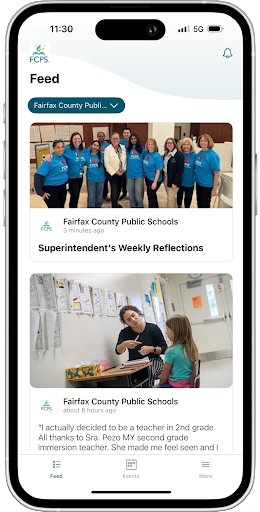
There are a lot of school and FCPS webpages to bookmark, but the FCPS mobile app serves as your central hub!
Check daily meal menus and calendars with no login required, or use one-tap quick links to launch SIS ParentVUE, Schoology, and MySchoolBucks.
Download the FCPS mobile app from the Apple App Store or Google Play Store..
|
New ParentVUE App
A new ParentVUE mobile app is available in the Apple and Google app stores. This new app provides parents and caregivers with a more secure sign-in. The current “classic” app will remain active for about six months. Families must download the new app by December 2026 to ensure they have continued mobile access to their child’s school data.
In the new app, families can enroll in multi-factor authentication (MFA) for FCPS Single Sign-On. While enrollment is optional, we strongly recommend that everyone enable this security feature.
1. To install on your mobile device go to the Apple App store or Google Play store.
2. Search for ParentVue (new)
3. Connect your app with the district. Tap the screen; then enter the school district zipcode: 22042
4. Select Fairfax County Public Schools. Follow the prompts and click YES to connect your account to the district.
5. Log in with your current ParentVue username and password. Choose your preferred language in the bottom dropbox.
Learn more about installing and navigating the new ParentVUE app. Parents needing assistance should submit a Parent Support Request.
Football Game Safety and Security Update
As we prepare for another exciting fall sports season, FCPS is implementing additional safety and security measures at all varsity football games.
Beginning this season, all spectators will participate in security screening using the same weapons detection technology introduced in our high schools last school year. A standardized bag policy will also be in place to help ensure a safe, efficient entry process for everyone attending our games. The following items are prohibited:
- Backpacks
- Purse
- Fanny pack
- Tote bags
- Outside food and beverage
- Sporting equipment (balls, bats, sticks, etc.)
- Any item prohibited by FCPS policy, or determined by event staff to present safety concerns
Approved bags are limited to:
- Clear plastic, vinyl, or pvc bags no larger than 12”x6”x12”
- Small clutch bag no larger than 4.5” x 6.5”
- Medical and diaper bags permitted but subject to inspection
As a reminder, middle school students and younger, must be accompanied by a responsible adult who remains with the student(s) at the event.
These enhancements are designed to support a safe and welcoming environment while allowing families, students, and community members to enjoy Friday night football. We encourage attendees to arrive a little earlier than usual to allow time for screening.
Across all grade levels, cellphones, cellphone accessories, and all smart devices must be off and personally stored for the duration of the school day. Watches that serve a dual purpose (like a smartwatch) must be off and personally stored for the duration of the school day, too. Personal devices that connect to a cellphone or cellphone accessory or operate as a smart device must also follow the FCPS Cellphone Policy.
FCPS Pre-K! Apply Now
The FCPS PreK programs provide a high-quality early learning experience for qualifying children ages 4 and 3 years old by September 30 who live in Fairfax County. Families are encouraged to apply as soon as possible; students who are 4 years old and those with multiple risk factors are prioritized.
Applications are accepted online, by email, or by mail or in person at our office at 7423 Camp Alger Avenue, Falls Church, Virginia 22042.
If you a have question about the application process or status, please call 703-208-7900 (English) or 703-208-7901 (Spanish) or by email at fcpsprekoffice@fcps.edu .
Oak Hill ES is one of the FCPS locations for pre-K.
Quick Links
|