Forestville Focus
Fairfax County Public Schools sent this bulletin at 08/23/2026 11:15 AM EDT
 We’re Eager to Welcome You Back to School!As summer winds down, we are looking forward to welcoming students back to our classrooms. Use the following list to help make sure your child is ready! ☑️ Sign Up for SIS ParentVUEAccess your student’s attendance records, grades, and assignments at any time with SIS ParentVUE. Contact our registrar at [email/phone number] if you need an activation code. Find out more about SIS ParentVUE. Update Your Contact InformationBe sure you receive important information! Update your phone number(s) and/or email address(es) by clicking “My Account” and reviewing the “Online Verification/Update.” On that form, you can also update immunization records, health information, and emergency contacts. ☑️ Update Immunizations and RecordsImmunizations are required for all students to attend school in Virginia. This is an important part of protecting them from certain diseases and keeping them healthy. When your child is immunized, remember to request a copy of their immunization record and bring that to our front office or submit the record via SIS ParentVUE as soon as possible. Find more information on FCPS’ website. ☑️ Learn About School MealsFamilies need to provide their children with money to purchase meals at school or send them with a packed lunch. Alternatively, families may apply to receive free and reduced-price meal benefits, pending approval. ☑️ Bookmark the School Year CalendarBe sure to bookmark the FCPS school year calendar to keep track of school holidays, breaks, and observances:
Please note that some holidays and observances, such as Eid al Fitr, may shift, and the calendar may be adjusted. Be First-Day ReadyThe first day of school, Monday, August 24, is just around the corner! Check out these back-to-school tips to make sure your child gets off to a great start. Also find out what will be new this school year.
Study Help and Support Available to Students in SchoologyA new Schoology Study and Support Hub is available for students in Schoology. This space was developed by the FCPS Educational Technology Team with input from students. It is designed to provide essential study tools and academic support resources directly to our learners.
Students can log in to Schoology and read their Schoology announcements or watch this video on the support hub for more information.
Help Your Child Navigate the Lunch LineCheck out some tips to help your child get through the lunch line quickly and have more time to eat:
If your child has any food allergies, learn how to submit accommodations for dietary restrictions and allergens. Access menus for breakfast, lunch, and other school meals, as well as allergen and nutrition information. Explore School Meals in the New Menu PlatformExperience an easier way to view your child’s school menus using MealViewer:
Printable menus are always available on the Food and Nutrition Services webpage. Advanced Academic ProgramsFairfax County Public Schools is committed to challenging all students through talent development and differentiated instruction. A continuum of Advanced Academic Programs (AAP) services is available to students in Grades K to 12 and is designed to match services to each student’s unique academic needs. Identification for Subject-Specific and Part-Time AAP services occurs throughout the school year. Full-Time AAP services have two identification cycles:
FCPS uses ability testing as one consideration in the holistic identification process for AAP services:
For more information, please visit the FCPS Advanced Academic Programs webpage. You Can Manage Student Web Access at HomeAt Forestville, we acknowledge that parents are our students' first and most important teachers. Parents now have greater control over their child’s FCPS-issued device outside of school hours through Lightspeed Parent Portal. In addition to monitoring weekly internet activity, parents can now also customize web access at home on FCPS devices through Lightspeed using Schedules and Web Rules. With Schedules, you can set tailored times to automatically pause or restrict internet access. This makes it easier to enforce rules around homework time, family dinners, weekends, or bedtime. In Web Rules, you can create Custom Block Lists to block specific, individual websites they do not want your child accessing at home. This allows parents greater control over what is happening online, under their own roof. These new custom controls take effect at home, outside of school hours, and when the device is off the FCPS network. They will not override standard district filtering policies during the instructional day.
Customize Your Lightspeed Settings All parents should be receiving weekly Lightspeed Online Student Activity Report emails. To set up these new features, click the “Log in or Register” button at the bottom of your weekly Lightspeed Online Student Activity Report email. Visit the FCPS Lightspeed Parent Portal Guide for more information. If you have additional questions, submit a Parent Technology Support Ticket. Parents are encouraged to discuss internet boundaries with their children so that they can understand the reasoning behind any limits and the differences between access at home and at school. Get tips on talking to your children about technology safety. Understanding Student Rights and Responsibilities Updates: New Universal Grade Matrices for FamiliesFamilies are encouraged to review the updated FCPS Student Rights and Responsibilities (SR&R) document, which explains expectations for student behavior and adult responses in order to enhance school safety and to create a fair, equitable, and supportive school environment. Updates for the 2026-27 school year include new Universal Grade Matrices (UGMs). UGMs are charts that show behavior expectations and school responses by grade level (K-3, 4-8, and 9-12). These at-a-glance resources (in Appendix D of the SR&R) are designed to make it easier for parents and caregivers to understand how schools respond to different types of behavior concerns. Visit the SR&R webpage for more information and to review additional updates to the SR&R for the 2026-27 school year. New Requirement for Student Device Use During the School DayStarting this school year, students must use FCPS-issued devices for school-related digital activities during the instructional day. This is in accordance with a new School Board requirement, approved on July 16, which states that students may not use personal electronic communication or computing devices, including personal laptops, tablets, smartwatches, smartphones, and similar devices. Students may only use their personal device if it is required as part of a necessary accommodation in the students’ Individualized Education Program (IEP) or Section 504 Plan. A principal or the principal’s designee may approve a limited, course-specific exception for students enrolled in a specialized class when the curriculum requires a technology tool or software that isn’t available on a standard FCPS-issued device. Families can help support this requirement by reminding students to bring their FCPS-issued device each day and use it for all school-related digital activities unless an approved exception applies. Please stay tuned for more information. SEL Screener Parent/Guardian NotificationThe Spring Social and Emotional Learning (SEL) Screener will be administered to students in grades 3 through 12 in October. Students use the SEL Screener twice a year to share their perspectives on how well their school and community help them develop skills they need to succeed. The screener works by asking questions or presenting statements that students can think about and respond to. This gives students a way to share how well their school community makes them feel valued, included, and supported. After each screening, results are available in the Documents tab of SIS ParentVUE and mailed to families without a ParentVUE account. For more information, including SEL Screener questions and opt-out information, please visit the Social-Emotional Learning (SEL) Screener webpage. Follow FCPS on WhatsAppIs WhatsApp one of the ways you stay connected with family, friends, and your community? Now you can use it to stay connected with FCPS, too. Follow the new FCPS WhatsApp Channel for helpful information and reminders throughout the school year, including important announcements, upcoming dates, tips for families, and more. FCPS NewsIn case you missed it in FCPS This Week, the school division shared updates on the following topics:
Read FCPS This Week to learn more about these topics. If you are not already receiving this weekly newsletter, please sign up today.  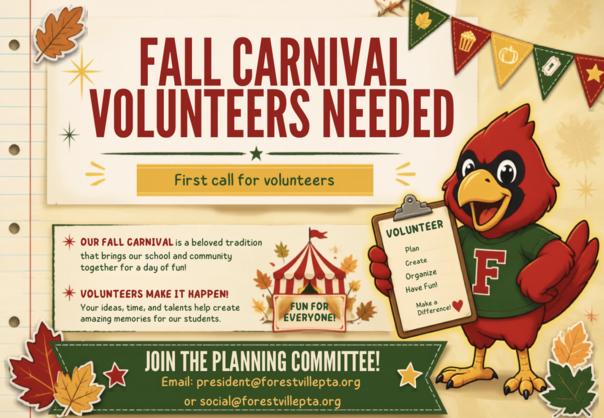 🎪 Fall Carnival Volunteers Needed!One of Forestville's favorite traditions is just around the corner, and we're looking for volunteers to help make this year's Fall Carnival a success! The Fall Carnival brings together our school and community for an evening of fun, games, and unforgettable memories. Whether you enjoy planning, organizing, creating, or simply lending a helping hand, we'd love to have you on the planning committee. No matter your experience level, there's a place for everyone to contribute. If you're interested in helping shape one of our biggest community events of the year, please contact the PTA at president@forestvillepta.org or social@forestvillepta.org. Together, we can make this year's Fall Carnival the best one yet! 🍂🎡
|
|